WLM export/import problem

petercr49

New member
Local time
7:21 AM
Messages
8
Hi,

I had to perform a system recovery on my laptop so I exported all my email to my external hard drive. I certainly selected the option to export ALL files. Having set up the laptop again I went to import my emails back and there are only a handful there. What happened to the other hundreds? I presume they are lost forever unless someone can suggest a lifeline. I suppose I should have checked the exported files before I wiped the laptop.

I've seen a few threads discussing similar problems. Why does the export function not work properly?

regards
Peter
 

My Computer

OS
windows 7 home premium
Hi Roderunner, thanks for the quick response. I had already seen that solution posted by your goodself in one of the other threads and I am going to try it although it might not be as easy to someone who isn't as savvy as you obviously are. I guess I have to accept that all my emails have been lost but looking at other threads I am not the only one to fall foul of this problem. The problem appears to be with the export operation. Why has Microsoft allowed this weakness to persist as they must know about it?

cheers
Peter
 

My Computer

OS
windows 7 home premium
Hi, I just tried the email export/import process again from my desktop to my laptop using my external hard drive. Selecting "All" files just did the same as before and transferred just a handful of emails out of a possible several hundred. I then "selected" an individual folder with about 20 emails in it and it transferred 1 email from the folder only. Is it me doing something wrong or is it the programme?
 

My Computer

OS
windows 7 home premium
Hi Peter,
2 questions. Did you follow my DocX file exactly. Are your messages still on your Server, like mine are on Gmail.
 

My Computer

Computer Manufacturer/Model Number
Look in my Signature.
OS
Win7 H.Prem. 32bit+SP1
Hi Roderunner. Yes did exactly as stated. When I exported only one selected folder with about 20 emails in it and only one exported, it wasn't the first or the last but somewhere in the middle, so why did it choose that one to export?

Answer to your other question about messages still being on my server, I haven't a clue! How do I find out? I use Plusnet for most of my emails.

regards
Peter
 

My Computer

OS
windows 7 home premium
Make the folders that you want eg Tom,Dick,Harry in WLM. Go to your exported folders open up folder Tom select the contents of folder except the wlmail.fol file. Now just drag the mails into corresponding folder name in WLM, it work but can take awhile if you have hundreds of folders.
 

My Computer

Computer Manufacturer/Model Number
Put together
OS
Win7 Pro-64 Bit
CPU
i7-2600-3.4GHz
Motherboard
ASRock Z68M
Memory
8 GIG DDR3
Graphics Card(s)
onboard
Sound Card
onboard
Hard Drives
Seagate 1TB 7200RPM
PSU
680 W
Case
black
Cooling
stock fans
Keyboard
Microsoft
Mouse
Microsoft optical
Hi Peter,
Check your account properties on the advanced tab it WLM. This is my setting in the red box, ignore the rest of it.

RR.JPG
 

My Computer

Computer Manufacturer/Model Number
Look in my Signature.
OS
Win7 H.Prem. 32bit+SP1
Thanks Brightblessings, unfortunately the fault appears to be with the "export" operation and there are only a couple of folders (deleted items and outbox) that were exported and even then only 1 email in each.
 

My Computer

OS
windows 7 home premium
Thanks Roderunner, I have it set like yours to leave copy on server, however, I have been in touch with Plusnet and they say that emails are not retained on their server. I have got back to them to ask why not and await ther responce.

regards
Peter
 

My Computer

OS
windows 7 home premium
I have found the answer to this problem on Microsoft communities webwsite. Exporting WLM email to an external drive DOES NOT WORK! You need to create a folder on your pc/laptop and export all your email. Then move the folder over to your external drive.

When trying to export to an external drive it's a pity that the export process says it has completed sucessfully when in fact it hasn't. Because of this I believed I had backed up all my email when in fact I hadn't and I have now lost a years worth of mail.
 

My Computer

OS
windows 7 home premium
Export and import to and from extenal has always worked for me.
 

My Computer

Computer Manufacturer/Model Number
Put together
OS
Win7 Pro-64 Bit
CPU
i7-2600-3.4GHz
Motherboard
ASRock Z68M
Memory
8 GIG DDR3
Graphics Card(s)
onboard
Sound Card
onboard
Hard Drives
Seagate 1TB 7200RPM
PSU
680 W
Case
black
Cooling
stock fans
Keyboard
Microsoft
Mouse
Microsoft optical
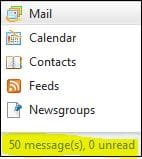
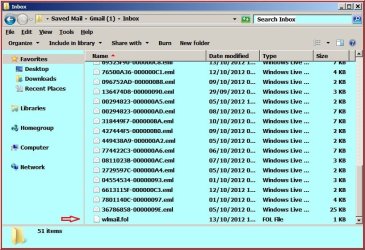
Peter, if you look at the bottom left corner of WLM, it shows the number of messages in your 'Inbox'. Now re run an 'Export' as in my .docx file. When complete, open the Saved Mail folder, then the top folder then the 'Inbox'. You will see I have 51 as during export an extra folder is added at the bottom, it is for Importing.

1.JPG

2.jpg
 

My Computer

Computer Manufacturer/Model Number
Look in my Signature.
OS
Win7 H.Prem. 32bit+SP1
Hi Roderunner and BrightBlessings, thanks for sticking with me. I've tried the export process a number of times and only a few folders each with 1 email in get exported. I have tried exporting to my external hard drive and a memory stick with the same result. The process takes about half a second.

However, when I export to a file on the internal hard drive the process works fine. All folders and emails are exported and you can tell because the process takes over 10 seconds. I can then move the folder to my external drive and import everything onto my other computer. Job done. I don't understand why neither my pc nor my laptop will export to an external drive whereas yours obviously does, but I guess thats life. From looking at various help websites I don't appear to be the only one that has this problem.

I just wish I had used my common sense and realised that all of my emails couldn't have exported in half a second and then I would have sorted it before I lost them.

regards
Peter
 

My Computer

OS
windows 7 home premium
Back
Top