
DougSundquist
New member
- Local time
- 4:57 PM
- Messages
- 3
Using Windows Live Mail 2011 in Windows 7 - I receive the following error on any email in which I select an HTML link. This occurs in my roadrunner email and my hotmail.
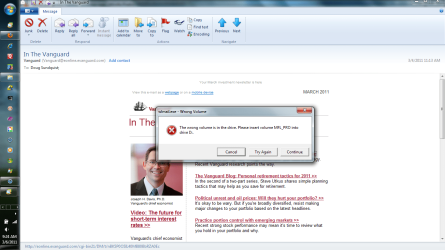
wlmail - Wrong Volume "The wrong volume is in the drive. Please insert volume MFL_PRO into drive D:." I searched the Windows Live support forum, I found 5 occurrences of this same problem but no resolution is offered in any of those posts. Obviously there's something going on. MFL_PRO is associated with my Brother printer. This was probably the last SW I installed via the CD drive if that provides a clue. If I insert the driver disc then I don't get the error but I can't leave it that way. I have included a screenshot.
Thanks and regards,
Doug
wlmail - Wrong Volume "The wrong volume is in the drive. Please insert volume MFL_PRO into drive D:." I searched the Windows Live support forum, I found 5 occurrences of this same problem but no resolution is offered in any of those posts. Obviously there's something going on. MFL_PRO is associated with my Brother printer. This was probably the last SW I installed via the CD drive if that provides a clue. If I insert the driver disc then I don't get the error but I can't leave it that way. I have included a screenshot.
Thanks and regards,
Doug
Attachments
My Computer
- Computer Manufacturer/Model Number
- Toshiba
- OS
- Windows 7 Home Premium 64 bit
- CPU
- AMD Vision Quad Core
- Memory
- 4 GB
