
Evening People,
I have heard mixed reviews about this piece of software, so wanted to try it myself. I appreciate some of the new features it brings, however some things are just plain odd!
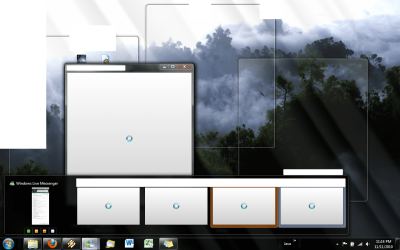
I can't really explain it with words, so 2011_1.png will do the best job I can. As you can see, I can't 'preview' windows like with most other things in Win7. I can't really figure whats causing this. I've tried playing with aero a little however it hasn't done much. Any tips would be much appreciated!
Also...the emoticons, what on earth did they do to them!? :sarc: looks like you're a lost/confused. 2011_2.png just looks suggestive! There is still no way to remove/alter any of these is there? (no chance of revering to the old emoticons?)
I also have gone through the post about "mail 2011 with messenger 2009" - no further possibility of getting that to work?
Also I am having some pretty significant problems with message notifications - I will have new messages yet not be notified about them. (See 2011_3.png) Anyone had this problem, and been able to fix it?
Any help on any of these issues is much appreciated!
Cheers,
Inci
I have heard mixed reviews about this piece of software, so wanted to try it myself. I appreciate some of the new features it brings, however some things are just plain odd!
I can't really explain it with words, so 2011_1.png will do the best job I can. As you can see, I can't 'preview' windows like with most other things in Win7. I can't really figure whats causing this. I've tried playing with aero a little however it hasn't done much. Any tips would be much appreciated!
Also...the emoticons, what on earth did they do to them!? :sarc: looks like you're a lost/confused. 2011_2.png just looks suggestive! There is still no way to remove/alter any of these is there? (no chance of revering to the old emoticons?)
I also have gone through the post about "mail 2011 with messenger 2009" - no further possibility of getting that to work?
Also I am having some pretty significant problems with message notifications - I will have new messages yet not be notified about them. (See 2011_3.png) Anyone had this problem, and been able to fix it?
Any help on any of these issues is much appreciated!
Cheers,
Inci
Attachments


My Computer
- OS
- Win7 - Ideally
- CPU
- Intel Q9450
- Motherboard
- GA-X48-DQ6
- Memory
- 4GB Corsair Dominator DDR2
- Graphics Card(s)
- 2x Radeon HD4850 (no OC)
- Sound Card
- Unused
- Monitor(s) Displays
- Some LG...
- Hard Drives
- 4x 1TB WD Caviar Black
- PSU
- Thermaltake 700W Toughpower
- Case
- Antec Twelve Hundred
- Cooling
- Air
- Keyboard
- G15
- Mouse
- G9
