WMC Is Recording Movies From Cable Channels Multiple Times

jfkbda

New member
Local time
11:10 AM
Messages
4
Hello all -

Just set up WMC with my Ceton Infinitv4 PCI card. It's working well, but WMC is recording movies from cable TV multiple times (example: I ask it to record the Monday at 9 PM showing of Pulp Fiction. It also records the movie on Tuesday at 3 PM and Wednesday at 12.)

My "Series Only" settings are:
Show Type: New
Channels: One Channel Only
Airtime: Specific Time

...so why the heck is WMC doing this?
 

My Computer My Computer

At a glance

windows 7 home 64 gb
OS
windows 7 home 64 gb
Hello all -

Just set up WMC with my Ceton Infinitv4 PCI card. It's working well, but WMC is recording movies from cable TV multiple times (example: I ask it to record the Monday at 9 PM showing of Pulp Fiction. It also records the movie on Tuesday at 3 PM and Wednesday at 12.)

My "Series Only" settings are:
Show Type: New
Channels: One Channel Only
Airtime: Specific Time

...so why the heck is WMC doing this?
Why are you setting up a "series" recording? In fact, how can you even set up a recording for a movie as a "series" recording?

Just go into the Guide, find the airing you want to record, and push OK. Then select "record", not "record series", and push OK. You've now just set a 1-time-only recording event. It cannot possibly record anything but this one airing.
 

My Computer My Computer

At a glance

Windows 7 Pro x64 (1), Win7 Pro X64 (2)i5-3350p 3.1Ghz/6MB-cache (1); E8400 3.0Ghz/6...8GB PC3-12800 DDR3 (1); 4GB PC3-10600 DDR3 (2)ATI HD7750 (1), (see TV cards); ATI R7 250 (2)
Computer type
PC/Desktop
Computer Manufacturer/Model Number
Home-built, two systems (1) and (2)
OS
Windows 7 Pro x64 (1), Win7 Pro X64 (2)
CPU
i5-3350p 3.1Ghz/6MB-cache (1); E8400 3.0Ghz/6MB-cache (2)
Motherboard
ASUS P8Z77-V Pro (1); ASUS P5Q3 (2)
Memory
8GB PC3-12800 DDR3 (1); 4GB PC3-10600 DDR3 (2)
Graphics Card(s)
ATI HD7750 (1), (see TV cards); ATI R7 250 (2)
Sound Card
Realtek ALC892 HD Audio (1); Realtek ALC1200 HD Audio (2)
Monitor(s) Displays
Eizo HD2441W LCD, Eizo S2433W (1); Eizo 24" S2433W (2)
Screen Resolution
1920x1200, 1920x1200 (1); 1920x1200 (2)
Hard Drives
(1) 1TB SATA-II (7200RPM), 2x2TB SATA-III (7200RPM), 250GB SATA-III (10000RPM) for OS; 2x2TB external USB 3.0

(2) 320GB SATA-II (7200RPM), 750GB SATA-II (7200RPM), 150GB SATA-II (10000RPM) for OS; 2TB external USB 3.0
PSU
Nesteq ECS-6001 600W (1); Nesteq ECS-5001 500W (2)
Case
Acousti-Case 360 (1) and (2)
Cooling
Noctua NH-U12P SE2 for CPU, 2x120mm case fans (1) and (2)
Keyboard
IBM PS/2 (1) and (2)
Mouse
Logitech MX Revolution wireless (1); Microsoft wired (2)
Internet Speed
100mbps down / 10mbps up
Antivirus
Microsoft Security Essentials; Malwarebyte Anti-Malware Pro
Browser
Firefox
Other Info
Ceton InfiniTV 4-tuner cablecard-enabled TV card as well as Hauppauge HVR-2250 OTA/ATSC 2-tuner TV card in (1), running under Win7 WMC
I'm not setting up a series recording. I just included that information in case it might be relevant.

I'm recording from the guide, and did not choose "record series." I chose "RECORD."

I'm here looking for help because it IS recording some movies multiple times, and I can't figure out why.
 

My Computer My Computer

At a glance

windows 7 home 64 gb
OS
windows 7 home 64 gb
WMC will automatically re-schedule the recording of a later airing or a program (even for a 1-off, not being part of a "series") if it fails to record the one you have scheduled for some reason... e.g. "no available tuner" at the original time, for some reason, and there is fortunately a later/subsequent airing of the same program. Of course if the first (and only requested) recording was successful, that automatic "fallback" re-scheduling for a later recording should not have been needed.

Fortunately, much useful and helpful diagnostic information (or at least "clues") are retained in WMC's History. Normally this is to avoid repeat recordings, and actually can be ever-growing (into the thousands of items) but for the recent past is extremely helpful in trying to understand what you scheduled, what your recorded, what you watched, what you deleted, what caused problems, etc.

If you go into History (Recorded TV -> view scheduled -> History) do you have any mention of the original recording, and /or any strange entries regarding the multiple recordings of the program at later times?

Is there any mention of a "series recording" on any of the History entries dealing with this program? Is there any explanation suggested in the collection of History entries as to what might be happening to cause the later recordings?
 

My Computer My Computer

At a glance

Windows 7 Pro x64 (1), Win7 Pro X64 (2)i5-3350p 3.1Ghz/6MB-cache (1); E8400 3.0Ghz/6...8GB PC3-12800 DDR3 (1); 4GB PC3-10600 DDR3 (2)ATI HD7750 (1), (see TV cards); ATI R7 250 (2)
Computer type
PC/Desktop
Computer Manufacturer/Model Number
Home-built, two systems (1) and (2)
OS
Windows 7 Pro x64 (1), Win7 Pro X64 (2)
CPU
i5-3350p 3.1Ghz/6MB-cache (1); E8400 3.0Ghz/6MB-cache (2)
Motherboard
ASUS P8Z77-V Pro (1); ASUS P5Q3 (2)
Memory
8GB PC3-12800 DDR3 (1); 4GB PC3-10600 DDR3 (2)
Graphics Card(s)
ATI HD7750 (1), (see TV cards); ATI R7 250 (2)
Sound Card
Realtek ALC892 HD Audio (1); Realtek ALC1200 HD Audio (2)
Monitor(s) Displays
Eizo HD2441W LCD, Eizo S2433W (1); Eizo 24" S2433W (2)
Screen Resolution
1920x1200, 1920x1200 (1); 1920x1200 (2)
Hard Drives
(1) 1TB SATA-II (7200RPM), 2x2TB SATA-III (7200RPM), 250GB SATA-III (10000RPM) for OS; 2x2TB external USB 3.0

(2) 320GB SATA-II (7200RPM), 750GB SATA-II (7200RPM), 150GB SATA-II (10000RPM) for OS; 2TB external USB 3.0
PSU
Nesteq ECS-6001 600W (1); Nesteq ECS-5001 500W (2)
Case
Acousti-Case 360 (1) and (2)
Cooling
Noctua NH-U12P SE2 for CPU, 2x120mm case fans (1) and (2)
Keyboard
IBM PS/2 (1) and (2)
Mouse
Logitech MX Revolution wireless (1); Microsoft wired (2)
Internet Speed
100mbps down / 10mbps up
Antivirus
Microsoft Security Essentials; Malwarebyte Anti-Malware Pro
Browser
Firefox
Other Info
Ceton InfiniTV 4-tuner cablecard-enabled TV card as well as Hauppauge HVR-2250 OTA/ATSC 2-tuner TV card in (1), running under Win7 WMC
Yes - you're correct; it seems WMC was re-recording movies because it labeled the original recordings as "PARTIAL RECORDINGS" due to an unavailable TV signal.

However - the recordings are all perfectly fine. There are no breaks, skips, or missed parts.

And now I understand why most people despise working with cable cards so much.

Thanks for your help.
 

My Computer My Computer

At a glance

windows 7 home 64 gb
OS
windows 7 home 64 gb
Yes - you're correct; it seems WMC was re-recording movies because it labeled the original recordings as "PARTIAL RECORDINGS" due to an unavailable TV signal.

However - the recordings are all perfectly fine. There are no breaks, skips, or missed parts.
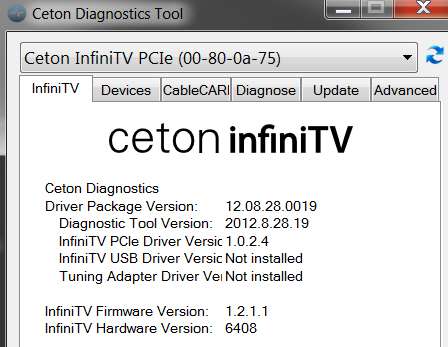
Have you upgraded your Ceton card to the latest hardware, firmware and driver software? This can really make a difference with marginal signal levels.

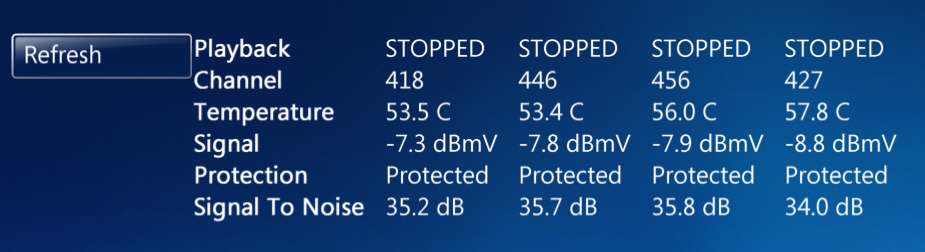
infinitvlevels.jpg


infinitvstatus.jpg


What are your signal levels on each of the tuners?
 

My Computer My Computer

At a glance

Windows 7 Pro x64 (1), Win7 Pro X64 (2)i5-3350p 3.1Ghz/6MB-cache (1); E8400 3.0Ghz/6...8GB PC3-12800 DDR3 (1); 4GB PC3-10600 DDR3 (2)ATI HD7750 (1), (see TV cards); ATI R7 250 (2)
Computer type
PC/Desktop
Computer Manufacturer/Model Number
Home-built, two systems (1) and (2)
OS
Windows 7 Pro x64 (1), Win7 Pro X64 (2)
CPU
i5-3350p 3.1Ghz/6MB-cache (1); E8400 3.0Ghz/6MB-cache (2)
Motherboard
ASUS P8Z77-V Pro (1); ASUS P5Q3 (2)
Memory
8GB PC3-12800 DDR3 (1); 4GB PC3-10600 DDR3 (2)
Graphics Card(s)
ATI HD7750 (1), (see TV cards); ATI R7 250 (2)
Sound Card
Realtek ALC892 HD Audio (1); Realtek ALC1200 HD Audio (2)
Monitor(s) Displays
Eizo HD2441W LCD, Eizo S2433W (1); Eizo 24" S2433W (2)
Screen Resolution
1920x1200, 1920x1200 (1); 1920x1200 (2)
Hard Drives
(1) 1TB SATA-II (7200RPM), 2x2TB SATA-III (7200RPM), 250GB SATA-III (10000RPM) for OS; 2x2TB external USB 3.0

(2) 320GB SATA-II (7200RPM), 750GB SATA-II (7200RPM), 150GB SATA-II (10000RPM) for OS; 2TB external USB 3.0
PSU
Nesteq ECS-6001 600W (1); Nesteq ECS-5001 500W (2)
Case
Acousti-Case 360 (1) and (2)
Cooling
Noctua NH-U12P SE2 for CPU, 2x120mm case fans (1) and (2)
Keyboard
IBM PS/2 (1) and (2)
Mouse
Logitech MX Revolution wireless (1); Microsoft wired (2)
Internet Speed
100mbps down / 10mbps up
Antivirus
Microsoft Security Essentials; Malwarebyte Anti-Malware Pro
Browser
Firefox
Other Info
Ceton InfiniTV 4-tuner cablecard-enabled TV card as well as Hauppauge HVR-2250 OTA/ATSC 2-tuner TV card in (1), running under Win7 WMC
Yes, I have all the latest drivers and firmware.

My signals are all at -11.3dBmV, which is not good as I understand it.

The data reads:
Frequency: 477000
SNR: 36.4 db
Signal: -11.3

All the signals on my cable boxes are at around -3, and Optimum was just at my house saying signal levels at the pole and at my splitters were all fine so I'm not sure why the signal level on this card is so low.
 

My Computer My Computer

At a glance

windows 7 home 64 gb
OS
windows 7 home 64 gb
Optimum was just at my house saying signal levels at the pole and at my splitters were all fine so I'm not sure why the signal level on this card is so low.
How many splitters do you have en route to the Ceton card? 2-way or 3-way or multiple splits?

3-way splitters typically have one side equal to double the other two. For example, the "stronger" side might be a signal loss of -3.5db while each of the other two outputs would be -7db. Normally, you'd send the stronger side to your cable modem (since that modem typically needs higher input signal strength than a DVR does), and the other two splits to DVR's around your house.

But if the Ceton is reading that low, you might investigate some other way to get the signal to the card involving fewer splits or stronger branches. For sure, you might just experiment trying to see if you can achieve a significantly higher measurement by replacing a 3-way with a 2-way, etc., even if you don't keep things that way.

Or, maybe an in-line amp might help if you need all the splits.

Just talking out loud, since it's certainly possible this might be what's responsible for your "no signal available" events.
 

My Computer My Computer

At a glance

Windows 7 Pro x64 (1), Win7 Pro X64 (2)i5-3350p 3.1Ghz/6MB-cache (1); E8400 3.0Ghz/6...8GB PC3-12800 DDR3 (1); 4GB PC3-10600 DDR3 (2)ATI HD7750 (1), (see TV cards); ATI R7 250 (2)
Computer type
PC/Desktop
Computer Manufacturer/Model Number
Home-built, two systems (1) and (2)
OS
Windows 7 Pro x64 (1), Win7 Pro X64 (2)
CPU
i5-3350p 3.1Ghz/6MB-cache (1); E8400 3.0Ghz/6MB-cache (2)
Motherboard
ASUS P8Z77-V Pro (1); ASUS P5Q3 (2)
Memory
8GB PC3-12800 DDR3 (1); 4GB PC3-10600 DDR3 (2)
Graphics Card(s)
ATI HD7750 (1), (see TV cards); ATI R7 250 (2)
Sound Card
Realtek ALC892 HD Audio (1); Realtek ALC1200 HD Audio (2)
Monitor(s) Displays
Eizo HD2441W LCD, Eizo S2433W (1); Eizo 24" S2433W (2)
Screen Resolution
1920x1200, 1920x1200 (1); 1920x1200 (2)
Hard Drives
(1) 1TB SATA-II (7200RPM), 2x2TB SATA-III (7200RPM), 250GB SATA-III (10000RPM) for OS; 2x2TB external USB 3.0

(2) 320GB SATA-II (7200RPM), 750GB SATA-II (7200RPM), 150GB SATA-II (10000RPM) for OS; 2TB external USB 3.0
PSU
Nesteq ECS-6001 600W (1); Nesteq ECS-5001 500W (2)
Case
Acousti-Case 360 (1) and (2)
Cooling
Noctua NH-U12P SE2 for CPU, 2x120mm case fans (1) and (2)
Keyboard
IBM PS/2 (1) and (2)
Mouse
Logitech MX Revolution wireless (1); Microsoft wired (2)
Internet Speed
100mbps down / 10mbps up
Antivirus
Microsoft Security Essentials; Malwarebyte Anti-Malware Pro
Browser
Firefox
Other Info
Ceton InfiniTV 4-tuner cablecard-enabled TV card as well as Hauppauge HVR-2250 OTA/ATSC 2-tuner TV card in (1), running under Win7 WMC
Back
Top