WMC sees my othet TV tuner, but I still cannot record at the same time

peggypwr1

New member
Local time
3:23 PM
Messages
5
Hello I have a Gateway DX4300 -15e with the Aver Hybrid TV tuner. I have an OTA antenna that feeds into this TV Tuner.

I bought a KWorld 435Q USB tv tuner some time ago and decided I wanted to have another tuner.

I installed the Kworld Windows 7 drivers, the device manger sees the USB TV tuner.

I took out the cable from the internal TV tuner, attached that cable to the IN splitter. Then attached two separate cables to the internal and one to the USB tuner (from OUT splitter). My intention is to have a dual tuner OTA antenna setup.

So after all of this, WMC detects the new tuner. It asked my if I wanted Comcast digital...or digital terrestrial (DT), I choose DT.

After all of that, I record one show, BUT, when I try to record another show at the same time, it says there is a conflict?!

If WMC sees my new USB TV tuner, why can't I dual record?

Do I need two separate antennas instead of splitting?

Thank you.
 

My Computer My Computer

At a glance

64 bit
OS
64 bit
I have a dual tuner card but one input is connected to an OTA antenna and the other is connected to a satellite box. During setup, it duplicated some of the local channels and I had to delete the duplicate channels from the guide. I kept all the local OTA channels and deleted the satellite "local service" channels. This allows me to watch or record off either tuner at the same time. This is because each tuner has it's own channels in the guide.

I suspect your problem is because the channels in your guide are all for the same tuner. Either that or WMC can't distinguish channels for each tuner. You may have to setup one tuner by manually adding the channels and give them a different channel number. Just prefix or suffix the regular channel number(s) with another number. This way, you control which channels are attached to each tuner and can record using either or both. But you will have to go back through the setup for one of the tuners and select "manual" from the options.
 

My Computer My Computer

At a glance

Windows 7 Pro-x64i7-2600 3.4GHz - 3.8GHz Turbo8Gb - 2x4GB, Muskin 991770 PC3-1333Integrated Intel HD 2000
Computer type
PC/Desktop
Computer Manufacturer/Model Number
Built 2/11/2011
OS
Windows 7 Pro-x64
CPU
i7-2600 3.4GHz - 3.8GHz Turbo
Motherboard
Intel DH67BL-B3
Memory
8Gb - 2x4GB, Muskin 991770 PC3-1333
Graphics Card(s)
Integrated Intel HD 2000
Sound Card
Integrated Intel 10.1 HD, RealTek ALC892
Monitor(s) Displays
Asus LCD VH222H, Haier HL24XSL2a
Screen Resolution
1920x1080, 1920x1080
Hard Drives
Crucial SSD C300-128Gb,
Western Digital WD5002AALX - 500Gb,
Western Digital WD7501AALS - 750Gb
PSU
Seasonic 650W 80+ Gold Modular
Case
Rosewill Defender
Cooling
Stock CPU, Four 120mm case fans, PCH fan added
Keyboard
Logitech EX100 Y-RBH94 Wireless
Mouse
Logitech EX100 M-RCE95 Wireless
Internet Speed
3.0/1.5 Mbs
Antivirus
Microsoft Security Essentials
Browser
Microsoft Internet Explorer 11
Other Info
Antec Veris Premier-Multimedia IR Station,
Cyber Accoustics-3602 Speakers,
AFT XM-5U Card Reader,
Hauppauge TV-HVR-2250,
Sony LX300 USB Turntable
Ok Ill try that, is it easy to do? So for one tuner channel 2 is 2, but for the other its 2.2?
 

My Computer My Computer

At a glance

64 bit
OS
64 bit
OTA channels may be something like 2.1, 2.2, 4.1, 4.2, etc. (Depending on your location.) Leave one set alone then add a new set of channels like 102.1, 102.2, 104.1, 104.2, etc. You'll have to run through your tuner setup again and select the tuner that will be set manually.
 

My Computer My Computer

At a glance

Windows 7 Pro-x64i7-2600 3.4GHz - 3.8GHz Turbo8Gb - 2x4GB, Muskin 991770 PC3-1333Integrated Intel HD 2000
Computer type
PC/Desktop
Computer Manufacturer/Model Number
Built 2/11/2011
OS
Windows 7 Pro-x64
CPU
i7-2600 3.4GHz - 3.8GHz Turbo
Motherboard
Intel DH67BL-B3
Memory
8Gb - 2x4GB, Muskin 991770 PC3-1333
Graphics Card(s)
Integrated Intel HD 2000
Sound Card
Integrated Intel 10.1 HD, RealTek ALC892
Monitor(s) Displays
Asus LCD VH222H, Haier HL24XSL2a
Screen Resolution
1920x1080, 1920x1080
Hard Drives
Crucial SSD C300-128Gb,
Western Digital WD5002AALX - 500Gb,
Western Digital WD7501AALS - 750Gb
PSU
Seasonic 650W 80+ Gold Modular
Case
Rosewill Defender
Cooling
Stock CPU, Four 120mm case fans, PCH fan added
Keyboard
Logitech EX100 Y-RBH94 Wireless
Mouse
Logitech EX100 M-RCE95 Wireless
Internet Speed
3.0/1.5 Mbs
Antivirus
Microsoft Security Essentials
Browser
Microsoft Internet Explorer 11
Other Info
Antec Veris Premier-Multimedia IR Station,
Cyber Accoustics-3602 Speakers,
AFT XM-5U Card Reader,
Hauppauge TV-HVR-2250,
Sony LX300 USB Turntable
Did you rescan channels with both tuners connected?

I suggest deleting Media Center data by following this guide

http://www.hack7mc.com/2009/09/clearing-guide-data-and-tuner-setup-from-windows-7-media-center.html

then rescanning. During setup, Media Center should say 'detected 2 tuners'.

After setup, go to guide and right click a channel and click Edit Channel-Edit Sources.

I have 2 dual tuners see attached jpeg showing 4 tuners. Yours should show 2 and they should both be 100% signal.

wmc.jpg.

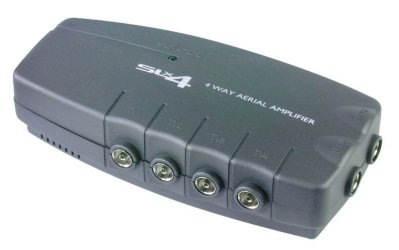
A splitter will halve the signal to each device. Personally I use a cheap distribution amplifier with 4 outputs to feed my various tuners/pcs.
 

My Computer My Computer

At a glance

Windows 7 pro x64 SP1Intel i7-2600k o/c to 4.6GHz8GB Mushkin 1866MHzNvidia GTX 750 Ti 2GB
Computer type
PC/Desktop
Computer Manufacturer/Model Number
self build
OS
Windows 7 pro x64 SP1
CPU
Intel i7-2600k o/c to 4.6GHz
Motherboard
MSI Z68-GD80
Memory
8GB Mushkin 1866MHz
Graphics Card(s)
Nvidia GTX 750 Ti 2GB
Sound Card
integrated
Monitor(s) Displays
Liyama ProLite 27"
Screen Resolution
1920*1080 px
Hard Drives
Seagate 2TB
PSU
Coolermaster GX 750W
Case
Antec 300 case + 5 fans
Cooling
Dark Rock Pro
Internet Speed
62Mbit down 18Mbit up
Antivirus
MSE
Browser
Firefox
Other Info
Blackgold BGT3650 Quad HD TV card. Also have various 3770 + 4770K render boxes.
Instaead of using a splittler, can I use two seperate OTA antenna for each tuner. Can WMC handle this?
 

My Computer My Computer

At a glance

64 bit
OS
64 bit
Sure - separate aerials is OK. Did you try my suggestion to rescan ? Did both tuners show up as per my screenshot ? If the signal is good, often a splitter will suffice. I use this distribution amplifier which costs 10-12 pounds in the UK.

aerial_amp.JPG
 

My Computer My Computer

At a glance

Windows 7 pro x64 SP1Intel i7-2600k o/c to 4.6GHz8GB Mushkin 1866MHzNvidia GTX 750 Ti 2GB
Computer type
PC/Desktop
Computer Manufacturer/Model Number
self build
OS
Windows 7 pro x64 SP1
CPU
Intel i7-2600k o/c to 4.6GHz
Motherboard
MSI Z68-GD80
Memory
8GB Mushkin 1866MHz
Graphics Card(s)
Nvidia GTX 750 Ti 2GB
Sound Card
integrated
Monitor(s) Displays
Liyama ProLite 27"
Screen Resolution
1920*1080 px
Hard Drives
Seagate 2TB
PSU
Coolermaster GX 750W
Case
Antec 300 case + 5 fans
Cooling
Dark Rock Pro
Internet Speed
62Mbit down 18Mbit up
Antivirus
MSE
Browser
Firefox
Other Info
Blackgold BGT3650 Quad HD TV card. Also have various 3770 + 4770K render boxes.
Hello the website you is not responding on ym computer? I'll try to seperate antenneas first.
 

My Computer My Computer

At a glance

64 bit
OS
64 bit
Ok, so now each tuner has its own OTA antenna. When I click on a channel 14.1 and go to edit sources, it shows 4 tuners??? Two show 100% and the other two show 90%

Also, even though I am watchinh channel 14.1, under edit sources it says channel 51.1, whats going on.

Can I assign one tuner to one specifiic channel?? Thanks
 

My Computer My Computer

At a glance

64 bit
OS
64 bit
If you look at my screenshot it says 1 of 8 tuners even though I only have 4 on that pc. This is because my aerial also picks up signals from adjacent areas, usually at 60%. WMC uses tuners that are ticked starting from the top down. After setup, I went through each channel and had to make a few changes to ensure the correct signals were being used ie check + uncheck tuners in the list.

If you have 2 single tuners, only 2 per channel should be selected ie the highest preferably 100% - and you can choose one specific tuner for each channel if you want.

In the UK we only have digital, but if your tuners are hybrid and analog is still available in your area each tuner may show up as 2 ie analog + digital.
 

My Computer My Computer

At a glance

Windows 7 pro x64 SP1Intel i7-2600k o/c to 4.6GHz8GB Mushkin 1866MHzNvidia GTX 750 Ti 2GB
Computer type
PC/Desktop
Computer Manufacturer/Model Number
self build
OS
Windows 7 pro x64 SP1
CPU
Intel i7-2600k o/c to 4.6GHz
Motherboard
MSI Z68-GD80
Memory
8GB Mushkin 1866MHz
Graphics Card(s)
Nvidia GTX 750 Ti 2GB
Sound Card
integrated
Monitor(s) Displays
Liyama ProLite 27"
Screen Resolution
1920*1080 px
Hard Drives
Seagate 2TB
PSU
Coolermaster GX 750W
Case
Antec 300 case + 5 fans
Cooling
Dark Rock Pro
Internet Speed
62Mbit down 18Mbit up
Antivirus
MSE
Browser
Firefox
Other Info
Blackgold BGT3650 Quad HD TV card. Also have various 3770 + 4770K render boxes.
Clear Media Center Data

If you want to reset WMC back to day one and start over here's how.

Goto Control panel, Folder Options, View and select 'Show hidden files and folders'

Save and restart pc in safe mode by hitting F8 at boot (this is so WMC services are not running)

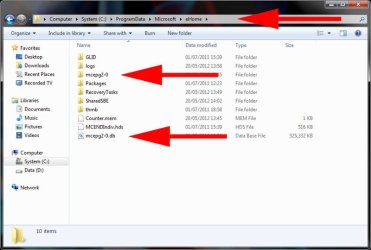
Navigate to C:\Program Data\Microsoft\ehome

delete folder mcepg2-0 and file mcepg2-0.db (this is existing WMC data)

restart pc normally

goto Folder Options and re-hide hidden files and folders

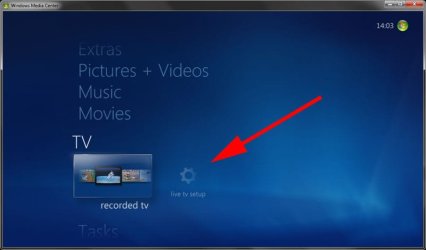
start WMC and click live TV setup

folder_options_view.jpg

ehome_delete.jpg

wmc_setup.jpg
 

My Computer My Computer

At a glance

Windows 7 pro x64 SP1Intel i7-2600k o/c to 4.6GHz8GB Mushkin 1866MHzNvidia GTX 750 Ti 2GB
Computer type
PC/Desktop
Computer Manufacturer/Model Number
self build
OS
Windows 7 pro x64 SP1
CPU
Intel i7-2600k o/c to 4.6GHz
Motherboard
MSI Z68-GD80
Memory
8GB Mushkin 1866MHz
Graphics Card(s)
Nvidia GTX 750 Ti 2GB
Sound Card
integrated
Monitor(s) Displays
Liyama ProLite 27"
Screen Resolution
1920*1080 px
Hard Drives
Seagate 2TB
PSU
Coolermaster GX 750W
Case
Antec 300 case + 5 fans
Cooling
Dark Rock Pro
Internet Speed
62Mbit down 18Mbit up
Antivirus
MSE
Browser
Firefox
Other Info
Blackgold BGT3650 Quad HD TV card. Also have various 3770 + 4770K render boxes.
Back
Top