WmiPrvSE.exe keeps loading up every 15 min or so.

LazyTom

New member
Local time
10:05 AM
Messages
14
There doesn`t seem to be a regular pattern as such but I would say it does occur every 15 minutes or so on average, - in saying that, there could be a gap of 20 minutes between occurrences or just 10 minutes, it seems quite random.

But what really bothers me is that when the PC is idle and I'm not doing anything out of the ordinary except looking at the Task Manager waiting for WmiPrvSE to load up again.
So I really don't understand which program triggers WmiPrvSE to load up everytime.

Is there a way to log the WmiPrvSE.exe service? Because I really like to know what causes this.
 

My Computer My Computer

At a glance

W7 64 bitIntel i7 4770kCorsair 8GB DDR3ASUS Geforce GTX 650 Ti
Computer type
PC/Desktop
Computer Manufacturer/Model Number
Custom build
OS
W7 64 bit
CPU
Intel i7 4770k
Motherboard
ASUS Sabertooth Z87
Memory
Corsair 8GB DDR3
Graphics Card(s)
ASUS Geforce GTX 650 Ti
Sound Card
Onboard
Monitor(s) Displays
17" Samsung CRT
Hard Drives
Samsung EVO SSD 256 GB + WD Green 2TB
PSU
Corsair AX 760
Antivirus
Avira Free
Browser
IE11

My Computer My Computer

At a glance

Windows 7 Pro 32Intel(R) Core(TM) i5 CPU M 540 @ 2.53GHz4,00 GB (Usable 2,98)NVIDIA NVS 5100M
Computer type
Laptop
Computer Manufacturer/Model Number
HP Elitebook 8540p
OS
Windows 7 Pro 32
CPU
Intel(R) Core(TM) i5 CPU M 540 @ 2.53GHz
Motherboard
Hewlett-Packard 1521
Memory
4,00 GB (Usable 2,98)
Graphics Card(s)
NVIDIA NVS 5100M
Sound Card
NVIDIA High Definition Audio
Screen Resolution
1600x900
Hard Drives
INTEL SSDSA2CW120G3
Antivirus
F-Secure Internet Security
Browser
IE, Firefox, Opera
Other Info
Sandboxie,
SRP (Software Restriction Policy),
EMET (Enhanced Mitigation Experience Toolkit),
WFC (Windows Firewall Control by BiniSoft),
Malwarebytes Premium
Process Logging

Well I can't answer your questions regarding WmiPrvSE.exe but I can suggest ways to log processes.

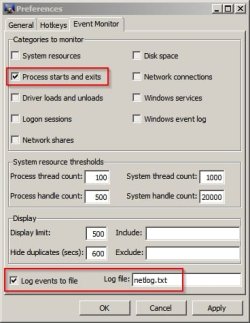
My preferred method:

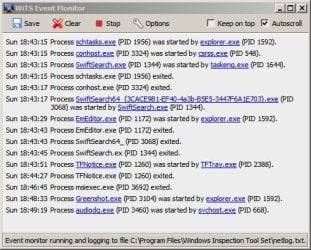
I run WITS - available from here: Windows Inspection Tool Set

WITS 1.jpg

WiTS Event Monitor.jpg

The log is saved here: "C:\Program Files\Windows Inspection Tool Set\netlog.txt"

Other than that there are a couple of other utilities that I use including ProcessLasso but it's primary purpose is process taming rather than logging.
 

My Computer My Computer

At a glance

Microsoft Windows 7 Home Premium 64-bit 7601 ...AMD C-60 APU with Radeon(tm) HD Graphics4.00 GBAMD Radeon HD 6290 Graphics
Computer type
Laptop
Computer Manufacturer/Model Number
ASUS
OS
Microsoft Windows 7 Home Premium 64-bit 7601 Multiprocessor Free Service Pack 1
CPU
AMD C-60 APU with Radeon(tm) HD Graphics
Motherboard
ASUSTeK COMPUTER INC. X501U
Memory
4.00 GB
Graphics Card(s)
AMD Radeon HD 6290 Graphics
Sound Card
(1) AMD High Definition Audio Device (2) Realtek High Defi
Screen Resolution
1366 x 768 x 32 bits (4294967296 colors) @ 60 Hz
Hard Drives
Hitachi HTS545050A7E380 SATA Disk Device
Antivirus
Comodo CIS & FW, SecureAplus App Whitelisting, Threatfire
Browser
Cyberfox 64bit, Opera 64bit, Airfox
Other Info
Spy-The-Spy, HitmanPro.Alert, Norton Connect Safe, MJRegWatcher, BitDefender TrafficLight, Voodoo Shield, Zemana AntiMalware
I don't know if this will help in your case but i did have the same problem once before & i tracked it down to two Comodo programs the main offender was was Comodo System Cleaner & a service it has called Cleaner Validator, It was set to start automatically i set it to on demand & that cured it,But then i never used that program much now i don't use it at all.& the other was also a Comodo Program called Program Manager & CPM Service did the same,The last one was not so bad & i have a faster PC now so it is not a problem,But the Cleaner Validator was a nightmare so the program had to go.I was lucky to happen to notice wmipvrse was always maxing out the CPU when Cleaner Validator running.Not much help really unless you have them programs but it was a case of watching services until the offender started
 

My Computer My Computer

At a glance

Windows 7 Home Premium 64bitAMD E-350 Zacate 40nm8GBAMD Radeon HD 6310 Graphics
Computer Manufacturer/Model Number
Sony VAIO VPCEL1E1E
OS
Windows 7 Home Premium 64bit
CPU
AMD E-350 Zacate 40nm
Motherboard
Sony VAIO C901CPF6
Memory
8GB
Graphics Card(s)
AMD Radeon HD 6310 Graphics
Sound Card
ATI High Definition Audio Divice, Conexant Smart Audio HD
Hard Drives
Toshiba MK3259GSXP SATA. And External Hard Drive iomega LDHD-UP, 1 Terabyte
Antivirus
Comodo Internet Security 7
Browser
Comodo Dragon,IE,SRWare IRON (Default).
Back
Top