WMP 12 Customizing and Windows explorer editing

Tekken179

New member
Member
Local time
9:36 PM
Messages
83
Location
Northern Ireland
Ok so i know how to skin WMP 12 etc. from the screenshot you can see that i'm a token themer fan and like the dark side of things for a desktop however I prefer using WMP over all other media players but cannot seem to skin it well, the skins add-on that comes with it suck, i can manage to edit it all except the font colour and i'm not sure on how to do this in windows seven any help?


secondly i need something simple here :P

bijmlk.png


how to i move that box highlighted in red to the bottom of windows explorer windows?
 

My Computer

Computer type
PC/Desktop
Computer Manufacturer/Model Number
ADVENT DT1411
OS
Windows 7 Premium (64 Bit)
CPU
Intel Core i5-2320 3.0 Ghz
Motherboard
N Foxconn
Memory
8 GB
Graphics Card(s)
AMD Radeon HD 6670
Sound Card
Built in
Monitor(s) Displays
21.5" Samsung LED HD
Screen Resolution
1920x1080
Hard Drives
1x 1.5TB
1x 1TB
PSU
405v
Case
Advent standard
Keyboard
Acer
Mouse
Trust GTX
Internet Speed
Sky Broadband 20Mgbs
Antivirus
E-Trust
Browser
Firefox
Your desktop looks pretty wicked, mind sharing what you are using?
 

My Computer

OS
home: Windows 7 x64 • work: OS X 10.12
CPU
home: 3.0 GHz x4 • work: 2 GHz x2
Memory
home: 8 GB • work: 16 GB
sure thing man.

Rocketdock (the dock at the bottom) - Skin is Milk aero (comes by default) About RocketDock - RocketDock.com

Rainmeter - you can get themes at deviantart.com just type in for example my clock 'digital reflective clock rainmeter' rainmeter.com

yahoo widgets - weather pro, calendar pro, recycle bin pro (change bin icon to token bin icon)

rocketdock icons 'lucid icons' - deviantart

taskbar icons - token and token windows explorer with darksoft v2 taskbar (you can find these by searching them in deviantart)

cursorFX - stealth cursor (wincustomize.org)

your gonig to need the UXpatcher for the taskbar

type in token on deviantart you will find other little things under the customize section

also use CAD (Cd album display) although you can't seee it and the skin i use is called 'theframe'
 

My Computer

Computer type
PC/Desktop
Computer Manufacturer/Model Number
ADVENT DT1411
OS
Windows 7 Premium (64 Bit)
CPU
Intel Core i5-2320 3.0 Ghz
Motherboard
N Foxconn
Memory
8 GB
Graphics Card(s)
AMD Radeon HD 6670
Sound Card
Built in
Monitor(s) Displays
21.5" Samsung LED HD
Screen Resolution
1920x1080
Hard Drives
1x 1.5TB
1x 1TB
PSU
405v
Case
Advent standard
Keyboard
Acer
Mouse
Trust GTX
Internet Speed
Sky Broadband 20Mgbs
Antivirus
E-Trust
Browser
Firefox
What VS is that? I have used it, I just can't remember the darn name. =/

I'm also curious, what program did you use to change the icons. I'm using Icon Packager, and I can't find a darn good token skin for it. =/

Sorry - I can't help you with the Explorer, be interested in the answer though. =)

~Joshua~
 

My Computer

OS
Windows 7
The VS is Dark Soft i believe. Tekken browse Deviantart for Rocketdock skin called Glass Curve it's nice and black and looks like a Mac Dock somewhat..will go well with the theme. :)

EDIT: Rocket Dock skin here
 

My Computer

Computer type
PC/Desktop
OS
Win7 Home Premium x64 SP1, Archlinux x86_64. Elementary Luna
Ok man thanks for the tip, just been editing other things, put my default browser back to firefox , p.s. check out my other thread i need serious help with windows live problems.. it's in software help section :D
 

My Computer

Computer type
PC/Desktop
Computer Manufacturer/Model Number
ADVENT DT1411
OS
Windows 7 Premium (64 Bit)
CPU
Intel Core i5-2320 3.0 Ghz
Motherboard
N Foxconn
Memory
8 GB
Graphics Card(s)
AMD Radeon HD 6670
Sound Card
Built in
Monitor(s) Displays
21.5" Samsung LED HD
Screen Resolution
1920x1080
Hard Drives
1x 1.5TB
1x 1TB
PSU
405v
Case
Advent standard
Keyboard
Acer
Mouse
Trust GTX
Internet Speed
Sky Broadband 20Mgbs
Antivirus
E-Trust
Browser
Firefox
Anyways a little off topic now but please any replies in regards to this thread?
 

My Computer

Computer type
PC/Desktop
Computer Manufacturer/Model Number
ADVENT DT1411
OS
Windows 7 Premium (64 Bit)
CPU
Intel Core i5-2320 3.0 Ghz
Motherboard
N Foxconn
Memory
8 GB
Graphics Card(s)
AMD Radeon HD 6670
Sound Card
Built in
Monitor(s) Displays
21.5" Samsung LED HD
Screen Resolution
1920x1080
Hard Drives
1x 1.5TB
1x 1TB
PSU
405v
Case
Advent standard
Keyboard
Acer
Mouse
Trust GTX
Internet Speed
Sky Broadband 20Mgbs
Antivirus
E-Trust
Browser
Firefox
I'm not sure if this is easily done, as you have over 130 views.

Just to keep your topic on the top here as well, what system files are you using, they all look really nice here. =)

~Joshua~
 

My Computer

OS
Windows 7
most of them can be found by searching token in deviant art under customization but it's just your standard patch to apply your own visual styles along with the editing the explorer shells i can't remember the exact .DLL's but it's simple as.

Well what i requested isn't hard i don't think i have seen screenshots of the things i want these people just can't seem to find the original owner of the screenshots or how to do what i want :P oh well i'm patient :)
 

My Computer

Computer type
PC/Desktop
Computer Manufacturer/Model Number
ADVENT DT1411
OS
Windows 7 Premium (64 Bit)
CPU
Intel Core i5-2320 3.0 Ghz
Motherboard
N Foxconn
Memory
8 GB
Graphics Card(s)
AMD Radeon HD 6670
Sound Card
Built in
Monitor(s) Displays
21.5" Samsung LED HD
Screen Resolution
1920x1080
Hard Drives
1x 1.5TB
1x 1TB
PSU
405v
Case
Advent standard
Keyboard
Acer
Mouse
Trust GTX
Internet Speed
Sky Broadband 20Mgbs
Antivirus
E-Trust
Browser
Firefox
Try putting a link in your signature, it really helps believe me.

And make the link a bit bigger then the normal size.

~Joshua~
 

My Computer

OS
Windows 7
um i didn't get the point of that reply? :S
 

My Computer

Computer type
PC/Desktop
Computer Manufacturer/Model Number
ADVENT DT1411
OS
Windows 7 Premium (64 Bit)
CPU
Intel Core i5-2320 3.0 Ghz
Motherboard
N Foxconn
Memory
8 GB
Graphics Card(s)
AMD Radeon HD 6670
Sound Card
Built in
Monitor(s) Displays
21.5" Samsung LED HD
Screen Resolution
1920x1080
Hard Drives
1x 1.5TB
1x 1TB
PSU
405v
Case
Advent standard
Keyboard
Acer
Mouse
Trust GTX
Internet Speed
Sky Broadband 20Mgbs
Antivirus
E-Trust
Browser
Firefox
In your signature you have the text - "War Determines Only Who is Left, Not Who is Right."

You had been saying that not many people have replied to this thread. In order for more people to see it, you may want to place a link to it in your signature, with a larger text font. I have done this several times before and leads to a quicker answer to your problem.

~Joshua~
 

My Computer

OS
Windows 7
hey Tekken179,

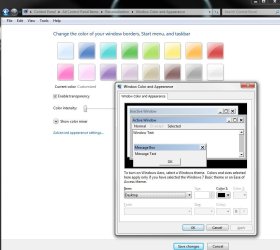
If you want to change the font color system side then customize the current windows theme. See attachment.

If you want to customize WMP only then I believe that you need to edit the skin *.wms file that's inside the *.wmz archive. I haven't tested this but you could look it up on MSDN and learn more if you need to.

To get you started, look at the default skin here %programfiles%\Windows Media Player\Skins\Revert.wmz (just change the *.wmz to *.zip and extract it). Inside with the pictures is a *.wms file, open this with notepad you should be able to edit the font sizes and colors inside.

I didn't look at closely as I want to leave some of the fun for you ;) ; but here's the text reference on MSDN so that you can learn how to read and edit the string (if you don't know that is).

Good Luck.
 

Attachments

  • Capture.JPG
    Capture.JPG
    105.4 KB · Views: 8

My Computer

Computer Manufacturer/Model Number
Custom Hack job
OS
Windows 7 Ultimate 64 bit
CPU
Intel(R) Core(TM)2 Quad CPU Q8200 @ 2.33GHz
Motherboard
GigaByte EP45-UD3
Memory
8 GB Kingston
Graphics Card(s)
Nvidia GeForce 9600GT
Sound Card
Soundblaster Audigy
Monitor(s) Displays
AOC x2 22"
Hard Drives
2 x Samsung 500GB (RAID)
2 x Samsung 2TB
1 x WD Green 2TB
1 x Seagate 1TB
1 x Samsung 500GB
PSU
Thermaltake QFan 750W
Case
CM Scout Gaming
Cooling
Coolermaster V10
Keyboard
Microsoft Wireless Keyboard 1000
Mouse
Microsoft Wireless Optical 2000
Internet Speed
320
Other Info
Winfast PVR2000CP
LG DVD-RAM DVD/RW/DL Super Multi
Linksys WMP300Nx2 Wireless Adapter
secondly i need something simple here :P

how to i move that box highlighted in red to the bottom of windows explorer windows?

Just stumbled across this article which explains moving the details pane to either the top or bottom of the window. A Google search for "shell32.dll topshell" might yield more results if you still have trouble.
 

My Computer

OS
home: Windows 7 x64 • work: OS X 10.12
CPU
home: 3.0 GHz x4 • work: 2 GHz x2
Memory
home: 8 GB • work: 16 GB
Back
Top