WMP 12 Doesn't show muis from library

raiderfan

New member
Local time
6:35 PM
Messages
22
Hi,

Whatever I did to my computer, the files in my music folder do not appear in the music library.

I've looked online and there are more suggestions for fixes than stars in the sky. Based on the number of suggestions I wouldn't even attempt to use one.

I added several pieces of music today and that does show up in the library along with two other pieces of music previously recorded from the same artist's CD.

I am using Windows 7 Home Premium 64 bit with SP1.

Any suggestions appreciated!:)

Thanks

raiderfan
 

My Computers My Computers

System One System Two

  • Computer Manufacturer/Model Number
    Wydan Technologies
    OS
    Windows 7 Home Premium64 bit
    CPU
    AMD Phenom X4 965 3400 mhz 4 core
    Motherboard
    asus M4A88T-M
    Memory
    4 GB ddr2 800 mhz
    Graphics Card(s)
    ATI Radeon 4520
    Sound Card
    On Board
    Monitor(s) Displays
    LG 2040W
    Hard Drives
    500GB Western Digital SATA
    PSU
    Amd Phenom X4 965 3400 MHZ 4 core
    Case
    Logsys Cs305
    Cooling
    AMD Standard
    Keyboard
    Microsoft USB Office Keyboard
    Mouse
    Microsoft USB Mouse
  • Computer type
    PC/Desktop
    System Manufacturer/Model Number
    Ironside Computers
    OS
    Windows 7 64 bit
    CPU
    AMD A10-7700K Radeon R7, 10 computer cores 4C+6G, 34+
    Motherboard
    ASRock FM2A78 Pro3+
    Memory
    8 gigabytes
    Graphics Card(s)
    On motherboard
    Sound Card
    on motherboard
    Monitor(s) Displays
    LG W2040
    Screen Resolution
    1280 x 1024
    Hard Drives
    Toshiba DT01ACA100 SATA Disc Device
    PSU
    UNK
    Case
    thorex
    Cooling
    UNK
    Keyboard
    Microsoft Office Keyboard
    Mouse
    Microdoft Comfort Mouse 4500
    Internet Speed
    8.32 MBPS upload 12.75 download
    Browser
    Firefox
Windows Media Player will not populate library.

Hi,

I have tried at least 6 supposed fixes for WMP 12 (Windows 7 Home 64 bit) from online as well as the help forum here but to no avail.

I don't see why WMP 12 can't be totally uninstalled and reinstalled. Reading and re-reading the same or similar versions of the same answers over and over at different sites is annoying at best. One answer was to edit two keys in the shell folder. However, once you arrived at the keys the post ended with words to the effect "and you just edit the keys". No hint of what the edit was! I would have tried my selective service number but decided the problem was bad enough.

Winamp is defunct and I don't like VLC Media Player's almost hidden copy ability. I've only used it for two days but I can only find a record button and no rip feature.

VLC doesn't seem to support album art for music in .wma format. Though that could be because of whatever corrupted file or files WMP has is has associated with the .wma file or the album art.

WMP has been around for some time but my problem appears unsolvable. There doesn't seem to be any type of diagnostic software for WMP.

The closest I've come to something that makes sense is a repair install. If I understand the procedure ( and I certainly may be wrong about this) it will remove all the patches and updates from Microsoft for the last 3 years. If that doesn't work then a total reinstall would fix the problem - great.

Sorry to rant here. I know most if not all of you volunteer and work very hard to help posters. Unfortunately it is impossible to get someone at Microsoft where the real problem lies.

I guess I'll try to search more but I am not optimistic based on my current level of success. I certainly will start backing everything up. I'm afraid the repair install is going to be my answer. :(

raiderfan
 

My Computers My Computers

System One System Two

  • Computer Manufacturer/Model Number
    Wydan Technologies
    OS
    Windows 7 Home Premium64 bit
    CPU
    AMD Phenom X4 965 3400 mhz 4 core
    Motherboard
    asus M4A88T-M
    Memory
    4 GB ddr2 800 mhz
    Graphics Card(s)
    ATI Radeon 4520
    Sound Card
    On Board
    Monitor(s) Displays
    LG 2040W
    Hard Drives
    500GB Western Digital SATA
    PSU
    Amd Phenom X4 965 3400 MHZ 4 core
    Case
    Logsys Cs305
    Cooling
    AMD Standard
    Keyboard
    Microsoft USB Office Keyboard
    Mouse
    Microsoft USB Mouse
  • Computer type
    PC/Desktop
    System Manufacturer/Model Number
    Ironside Computers
    OS
    Windows 7 64 bit
    CPU
    AMD A10-7700K Radeon R7, 10 computer cores 4C+6G, 34+
    Motherboard
    ASRock FM2A78 Pro3+
    Memory
    8 gigabytes
    Graphics Card(s)
    On motherboard
    Sound Card
    on motherboard
    Monitor(s) Displays
    LG W2040
    Screen Resolution
    1280 x 1024
    Hard Drives
    Toshiba DT01ACA100 SATA Disc Device
    PSU
    UNK
    Case
    thorex
    Cooling
    UNK
    Keyboard
    Microsoft Office Keyboard
    Mouse
    Microdoft Comfort Mouse 4500
    Internet Speed
    8.32 MBPS upload 12.75 download
    Browser
    Firefox
Where are your Music and Video files stored - which folders ?? And what is the path to those folders.
 

My Computer My Computer

Computer Manufacturer/Model Number
HP, Dell, Gateway, Toshiba - 4 laptops and 2 desktops
OS
Vista, Windows7, Mint Mate, Zorin, Windows 8
CPU
from 1.6GHz Duo to i7
Monitor(s) Displays
2x HP w2207
Hard Drives
5x HDD, 7x SSD, 12x Externals
Keyboard
with trackball - no mices
Mouse
Trackball mice
Internet Speed
DSL 6000
the only thing i got from your post is that wmp doesnt populate your library.

im sorry but that doesnt explain what the issue is and what help you would like.
can you explain more what you mean by populate your library.

if you mean the library within wmp then i can possibly help but i need to know what you mean by populate.
please use a screenshot it may help explain too, this would help greatly
 

My Computer My Computer

Computer Manufacturer/Model Number
Hewlett packard/p6512uk
OS
Microsoft Windows 7 Home Premium 64-bit 7600
CPU
IIx4 amd athelon 635 processor
Motherboard
FOXCONN 2AA9
Memory
2x2gb
Graphics Card(s)
ati radeon HD 5450
Sound Card
(1) Realtek High Definition Audio (2) AMD High Definition
Monitor(s) Displays
samsung lcd tv 32"
Screen Resolution
1360x 768
Hard Drives
(1) WDC WD10 01FAES-60Z2A0 SATA Disk Device (2) Maxtor OneTouch USB Device (3) ST310003 33AS USB Device (4) WD My Book 1111 USB Device
PSU
?
Cooling
air!
Keyboard
wireless hp
Mouse
wireless Hp,optical
Internet Speed
1.10mb/s
Antivirus
MSE
Browser
Firefox
Hi WHS and boobah,

What I mean to say is that for some reason WMP 12 no longer displays 99.9% of the music tracs stored on my pc. It happened approximately 1 ½ weeks ago. Perhaps it was something I did wrong. I have scanned the system with the scanner from my Avast Anti-Virus, Malware Bytes, and TDS Killer with no positive results. The Sophos rootkit scan also produced no results . I'm sure it is not some malware problem.

The tracs are and were located in C:\Users\Tom\Music. The rip location is also the same. It has been that way since I purchased the computer 3 ½ years ago.

Online suggestions to solve this problem include variations on turning off Windows Network Sharing Service, deleting all the. wmdb files in C:\Users\Tom\AppData\Local\Microsoft\Media Player, restarting Windows Network Sharing Service, rebooting and allowing WMP to rebuild the database. No joy.

Another suggestion was to turn Windows Media Player Off and On through the Windows Control Panel, rebooting, and the letting WMP 12 rebuild its database. No Joy.

Another suggested turning off network sharing and deleting CurrentDatabase_371.wmdb file from the C:\Users\Tom\AppData\Local\Microsoft\Media Player On my pc the file is named _372.wmdb file. Rinse repeat as above
Still another proposed solution suggested that in addition to stopping the Windows Network Sharing Service wmp.exe*32 should also be stopped as well. Rinse repeat as above.

As an experiment, (after going through the above procedure) I ripped several tracs from a CD that I already had ripped tracs from to the C:\Users|Tom\Music folder and rebooted. Surprisingly, all tracs now appear in the WMP12 library. All tracs are in the location cited above, in the proper artists folder an in the proper album or cd folder of that artist’s folder. I don’t like the prospect of rerecording all of the tracs from my cd’s as well as from cd’s I borrowed, or music I purchased!
One website, answers.microsoft.com suggested going to:

HKEY_USERS(S ?)\YourUserAccount\etc. as opposed to the “first registry key” enumerated below and check the library accounts- (which are)(what should I do)? and HKEY_USERS(S ?)\YourUserAccount\etc. as opposed to the “second registry key enumerated below and check the library accounts- - (which are)(what should I do)? This sounded promising but I could find no such paths in HKEY_USERS(S ?)

“I ran across an answer that may be helpful at the social/technet.microsoft.com that provided this information: Part of the answer reads:
UPDATE: Luckily the first 2 hits searching for "my music" in the registry were the culprits. For some reason they are not pointing to the library but directly to te (sic) same address(sic) where the library was pointing (a mapped network drive that had been removed). Removing the mapping to the network drive from the library apparently did not affect the link for that particular my music destination.
1st registry key: Computer\HKEY_CURRENT_USER\Software\Microsoft\Windows\CurrentVersion\Explorer\Shell Folders

2nd registry key: Computer\HKEY_CURRENT_USER\Software\Microsoft\Windows\CurrentVersion\Explorer\User Shell Folders
If you change the destinations that are no longer accessible (sic) to something that IS accessible WMP should be working again.”

Unfortunately, I don’t have the knowledge of which keys should be changed and to what, or if there are registry keys that should be deleted as well? It may not even solve the problem!

As you can see I have put considerable time and effort to solve my problem with the exception of the registry edit. If you look online using variations of Windows Media Player, Library, corrupt, missing music, etc. you will find many posts for any number versions of Windows Media Player having the same problem. Some are solved by the variations above. Some are not. Microsoft should devote a book to this evidently rampant problem.

I am vehemently opposed to doing a repair install. Reinstalling all the patches and updates from Microsoft plus reinstalling my software is onerous and should not need to be done.

Perhaps you can offer some insight into other options that might work. If it is the registry keys I could use some help in which key to edit/what should the edit be.

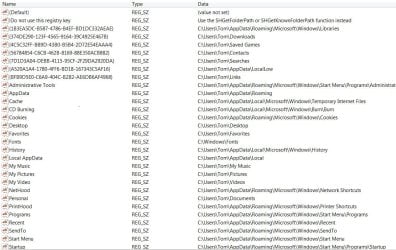
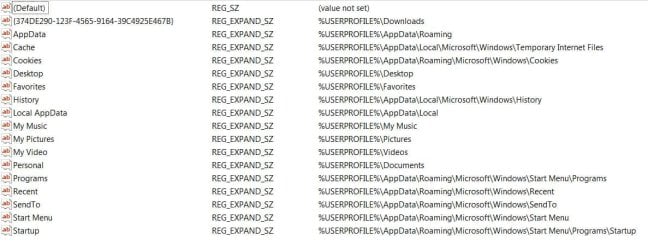
I have (hopefully) attached .jpg files showing the data from the two different registry keys mentioned in the (second) registry solution.

Attachment one is from the explorer shell folder key. Attachment 2 is from the user shell folder key

Thanks (and sorry to be so longwinded)
Raiderfan (Windows 7 SP1 64 bit)

 

Attachments

  • Explorer Shell Folders.jpg
    Explorer Shell Folders.jpg
    138.6 KB · Views: 1
  • User Shell Folder.jpg
    User Shell Folder.jpg
    74.5 KB · Views: 1
Last edited:

My Computers My Computers

System One System Two

  • Computer Manufacturer/Model Number
    Wydan Technologies
    OS
    Windows 7 Home Premium64 bit
    CPU
    AMD Phenom X4 965 3400 mhz 4 core
    Motherboard
    asus M4A88T-M
    Memory
    4 GB ddr2 800 mhz
    Graphics Card(s)
    ATI Radeon 4520
    Sound Card
    On Board
    Monitor(s) Displays
    LG 2040W
    Hard Drives
    500GB Western Digital SATA
    PSU
    Amd Phenom X4 965 3400 MHZ 4 core
    Case
    Logsys Cs305
    Cooling
    AMD Standard
    Keyboard
    Microsoft USB Office Keyboard
    Mouse
    Microsoft USB Mouse
  • Computer type
    PC/Desktop
    System Manufacturer/Model Number
    Ironside Computers
    OS
    Windows 7 64 bit
    CPU
    AMD A10-7700K Radeon R7, 10 computer cores 4C+6G, 34+
    Motherboard
    ASRock FM2A78 Pro3+
    Memory
    8 gigabytes
    Graphics Card(s)
    On motherboard
    Sound Card
    on motherboard
    Monitor(s) Displays
    LG W2040
    Screen Resolution
    1280 x 1024
    Hard Drives
    Toshiba DT01ACA100 SATA Disc Device
    PSU
    UNK
    Case
    thorex
    Cooling
    UNK
    Keyboard
    Microsoft Office Keyboard
    Mouse
    Microdoft Comfort Mouse 4500
    Internet Speed
    8.32 MBPS upload 12.75 download
    Browser
    Firefox
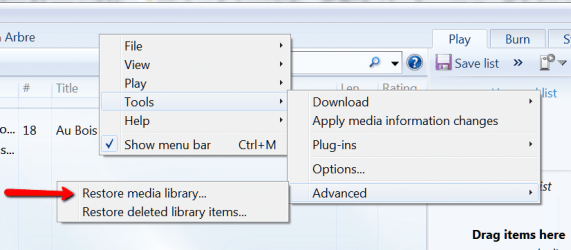
Did you try this:
 

Attachments

  • 2013-12-13_1955.png
    2013-12-13_1955.png
    37.7 KB · Views: 1

My Computer My Computer

Computer Manufacturer/Model Number
HP, Dell, Gateway, Toshiba - 4 laptops and 2 desktops
OS
Vista, Windows7, Mint Mate, Zorin, Windows 8
CPU
from 1.6GHz Duo to i7
Monitor(s) Displays
2x HP w2207
Hard Drives
5x HDD, 7x SSD, 12x Externals
Keyboard
with trackball - no mices
Mouse
Trackball mice
Internet Speed
DSL 6000
HI WHS,

No I had not tried that. My fault because the menu bar wasn't displayed.

After you suggestion,I was going to try it when a pop-up message appeared saying "Continuing will empty your media library and close windows media."

I must be misinterpreting and not understanding the message as to how WMP 12 works.

Since the music is already stored in the C:\Users\Tom\Music folder(if that is correct), why would it be necessary to empty the media library since the music is already there?

Is the problem that the path (folder) storing the music is incorrect;( i.e. not the default folder WMP 12 would use) and the library would be rebuilt in the correct location? What is the correct default location if not the one I have outlined above?

Sorry, but I don't want to lose the music. Also, I would like to understand what is happening "behind the scene" for curiosity's sake.

Thanks for your patience

raiderfan
 
Last edited:

My Computers My Computers

System One System Two

  • Computer Manufacturer/Model Number
    Wydan Technologies
    OS
    Windows 7 Home Premium64 bit
    CPU
    AMD Phenom X4 965 3400 mhz 4 core
    Motherboard
    asus M4A88T-M
    Memory
    4 GB ddr2 800 mhz
    Graphics Card(s)
    ATI Radeon 4520
    Sound Card
    On Board
    Monitor(s) Displays
    LG 2040W
    Hard Drives
    500GB Western Digital SATA
    PSU
    Amd Phenom X4 965 3400 MHZ 4 core
    Case
    Logsys Cs305
    Cooling
    AMD Standard
    Keyboard
    Microsoft USB Office Keyboard
    Mouse
    Microsoft USB Mouse
  • Computer type
    PC/Desktop
    System Manufacturer/Model Number
    Ironside Computers
    OS
    Windows 7 64 bit
    CPU
    AMD A10-7700K Radeon R7, 10 computer cores 4C+6G, 34+
    Motherboard
    ASRock FM2A78 Pro3+
    Memory
    8 gigabytes
    Graphics Card(s)
    On motherboard
    Sound Card
    on motherboard
    Monitor(s) Displays
    LG W2040
    Screen Resolution
    1280 x 1024
    Hard Drives
    Toshiba DT01ACA100 SATA Disc Device
    PSU
    UNK
    Case
    thorex
    Cooling
    UNK
    Keyboard
    Microsoft Office Keyboard
    Mouse
    Microdoft Comfort Mouse 4500
    Internet Speed
    8.32 MBPS upload 12.75 download
    Browser
    Firefox
I think there is a difference between 'media library' and your 'media files'. It would be normal that your media library gets purged first before it is being restored - else you may end up with duplicates.

But if you want to make double sure that nothing happens, backup your music and video files first. Your folders seem to be at the right default location.
 

My Computer My Computer

Computer Manufacturer/Model Number
HP, Dell, Gateway, Toshiba - 4 laptops and 2 desktops
OS
Vista, Windows7, Mint Mate, Zorin, Windows 8
CPU
from 1.6GHz Duo to i7
Monitor(s) Displays
2x HP w2207
Hard Drives
5x HDD, 7x SSD, 12x Externals
Keyboard
with trackball - no mices
Mouse
Trackball mice
Internet Speed
DSL 6000
WMP doesn't show music from library

No joy.

raiderfan
 

My Computers My Computers

System One System Two

  • Computer Manufacturer/Model Number
    Wydan Technologies
    OS
    Windows 7 Home Premium64 bit
    CPU
    AMD Phenom X4 965 3400 mhz 4 core
    Motherboard
    asus M4A88T-M
    Memory
    4 GB ddr2 800 mhz
    Graphics Card(s)
    ATI Radeon 4520
    Sound Card
    On Board
    Monitor(s) Displays
    LG 2040W
    Hard Drives
    500GB Western Digital SATA
    PSU
    Amd Phenom X4 965 3400 MHZ 4 core
    Case
    Logsys Cs305
    Cooling
    AMD Standard
    Keyboard
    Microsoft USB Office Keyboard
    Mouse
    Microsoft USB Mouse
  • Computer type
    PC/Desktop
    System Manufacturer/Model Number
    Ironside Computers
    OS
    Windows 7 64 bit
    CPU
    AMD A10-7700K Radeon R7, 10 computer cores 4C+6G, 34+
    Motherboard
    ASRock FM2A78 Pro3+
    Memory
    8 gigabytes
    Graphics Card(s)
    On motherboard
    Sound Card
    on motherboard
    Monitor(s) Displays
    LG W2040
    Screen Resolution
    1280 x 1024
    Hard Drives
    Toshiba DT01ACA100 SATA Disc Device
    PSU
    UNK
    Case
    thorex
    Cooling
    UNK
    Keyboard
    Microsoft Office Keyboard
    Mouse
    Microdoft Comfort Mouse 4500
    Internet Speed
    8.32 MBPS upload 12.75 download
    Browser
    Firefox
Windows media player doen't show music in library

Update,

VLC media Player does not show the music folder. It doesn't even show individual tracs. I have to drill down to a trac in order to find it and play it.

raiderfan
 

My Computers My Computers

System One System Two

  • Computer Manufacturer/Model Number
    Wydan Technologies
    OS
    Windows 7 Home Premium64 bit
    CPU
    AMD Phenom X4 965 3400 mhz 4 core
    Motherboard
    asus M4A88T-M
    Memory
    4 GB ddr2 800 mhz
    Graphics Card(s)
    ATI Radeon 4520
    Sound Card
    On Board
    Monitor(s) Displays
    LG 2040W
    Hard Drives
    500GB Western Digital SATA
    PSU
    Amd Phenom X4 965 3400 MHZ 4 core
    Case
    Logsys Cs305
    Cooling
    AMD Standard
    Keyboard
    Microsoft USB Office Keyboard
    Mouse
    Microsoft USB Mouse
  • Computer type
    PC/Desktop
    System Manufacturer/Model Number
    Ironside Computers
    OS
    Windows 7 64 bit
    CPU
    AMD A10-7700K Radeon R7, 10 computer cores 4C+6G, 34+
    Motherboard
    ASRock FM2A78 Pro3+
    Memory
    8 gigabytes
    Graphics Card(s)
    On motherboard
    Sound Card
    on motherboard
    Monitor(s) Displays
    LG W2040
    Screen Resolution
    1280 x 1024
    Hard Drives
    Toshiba DT01ACA100 SATA Disc Device
    PSU
    UNK
    Case
    thorex
    Cooling
    UNK
    Keyboard
    Microsoft Office Keyboard
    Mouse
    Microdoft Comfort Mouse 4500
    Internet Speed
    8.32 MBPS upload 12.75 download
    Browser
    Firefox
Hello,

I believe I found the problem.

In my initial post, I mentioned that I had ripped music tracs from a cd that I had already ripped tracs from. The new tracs as well as the old ones appeared in the library. Today I ripped a trac from a new cd and that trac also appeared in the library.

I switched back and forth between tracs that appeared in the library and tracs that did not appear in the library. I noticed that, in the tracs that showed in the library the attribute listed in the details tab was A which I believe stands for Archived. The files that do not appear are listed as HA which I believe stands for Hidden Archive. The general tab on the file had the "hidden" box checked. I unchecked. I also l unchecked any "hidden" check box in the artist folder and sub folder.

I then went to tools >advanced > and selected restore media library and the tracks with the album art and other attributes such as album name genre etc appeared.

I'll report back in two or three days to report on whether or not this is the solution.

If it is, perhaps it's something to file away in memory that might help someone else who is going crazy.

Thanks for all your help

raiderfan
 
Last edited:

My Computers My Computers

System One System Two

  • Computer Manufacturer/Model Number
    Wydan Technologies
    OS
    Windows 7 Home Premium64 bit
    CPU
    AMD Phenom X4 965 3400 mhz 4 core
    Motherboard
    asus M4A88T-M
    Memory
    4 GB ddr2 800 mhz
    Graphics Card(s)
    ATI Radeon 4520
    Sound Card
    On Board
    Monitor(s) Displays
    LG 2040W
    Hard Drives
    500GB Western Digital SATA
    PSU
    Amd Phenom X4 965 3400 MHZ 4 core
    Case
    Logsys Cs305
    Cooling
    AMD Standard
    Keyboard
    Microsoft USB Office Keyboard
    Mouse
    Microsoft USB Mouse
  • Computer type
    PC/Desktop
    System Manufacturer/Model Number
    Ironside Computers
    OS
    Windows 7 64 bit
    CPU
    AMD A10-7700K Radeon R7, 10 computer cores 4C+6G, 34+
    Motherboard
    ASRock FM2A78 Pro3+
    Memory
    8 gigabytes
    Graphics Card(s)
    On motherboard
    Sound Card
    on motherboard
    Monitor(s) Displays
    LG W2040
    Screen Resolution
    1280 x 1024
    Hard Drives
    Toshiba DT01ACA100 SATA Disc Device
    PSU
    UNK
    Case
    thorex
    Cooling
    UNK
    Keyboard
    Microsoft Office Keyboard
    Mouse
    Microdoft Comfort Mouse 4500
    Internet Speed
    8.32 MBPS upload 12.75 download
    Browser
    Firefox
well done ,good fix.
always satisfying when you solve something yourself. :)
thanks for posting your update.
 

My Computer My Computer

Computer Manufacturer/Model Number
Hewlett packard/p6512uk
OS
Microsoft Windows 7 Home Premium 64-bit 7600
CPU
IIx4 amd athelon 635 processor
Motherboard
FOXCONN 2AA9
Memory
2x2gb
Graphics Card(s)
ati radeon HD 5450
Sound Card
(1) Realtek High Definition Audio (2) AMD High Definition
Monitor(s) Displays
samsung lcd tv 32"
Screen Resolution
1360x 768
Hard Drives
(1) WDC WD10 01FAES-60Z2A0 SATA Disk Device (2) Maxtor OneTouch USB Device (3) ST310003 33AS USB Device (4) WD My Book 1111 USB Device
PSU
?
Cooling
air!
Keyboard
wireless hp
Mouse
wireless Hp,optical
Internet Speed
1.10mb/s
Antivirus
MSE
Browser
Firefox
Hi boobah,

Thanks. It was satisfying. I don't like mysteries.

I spent some time after my last post rebuilding the music library. The fix continues to work.

I would just like to know what I did ( the most likely scenario) to make it happen.

Thank you for your help and support.

raiderfan
 

My Computers My Computers

System One System Two

  • Computer Manufacturer/Model Number
    Wydan Technologies
    OS
    Windows 7 Home Premium64 bit
    CPU
    AMD Phenom X4 965 3400 mhz 4 core
    Motherboard
    asus M4A88T-M
    Memory
    4 GB ddr2 800 mhz
    Graphics Card(s)
    ATI Radeon 4520
    Sound Card
    On Board
    Monitor(s) Displays
    LG 2040W
    Hard Drives
    500GB Western Digital SATA
    PSU
    Amd Phenom X4 965 3400 MHZ 4 core
    Case
    Logsys Cs305
    Cooling
    AMD Standard
    Keyboard
    Microsoft USB Office Keyboard
    Mouse
    Microsoft USB Mouse
  • Computer type
    PC/Desktop
    System Manufacturer/Model Number
    Ironside Computers
    OS
    Windows 7 64 bit
    CPU
    AMD A10-7700K Radeon R7, 10 computer cores 4C+6G, 34+
    Motherboard
    ASRock FM2A78 Pro3+
    Memory
    8 gigabytes
    Graphics Card(s)
    On motherboard
    Sound Card
    on motherboard
    Monitor(s) Displays
    LG W2040
    Screen Resolution
    1280 x 1024
    Hard Drives
    Toshiba DT01ACA100 SATA Disc Device
    PSU
    UNK
    Case
    thorex
    Cooling
    UNK
    Keyboard
    Microsoft Office Keyboard
    Mouse
    Microdoft Comfort Mouse 4500
    Internet Speed
    8.32 MBPS upload 12.75 download
    Browser
    Firefox
your welcome. :D
 

My Computer My Computer

Computer Manufacturer/Model Number
Hewlett packard/p6512uk
OS
Microsoft Windows 7 Home Premium 64-bit 7600
CPU
IIx4 amd athelon 635 processor
Motherboard
FOXCONN 2AA9
Memory
2x2gb
Graphics Card(s)
ati radeon HD 5450
Sound Card
(1) Realtek High Definition Audio (2) AMD High Definition
Monitor(s) Displays
samsung lcd tv 32"
Screen Resolution
1360x 768
Hard Drives
(1) WDC WD10 01FAES-60Z2A0 SATA Disk Device (2) Maxtor OneTouch USB Device (3) ST310003 33AS USB Device (4) WD My Book 1111 USB Device
PSU
?
Cooling
air!
Keyboard
wireless hp
Mouse
wireless Hp,optical
Internet Speed
1.10mb/s
Antivirus
MSE
Browser
Firefox
Back
Top