WMP 12 problem

case

New member
Local time
9:29 AM
Messages
17
Hello, is there a way to change the media player certain websites use to stream audio cause when im trying to do that i get error code c00d11b1. Ive used the search function on here and also googled the problem and tried all suggested solutions to no avail. Ive also reported the problem to the website and im waiting to hear from them. Can WMP 12 be uninstalled from W7 and re-installed because ive read that this as worked with WMP11. HELP PLEASE !! before mi head explodes:mad:
 

My Computer

Computer Manufacturer/Model Number
acer 6920
OS
7 home premium x64
CPU
2.00 gigahertz Intel Core2 Duo
Motherboard
Board: Acer Aspire 6920 Aspire 6920
Memory
2040 Megabytes Usable Installed Memory
Graphics Card(s)
Mobile Intel(R) 965 Express Chipset Family
Hard Drives
ST9250315AS [Hard drive] (250.06 GB)
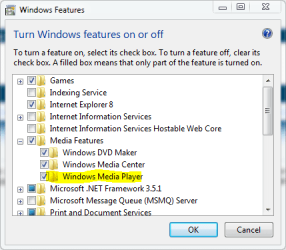
I don't know if that will help, But what you can do is go to Start, Type "windows features", "Turn windows features on or off" will be on top, Click on that and when it opens scroll to media features, expand, uncheck media player, then OK, Restart.
To turn it back on just do the same in reverse.
 

Attachments

  • windows features.PNG
    windows features.PNG
    12 KB · Views: 18

My Computer

Computer type
PC/Desktop
Computer Manufacturer/Model Number
Self Built
OS
Win 10 Pro x64
CPU
Intel I5-2500K @3.3GHz
Motherboard
Asrock P67 Extreme4
Memory
16GB G.Skill Ripjaws X (4x4GB)
Graphics Card(s)
EVGA GeForce 750 Ti SC 2GB
Sound Card
ASUS Xonar DG 5.1 Channels 24-bit 96KHz PCI Interface Sound
Monitor(s) Displays
auria eq2367
Screen Resolution
1920 x 1080
Hard Drives
250GB Samsung 850 EVO SSD
1TB WD Blue
1TB Hitachi
PSU
SeaSonic X 650W 80 Plus Gold
Case
Corsair Obsidian 750D
Cooling
Corsair H60, Three 140mm case fans
Keyboard
Logitech Wireless Keyboard K520
Mouse
Logitech Wireless Mouse M310
Internet Speed
Wave Broadband ~ 100 dn 5 up
Antivirus
Windows Defender, Malwarebytes Premium
Browser
Edge, IE11, Chrome
Other Info
Laptop specs: HP g7-1365dx /
CPU: AMD A6-3420M APU with Radeon(tm) HD Graphics /
RAM: Crucial 8Gb (2x4Gb) /
SSD: Crucial M4-CT128M4SSD2 ATA Device/ FW 000F /
GFX: AMD Radeon HD 6520G /
OS: Windows 10 Pro x64
Thanks for that i will give it a try and post back later.
 

My Computer

Computer Manufacturer/Model Number
acer 6920
OS
7 home premium x64
CPU
2.00 gigahertz Intel Core2 Duo
Motherboard
Board: Acer Aspire 6920 Aspire 6920
Memory
2040 Megabytes Usable Installed Memory
Graphics Card(s)
Mobile Intel(R) 965 Express Chipset Family
Hard Drives
ST9250315AS [Hard drive] (250.06 GB)

My Computer

Computer type
PC/Desktop
Computer Manufacturer/Model Number
Self Built
OS
Win 10 Pro x64
CPU
Intel I5-2500K @3.3GHz
Motherboard
Asrock P67 Extreme4
Memory
16GB G.Skill Ripjaws X (4x4GB)
Graphics Card(s)
EVGA GeForce 750 Ti SC 2GB
Sound Card
ASUS Xonar DG 5.1 Channels 24-bit 96KHz PCI Interface Sound
Monitor(s) Displays
auria eq2367
Screen Resolution
1920 x 1080
Hard Drives
250GB Samsung 850 EVO SSD
1TB WD Blue
1TB Hitachi
PSU
SeaSonic X 650W 80 Plus Gold
Case
Corsair Obsidian 750D
Cooling
Corsair H60, Three 140mm case fans
Keyboard
Logitech Wireless Keyboard K520
Mouse
Logitech Wireless Mouse M310
Internet Speed
Wave Broadband ~ 100 dn 5 up
Antivirus
Windows Defender, Malwarebytes Premium
Browser
Edge, IE11, Chrome
Other Info
Laptop specs: HP g7-1365dx /
CPU: AMD A6-3420M APU with Radeon(tm) HD Graphics /
RAM: Crucial 8Gb (2x4Gb) /
SSD: Crucial M4-CT128M4SSD2 ATA Device/ FW 000F /
GFX: AMD Radeon HD 6520G /
OS: Windows 10 Pro x64
WMP 12 problems

Hi case,

From all the feedback on PC forums, seems like lots of ppl who have purchased MS Windows 7 OS are saying they don't like the Windows Media Player 12's new layout and very boring look + Micro$oft have changed everything around; and also saying that WMP12 is 'very slow' to start playing and to navigate your music and video files.

Notice you mentioned reading about possibly turning OFF Windows Media Player 12 and reinstalling Windows Media Player 11. TAKE CARE! I tried this by turning OFF Windows Media Player 12 (using the method shown above by derekimo), then restart PC, then installing Windows Media Player 11 (a standalone install version downloaded from Micro$oft). Well, it didn't work on my Acer Aspire 5536 laptop and gave the error message: 'This version of Windows Media Player is not compatible with Windows 7 OS').

Friends who have tried the same 'Switch OFF WMP 12 and install WMP11' procedure have said attempting this crashed their system requiring a repair / reinstall of the Windows 7 OS!! Also, in Windows 7, if you turn OFF Windows Media Player 12 as shown, you will also lose Windows DVD Maker and Windows Media Centre as these rely entirely on Windows Media Player 12 to function properly.

So it looks like we are stuck with Windows Media Player 12 in Windows 7 (or if you really hate it, just use another Media Player - there are plenty of good free media players to choose from).

On the error code C00D11B1:

This from Micro$oft: Try Windows update for possible driver updates or try your sound device manufacturer's website for new drivers for Windows 7. Sometimes with Internet streaming files, there might be a network issue?

If you're trying to play an MP3 file that contains compressed ID3 headers, make a copy of the file, and then use a non-Microsoft ID3 tag-editing program to remove or reset the file's ID3 headers. The ID3 header is a portion of the file that stores the song's album information (for example, the song name, artist name, album name, and genre). This information is sometimes called a tag. After you remove the ID3 headers, Windows Media Player should be able to play the MP3 file. WARNING: Attempting to remove ID3 headers might damage the file and make it unplayable. Therefore, always make a copy of the file before you edit it.

Hope this helps.
Rich.

 

My Computer

Computer Manufacturer/Model Number
Acer Aspire 5536
OS
Windows 7 Ultimate
CPU
AMD Athlon 64 x 2
Motherboard
unsure
Memory
3 GB
Graphics Card(s)
ATI Radeon HD 3200
Sound Card
Realtek HD Audio
Monitor(s) Displays
15.6" HD LCD
Hard Drives
Western Digital 250GB SATA
Cooling
Fan
Welcome Richardst6616,
I believe case is trying to uninstall and reinstall WMP 12. But that is some helpful info, So thanks for helping on your first post.:)
 

My Computer

Computer type
PC/Desktop
Computer Manufacturer/Model Number
Self Built
OS
Win 10 Pro x64
CPU
Intel I5-2500K @3.3GHz
Motherboard
Asrock P67 Extreme4
Memory
16GB G.Skill Ripjaws X (4x4GB)
Graphics Card(s)
EVGA GeForce 750 Ti SC 2GB
Sound Card
ASUS Xonar DG 5.1 Channels 24-bit 96KHz PCI Interface Sound
Monitor(s) Displays
auria eq2367
Screen Resolution
1920 x 1080
Hard Drives
250GB Samsung 850 EVO SSD
1TB WD Blue
1TB Hitachi
PSU
SeaSonic X 650W 80 Plus Gold
Case
Corsair Obsidian 750D
Cooling
Corsair H60, Three 140mm case fans
Keyboard
Logitech Wireless Keyboard K520
Mouse
Logitech Wireless Mouse M310
Internet Speed
Wave Broadband ~ 100 dn 5 up
Antivirus
Windows Defender, Malwarebytes Premium
Browser
Edge, IE11, Chrome
Other Info
Laptop specs: HP g7-1365dx /
CPU: AMD A6-3420M APU with Radeon(tm) HD Graphics /
RAM: Crucial 8Gb (2x4Gb) /
SSD: Crucial M4-CT128M4SSD2 ATA Device/ FW 000F /
GFX: AMD Radeon HD 6520G /
OS: Windows 10 Pro x64
Hello again, i did get directed to the security update regarding the error code and it didn,t fix the problem. What im trying to do is listen to live commentry of my teams football matches which i have subscribed to. When i click on play it does all the media connecting, bufferring and so on and then gives me the error code. The media player on the website is WMP and what i wanted to know is there a way to associate this type of audio streaming with another media player alltogether. Thanks ror the warning 6616 i have no intention of installing another version of WMP as i think there,s better (easier) players for us noobs to use.
 

My Computer

Computer Manufacturer/Model Number
acer 6920
OS
7 home premium x64
CPU
2.00 gigahertz Intel Core2 Duo
Motherboard
Board: Acer Aspire 6920 Aspire 6920
Memory
2040 Megabytes Usable Installed Memory
Graphics Card(s)
Mobile Intel(R) 965 Express Chipset Family
Hard Drives
ST9250315AS [Hard drive] (250.06 GB)
I don't have an answer for that question, but I'm sure someone will come around with one for you, Sorry that your other attempt didn't fix the issue. Keep checking back.
 

My Computer

Computer type
PC/Desktop
Computer Manufacturer/Model Number
Self Built
OS
Win 10 Pro x64
CPU
Intel I5-2500K @3.3GHz
Motherboard
Asrock P67 Extreme4
Memory
16GB G.Skill Ripjaws X (4x4GB)
Graphics Card(s)
EVGA GeForce 750 Ti SC 2GB
Sound Card
ASUS Xonar DG 5.1 Channels 24-bit 96KHz PCI Interface Sound
Monitor(s) Displays
auria eq2367
Screen Resolution
1920 x 1080
Hard Drives
250GB Samsung 850 EVO SSD
1TB WD Blue
1TB Hitachi
PSU
SeaSonic X 650W 80 Plus Gold
Case
Corsair Obsidian 750D
Cooling
Corsair H60, Three 140mm case fans
Keyboard
Logitech Wireless Keyboard K520
Mouse
Logitech Wireless Mouse M310
Internet Speed
Wave Broadband ~ 100 dn 5 up
Antivirus
Windows Defender, Malwarebytes Premium
Browser
Edge, IE11, Chrome
Other Info
Laptop specs: HP g7-1365dx /
CPU: AMD A6-3420M APU with Radeon(tm) HD Graphics /
RAM: Crucial 8Gb (2x4Gb) /
SSD: Crucial M4-CT128M4SSD2 ATA Device/ FW 000F /
GFX: AMD Radeon HD 6520G /
OS: Windows 10 Pro x64
Try this:
Managing file types - Firefox

This will not affect media embedded in a web page - only links to the files themselves. Certain file extensions may include multiple entries, one for each MIME type associated with that type of file.

Changing download actions

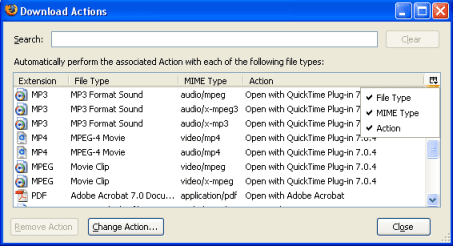
Go to "Tools -> Options -> Content / File Types -> Manage...". The Download Actions window will open. (MIME types are not shown by default. Click the icon in the top right corner and select "MIME Type" to display them.)

Select a file type entry and click 'Change Action...'

* If you want files of that type to open with the default application, select "Open them with the default application".
* If you want a different application to handle that type, select "Open them with this application" and choose the application. Caution: Make sure that the application you choose can handle the file type. For example, to choose Windows Media Player, browse to the C:\Program Files\Windows Media Player folder in the "Select Helper Application" window and select "wmplayer.exe".
* If you want the file to be saved instead of opened, select "Save them on my computer".
* In some cases, the option "Use this Plugin" will be available. It is the default action if a plugin is found for the file type
Download_Actions.png
File types and download actions - MozillaZine Knowledge Base
Hope this helps
cheers
 

My Computer

Computer Manufacturer/Model Number
Micro-Star International/MS-7529
OS
Windows 7 Ultimate x32
CPU
DualCore Intel Pentium E2200, 2218 MHz (11 x 202)
Motherboard
MSI G31M3 V2 (MS-7529) (2 PCI, 1 PCI-E x16,2 DDR2 DIMM)
Memory
2 GB DDR2-800 DDR2 SDRAM
Graphics Card(s)
nVIDIA GeForce 9500GT 1GB
Sound Card
Realtek ALC888/1200 @ Intel 82801GB ICH7
Monitor(s) Displays
Samsung SyncMaster 2253BW (Digital) 22'' LCD
Screen Resolution
1680x1050
Hard Drives
SAMSUNG HD322IJ ATA Device (298 GB , IDE)

My Computer

Computer Manufacturer/Model Number
Sony Vaio FZ21Z
OS
Windows 7 Ultimate x64 ®™
CPU
Intel Core 2 Duo (2.2 GHz)
Motherboard
Sony (Intel Chipset)
Memory
2x 2GB Corsair (667 MHz)
Graphics Card(s)
NVIDIA 8600M GS (256MB)
Sound Card
Sigmatel
Monitor(s) Displays
15.4" TFT X-Black
Screen Resolution
1280x800
Hard Drives
Western Digital 300GB Scorpio Black (7200rpm)
Mouse
Logitech Anywhere MX
Internet Speed
Sky 5MB
Well just to update everyone i received a detailed email from the help section of the website that im trying to listen to but everything they suggested never worked. Install a codec pack and alter some settings in system settings was a couple of their suggestions.
 

My Computer

Computer Manufacturer/Model Number
acer 6920
OS
7 home premium x64
CPU
2.00 gigahertz Intel Core2 Duo
Motherboard
Board: Acer Aspire 6920 Aspire 6920
Memory
2040 Megabytes Usable Installed Memory
Graphics Card(s)
Mobile Intel(R) 965 Express Chipset Family
Hard Drives
ST9250315AS [Hard drive] (250.06 GB)
Back
Top