WMP 12 sizing problem

mowerman

New member
Local time
1:01 PM
Messages
36
Location
Florida
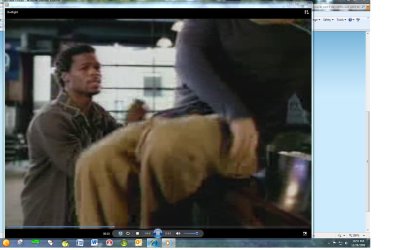
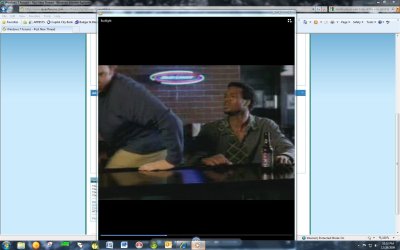
When I watch a fullscreen video using WMP 12 and click the "restore down" and then resize the window by draging, it won't stay that way after closing WMP. Upon starting a video the next time it starts in the size shown in my screenshot #1. I want it to start like screenshot #2. Someone posted the solution to this problem on this or another forum but I can't seem to find it through search. How do I get WMP to start in the size like screenshot #2 by default? Thanks in advance
 

Attachments
  • Screenshot #1.jpg
    Screenshot #1.jpg
    108.2 KB · Views: 20
  • Screenshot #2.jpg
    Screenshot #2.jpg
    100.8 KB · Views: 14

My Computer

Computer Manufacturer/Model Number
Homebuilt
OS
W7 64bit 7600 with SP1
CPU
AMD Athlon 64 DC 4200+ 2.2Ghz
Motherboard
Biostar TForce6100
Memory
4 Gigs
Graphics Card(s)
Radeon X1650 256MB
Sound Card
onboard
Monitor(s) Displays
HP w2207h
Screen Resolution
1680x1050
Hard Drives
OS - WD 320Gig SATA
BackUp - WD 640Gig 32mg cashe SATA
PSU
Antec 500W 80+
Case
Antec
Hello,

Have you tried going into the Properties of WMP and asking it to open maximized?

~Jonathan
 

My Computer

Computer Manufacturer/Model Number
Custom
OS
Windows 7 Professional x64
CPU
Intel i7 2600K OC'd @ 4620 MHz
Motherboard
Asus P8Z68-V Pro
Memory
16GB GSkill Sniper 2133 Mhz (4x4GB)
Graphics Card(s)
EVGA GeForce GTX 480 SuperClocked+
Sound Card
Realtek High Definition Audio
Monitor(s) Displays
2x Acer S273HLbmii 27"
Screen Resolution
2 x 1920x1080
Hard Drives
64GB Crucial M4 SSD

Storage: Hitachi 1TB 5400RPM, Samsung 1.5TB 5400RPM
PSU
Corsair HW Series 750w (modular)
Case
Cooler Master HAF 932 Advanced Blue Edition
Cooling
CM Hyper 212+ CPU cooler, 3x 230mm + 1x 140mm case fans
Keyboard
Logitech MK320 (wireless)
Mouse
Logitech MK320 (wireless)
Internet Speed
30 Mb/s : 2 Mb/s
Did you uncheck "Fit Player to video"? Right>click the video while its place > Video > Fit Plater to video.
 

My Computer

Computer type
PC/Desktop
Computer Manufacturer/Model Number
Alienware Aurora ALX R4
OS
Windows 10 Pro (x64)
CPU
Intel Core i7-3930K (3.2GHz - 4.5GHz)
Motherboard
Alienware Aurora-R4 x79
Memory
4x Samsung 4GB PC3-12800 DDR3 (16GB 1600MHz)
Graphics Card(s)
Nvidia Geforce GTX 690
Sound Card
SteelSeries Siberia Elite
Monitor(s) Displays
Dell UltraSharp U3011
Screen Resolution
2560x1600
Hard Drives
Samsung 850 Pro 256 GB, Seagate 1TB Desktop Hybrid HDD, 2x Western Digital 4TB Green HDD
PSU
875W Some Dell PSU <.<
Case
Alienware Aurora ALX
Cooling
Custom Liquid Cooling (EK CPU & GPU blocks) dual EK 480RAD
Keyboard
Logitech G710+ Mechanical
Mouse
Logitech G700s
Internet Speed
Verizon Fios (50 mbps average)
Other Info
Server: Intel NUC D54250WYK: i5-4250U, 16GB, 256 GB mSATA, Windows Server 2012 R2
Jonathan and logicearth,
Yes, I went into properties and tried both of your solutions and neither worked for what I wanted.
 

My Computer

Computer Manufacturer/Model Number
Homebuilt
OS
W7 64bit 7600 with SP1
CPU
AMD Athlon 64 DC 4200+ 2.2Ghz
Motherboard
Biostar TForce6100
Memory
4 Gigs
Graphics Card(s)
Radeon X1650 256MB
Sound Card
onboard
Monitor(s) Displays
HP w2207h
Screen Resolution
1680x1050
Hard Drives
OS - WD 320Gig SATA
BackUp - WD 640Gig 32mg cashe SATA
PSU
Antec 500W 80+
Case
Antec

My Computer

Computer Manufacturer/Model Number
Samsung NP550P5C-S02IN
OS
Windows 7 Ultimate - 64-bit | Windows 8 Pro - 64-bit
CPU
Intel® Core™ i7 Processor 3,610QM (2.30Hz, 6MB L3 Cach
Memory
8 GB
Graphics Card(s)
NVIDIA® GeForce® GT 650M 2GB Graphics, Optimus™ techno
Sound Card
SoundAlive™ JBL 3 Speakers (With sub-Woofer)
Monitor(s) Displays
39.62cm (15.6) SuperBright 300nit HD+ LED Display
Screen Resolution
1,600 x 900, Anti-Reflective
Hard Drives
1TB S-ATA II Hard Drive (5,400RPM)
The answer to your problem is this:

Open WMP from the task bar, switch to now playing mode, adjust to your liking, then close.

Now it will open in that size (assuming you don't have it resizing to the video, and have checked "fit video to player" rather than "fit player to video" which will resize it every time).
 

My Computer

OS
XP / Win7 x64 Pro
CPU
Intel Quad-Core Q9450 @ 3.2GHz
Motherboard
Asus P5-E
Memory
2x2GB GSkill DDR2
Graphics Card(s)
NVIDIA GeForce 8600 GTS (EVGA)
Monitor(s) Displays
Dell 2408WFP
Screen Resolution
1920x1200
I actually found a workaround in web regarding the same problem thought of posting it

Open an MP3 file, Press Ctrl+3 to go to Now Playing view, Resize the window, then close WMP. The next time you double click a movie file, the window opens at the size set while playing the MP3 file
 

My Computer

Computer Manufacturer/Model Number
Samsung NP550P5C-S02IN
OS
Windows 7 Ultimate - 64-bit | Windows 8 Pro - 64-bit
CPU
Intel® Core™ i7 Processor 3,610QM (2.30Hz, 6MB L3 Cach
Memory
8 GB
Graphics Card(s)
NVIDIA® GeForce® GT 650M 2GB Graphics, Optimus™ techno
Sound Card
SoundAlive™ JBL 3 Speakers (With sub-Woofer)
Monitor(s) Displays
39.62cm (15.6) SuperBright 300nit HD+ LED Display
Screen Resolution
1,600 x 900, Anti-Reflective
Hard Drives
1TB S-ATA II Hard Drive (5,400RPM)
Back
Top