WMP can't play avi

Anttix

New member
Local time
8:15 AM
Messages
6
Right, this is doing my nut in.

Some background:

I'm on Win7 HomePrem 64bit.

I'm fearing that I'm going to have to end up doing a clean install to fix this, but I REALLY don't want to do it due to the amount of tweaking I've had to do to get it stable and working (mostly) as I want it.

I have a satellite card installed that I access through WMC which is a 64bit app, so I have installed FFDShow 64 (Actually, the Klite 64 bit codec pack). The amount of messing about I had to do to get it working and to get WMC to play HD satellite feeds & the EPG was unreal.

So, as the WMC codecs were 64bit, I had to change the default WMP to the 64bit version, which again is a right PITA, not helped by the 32 and 64 bit versions having the same process name. Why on earth does 64 bit win7 default to 32bit WMP? Lord only knows. For the most part it all works well, although sometimes the FFDshow/Matroska splitter fails to load but I can live with that if needs be.

One of the main reasons I use FFDSHow is because it can output surround sound - this is really key for me.

The problem itself:

I can't play .avi files through WMP64 or WMC. I therefore download the Divx codec... No dice. Uninstalled & downloaded codec & player. Again, no dice, although I can play .avi files in the Divx Player.

Somewhere I need to tick/untick a box, but blowed if I know where!

Do any of you have any suggestions as to where I should start?
 

My Computer

Computer Manufacturer/Model Number
Self Build
OS
Win7 Home Premium 64 bit
CPU
Core2Quad Q8400
Motherboard
Asus P5Q
Memory
8gb Kingston DDR2 8500
Graphics Card(s)
GTX460
Sound Card
Asus D2/PM
Monitor(s) Displays
Benq MP721c Projector 1024x768 native
Hard Drives
2x1TB Samsung F3 in RAID 0
PSU
Zalman 500w silent
Case
Silentmax acoustic lined
Cooling
Various noctua case fans + noctua NHU9 CPU cooler
Keyboard
Evoluent Ergonomic
Mouse
Logitech wireless
Internet Speed
6 meg
Other Info
Tevii S480 Satellite card
The problem itself:

I can't play .avi files through WMP64 or WMC.

Do any of you have any suggestions as to where I should start?
(1) My own recommendation (e.g. if you do a clean reinstall)... do NOT install any outside codec packs (e.g. Shark, KLite, etc.) into Win7. The Microsoft foundation in Win7 pretty much supports almost everything there is out there.

I'd UNINSTALL whatever external codec packs you've installed.

You do NOT need to install external Divx product. Both Win7 and FFDSHOW provide perfectly adequate Divx codec support built into them. I'd uninstall the external Divx.

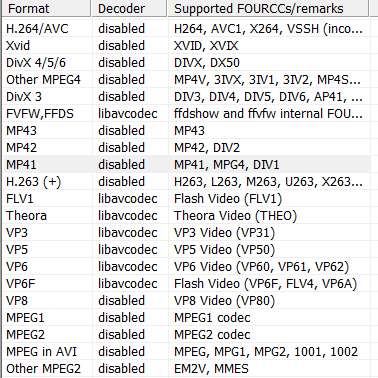
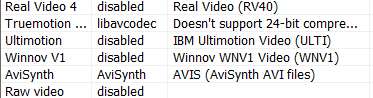
(2) You can install FFDShow x64 without fear. You want to UN-CHECK support for a number of the pre-checked decoder formats, so that the existing standard built-in Win7 capabilities for these codecs are left undisturbed. (See video configuration list below)

(3) You can install Haali Media Splitter (Matroska) without fear.

(4) You should install the GSpot Codec Information Appliance, and then open your problem AVI files in it. The GSPot program will tell you exactly what audio/video codecs are internal to the AVI files, and whether or not you have them properly installed on your Win7 system.

You can also use GSpot to attempt to render the AVI (inside its own audio/video window) to confirm or deny that you do or do not have proper audio/video codecs installed to play your AVIs.

------------------------------------------------------------------

Here's what I have checked and unchecked in my own FFDSHOW video configuration (I have yet to run into an AVI or MPG that would not play in Windows Media Player):

ffdshow1.jpg


ffdshow2.jpg


ffdshow3.jpg

ffdshow4.jpg
 

My Computer

Computer type
PC/Desktop
Computer Manufacturer/Model Number
Home-built, two systems (1) and (2)
OS
Windows 7 Pro x64 (1), Win7 Pro X64 (2)
CPU
i5-3350p 3.1Ghz/6MB-cache (1); E8400 3.0Ghz/6MB-cache (2)
Motherboard
ASUS P8Z77-V Pro (1); ASUS P5Q3 (2)
Memory
8GB PC3-12800 DDR3 (1); 4GB PC3-10600 DDR3 (2)
Graphics Card(s)
ATI HD7750 (1), (see TV cards); ATI R7 250 (2)
Sound Card
Realtek ALC892 HD Audio (1); Realtek ALC1200 HD Audio (2)
Monitor(s) Displays
Eizo HD2441W LCD, Eizo S2433W (1); Eizo 24" S2433W (2)
Screen Resolution
1920x1200, 1920x1200 (1); 1920x1200 (2)
Hard Drives
(1) 1TB SATA-II (7200RPM), 2x2TB SATA-III (7200RPM), 250GB SATA-III (10000RPM) for OS; 2x2TB external USB 3.0

(2) 320GB SATA-II (7200RPM), 750GB SATA-II (7200RPM), 150GB SATA-II (10000RPM) for OS; 2TB external USB 3.0
PSU
Nesteq ECS-6001 600W (1); Nesteq ECS-5001 500W (2)
Case
Acousti-Case 360 (1) and (2)
Cooling
Noctua NH-U12P SE2 for CPU, 2x120mm case fans (1) and (2)
Keyboard
IBM PS/2 (1) and (2)
Mouse
Logitech MX Revolution wireless (1); Microsoft wired (2)
Internet Speed
100mbps down / 10mbps up
Antivirus
Microsoft Security Essentials; Malwarebyte Anti-Malware Pro
Browser
Firefox
Other Info
Ceton InfiniTV 4-tuner cablecard-enabled TV card as well as Hauppauge HVR-2250 OTA/ATSC 2-tuner TV card in (1), running under Win7 WMC
Thanks for your response dsperber.

avi files used to play, then they just... stopped.

Anyway, I've followed your instructions to the letter and it has solved the .avi issue, so thank you! I now also get surround sound audio from some .mkv files that previously came out silent. Another thank you.

Of course there has to be a 'but'... I've now lost sound on some other .mkv files. These files previously gave me surround sound. Also the icon for .mkv has changed from being a WMP logo to a Matroska logo - not an issue, but it's a change. You posted up your ffdshow video settings, would you be able to do the same for audio? A key thing for me is the surround sound working properly; at the moment it seems to be all or nothing.

What steps do you think I should take next?
 

My Computer

Computer Manufacturer/Model Number
Self Build
OS
Win7 Home Premium 64 bit
CPU
Core2Quad Q8400
Motherboard
Asus P5Q
Memory
8gb Kingston DDR2 8500
Graphics Card(s)
GTX460
Sound Card
Asus D2/PM
Monitor(s) Displays
Benq MP721c Projector 1024x768 native
Hard Drives
2x1TB Samsung F3 in RAID 0
PSU
Zalman 500w silent
Case
Silentmax acoustic lined
Cooling
Various noctua case fans + noctua NHU9 CPU cooler
Keyboard
Evoluent Ergonomic
Mouse
Logitech wireless
Internet Speed
6 meg
Other Info
Tevii S480 Satellite card
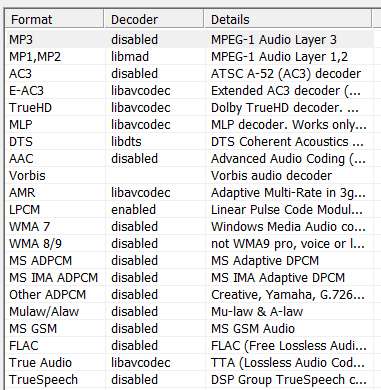
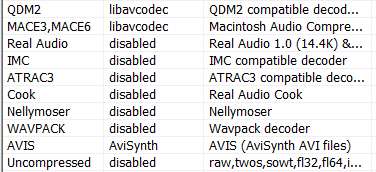
You posted up your ffdshow video settings, would you be able to do the same for audio?
Sure. Note that I've also disabled audio codecs where either Win7 has built-in support, or where I use a 3rd-party media player for audio (e.g. Winamp) which does not require that codecs be installed (e.g. for FLAC).

ffdshow5.jpg

ffdshow6.jpg


A key thing for me is the surround sound working properly; at the moment it seems to be all or nothing.
I myself do not use surround-sound, so I don't know if my audio configuration will make a difference for you or not in regards to this mystery.

I also do not have any MKV files of my own, so I honestly have no firsthand experience with playing them. I only have the Haali splitter installed because it's required (along with ffdshow and AVISynth) for multiAVCHD (a program I use to produce authored BluRay versions of recorded HDTV program clips MPEG-2 streams with no re-compression).


What steps do you think I should take next?
Did you install GSpot?

If so, did you use it to analyze your clips that you're having trouble with, to show the underlying audio/video codecs used in the clip? I actually don't know if it supports MKV, again because I don't have any. I know it supports AVI and MPG.

Have you tried playing the problem clips using VideoLAN VLC (which I know supports MKV)? Do you get surround sound using it?
 

My Computer

Computer type
PC/Desktop
Computer Manufacturer/Model Number
Home-built, two systems (1) and (2)
OS
Windows 7 Pro x64 (1), Win7 Pro X64 (2)
CPU
i5-3350p 3.1Ghz/6MB-cache (1); E8400 3.0Ghz/6MB-cache (2)
Motherboard
ASUS P8Z77-V Pro (1); ASUS P5Q3 (2)
Memory
8GB PC3-12800 DDR3 (1); 4GB PC3-10600 DDR3 (2)
Graphics Card(s)
ATI HD7750 (1), (see TV cards); ATI R7 250 (2)
Sound Card
Realtek ALC892 HD Audio (1); Realtek ALC1200 HD Audio (2)
Monitor(s) Displays
Eizo HD2441W LCD, Eizo S2433W (1); Eizo 24" S2433W (2)
Screen Resolution
1920x1200, 1920x1200 (1); 1920x1200 (2)
Hard Drives
(1) 1TB SATA-II (7200RPM), 2x2TB SATA-III (7200RPM), 250GB SATA-III (10000RPM) for OS; 2x2TB external USB 3.0

(2) 320GB SATA-II (7200RPM), 750GB SATA-II (7200RPM), 150GB SATA-II (10000RPM) for OS; 2TB external USB 3.0
PSU
Nesteq ECS-6001 600W (1); Nesteq ECS-5001 500W (2)
Case
Acousti-Case 360 (1) and (2)
Cooling
Noctua NH-U12P SE2 for CPU, 2x120mm case fans (1) and (2)
Keyboard
IBM PS/2 (1) and (2)
Mouse
Logitech MX Revolution wireless (1); Microsoft wired (2)
Internet Speed
100mbps down / 10mbps up
Antivirus
Microsoft Security Essentials; Malwarebyte Anti-Malware Pro
Browser
Firefox
Other Info
Ceton InfiniTV 4-tuner cablecard-enabled TV card as well as Hauppauge HVR-2250 OTA/ATSC 2-tuner TV card in (1), running under Win7 WMC
Back
Top