
WMP Creates Duplicate Files

raf051888

New member
Member
VIP
Local time
3:41 PM
Messages
107
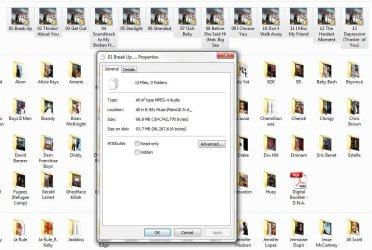
I was looking for a album in WMP that I purchased in iTunes. However, it was not in the library; so I dragged and dropped in into WMP. Now I have the following, the album in its original source location: \Music\Mario\D.N.A\ and also in the \Music\ directory.

I have verified that the new files in the directory \Music\ are not just links even though they point to the other directory. [see image]

Weird Issue.JPG

I deleted the files from the \Music\ directory and that removes them from the \Music\Mario\D.N.A.\ directory.

Any ideas?
 

Attachments
  • Weird Issue.JPG
    Weird Issue.JPG
    96.1 KB · Views: 43

My Computer

OS
Windows 7 64-bit
CPU
AMD Athlon II X4 620 Propus @ 2.6ghz
Motherboard
GIGABYTE GA-MA785GM-US2H
Memory
OCZ Platinum 4GB (2 x 2GB) 240-Pin DDR2 SDRAM DDR2 1066 (PC2
Graphics Card(s)
ATI Radeon HD 4200 [on board]
Sound Card
Realtek ALC889A [on board]
Case
APEVIA X-QPACK-NW-BK/420 Black Aluminum
I'm bumping this hoping someone would know...
 

My Computer

OS
Windows 7 64-bit
CPU
AMD Athlon II X4 620 Propus @ 2.6ghz
Motherboard
GIGABYTE GA-MA785GM-US2H
Memory
OCZ Platinum 4GB (2 x 2GB) 240-Pin DDR2 SDRAM DDR2 1066 (PC2
Graphics Card(s)
ATI Radeon HD 4200 [on board]
Sound Card
Realtek ALC889A [on board]
Case
APEVIA X-QPACK-NW-BK/420 Black Aluminum
I figured this out. When I dragged and dropped that folder into WMP it added it to the Music Libraries of the OS. I removed it from the library and it deleted the duplicate files.

Please Mark as solved.
 

My Computer

OS
Windows 7 64-bit
CPU
AMD Athlon II X4 620 Propus @ 2.6ghz
Motherboard
GIGABYTE GA-MA785GM-US2H
Memory
OCZ Platinum 4GB (2 x 2GB) 240-Pin DDR2 SDRAM DDR2 1066 (PC2
Graphics Card(s)
ATI Radeon HD 4200 [on board]
Sound Card
Realtek ALC889A [on board]
Case
APEVIA X-QPACK-NW-BK/420 Black Aluminum
I had a similar problem.

Folder A is in Library/My Documents
Folder A is in Library/My Documents/Folder B.

Deleting either Folder A removed the folder from both places.

Properties of Folder A in My Documents indicate it links to My Documents/Folder B

Comment:
Had within the hour backed up files to OneDrive, including Folder B. During this process, I did get a synchronization error about a software update requirement. Assume that the sync may have caused the problem or just OneDrive. I find OneDrive very awkward.

Solution:
None, really. Folder A had been backed up to OneDrive, but if I downloaded it again, the problem still occurred. So Folder A is still on OneDrive, and saved a zipped download on USB. However, copy from to USB to hard drive continues problem. Will have to access the folder from USB or OneDrive.

The files in question were text files, not music files that may end up in the Windows Media Player and in the My Music folders. I think the OneDrive synchronization or upload is where the issue began.
 
Last edited:

My Computer

Computer type
PC/Desktop
Computer Manufacturer/Model Number
Lenovo
OS
Windows 7 Enterprise Service Pack 1 64-bit
CPU
[email protected]
Memory
4.00 GB
Graphics Card(s)
Intel HD Graphics 4600
Hard Drives
Intel ATA
Back
Top