WMP disappeared

tonyvella

New member
Member
VIP
Local time
6:58 AM
Messages
161
I recently d/l Winamp Pro to use as a default media player. Not because I didn't like WMP any more but because I click the icons for it and nothing happens. I had in mind to un-install and re-install but when I went to control panel > programs and features it was not even listed any longer. I tried looking for it with my revo uninstaller and it does not appear in its list either. Incidentally, neither does Windows Media Center.

My Winamp is working fine but I still would like to know what the heck is going on.
 

My Computer

OS
windows 7 Home Premium
Have a look here: C:\Program Files (x86)\Windows Media Player. I am sure it is there. And yes, it does not show with the uninstalls because it is an integral part of the system.
 

My Computer

Computer Manufacturer/Model Number
HP, Dell, Gateway, Toshiba - 4 laptops and 2 desktops
OS
Vista, Windows7, Mint Mate, Zorin, Windows 8
CPU
from 1.6GHz Duo to i7
Monitor(s) Displays
2x HP w2207
Hard Drives
5x HDD, 7x SSD, 12x Externals
Keyboard
with trackball - no mices
Mouse
Trackball mice
Internet Speed
DSL 6000
Thank you very much for your reply. I did what you recommended and found it. So I removed my desktop icon and created a new one. Now, my WMP will only open if I run it as administrator. I am the only one who has ever used this laptop. Why "run as administrator" only? Thanks in advance.
 

My Computer

OS
windows 7 Home Premium
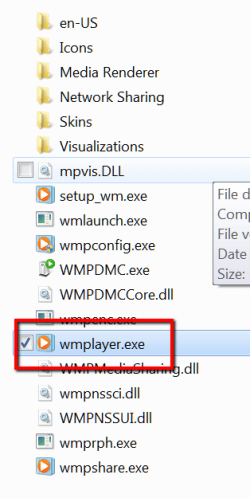
Are you sure you made a shortcut of the right .exe (see picture). Why don't you pin it to the taskbar or the start menu instead. I had no trouble either way.
 

Attachments

  • 2014-04-26_1435.png
    2014-04-26_1435.png
    13.5 KB · Views: 9

My Computer

Computer Manufacturer/Model Number
HP, Dell, Gateway, Toshiba - 4 laptops and 2 desktops
OS
Vista, Windows7, Mint Mate, Zorin, Windows 8
CPU
from 1.6GHz Duo to i7
Monitor(s) Displays
2x HP w2207
Hard Drives
5x HDD, 7x SSD, 12x Externals
Keyboard
with trackball - no mices
Mouse
Trackball mice
Internet Speed
DSL 6000
it does not show with the uninstalls because it is an integral part of the system.

You can disable/enable WMP and WMC in the 'turn Windows features on or off' dialog. Disabling, rebooting, then re-enabling can sometimes cure problems. See pic

wmp_on_off.JPG
 

My Computer

Computer type
PC/Desktop
Computer Manufacturer/Model Number
self build
OS
Windows 7 pro x64 SP1
CPU
Intel i7-2600k o/c to 4.6GHz
Motherboard
MSI Z68-GD80
Memory
8GB Mushkin 1866MHz
Graphics Card(s)
Nvidia GTX 750 Ti 2GB
Sound Card
integrated
Monitor(s) Displays
Liyama ProLite 27"
Screen Resolution
1920*1080 px
Hard Drives
Seagate 2TB
PSU
Coolermaster GX 750W
Case
Antec 300 case + 5 fans
Cooling
Dark Rock Pro
Internet Speed
62Mbit down 18Mbit up
Antivirus
MSE
Browser
Firefox
Other Info
Blackgold BGT3650 Quad HD TV card. Also have various 3770 + 4770K render boxes.
Thank you. Here are two answers in one.
1. I pinned a new shortcut for WMP to the taskbar as recommended by whs. WMP works fine but it asks me every time whether I want to allow this program to make changes to my computer.
2. As recommmended by 3D Jay, I disabled both Player and Center, rebooted, enabled them, rebooted and created a new pin to taskbar. It still asks me every time whether I want to allow this program to make changes to my computer.

I click yes and everything is fine: music, short video, video movie, etc. I am lost!

Incidentally, I forgot to mention that I used to have a menu line where I used to choose file, open, play, etc. That toolbar (is that what it's called?) is no longer there.
 

My Computer

OS
windows 7 Home Premium
No idea regarding the UAC requirement. For the rest, see the pic.
 

Attachments

  • 2014-04-26_1604.png
    2014-04-26_1604.png
    55.8 KB · Views: 0

My Computer

Computer Manufacturer/Model Number
HP, Dell, Gateway, Toshiba - 4 laptops and 2 desktops
OS
Vista, Windows7, Mint Mate, Zorin, Windows 8
CPU
from 1.6GHz Duo to i7
Monitor(s) Displays
2x HP w2207
Hard Drives
5x HDD, 7x SSD, 12x Externals
Keyboard
with trackball - no mices
Mouse
Trackball mice
Internet Speed
DSL 6000
Back
Top