WMP12 and deleting pics

lnxtinman

New member
Member
Local time
6:14 AM
Messages
55
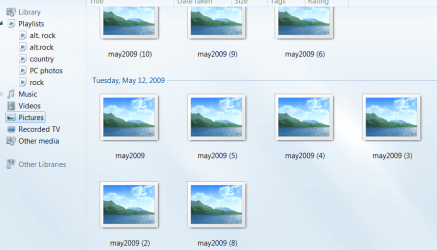
how can i delete the pics from wmp12? i have moved pics to a new folder, tried delete in wmp and it still shows the frames i posted here along with names. i just want a clean picture folder with nothing in it.
 

Attachments

  • wmp.PNG
    wmp.PNG
    73.4 KB · Views: 15

My Computer My Computer

Computer Manufacturer/Model Number
home built
OS
windows 7 ultimate
CPU
core 2 quad q6600
Motherboard
asus p5k3 deluxe
Memory
4GB OCZ DDR3
Graphics Card(s)
nvidia geforce 8800 gts
Sound Card
soundblaster x-fi xtreme
Monitor(s) Displays
viewsonic va2226
Case
soprano dx
Keyboard
logitech G-15
Mouse
logitech G5
Internet Speed
AT&T U-Verse 18MBS
When you move a file or folder in Explorer that WMP is watching, it will then watch that folder. Remove the watched folder from WMP. If it is watching a folder that contains your new subfolder it will be added.

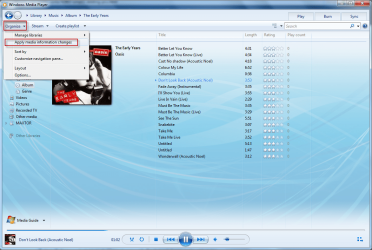
File>Manage Libraries>Pictures

Also check what folders your Pictures Library is watching. If it is watching all of C:, for example, it will continue to add all pics fom C: to the library.

This is new in W7.
 
i moved the pics from the folder it was watching then deleted the old folder like you said. when i do it leaves just the frames with the old pic names beneath them. it seems to be getting rid of the folder but it maintains the frames....weird.
 

My Computer My Computer

Computer Manufacturer/Model Number
home built
OS
windows 7 ultimate
CPU
core 2 quad q6600
Motherboard
asus p5k3 deluxe
Memory
4GB OCZ DDR3
Graphics Card(s)
nvidia geforce 8800 gts
Sound Card
soundblaster x-fi xtreme
Monitor(s) Displays
viewsonic va2226
Case
soprano dx
Keyboard
logitech G-15
Mouse
logitech G5
Internet Speed
AT&T U-Verse 18MBS
I find that it sometimes takes 'Applying media changes' for it to refresh properly.

fgffg.png
 

My Computer My Computer

Computer Manufacturer/Model Number
HP Touchsmart IQ771.uk
OS
Windows 7 Ultimate x64
CPU
AMD Turion(tm) 64 X2 Mobile Technology TL-56
Motherboard
ASUS Pheonix
Memory
3GB Nanya PC2-6400 DDR2-SDRAM SO-DIM (400MHz)
Graphics Card(s)
NVIDIA GeForce Go 7600 256MB GDDR3 SDRAM
Sound Card
High Definition Intergrated NVIDIA MCP51
Monitor(s) Displays
46" Sony Bravia HDTV
Screen Resolution
1600x1200
Hard Drives
1.5TB Samsug
320GB Seagate ST3320820AS - SATA 3Gb/s 8MB
500GB Maxtor Basics STM305003EHD301-RK
Internet Speed
↓6.32 Mb/s ↑0.35 Mb/s ↔26ms
Other Info
BIOS - American Megatrends Inc. 5.07
Ethernet Port - NVIDIA nForce 10/100/1000 Mbps
DVD Drive - TSSTcorp DVDR/RW TS-T632L
i moved the pics from the folder it was watching then deleted the old folder like you said. when i do it leaves just the frames with the old pic names beneath them. it seems to be getting rid of the folder but it maintains the frames....weird.

First stop watching the folder, then move the files, etc., making sure your folder is not a subfolder of a location already being watched.
 
i did that too. i put all the pics back in the folder like it was which put the pics back in their frames in wmp12......then i stopped watching it and then moved all the pics to a different folder......the empty frames are still there:cry:
 

My Computer My Computer

Computer Manufacturer/Model Number
home built
OS
windows 7 ultimate
CPU
core 2 quad q6600
Motherboard
asus p5k3 deluxe
Memory
4GB OCZ DDR3
Graphics Card(s)
nvidia geforce 8800 gts
Sound Card
soundblaster x-fi xtreme
Monitor(s) Displays
viewsonic va2226
Case
soprano dx
Keyboard
logitech G-15
Mouse
logitech G5
Internet Speed
AT&T U-Verse 18MBS
Back
Top