
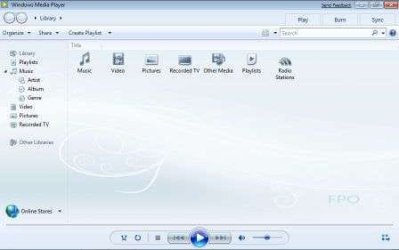
WMP12 Library view.

LapTopDog

New member
Local time
9:20 PM
Messages
22
Location
London
I notice Microsoft have given us 6 WMP12 library background images to choose from but only by using the registry hack ...

HKEY_CURRENT_USER\Software\Microsoft\MediaPlayer\Preferences

Right hand pane ... 'LibraryBackgroundImage'

REG_DWORD or DWORD if your 32-bit

Changing the value in the Value Data window from 0-6

6 being default and 0 being no background.

Sadly all six images look very similar to one another and so, are in need of a change!
I've hacked my way though the wmploc.dll and I can't find them.

Am I looking in the wrong place?

Does anyone else know a way to replace the library view?

Thanks in advance.
 

Attachments
  • wmp12-bg3.jpg
    wmp12-bg3.jpg
    18 KB · Views: 97

My Computer

OS
Win7, Ubuntu 8.04, Mandriva Powerpack 09
I was checking this out today, before i saw your post and opened the wmploc.dll with resource hacker and found the png files at the bottom somewhere around there. The problem however is that they are in binary so unless you have the patience to convert them to visible files so you can see the size of the new png to replace them with, and then convert your new png to binary, it is a pain in the .....
There was no need to do this, it is a way to slow down the hackers
"i could not find any programs that will do this fast"

Yes you were in the right place the files are in the wmploc.dll close to bottom and labeled clearly as to what they are - just use resource hacker and expand them all.

good luck
 

My Computer

Computer Manufacturer/Model Number
dell optiplex - 2003
OS
windows7 7600 x86
CPU
itel pentium 4
Memory
3.00 GB
Graphics Card(s)
diamond radion x1050
Sound Card
SoundMax
Monitor(s) Displays
dell 2408wfp dell e172fp
Screen Resolution
1920 x 1200 1280 x 1024
Hard Drives
2 - 80 GB internals WD
1 - 01 TB ext
2 - 750 GB ext
1- 500 GB ext
all running on system no problems
Keyboard
old logitech cordless
Mouse
logitech wireless
Internet Speed
16 / 4
Other Info
networked into my sbs2003 server running sp1 still
it's a wonder I could even get windows 7 to connect to it
Welcome to the forum t41.

Honoured being your first post.

I shall ResHack wmploc.dll again, could be up all night ... again.

Thanks.
 

My Computer

OS
Win7, Ubuntu 8.04, Mandriva Powerpack 09
hey, did anybody ever get this sussed who would perhaps like to make a tutorial, or provide step by step destructions (pun intended)? i'm sure the guys on the wallpaper thread will have a field day ;)
 

My Computer

OS
Windows 7 Ultimate 64Bit
CPU
AMD Athlon x4 650 3Ghz
Motherboard
ASUS
Memory
4gb
Graphics Card(s)
ATI Radeon 3000 series Onboard
Hmm I'm gonna go through this and see if I can get it working.. =P

I''ll post back soon!

Edit : Ok I used Resource Hacker, got into wmploc.dll and on the list of files, at the vey bottom

Theres a folder 257 - in there you'll find

LIBRARY_BACKGROUND2.PNG
LIBRARY_BACKGROUND3.PNG
LIBRARY_BACKGROUND4.PNG
LIBRARY_BACKGROUND5.PNG
LIBRARY_BACKGROUND6.PNG
LIBRARY_BACKGROUND7.PNG

Now all come up with code but the last one comes up with what seems like an actual view of the background. So my question is how do I take one of thoes files and figure out how to replace it with a new png and also figure out what size the background will be.

Please help! =P

Thanks,
Kukag
 

My Computer

Computer Manufacturer/Model Number
Custom
OS
Windows 7
CPU
AMD Phenom II X4 940 3.0 Stock
Motherboard
Gigabyte GA-MA78GM-S2H
Memory
G.SKILL DDR2 800 PI Black 4GB+Corsair XMS2 Xtrm Gaming 2GB
Graphics Card(s)
ASUS EN8800GT TOP (Fact OC)
Monitor(s) Displays
Optiquest 20" Flatscreen
Screen Resolution
1680x1050
Hard Drives
Seagate 3.5' 7200RPM 750GB HDD
PSU
Antec NeoHE 550W
Cooling
Stock AMD Phenom HSF
Keyboard
Logitech G15
Internet Speed
Charter HighSpeed 10 Down / 5 Up
I just use restorator... drag and drop, is there trial for restorator? as it's paid software.

Anyway you can definetly change them.
 

My Computer

OS
Windows 7 Professional x64
CPU
E6420 (temporary)
Motherboard
G43 Twins-FullHD (temporary)
Memory
DDR2 2x1gb (temporary)
Graphics Card(s)
Evga GTX 480 Superclocked+
Sound Card
Creative X-FI Extreme Audio Pci-E
Monitor(s) Displays
2x24" Samsung SyncMaster 2494HS
Screen Resolution
1920x1080
Hard Drives
2xSamsung 500GB
Samsung F3 1 TB
PSU
OCZ GameXstream 850w
Case
Cooler Master HAF X
Keyboard
Logitech Illuminated
Mouse
Logitech MX518
Internet Speed
40/2
Hmm I don't mind buying it if it actually works but what kind of file would I create to replace the current one?

Thanks,
Kukag
 

My Computer

Computer Manufacturer/Model Number
Custom
OS
Windows 7
CPU
AMD Phenom II X4 940 3.0 Stock
Motherboard
Gigabyte GA-MA78GM-S2H
Memory
G.SKILL DDR2 800 PI Black 4GB+Corsair XMS2 Xtrm Gaming 2GB
Graphics Card(s)
ASUS EN8800GT TOP (Fact OC)
Monitor(s) Displays
Optiquest 20" Flatscreen
Screen Resolution
1680x1050
Hard Drives
Seagate 3.5' 7200RPM 750GB HDD
PSU
Antec NeoHE 550W
Cooling
Stock AMD Phenom HSF
Keyboard
Logitech G15
Internet Speed
Charter HighSpeed 10 Down / 5 Up
Hmm I'm gonna go through this and see if I can get it working.. =P

I''ll post back soon!

Edit : Ok I used Resource Hacker, got into wmploc.dll and on the list of files, at the vey bottom

Theres a folder 257 - in there you'll find

LIBRARY_BACKGROUND2.PNG
LIBRARY_BACKGROUND3.PNG
LIBRARY_BACKGROUND4.PNG
LIBRARY_BACKGROUND5.PNG
LIBRARY_BACKGROUND6.PNG
LIBRARY_BACKGROUND7.PNG

Now all come up with code but the last one comes up with what seems like an actual view of the background. So my question is how do I take one of thoes files and figure out how to replace it with a new png and also figure out what size the background will be.

Please help! =P

Thanks,
Kukag
Open the dll with Restorator 2007, go to that said resource, extract the images to some folder on your PC, the images are in 800x600 resolution, from there just replace with your own 800x600 PNG image, that's what I did a few months back, I'm at work right now so I can't show you the screenshot, however if you visit this thread you'll find a post by me with a similar hack in Windows Media Player's main window: http://www.sevenforums.com/customization/16430-post-your-windows-7-desktops-96.html
 

My Computer

Computer Manufacturer/Model Number
It's a Custom Build.....
OS
Windows 7 Ultimate x64, 7600.20647 RTM
CPU
Intel Core2Quad Q9505 @ 4.0Ghz
Motherboard
Intel Skyburg DP45SG
Memory
6GB Transcend DDR3-1333 Dual Channel
Graphics Card(s)
ASUS GTX285 1GB GDDR3
Sound Card
OnBoard Intel IDT HD Audio
Monitor(s) Displays
HP w2207h 22" WideScreen LCD, VGA & HDMI
Screen Resolution
1680x1050, 60Hz
Hard Drives
1TB WD Caviar Black, Green Power...
1TB Dell, 32Mb/s, Internal SATA
320GB Seagate Internal SATA (3 Partitions)
PSU
Omega 600W ATX2.0 Dual Rail, 2x Fans
Case
Cooler Master HAF 922
Cooling
Corsair Hydro H50 in Push-Pull mode, 4 Case Fans with LED
Keyboard
White aigo keyboard with blue LED on the keys....
Mouse
Genius Mini Tracer
Internet Speed
I'm ashamed to say...
Other Info
Aigo wireless keyboard(black) and a 2.1 Speaker System(white)
Back
Top