wmpnetwk.exe taking up all physical memory

Barreloffun

New member
Local time
12:54 AM
Messages
17
Hi,
my wmpnetwk.exe seems to take up all my physical memory. the only time it does not is when im running wmplayer.exe. i think i have a corrupted file that my comp is trying to stream through the network i just dont know how to weed it out, any suggestions? also, my comp seems to run btw 45 to 54 processes i think that is a little to much also. however i dont know which ones are necessary and which ones are not for the system to run. i tried to post a hijack this log but when i run a scan it doesnt let me make a log of the data? help plz.
 

My Computer My Computer

Computer Manufacturer/Model Number
Compaq
OS
Windows 7 64bit Home Edition
Hi,
my wmpnetwk.exe seems to take up all my physical memory. the only time it does not is when im running wmplayer.exe. i think i have a corrupted file that my comp is trying to stream through the network i just dont know how to weed it out, any suggestions? also, my comp seems to run btw 45 to 54 processes i think that is a little to much also. however i dont know which ones are necessary and which ones are not for the system to run. i tried to post a hijack this log but when i run a scan it doesnt let me make a log of the data? help plz.

How much memory do you have? do you stream music over the lan?


Ken
 

My Computer My Computer

Computer Manufacturer/Model Number
HP Pavillion dv-7 1005 Tx
OS
Win 8 Release candidate 8400
CPU
[email protected]
Memory
4 gigs
Graphics Card(s)
Nvidia 9600M
Sound Card
HD built-in
Monitor(s) Displays
17" Wxga
Screen Resolution
1440x900
Cooling
none
Internet Speed
45Mb down 5Mb up
Is it possible you have WMP set to search the entire drive for new media? Instead of just the Music Library, or Documents?

If not...

If you do not share media on a network, you can disable the service:

Start> Type in Services.msc> click on services.msc in results

Start.jpg

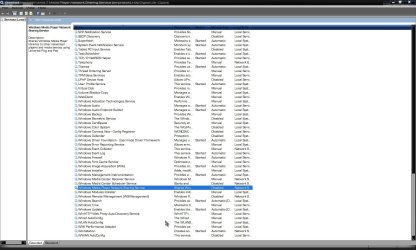
When Services opens, scroll down to Windows Media Player Network Sharing Service

Services.jpg

Double click on entry and set to disabled

Startup.jpg

OK your way out, and close out Services and see if that doesn't do the trick.

A Guy
 

My Computer My Computer

Computer type
PC/Desktop
OS
Windows 10 Home x64
CPU
INTEL Core i5-750 Quad-Core 3.37GHz
Motherboard
ASUS P7P55D
Memory
HyperX Fury Black Series 8GB (2 x 4GB) 1866Mhz
Graphics Card(s)
EVGA GeForce GTX 750 Superclocked 1GB 128-Bit GDDR5
Monitor(s) Displays
LG 32MA68HY 32" IPS
Screen Resolution
1920 x 1080
Hard Drives
Samsung 840 Evo 120GB, SEAGATE 500GB Barracuda® 7200.12, SATA 3 Gb/s, 7200 RPM, 16MB cache
PSU
ANTEC TruePower New TP-550, 80 PLUS, 550W
Case
ANTEC Three Hundred Illusion
Cooling
COOLER MASTER Hyper 212 Plus, 4 x 120mm 1 x 140mm Noctua's
Internet Speed
85 + Mbps
Antivirus
Avast
Browser
Vivaldi
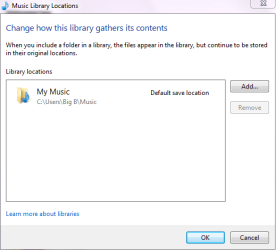
Ken, yes I stream Music/Videos to my PS3 over the network for starters. A guy, u were close but Didn't have to stop the service. This had been nagging me for weeks till I finally sat down and tried to take a stab at it. I knew what was going. My files were being streamed and re-streamed over the network. I just didnt know how to stop it without canceling the service. so, For future reference anyone with this problem using Windows Media Player 11 to stream music/videos to a game console (PS3, Xbox 360, etc..), this is how I finally got my Wmpnetwk.exe stop taking up all my physical memory. Open windows media player> Organize (top left side)> Manage Libraries (first drop down option)> Music/Video/Pic/Recorded TV should be the 4 options that you see when you place cursor on Manage Libraries. Upon clicking on say, Music you should see a picture like the one below. If not the chances are that you have more than one file being streamed and re-streamed. That is whats taking up all your physical memory and slowing your machine down. check to make sure the files and folders in there are either from your "My Music/Pics/Videos" or a File that has been added that contains Music/Videos/Pics other than the ones already in those folders. Hope that works and Happy streaming to ya.
 

Attachments

  • WMP promp.PNG
    WMP promp.PNG
    9.5 KB · Views: 74

My Computer My Computer

Computer Manufacturer/Model Number
Compaq
OS
Windows 7 64bit Home Edition
Glad you got it sorted :)

A Guy
 

My Computer My Computer

Computer type
PC/Desktop
OS
Windows 10 Home x64
CPU
INTEL Core i5-750 Quad-Core 3.37GHz
Motherboard
ASUS P7P55D
Memory
HyperX Fury Black Series 8GB (2 x 4GB) 1866Mhz
Graphics Card(s)
EVGA GeForce GTX 750 Superclocked 1GB 128-Bit GDDR5
Monitor(s) Displays
LG 32MA68HY 32" IPS
Screen Resolution
1920 x 1080
Hard Drives
Samsung 840 Evo 120GB, SEAGATE 500GB Barracuda® 7200.12, SATA 3 Gb/s, 7200 RPM, 16MB cache
PSU
ANTEC TruePower New TP-550, 80 PLUS, 550W
Case
ANTEC Three Hundred Illusion
Cooling
COOLER MASTER Hyper 212 Plus, 4 x 120mm 1 x 140mm Noctua's
Internet Speed
85 + Mbps
Antivirus
Avast
Browser
Vivaldi
Problem Solved - WMP Scanning Entire C:\

@Barrelloffun -

After a full day of Google searches I finally found your post. WMP was indeed scanning the entire C:\. Now fixed. My CPU went from 62% to 4%. Memory went 100% to about 25% of my 3GB (2.66GB Usable).:)

I was on the verge of restoring the OS and buying more memory but problem solved.
 

My Computer My Computer

Computer type
Laptop
Computer Manufacturer/Model Number
Toshiba
OS
Windows Home Premium 64 bit
Memory
3GB
Antivirus
MSE
Browser
IE 10
Had the same problem and took me 10sec to find this post. Ty!
 

My Computer My Computer

Computer type
PC/Desktop
OS
Windows 7 ultimate x64
Back
Top