wondering if you could give me some advice about dual booting?

Os0o

New member
Member
Local time
4:49 PM
Messages
27
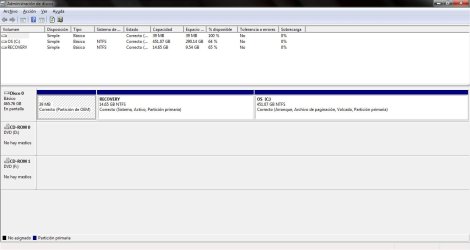
Hello everyone, I was wondering if you could give me some advice. I currently have my dell laptop running Windows 7 Home Premium x64 and I would like to dual boot it with Windows XP x32. Right now I have 3 partitions in my HDD, a 39 MB OEM Partition (I don't know what's it for), a Recovery Partition (System, Active, Primary Partition) and my OS partition (Boot, Paging, Dumping, Primary Partition). My questions are:

Will doing the whole dual boot procedure prevent me from using Hibernation? I read somewhere else (I don't remember where) that dual booting could mess the hibernation process.

My laptop came with a recovery partition and it has an option to enter a Recovery Menu when pressing F8 during boot without using my Windows Installation DVD. I don't know if this is an option every Windows 7 has or if it's something dell added. I also read that if you mess with the MBR you could prevent the computer from finding this "Recovery Menu" option. I don't really understand much about the MBR and I don't know if EasyBCD rewrites everything or just adds a new entry without changing the current entries.
 

My Computer My Computer

At a glance

Windows 7 Home Premium x64Intel Core 2 Duo T6600ATI Mobility Radeon HD 4330
Computer Manufacturer/Model Number
Dell Inspiron 1545
OS
Windows 7 Home Premium x64
CPU
Intel Core 2 Duo T6600
Graphics Card(s)
ATI Mobility Radeon HD 4330
Sound Card
IDT High Definition Audio CODEC
Screen Resolution
1366x768
Internet Speed
4.0 mbps
To be sure, make your Recovery disks off that Recovery Partition. Dual Booting with XP on a partition you shrink from the C Win7 drive should not affect the Recov Partition, however with the disks you have a backup.

http://www.sevenforums.com/tutorials/2672-partition-volume-shrink.html

Use the XP installer to create and format the partition in the shrink space. If XP doesn't see the HD, you'll need to insert the SATA controller driver at the F6 prompt during drivers-loading phase at beginning. But if you don't have a floppy drive to do this, you'll need to slipstream the driver in this way: http://www.sevenforums.com/tutorials/72185-sata-drivers-slipstream-into-windows-xp-cd.html?ltr=S
 
Hi Greg, tanks for your quick response. Right now I'm not worried about the Recovery Partition itself, I think I can backup the .WIM files just in case, but what I am really concerned with is whether I'll be able to boot to the Recovery Menu if I change the MBR.
 

My Computer My Computer

At a glance

Windows 7 Home Premium x64Intel Core 2 Duo T6600ATI Mobility Radeon HD 4330
Computer Manufacturer/Model Number
Dell Inspiron 1545
OS
Windows 7 Home Premium x64
CPU
Intel Core 2 Duo T6600
Graphics Card(s)
ATI Mobility Radeon HD 4330
Sound Card
IDT High Definition Audio CODEC
Screen Resolution
1366x768
Internet Speed
4.0 mbps
I haven't heard of Dell Recovery refusing to run after dual boot updates the MBR. This may be because XP claims the System MBR into itself upon install, then it is updated on the XP partition using EasyBCD 2.0 to add Win7.

You can always return the System MBR to Recovery if you need to run it by marking XP inactive, Recovery partition active (which might be enough) then running Startup Repair up to 3 separate times with reboots to recover the System MBR into Recovery. http://www.sevenforums.com/tutorials/71432-partition-mark-active.html

The solution to your problem would be to install XP to separate HD while Win7 HD is unplugged. After install plug Win7 back in, set it as first HD to boot in BIOS setup, then when you need to boot XP tap the Dell F12 key for one-time BIOS Boot Menu to select XP HD to boot. This keeps the HD's independent.

As I said, make the Recovery Disk set to have a backup.
 
Hello Os0o, welcome to Seven Forums!


@Greg, correct me if I'm wrong.


Since he already has 3 primaries the forth will be an Extended/Logical and if he doesn't use Partition Wizard (Option Four, in this tutorial below) to convert it to a primary before the XP install is started the "OEM Recovery Partition" will remain as "System, Active" correct?


Partition Wizard : Use the Bootable CD
 

My Computer My Computer

At a glance

W 7 64-bit UltimateIntel Q9550 Yorkfield8GB Dominator 8500C5DATI : XFX 5870
Computer Manufacturer/Model Number
* BFK Customs *
OS
W 7 64-bit Ultimate
CPU
Intel Q9550 Yorkfield
Motherboard
ASUS P5Q Pro
Memory
8GB Dominator 8500C5D
Graphics Card(s)
ATI : XFX 5870
Sound Card
Realtek HD Audio 7-1
Monitor(s) Displays
1x 47" LCD HDMI & 3x 26" LCD HDMI
Screen Resolution
1920x1080P & 1920x1200
Hard Drives
1x 80GB Intel X25-M G2 SSD : 1x 500GB & 1x 640GB WD Caviar Black(s)
PSU
Corsair 620HX
Case
Cooler Master RC-690
Cooling
Tuniq Tower 120, 2x 140mm and 3x 120mm case fans
Keyboard
Microsoft 500
Mouse
Razer Diamondback 3G
Internet Speed
14 Mb/s
Other Info
1x Koutech 3Gb/s SATA HDD Hot Swap Rack
It's worth a try, but I don't think XP has the brains to update the System MBR existing on Recovery partition.

XP after SP2 has the ability to install to Logical if its boot files are placed on a Primary partition, but I have only known XP to hijack the SYstem MBR upon install. I think it fails in attempt to install it to Logical, but am not sure of this when there is already an existing Primary that's System Active.

OsOo: after shrinking your partition to make room for XP install, try creating New one and formatting in Disk Mgmt to see if it gives you Logical partition. If not, use free Partition Wizard to create/format a Logical partition there. Then try XP install to it without further formatting - the XP installer will not format a Logical partition.
 
Well, I don't know the difference between a logical partition and and a "normal" one, but the OEM partition isn't marked as primary, it just says OEM, does that mean that if I make a new partition it won't be logical?
 

My Computer My Computer

At a glance

Windows 7 Home Premium x64Intel Core 2 Duo T6600ATI Mobility Radeon HD 4330
Computer Manufacturer/Model Number
Dell Inspiron 1545
OS
Windows 7 Home Premium x64
CPU
Intel Core 2 Duo T6600
Graphics Card(s)
ATI Mobility Radeon HD 4330
Sound Card
IDT High Definition Audio CODEC
Screen Resolution
1366x768
Internet Speed
4.0 mbps
Make the new partition in Disk Mgmt and see. It will either be blue Primary or Green Extended Logical.

If Green Logical, try XP install to it to see if it works.

If Blue Primary is created, Delete it and use Partition Wizard to create and format New Logical partition there to try install.
 
If you don't mind me asking, why would I want a logical partition instead of a primary one?

On a different subject, I think that some of my concepts were wrong, what I'm worried about is that if I install XP and then use EasyBCD to add Windows 7, will I be able to boot to the Windows Recovery Environment? If I'm correct these tools are only included with Windows 7/Vista, so installing XP could prevent me from using them? Dell Recovery Tools are located within the Recovery Environment (I guess Dell added an extra option there), that's why I want to still be able to use it after installing XP.

I don't know if installing XP, then using the Windows 7 installation DVD to fix the MBR and/or whatever needs to be fixed, and then adding XP with EasyBCD from Windows 7 could help.
 

My Computer My Computer

At a glance

Windows 7 Home Premium x64Intel Core 2 Duo T6600ATI Mobility Radeon HD 4330
Computer Manufacturer/Model Number
Dell Inspiron 1545
OS
Windows 7 Home Premium x64
CPU
Intel Core 2 Duo T6600
Graphics Card(s)
ATI Mobility Radeon HD 4330
Sound Card
IDT High Definition Audio CODEC
Screen Resolution
1366x768
Internet Speed
4.0 mbps
You need a primary partition to install an OS, unless the boot files are placed upon a primary partition - then the OS can be installed to Logical.

Since you already have 3 Primary partitions, Disk Mgmt will likely want to create a Logical partition. This might be a good choice in this case since if XP will install to the Logical partition, research which BarefootKid has been doing shows that XP might place its boot files on the System Active boot partition. Then you only need to add Win7 from XP using the steps in the tutorial: http://www.sevenforums.com/tutorials/8057-dual-boot-installation-windows-7-xp.html

In other words, trying to install XP to a Logical partition will either not work (in which case you can create a Primary Partition using Partion Wizard), or it will place the boot files where you want them on the Recovery partition.

To install XP to a Primary partition will create a new System MBR there and remove the System Active designation from Recovery. However it can be recreated by marking Recov active again using PW, then booting the Win7 DVD to run Startup Repair up to 3 separate times with reboots.

This will start Win7 so you can add XP using EasyBCD 2.0 to update the System Active MBR on Recov partition - which may be accomplished by simply installing XP to a Logical anyway.

You can back up externally a System Image of your full HD using built-in Win7 backup imaging to start over if necessary. You should also make your Recovery Disks now.

If you will post back a screenshot of your Disk Management drive map and listings, we can advise you better.
 
Wouldn't XP placing its boot files on the system active boot partition create some weird stuff? Like having both Windows 7 and XP files on the same Windows folder or something like that? Anyway here's a screenshot (I hope I attach it correctly) of disk management. It's in spanish though, but it goes like this:
-39 MB OEM Partition
-14.65 GB Recovery Partition (System, Active, Primary Partition)
-451.07 GB OS Partition (Boot, Paging, Dumping, Primary Partition)
 

Attachments

  • Disk management.jpg
    Disk management.jpg
    63.4 KB · Views: 7

My Computer My Computer

At a glance

Windows 7 Home Premium x64Intel Core 2 Duo T6600ATI Mobility Radeon HD 4330
Computer Manufacturer/Model Number
Dell Inspiron 1545
OS
Windows 7 Home Premium x64
CPU
Intel Core 2 Duo T6600
Graphics Card(s)
ATI Mobility Radeon HD 4330
Sound Card
IDT High Definition Audio CODEC
Screen Resolution
1366x768
Internet Speed
4.0 mbps
Recovery has plenty of space to update the SYstem MBR for XP which is three small boot files.

If you install XP to a Primary partition, it will steal the System MBR from Recovery into XP partition, then you have the choice to either run EasyBCD from XP to update the System boot files on XP, or start Win7 again by running Startup Repair to reinstall the System MBR to the first partition which is marked Active. You could mark Recov partition Active to rewrite the 7 MBR there, or even take it into the Win7 partition itself and leave the Recov partition inactive until you need to mark it so to run Recovery.

Again, make a WIn7 backup image stored externally and your REcovery disks so you can revert back by at least two separate methods if needed.

If you make your Recovery disks they will reinstall the Recovery Partition if need be. That's why they are made, in case of HD failure so you can restore your new HD exactly like the old one.
 
OK I'm a little confused, there can only be one active partition, right? So the MBR is in the Recovery partition? Meaning my computer boots to the Recovery Partition even though the OS is installed in a different partition? I didn't know that.

My computer came with a factory windows image saved in the Recovery Partition, although it's splitted in 4 different files I don't know why, is there any way to be sure these 4 files have everything or should I make a new single file?

I also have the installation DVD that came with my laptop, if I boot to it I get the option to install Windows 7 or to go to the Recovery Environment, the difference is that the Environment within my computer has an extra Dell DataSafe option, whereas the DVD environment doesn't, that's why I think that fixing the MBR from the DVD may not allow me to get back to the one I already have in my laptop. I don't know if I'm making sense hehe...

Don't get me wrong, I appreciate all the help you've given me but I'm trying to make sure that installing XP won't prevent me from using Dell DataSafe from the Recovery Environment, maybe doing this will even void my warranty so I need to be sure of what I'm doing.
 

My Computer My Computer

At a glance

Windows 7 Home Premium x64Intel Core 2 Duo T6600ATI Mobility Radeon HD 4330
Computer Manufacturer/Model Number
Dell Inspiron 1545
OS
Windows 7 Home Premium x64
CPU
Intel Core 2 Duo T6600
Graphics Card(s)
ATI Mobility Radeon HD 4330
Sound Card
IDT High Definition Audio CODEC
Screen Resolution
1366x768
Internet Speed
4.0 mbps
I would call or chat Dell Tech Support to ask them these very good questions, or let's hope a Dell expert who knows might see this.

All I can advise is what I have already. Many tech enthusiasts wipe the entire HD to reinstall and rely on Recovery Disks and/or Win7 backup image of the full HD for recovery. But Dell has a very competent Recovery partition scheme so I can understand why you would want to keep it intact, especially since the boot-critical files are housed within it and even reimaging could not guarantee some loss of Recovery function.
 
Well, I chatted with Dell Tech Support and the guy told me that if I install Windows XP I'll void my warranty, even if it's in dual boot, so we didn't even get to determine if that would mess with Dell DataSafe (I don't think the guy could've helped me anyway). I guess I'm going to have to wait before trying the whole dual boot thing, for now I guess I'll have to use an old laptop with XP.

Thanks for all the help anyway =P.

P.S: I don't know if I should make a new thread or something but what program do you recommend for installing a virtual machine? I tried VMWare once and, even though I can't prove it, I think it messed something really bad because some days after installing it, my laptop just got really slow and after an attempt to reboot, Windows wouldn't get past the "Loading Windows" screen.
 

My Computer My Computer

At a glance

Windows 7 Home Premium x64Intel Core 2 Duo T6600ATI Mobility Radeon HD 4330
Computer Manufacturer/Model Number
Dell Inspiron 1545
OS
Windows 7 Home Premium x64
CPU
Intel Core 2 Duo T6600
Graphics Card(s)
ATI Mobility Radeon HD 4330
Sound Card
IDT High Definition Audio CODEC
Screen Resolution
1366x768
Internet Speed
4.0 mbps
Back
Top