
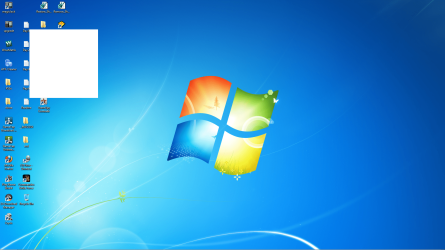
Wondering what this white box is... shows up in random spots...

knk17forever

New member
Member
Local time
1:03 AM
Messages
89
Location
Hamilton
Wondering what this white box is... shows up in random spots on my desktop.

Here is screenshot attached.
 

Attachments

  • ssofdt1.png
    ssofdt1.png
    591 KB · Views: 44

My Computer My Computer

At a glance

Windows 7 Premium 64 bitIntel 870 quad core4g320 gt nvidia geforce
Computer Manufacturer/Model Number
Acer Aspire M3910
OS
Windows 7 Premium 64 bit
CPU
Intel 870 quad core
Motherboard
Acer
Memory
4g
Graphics Card(s)
320 gt nvidia geforce
Sound Card
Realtek
Monitor(s) Displays
Acer P236H
Screen Resolution
1920 x 1080
Hard Drives
450 GB Sata 7200 RPM
PSU
Not sure is 250, 300 or 350 watt Acer OEM, needs upgrading.
Case
Acer M3910
Cooling
Air cooled... Coolmaster for cpu.
Keyboard
Acer USB Keyboard... made in China :)
Mouse
Acer USB optical mouse... made in China :)
Internet Speed
Get upto 4Mbps download and .7Mbps download :(
Other Info
Need to upgrade my PSU, and graphics card for sure and a faster internet service... I would also like to make my computer as silent as possible... and to get wireless keyboard, mouse, headphones, speakers and mic... may wait till its time to get a new computer though and build one myself :)
That's a new one :confused:
some generic advice here...
download install update and run Malwarebytes' Antimalware (free).
If you can remember it starting happening recently, I'd system restore to prior whitebox
Run SFC /scannow in a 'run as administrator' command prompt.
 

My Computer My Computer

At a glance

Windows 7 Home Premium x64 OEM --> RTM clean ...Intel T44004Gb? - Mobile Intel(R) 4 Series Express Chipset ...
Computer Manufacturer/Model Number
Toshiba Satellite L500
OS
Windows 7 Home Premium x64 OEM --> RTM clean install
CPU
Intel T4400
Motherboard
? - laptop inbuilt ?
Memory
4Gb
Graphics Card(s)
? - Mobile Intel(R) 4 Series Express Chipset Family ?
Sound Card
Realtek
Monitor(s) Displays
? + extended to a 42" LG55PC plasma tele!
Screen Resolution
1366 * 768
Hard Drives
320Gb 5500rpm
PSU
?
Case
?
Cooling
?
Internet Speed
3Meg, when it works.
Other Info
A LOWLY LAPTOP!
That's a new one :confused:
some generic advice here...
download install update and run Malwarebytes' Antimalware (free).
If you can remember it starting happening recently, I'd system restore to prior whitebox
Run SFC /scannow in a 'run as administrator' command prompt.

Thanks for suggestion... I use Malwarebytes and it is always up to date and I run it daily... says no infections.

What ever the white box was is gone now... very strange.

Thanks.
 

My Computer My Computer

At a glance

Windows 7 Premium 64 bitIntel 870 quad core4g320 gt nvidia geforce
Computer Manufacturer/Model Number
Acer Aspire M3910
OS
Windows 7 Premium 64 bit
CPU
Intel 870 quad core
Motherboard
Acer
Memory
4g
Graphics Card(s)
320 gt nvidia geforce
Sound Card
Realtek
Monitor(s) Displays
Acer P236H
Screen Resolution
1920 x 1080
Hard Drives
450 GB Sata 7200 RPM
PSU
Not sure is 250, 300 or 350 watt Acer OEM, needs upgrading.
Case
Acer M3910
Cooling
Air cooled... Coolmaster for cpu.
Keyboard
Acer USB Keyboard... made in China :)
Mouse
Acer USB optical mouse... made in China :)
Internet Speed
Get upto 4Mbps download and .7Mbps download :(
Other Info
Need to upgrade my PSU, and graphics card for sure and a faster internet service... I would also like to make my computer as silent as possible... and to get wireless keyboard, mouse, headphones, speakers and mic... may wait till its time to get a new computer though and build one myself :)
This happens sometimes. It is a glitch when Windows opens or clears Windows, can also be due to a video driver. It is not serious. Usually disappears after starting a new program.

Regards....Mike Connor
 

My Computer My Computer

At a glance

Several, including Windows 7 x64 Ultimate
OS
Several, including Windows 7 x64 Ultimate
Just guessing, but I'd say it is just visual artifacts left over in your video card's frame buffer. As Mike Connor stated above, opening another window or launching a program should do the trick. I've run into this quite a bit back when I used to do a lot of Desktop Publishing. In those cases I would just zoom in then zoom out and it would clear the window.
 

My Computer My Computer

At a glance

Windows 7 Pro 64bit, Ubuntu 10.10 64bitAMD Phenom II X4 955 Black Edition4GB(2x) eVGA 9800GT in SLI
Computer Manufacturer/Model Number
Custom Built
OS
Windows 7 Pro 64bit, Ubuntu 10.10 64bit
CPU
AMD Phenom II X4 955 Black Edition
Motherboard
Gigabyte GA-MA790X-UD4P
Memory
4GB
Graphics Card(s)
(2x) eVGA 9800GT in SLI
Sound Card
Creative X-Fi Platinum
Monitor(s) Displays
Samsung SyncMaster 205BW
Screen Resolution
1920x1200
Hard Drives
WD 80GB SATA, WD 500GB SATA
PSU
Corsair TX750
Case
Thermaltake Xaser4
Cooling
Zalman CNPS9500 LED
Keyboard
Logitech G15 Gaming Keyboard
Mouse
Logitech G5 Laser Mouse
Internet Speed
DSL 6mb/768k
This happens sometimes. It is a glitch when Windows opens or clears Windows, can also be due to a video driver. It is not serious. Usually disappears after starting a new program.

Regards....Mike Connor

Just guessing, but I'd say it is just visual artifacts left over in your video card's frame buffer. As Mike Connor stated above, opening another window or launching a program should do the trick. I've run into this quite a bit back when I used to do a lot of Desktop Publishing. In those cases I would just zoom in then zoom out and it would clear the window.

Thanks for the info... it seems to have only happened once or twice since I posted this... not happening lately anyway.

Thanks again for the heads up :)
 

My Computer My Computer

At a glance

Windows 7 Premium 64 bitIntel 870 quad core4g320 gt nvidia geforce
Computer Manufacturer/Model Number
Acer Aspire M3910
OS
Windows 7 Premium 64 bit
CPU
Intel 870 quad core
Motherboard
Acer
Memory
4g
Graphics Card(s)
320 gt nvidia geforce
Sound Card
Realtek
Monitor(s) Displays
Acer P236H
Screen Resolution
1920 x 1080
Hard Drives
450 GB Sata 7200 RPM
PSU
Not sure is 250, 300 or 350 watt Acer OEM, needs upgrading.
Case
Acer M3910
Cooling
Air cooled... Coolmaster for cpu.
Keyboard
Acer USB Keyboard... made in China :)
Mouse
Acer USB optical mouse... made in China :)
Internet Speed
Get upto 4Mbps download and .7Mbps download :(
Other Info
Need to upgrade my PSU, and graphics card for sure and a faster internet service... I would also like to make my computer as silent as possible... and to get wireless keyboard, mouse, headphones, speakers and mic... may wait till its time to get a new computer though and build one myself :)

My Computer My Computer

At a glance

Win 7 Ultimate x64FX-8350 @ 4.6 GHz so farADATA XPG V1 Series Black 8GB DDR3 1600Sapphire R9 270x Dual-X
Computer type
PC/Desktop
Computer Manufacturer/Model Number
Me
OS
Win 7 Ultimate x64
CPU
FX-8350 @ 4.6 GHz so far
Motherboard
Asus M5A97 EVO
Memory
ADATA XPG V1 Series Black 8GB DDR3 1600
Graphics Card(s)
Sapphire R9 270x Dual-X
Sound Card
Xonar DGX w/ Corsair Vengence 1300
Monitor(s) Displays
Acer S232HL Abid
Screen Resolution
1920x1080
Hard Drives
120 GB OCZ Vertex 3
500 GB Seagate 7200.12
PSU
Antec Earthwatts 650W Green
Case
Antec Three Hundred
Cooling
Cooler Master 212 EVO
Keyboard
Logitech G510
Mouse
Logitech G500s
Internet Speed
35000/3000
Back
Top