Wonky Screen Corruption Problem

johnsag49

New member
Local time
7:16 PM
Messages
10
I have a strange screen problem with default UAC settings (and it often appears, to a lesser degree, during boot)

Black (or white) streaks, missing or broken lines when the desktop is dimmed to show a system message. If, in UAC, I choose "Don't Dim Desktop"... the problem goes away when messages appear. The regular desktop is fine. This only happens when the boot screens are shown, and when the UAC is allowed to dim the desktop.

I have an ASRock 4CoreDual SATA2, eVGA 7600GS on AGP (sorry, can't go to PCIe right now,) 2GB of ram. This happened under both the Win 7 Beta and RC1, which I'm running now. Any thoughts?

2vrwmlc.jpg


21b27ux.jpg
 

My Computer

Computer Manufacturer/Model Number
Self Built
OS
Windows 7 RC 1
CPU
E4500
Motherboard
Asus 4Core Dual-SATA2
Memory
2GB
Graphics Card(s)
eVGA 7600GS
Sound Card
Soundblaster Live
Monitor(s) Displays
Samsung 19" WS LCD
PSU
Antec 500W
Hi johnsag49, and welcome to SevenForums.

From the description and the screenshots you posted, i think the problem you are experiencing could be caused by a number of things :

- Bad or outdated graphics driver installed - - - try to find and download the latest driver for your graphics card

- Try to find latest driver for your monitor

- Your graphics card could be overheating or dieing
read my post here http://www.sevenforums.com/drivers/14427-weird-display-problem-games.html#post146080 about similar graphics corruption problem

- Your monitor could be malfunctioning


That is all i can think of right now, if i think of anything else i will post it here.

Hope this helps.
 

My Computer

Computer Manufacturer/Model Number
custom built
OS
Windows 7 Home Basic 64bit
CPU
Intel Core 2 Duo 6420 (2.13 Ghz)
Motherboard
Asus P5B-E Plus
Memory
2x1 GB Kingston KVR DDR2 800Mhz
Graphics Card(s)
Saphire ATI HD4870 512MB
Sound Card
Creative Audigy 4 PCI
Monitor(s) Displays
Samsung SyncMaster T220
Screen Resolution
1680x1050
Hard Drives
WD 320GB (Sata2)
Maxtor 250GB (ATA133)
Maxtor 80GB (ATA133)
PSU
Coolermaster Silent Pro 700Watt
Case
Chieftec midi tower case
Cooling
stock cpu cooler/fan
Keyboard
Logitech UltraX Premium Keyboard (usb 2.0)
Mouse
Logitech MX518 gaming grade optical mouse 1800dpi(usb2.0)
display problem

I have a strange screen problem with default UAC settings (and it often appears, to a lesser degree, during boot)

Black (or white) streaks, missing or broken lines when the desktop is dimmed to show a system message. If, in UAC, I choose "Don't Dim Desktop"... the problem goes away when messages appear. The regular desktop is fine. This only happens when the boot screens are shown, and when the UAC is allowed to dim the desktop.

I have an ASRock 4CoreDual SATA2, eVGA 7600GS on AGP (sorry, can't go to PCIe right now,) 2GB of ram. This happened under both the Win 7 Beta and RC1, which I'm running now. Any thoughts?


2vrwmlc.jpg


21b27ux.jpg

HI
Does this only happen with uac meeage or does it happan at other times?

Ken
 

My Computer

Computer Manufacturer/Model Number
HP Pavillion dv-7 1005 Tx
OS
Win 8 Release candidate 8400
CPU
[email protected]
Memory
4 gigs
Graphics Card(s)
Nvidia 9600M
Sound Card
HD built-in
Monitor(s) Displays
17" Wxga
Screen Resolution
1440x900
Cooling
none
Internet Speed
45Mb down 5Mb up
Thanks for the speedy replies:

It only happens when I allow the UAC to dim the desktop, and to a much, much lesser extent on just the boot up screen. During normal operation, I have no artifacts whatsoever.

I dual boot, Win XP Pro SP3 and Win 7 (sep hard drives)

I have a beefy (aftermarket) cooler on the graphics card, so I don't know that overheating would be an issue. I cleaned the fins yesterday.

I installed the latest driver for my card available on eVGA's web site.
 

My Computer

Computer Manufacturer/Model Number
Self Built
OS
Windows 7 RC 1
CPU
E4500
Motherboard
Asus 4Core Dual-SATA2
Memory
2GB
Graphics Card(s)
eVGA 7600GS
Sound Card
Soundblaster Live
Monitor(s) Displays
Samsung 19" WS LCD
PSU
Antec 500W
This may help as well:

Here's all the info from "Components:"

Name NVIDIA GeForce 7600 GS
PNP Device ID PCI\VEN_10DE&DEV_02E1&SUBSYS_A5423842&REV_A2\4&354AEA31&0&0008
Adapter Type GeForce 7600 GS, NVIDIA compatible
Adapter Description NVIDIA GeForce 7600 GS
Adapter RAM 256.00 MB (268,435,456 bytes)
Installed Drivers nvd3dum.dll
Driver Version 8.15.11.8585
INF File oem5.inf (Section001 section)
Color Planes Not Available
Color Table Entries 4294967296
Resolution 1440 x 900 x 59 hertz
Bits/Pixel 32
Memory Address 0xFD000000-0xFDFFFFFF
Memory Address 0xD0000000-0xDFFFFFFF
Memory Address 0xFC000000-0xFEAFFFFF
IRQ Channel IRQ 16
I/O Port 0x000003B0-0x000003BB
I/O Port 0x000003C0-0x000003DF
Memory Address 0xA0000-0xBFFFF
Driver c:\windows\system32\drivers\nvlddmkm.sys (8.15.11.8585, 9.39 MB (9,850,016 bytes), 4/30/2009 10:02 PM)


My exact motherboard (ASRock 4CoreDual-SATA2 LGA 775 VIA PT880 Pro/PT880 Ultra ATX Intel Motherboard)can be seen here:
Newegg.com - ASRock 4CoreDual-SATA2 LGA 775 VIA PT880 Pro/PT880 Ultra ATX Intel Motherboard - Intel Motherboards

My exact videocard ( EVGA 256-A8-N542-T2 GeForce 7600GS 256MB 128-bit GDDR2 AGP 4X/8X Video Card ) can be seen here:
Newegg.com - EVGA 256-A8-N542-T2 GeForce 7600GS 256MB 128-bit GDDR2 AGP 4X/8X Video Card - Desktop Graphics / Video Cards

Are you using the 32-bit or 64-bit version? 32-bit
Was it a "clean" install or an upgrade? clean, on separate hard drive
Are you dual-booting? yes, Win XP Pro SP3 is on another HD
Are you suing the official RC directly from Microsoft? yes, official RC 1
Did this occur immediately after install? Yes, on both the RC and the Beta
Do you recall installing any software that may have caused the problem? No, it has happened on both right away (very first boot)
 

My Computer

Computer Manufacturer/Model Number
Self Built
OS
Windows 7 RC 1
CPU
E4500
Motherboard
Asus 4Core Dual-SATA2
Memory
2GB
Graphics Card(s)
eVGA 7600GS
Sound Card
Soundblaster Live
Monitor(s) Displays
Samsung 19" WS LCD
PSU
Antec 500W
screen prob

This may help as well:

Here's all the info from "Components:"

Name NVIDIA GeForce 7600 GS
PNP Device ID PCI\VEN_10DE&DEV_02E1&SUBSYS_A5423842&REV_A2\4&354AEA31&0&0008
Adapter Type GeForce 7600 GS, NVIDIA compatible
Adapter Description NVIDIA GeForce 7600 GS
Adapter RAM 256.00 MB (268,435,456 bytes)
Installed Drivers nvd3dum.dll
Driver Version 8.15.11.8585
INF File oem5.inf (Section001 section)
Color Planes Not Available
Color Table Entries 4294967296
Resolution 1440 x 900 x 59 hertz
Bits/Pixel 32
Memory Address 0xFD000000-0xFDFFFFFF
Memory Address 0xD0000000-0xDFFFFFFF
Memory Address 0xFC000000-0xFEAFFFFF
IRQ Channel IRQ 16
I/O Port 0x000003B0-0x000003BB
I/O Port 0x000003C0-0x000003DF
Memory Address 0xA0000-0xBFFFF
Driver c:\windows\system32\drivers\nvlddmkm.sys (8.15.11.8585, 9.39 MB (9,850,016 bytes), 4/30/2009 10:02 PM)


My exact motherboard (ASRock 4CoreDual-SATA2 LGA 775 VIA PT880 Pro/PT880 Ultra ATX Intel Motherboard)can be seen here:
Newegg.com - ASRock 4CoreDual-SATA2 LGA 775 VIA PT880 Pro/PT880 Ultra ATX Intel Motherboard - Intel Motherboards

My exact videocard ( EVGA 256-A8-N542-T2 GeForce 7600GS 256MB 128-bit GDDR2 AGP 4X/8X Video Card ) can be seen here:
Newegg.com - EVGA 256-A8-N542-T2 GeForce 7600GS 256MB 128-bit GDDR2 AGP 4X/8X Video Card - Desktop Graphics / Video Cards

Are you using the 32-bit or 64-bit version? 32-bit
Was it a "clean" install or an upgrade? clean, on separate hard drive
Are you dual-booting? yes, Win XP Pro SP3 is on another HD
Are you suing the official RC directly from Microsoft? yes, official RC 1
Did this occur immediately after install? Yes, on both the RC and the Beta
Do you recall installing any software that may have caused the problem? No, it has happened on both right away (very first boot)
Do you have quicktime and direct x installed
Thanks for the info it will help

Ken
 

My Computer

Computer Manufacturer/Model Number
HP Pavillion dv-7 1005 Tx
OS
Win 8 Release candidate 8400
CPU
[email protected]
Memory
4 gigs
Graphics Card(s)
Nvidia 9600M
Sound Card
HD built-in
Monitor(s) Displays
17" Wxga
Screen Resolution
1440x900
Cooling
none
Internet Speed
45Mb down 5Mb up
I'm not 100% sure about quicktime or directX, whatever is the standard install.
 

My Computer

Computer Manufacturer/Model Number
Self Built
OS
Windows 7 RC 1
CPU
E4500
Motherboard
Asus 4Core Dual-SATA2
Memory
2GB
Graphics Card(s)
eVGA 7600GS
Sound Card
Soundblaster Live
Monitor(s) Displays
Samsung 19" WS LCD
PSU
Antec 500W
screen probs

I'm not 100% sure about quicktime or directX, whatever is the standard install.

It could also be a heat problem or a dust problem but im still leaning towards vid driver.

I dont have that brand of videobut I will do a google search for it and screen probs and if i come up with something i will reply

Ken
 

My Computer

Computer Manufacturer/Model Number
HP Pavillion dv-7 1005 Tx
OS
Win 8 Release candidate 8400
CPU
[email protected]
Memory
4 gigs
Graphics Card(s)
Nvidia 9600M
Sound Card
HD built-in
Monitor(s) Displays
17" Wxga
Screen Resolution
1440x900
Cooling
none
Internet Speed
45Mb down 5Mb up
Interesting.

I completely uninstalled the nvidia drivers... right now I'm running on crappy 1024x768. Under both Aero themes and regular, "classic" themes, no problems at all. No screen artifacts, even on the boot screens. The resolution and colors are a bit off, but there's nothing fragmented or out of place.

What gives??!
 

My Computer

Computer Manufacturer/Model Number
Self Built
OS
Windows 7 RC 1
CPU
E4500
Motherboard
Asus 4Core Dual-SATA2
Memory
2GB
Graphics Card(s)
eVGA 7600GS
Sound Card
Soundblaster Live
Monitor(s) Displays
Samsung 19" WS LCD
PSU
Antec 500W
Screen prob

Interesting.

I completely uninstalled the nvidia drivers... right now I'm running on crappy 1024x768. Under both Aero themes and regular, "classic" themes, no problems at all. No screen artifacts, even on the boot screens. The resolution and colors are a bit off, but there's nothing fragmented or out of place.

What gives??!

Well at least you know its a driver issue. Could you tell us whet driver and version it was (without installing it) to see if someone has a newer or different version.

Ken
 

My Computer

Computer Manufacturer/Model Number
HP Pavillion dv-7 1005 Tx
OS
Win 8 Release candidate 8400
CPU
[email protected]
Memory
4 gigs
Graphics Card(s)
Nvidia 9600M
Sound Card
HD built-in
Monitor(s) Displays
17" Wxga
Screen Resolution
1440x900
Cooling
none
Internet Speed
45Mb down 5Mb up
I was, and now am, using Nvidia latest drivers 186.86.
 

My Computer

Computer Manufacturer/Model Number
Self Built
OS
Windows 7 RC 1
CPU
E4500
Motherboard
Asus 4Core Dual-SATA2
Memory
2GB
Graphics Card(s)
eVGA 7600GS
Sound Card
Soundblaster Live
Monitor(s) Displays
Samsung 19" WS LCD
PSU
Antec 500W
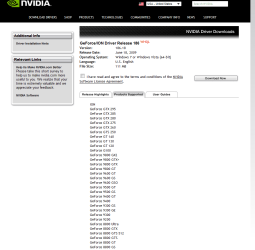
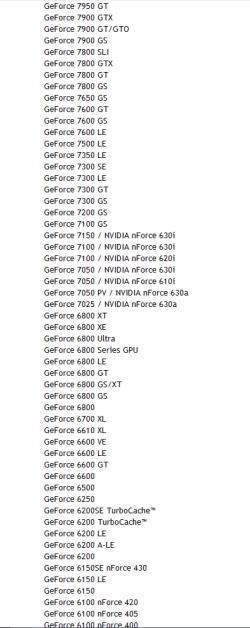
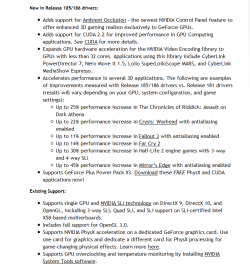
Well I went to nvidia's site and looked for latest drivers for Windows 7 that support your card and the site gave me this result :

GeForce/ION Driver Release 186 32bit

GeForce/ION Driver Release 186 64bit

These drivers are dated june 18. 2009
and it says it supports your card

Capture.PNG

Capture2.PNG

Capture3.PNG

Capture4.PNG


Maybe try with this driver?
 

My Computer

Computer Manufacturer/Model Number
custom built
OS
Windows 7 Home Basic 64bit
CPU
Intel Core 2 Duo 6420 (2.13 Ghz)
Motherboard
Asus P5B-E Plus
Memory
2x1 GB Kingston KVR DDR2 800Mhz
Graphics Card(s)
Saphire ATI HD4870 512MB
Sound Card
Creative Audigy 4 PCI
Monitor(s) Displays
Samsung SyncMaster T220
Screen Resolution
1680x1050
Hard Drives
WD 320GB (Sata2)
Maxtor 250GB (ATA133)
Maxtor 80GB (ATA133)
PSU
Coolermaster Silent Pro 700Watt
Case
Chieftec midi tower case
Cooling
stock cpu cooler/fan
Keyboard
Logitech UltraX Premium Keyboard (usb 2.0)
Mouse
Logitech MX518 gaming grade optical mouse 1800dpi(usb2.0)
186.86... and I've confirmed through the tubes that other people have had this problem as well. Looks like its a new videocard for me!
 

My Computer

Computer Manufacturer/Model Number
Self Built
OS
Windows 7 RC 1
CPU
E4500
Motherboard
Asus 4Core Dual-SATA2
Memory
2GB
Graphics Card(s)
eVGA 7600GS
Sound Card
Soundblaster Live
Monitor(s) Displays
Samsung 19" WS LCD
PSU
Antec 500W
Well I picked up a Sapphire HD 3650 AGP card... when I finally found a driver that worked, it cleaned up the problem. So I guess the artifacts were an issue with the Nvidia drivers. Since the AGP bus is a dead interface, I assume no one will try to fix the problem. So this new card will hold me over until I'm ready to upgrade the whole system.
 

My Computer

Computer Manufacturer/Model Number
Self Built
OS
Windows 7 RC 1
CPU
E4500
Motherboard
Asus 4Core Dual-SATA2
Memory
2GB
Graphics Card(s)
eVGA 7600GS
Sound Card
Soundblaster Live
Monitor(s) Displays
Samsung 19" WS LCD
PSU
Antec 500W
Hello,
i have exactly the same problem after first install!

Tests:

  • win7RC1x64 and win7Build7229x64
  • using latest nVIDIA x64 driver for win7
  • Switch to "Windows Classic" Theme i se the corruption
  • When i deactivate the "themes" service, i see nothing only the wonky screen corruption
  • STRG + ALT + DEL i see to the wonky screen corruption
  • In safemode, i have no problems

System, se My System Specs
 
Last edited:

My Computer

OS
Windows 7 x64
CPU
Intel Core 2 Quad Q6660
Motherboard
ASRock 4CoreDual-SATA2
Memory
2GB DDRII
Graphics Card(s)
Asus V9999 Gamer Edition (nVIDA Geforce 6800 AGP)
Sound Card
Creative Sound Blaster Audigy 2 ZS
Monitor(s) Displays
Samsung 930BF on DVI-D and Samsung 930BF on VGA
Screen Resolution
1280x1024 @ 32bit on DVI-D and 1280x1024 @ 32bit on VGA
Hard Drives
2x Western Digital120GB Sata @ Radio 0, 4k size and one WD2500JB ATA
Keyboard
Logitech Cordless Elite Duo
Mouse
Logitech MX700 Cordless Optical
Internet Speed
10Mbit Up & Download
Interesting, we both have the same motherboard, ASRock 4CoreDual Sata-2. I wonder if there's something weird going on with it? This ATI Sapphire card I've got now doesn't show any weird artifacts... so my feeling is it's some kind of problem with the lower end nvidia cards.
 

My Computer

Computer Manufacturer/Model Number
Self Built
OS
Windows 7 RC 1
CPU
E4500
Motherboard
Asus 4Core Dual-SATA2
Memory
2GB
Graphics Card(s)
eVGA 7600GS
Sound Card
Soundblaster Live
Monitor(s) Displays
Samsung 19" WS LCD
PSU
Antec 500W
When i flash the card to the 6800 Ultra (possible), win7 and nVIDIA detect it normal and have the same problems ;)

Yeah the same motherboard but have you too the 2.10 Bios?
 

My Computer

OS
Windows 7 x64
CPU
Intel Core 2 Quad Q6660
Motherboard
ASRock 4CoreDual-SATA2
Memory
2GB DDRII
Graphics Card(s)
Asus V9999 Gamer Edition (nVIDA Geforce 6800 AGP)
Sound Card
Creative Sound Blaster Audigy 2 ZS
Monitor(s) Displays
Samsung 930BF on DVI-D and Samsung 930BF on VGA
Screen Resolution
1280x1024 @ 32bit on DVI-D and 1280x1024 @ 32bit on VGA
Hard Drives
2x Western Digital120GB Sata @ Radio 0, 4k size and one WD2500JB ATA
Keyboard
Logitech Cordless Elite Duo
Mouse
Logitech MX700 Cordless Optical
Internet Speed
10Mbit Up & Download
When this thing happens does you computer hangs or works very slowly??
 

My Computer

Computer Manufacturer/Model Number
Custom made
OS
Window 7 build 7600, Xp pro(VM)
CPU
Amd Athlon 2000 xp+
Motherboard
Asus x series
Memory
kingstone(1gb+256MB)
Graphics Card(s)
Nvdia 6200(256 mb+255mb(shared))
Sound Card
soundmax
Monitor(s) Displays
Lg Flatron w1943
Screen Resolution
1360x768
Hard Drives
segate 80GB
Case
i-ball
Keyboard
i-ball
Mouse
i-ball
Internet Speed
256kbps up and 256 kbps down
My PC works very good. With winXPproSP3 works great!
 

My Computer

OS
Windows 7 x64
CPU
Intel Core 2 Quad Q6660
Motherboard
ASRock 4CoreDual-SATA2
Memory
2GB DDRII
Graphics Card(s)
Asus V9999 Gamer Edition (nVIDA Geforce 6800 AGP)
Sound Card
Creative Sound Blaster Audigy 2 ZS
Monitor(s) Displays
Samsung 930BF on DVI-D and Samsung 930BF on VGA
Screen Resolution
1280x1024 @ 32bit on DVI-D and 1280x1024 @ 32bit on VGA
Hard Drives
2x Western Digital120GB Sata @ Radio 0, 4k size and one WD2500JB ATA
Keyboard
Logitech Cordless Elite Duo
Mouse
Logitech MX700 Cordless Optical
Internet Speed
10Mbit Up & Download
Did you said that this problem also occur while booting(while computer shows its motherboards information when you just switch on your computer)?
 

My Computer

Computer Manufacturer/Model Number
Custom made
OS
Window 7 build 7600, Xp pro(VM)
CPU
Amd Athlon 2000 xp+
Motherboard
Asus x series
Memory
kingstone(1gb+256MB)
Graphics Card(s)
Nvdia 6200(256 mb+255mb(shared))
Sound Card
soundmax
Monitor(s) Displays
Lg Flatron w1943
Screen Resolution
1360x768
Hard Drives
segate 80GB
Case
i-ball
Keyboard
i-ball
Mouse
i-ball
Internet Speed
256kbps up and 256 kbps down
Back
Top