Solved Won't boot without disc in drive.

BeKure

New member
Member
VIP
Local time
6:11 AM
Messages
117
I am running Windows 7 64 bit and Windows will never start without the Windows 7 disc in the DvD Rom drive. Almost as if my computer doesn't realize that Windows is installed on my HD. Has anyone else had this problem or can anyone offer a solution? I do have my HD set as my primary drive and my DVD Rom as my secondary drive.
Any help would be appreciated.

Emitted from my Droid X via TapaTalk
 
Last edited:

My Computer My Computer

At a glance

Windows 7 [64-Bit]AMD Phenom II X6 1100T Black Edition Thuban 3...G.SKILL Ripjaws X Series 8GB 240-Pin DDR3 SDR...ATI Radeon HD 5870 1GB DDR5 PCI-Express Card
OS
Windows 7 [64-Bit]
CPU
AMD Phenom II X6 1100T Black Edition Thuban 3.3GHz, 3.7GHz
Motherboard
GIGABYTE GA-990XA-UD3 AM3+ AMD
Memory
G.SKILL Ripjaws X Series 8GB 240-Pin DDR3 SDRAM DDR3 186
Graphics Card(s)
ATI Radeon HD 5870 1GB DDR5 PCI-Express Card
Sound Card
N/A (On-board Sound)
Monitor(s) Displays
HANNSpree 42" Class LCD 1080p 120Hz HDTV
Screen Resolution
1920 x 1080
Hard Drives
SSD: Crucial M4 CT064M4SSD2 2.5" 64GB SATA

HDD 1: Western Digital Caviar Blue WD5000AAKS 2TB 7200 RPM 16MB Cache

HDD 2: Western Digital Caviar Blue WD5000AAKS 1TB 7200 RPM 16MB Cache

HDD 3: Western Digital Caviar Blue WD5000AAKS 500GB 7200 R
PSU
Antec High Current Gamer Series HCG-900 900W
Case
NZXT Phantom PHAN-001WT Red Steel / Plastic Enthusiast ATX
Cooling
FANS: 140MM (x1), 120MM (x3), 200MM (x2)
Keyboard
Logitech G13 & Steelseries Merc Stealth
Mouse
Cyborg M.M.O. 7 Gaming Mouse, Logitech G700 & Steelseries Wo
Internet Speed
25 Mbps Download / 2 Mbps Upload
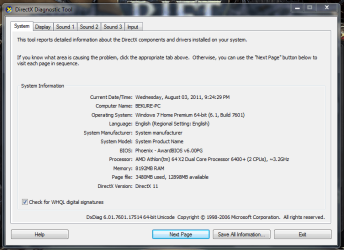
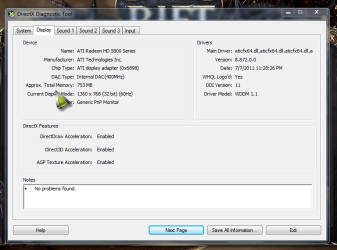
could you be a little more specific as to your hardware?
If it's prebuilt just model number is fine
If you put it together more detailed information would be nice.
 

My Computer My Computer

At a glance

Windows 7 x64Intel i7 2600kG.skill Ripjaw 16gigs @ 1866Nvidia gtx580 (evga)
Computer Manufacturer/Model Number
Insane hobo technologies. ;-)
OS
Windows 7 x64
CPU
Intel i7 2600k
Motherboard
Asrock z68 extreme 4 gen 3
Memory
G.skill Ripjaw 16gigs @ 1866
Graphics Card(s)
Nvidia gtx580 (evga)
Sound Card
Integrated HD audio + hdmi
Monitor(s) Displays
24" ASUS widescreen + 42" insignia
Screen Resolution
1080p (1920x1080)
Hard Drives
128 Samsung 830
256 Samsung 840
3 x 1tb storage drive (various)
1 western digital 1tb (eSATA)
1 Seagate 1tb (eSATA)
PSU
1 kilowatt SLI/Crossfire rated Silverstone modular
Case
NZXT Phantom + additional 220 fan
Cooling
Zalmann
Keyboard
Microsoft wireless 3000 (v2)
Mouse
MS - wireless 5000 (bluetrack)
Internet Speed
depends on if you ask me or my provider.
Other Info
The above information is provided as is, and the author assumes no responsibility for issues it may cause with your sanity or fanboyism.
The usual fix for this is to boot the Install DVD and run Startup Repair up to 3 times (requires reboot between each one). No I don't know why 3 is the magic number but that is what I see here all the time.

After that, remove the DVD and see if it boots normally.

If not, post a screen shot of your expanded Disk Management window.

To post a picture to GeeksToGo:

Make sure the window you want to capture has the focus.
Press Alt+Print Screen. That will capture the active window.
Start MSPaint - Start then Run, type mspaint and press Enter.
Press Ctrl+v to paste the picture in to MS Paint.
Click File then Save as and save it to your Desktop.

Start a new reply.
Click on the Browse button below the message input area.
Navigate to where you saved the picture, select it and click on Open.
Click on Attach This File.
Once uploaded, click on Add To Post to the far right of the uploaded file.
Scroll down and click Preview Post to verify the image shows.
 

My Computer My Computer

At a glance

Windows 10 Pro X64Intel Quad Core i7-4770 @ 3.4Ghz16.0GB PC3-12800 DDR3 SDRAM 1600 MHzIntel Integrated HD Graphics
Computer type
PC/Desktop
Computer Manufacturer/Model Number
Lenovo IdeaCenter 450
OS
Windows 10 Pro X64
CPU
Intel Quad Core i7-4770 @ 3.4Ghz
Memory
16.0GB PC3-12800 DDR3 SDRAM 1600 MHz
Graphics Card(s)
Intel Integrated HD Graphics
Sound Card
Realtek HD Audio
Monitor(s) Displays
HP 22" LCD
Screen Resolution
1680 x 1050
Hard Drives
250GB Samsung EVO SATA-3 SSD
2TB Seagate ST2000DM001 SATA-2
1.5TB Seagate ST3150041AS SATA
Keyboard
Dell USB
Mouse
Lenovo USB
Internet Speed
Cable via Road Runner 3MB Upload, 30MB Download
Antivirus
Windows Defender, MBAM Pro, MBAE
Browser
Seamonkey
Other Info
UEFI/GPT
PLDS DVD-RW DH16AERSH
I hope this helps.
 

Attachments

  • Capture.PNG
    Capture.PNG
    30.9 KB · Views: 335
  • Capture2.PNG
    Capture2.PNG
    39.6 KB · Views: 199
  • DxDiag.txt
    DxDiag.txt
    52.5 KB · Views: 25

My Computer My Computer

At a glance

Windows 7 [64-Bit]AMD Phenom II X6 1100T Black Edition Thuban 3...G.SKILL Ripjaws X Series 8GB 240-Pin DDR3 SDR...ATI Radeon HD 5870 1GB DDR5 PCI-Express Card
OS
Windows 7 [64-Bit]
CPU
AMD Phenom II X6 1100T Black Edition Thuban 3.3GHz, 3.7GHz
Motherboard
GIGABYTE GA-990XA-UD3 AM3+ AMD
Memory
G.SKILL Ripjaws X Series 8GB 240-Pin DDR3 SDRAM DDR3 186
Graphics Card(s)
ATI Radeon HD 5870 1GB DDR5 PCI-Express Card
Sound Card
N/A (On-board Sound)
Monitor(s) Displays
HANNSpree 42" Class LCD 1080p 120Hz HDTV
Screen Resolution
1920 x 1080
Hard Drives
SSD: Crucial M4 CT064M4SSD2 2.5" 64GB SATA

HDD 1: Western Digital Caviar Blue WD5000AAKS 2TB 7200 RPM 16MB Cache

HDD 2: Western Digital Caviar Blue WD5000AAKS 1TB 7200 RPM 16MB Cache

HDD 3: Western Digital Caviar Blue WD5000AAKS 500GB 7200 R
PSU
Antec High Current Gamer Series HCG-900 900W
Case
NZXT Phantom PHAN-001WT Red Steel / Plastic Enthusiast ATX
Cooling
FANS: 140MM (x1), 120MM (x3), 200MM (x2)
Keyboard
Logitech G13 & Steelseries Merc Stealth
Mouse
Cyborg M.M.O. 7 Gaming Mouse, Logitech G700 & Steelseries Wo
Internet Speed
25 Mbps Download / 2 Mbps Upload
The usual fix for this is to boot the Install DVD and run Startup Repair up to 3 times (requires reboot between each one). No I don't know why 3 is the magic number but that is what I see here all the time.

After that, remove the DVD and see if it boots normally.

If not, post a screen shot of your expanded Disk Management window.

To post a picture to GeeksToGo:

Make sure the window you want to capture has the focus.
Press Alt+Print Screen. That will capture the active window.
Start MSPaint - Start then Run, type mspaint and press Enter.
Press Ctrl+v to paste the picture in to MS Paint.
Click File then Save as and save it to your Desktop.

Start a new reply.
Click on the Browse button below the message input area.
Navigate to where you saved the picture, select it and click on Open.
Click on Attach This File.
Once uploaded, click on Add To Post to the far right of the uploaded file.
Scroll down and click Preview Post to verify the image shows.

So should I run this repair client through Windows after it boots or before Windows even boots up?

Emitted from my Droid X via TapaTalk
 

My Computer My Computer

At a glance

Windows 7 [64-Bit]AMD Phenom II X6 1100T Black Edition Thuban 3...G.SKILL Ripjaws X Series 8GB 240-Pin DDR3 SDR...ATI Radeon HD 5870 1GB DDR5 PCI-Express Card
OS
Windows 7 [64-Bit]
CPU
AMD Phenom II X6 1100T Black Edition Thuban 3.3GHz, 3.7GHz
Motherboard
GIGABYTE GA-990XA-UD3 AM3+ AMD
Memory
G.SKILL Ripjaws X Series 8GB 240-Pin DDR3 SDRAM DDR3 186
Graphics Card(s)
ATI Radeon HD 5870 1GB DDR5 PCI-Express Card
Sound Card
N/A (On-board Sound)
Monitor(s) Displays
HANNSpree 42" Class LCD 1080p 120Hz HDTV
Screen Resolution
1920 x 1080
Hard Drives
SSD: Crucial M4 CT064M4SSD2 2.5" 64GB SATA

HDD 1: Western Digital Caviar Blue WD5000AAKS 2TB 7200 RPM 16MB Cache

HDD 2: Western Digital Caviar Blue WD5000AAKS 1TB 7200 RPM 16MB Cache

HDD 3: Western Digital Caviar Blue WD5000AAKS 500GB 7200 R
PSU
Antec High Current Gamer Series HCG-900 900W
Case
NZXT Phantom PHAN-001WT Red Steel / Plastic Enthusiast ATX
Cooling
FANS: 140MM (x1), 120MM (x3), 200MM (x2)
Keyboard
Logitech G13 & Steelseries Merc Stealth
Mouse
Cyborg M.M.O. 7 Gaming Mouse, Logitech G700 & Steelseries Wo
Internet Speed
25 Mbps Download / 2 Mbps Upload
Hello BeKure, welcome to Seven Forums!


Have a look at the information in this tutorial at the link below and be sure to post back with any further questions you may have and to keep us informed.


   Note
   Note
   Note

Before we make any specific recommendations will you please post a snip/screen-shot of the entire Windows disk management drive map with a full description as to which drive/partition is which, so we can see what you have going on as there may be a fairly simple way to resolve the situation.

In the Windows start menu right click computer and click manage, in the left pane of the "Computer Management" window that opens click disk management and post a maximized snip of that.


How to Upload and Post a Screenshot and File in Seven Forums


My Computer My Computer

At a glance

W 7 64-bit UltimateIntel Q9550 Yorkfield8GB Dominator 8500C5DATI : XFX 5870
Computer Manufacturer/Model Number
* BFK Customs *
OS
W 7 64-bit Ultimate
CPU
Intel Q9550 Yorkfield
Motherboard
ASUS P5Q Pro
Memory
8GB Dominator 8500C5D
Graphics Card(s)
ATI : XFX 5870
Sound Card
Realtek HD Audio 7-1
Monitor(s) Displays
1x 47" LCD HDMI & 3x 26" LCD HDMI
Screen Resolution
1920x1080P & 1920x1200
Hard Drives
1x 80GB Intel X25-M G2 SSD : 1x 500GB & 1x 640GB WD Caviar Black(s)
PSU
Corsair 620HX
Case
Cooler Master RC-690
Cooling
Tuniq Tower 120, 2x 140mm and 3x 120mm case fans
Keyboard
Microsoft 500
Mouse
Razer Diamondback 3G
Internet Speed
14 Mb/s
Other Info
1x Koutech 3Gb/s SATA HDD Hot Swap Rack
I reset the bios on my MoBo and Windows loads without the disc now. Thank you all for the great suggestions. This has got to be the most helpful forum ever! :-)

Emitted from my Droid X via TapaTalk
 

My Computer My Computer

At a glance

Windows 7 [64-Bit]AMD Phenom II X6 1100T Black Edition Thuban 3...G.SKILL Ripjaws X Series 8GB 240-Pin DDR3 SDR...ATI Radeon HD 5870 1GB DDR5 PCI-Express Card
OS
Windows 7 [64-Bit]
CPU
AMD Phenom II X6 1100T Black Edition Thuban 3.3GHz, 3.7GHz
Motherboard
GIGABYTE GA-990XA-UD3 AM3+ AMD
Memory
G.SKILL Ripjaws X Series 8GB 240-Pin DDR3 SDRAM DDR3 186
Graphics Card(s)
ATI Radeon HD 5870 1GB DDR5 PCI-Express Card
Sound Card
N/A (On-board Sound)
Monitor(s) Displays
HANNSpree 42" Class LCD 1080p 120Hz HDTV
Screen Resolution
1920 x 1080
Hard Drives
SSD: Crucial M4 CT064M4SSD2 2.5" 64GB SATA

HDD 1: Western Digital Caviar Blue WD5000AAKS 2TB 7200 RPM 16MB Cache

HDD 2: Western Digital Caviar Blue WD5000AAKS 1TB 7200 RPM 16MB Cache

HDD 3: Western Digital Caviar Blue WD5000AAKS 500GB 7200 R
PSU
Antec High Current Gamer Series HCG-900 900W
Case
NZXT Phantom PHAN-001WT Red Steel / Plastic Enthusiast ATX
Cooling
FANS: 140MM (x1), 120MM (x3), 200MM (x2)
Keyboard
Logitech G13 & Steelseries Merc Stealth
Mouse
Cyborg M.M.O. 7 Gaming Mouse, Logitech G700 & Steelseries Wo
Internet Speed
25 Mbps Download / 2 Mbps Upload
Good to see you found a solution and thanks for the update.
 

My Computer My Computer

At a glance

W 7 64-bit UltimateIntel Q9550 Yorkfield8GB Dominator 8500C5DATI : XFX 5870
Computer Manufacturer/Model Number
* BFK Customs *
OS
W 7 64-bit Ultimate
CPU
Intel Q9550 Yorkfield
Motherboard
ASUS P5Q Pro
Memory
8GB Dominator 8500C5D
Graphics Card(s)
ATI : XFX 5870
Sound Card
Realtek HD Audio 7-1
Monitor(s) Displays
1x 47" LCD HDMI & 3x 26" LCD HDMI
Screen Resolution
1920x1080P & 1920x1200
Hard Drives
1x 80GB Intel X25-M G2 SSD : 1x 500GB & 1x 640GB WD Caviar Black(s)
PSU
Corsair 620HX
Case
Cooler Master RC-690
Cooling
Tuniq Tower 120, 2x 140mm and 3x 120mm case fans
Keyboard
Microsoft 500
Mouse
Razer Diamondback 3G
Internet Speed
14 Mb/s
Other Info
1x Koutech 3Gb/s SATA HDD Hot Swap Rack
When I installed Win 7 I had 2 drives in the computer and I had the same problem. The solution was to reboot into BIOS and change the boot order of the drives. It was that simple. I realize that this is an old thread, but it helped me, perhaps it will help someone else.
 

My Computer My Computer

At a glance

win 7 64 bit
OS
win 7 64 bit
Back
Top