
won't download gadgets

wb7uxo

New member
I was playing around with some settings, and somehow disabled the ability to download gadgets. If I download them through .zip files, they will install and work fine. I cannot remember how I got to the initial screen so that I can enable whatever I disabled. I am running the Enterprise edition of Windows 7.
 

My Computer

Computer Manufacturer/Model Number
custom built
OS
Windows 7 Enterprise Edition
CPU
Intel E7200 @ 2.53GHz
Motherboard
ASUS P5GC-MX/1333
Memory
3 GB
Graphics Card(s)
NVIDIA GeForce 8400 GS
Sound Card
Realtek High Definition Audio (built into motherboard
Monitor(s) Displays
ViewSonic VA1930wm
Screen Resolution
1440 x 900
Hard Drives
ST3320613AS ATA 320GB
ST380815AS ATA 80GB
ST380815AS ATA 80GB
Case
ASUSTek Computer INC. Desktop
Keyboard
Microsoft Natural Egonomic 4000 v 1.0
Mouse
Microsoft Wireless Mouse 5000
Internet Speed
DSL
Other Info
BIOS
A_M_I_ - 12000724
BIOS Date: 12/24/07 14:46:29 Ver:
08.00.10

My Computer

Computer Manufacturer/Model Number
Custom
OS
Windows 7 Professional x64
CPU
Intel i7 2600K OC'd @ 4620 MHz
Motherboard
Asus P8Z68-V Pro
Memory
16GB GSkill Sniper 2133 Mhz (4x4GB)
Graphics Card(s)
EVGA GeForce GTX 480 SuperClocked+
Sound Card
Realtek High Definition Audio
Monitor(s) Displays
2x Acer S273HLbmii 27"
Screen Resolution
2 x 1920x1080
Hard Drives
64GB Crucial M4 SSD

Storage: Hitachi 1TB 5400RPM, Samsung 1.5TB 5400RPM
PSU
Corsair HW Series 750w (modular)
Case
Cooler Master HAF 932 Advanced Blue Edition
Cooling
CM Hyper 212+ CPU cooler, 3x 230mm + 1x 140mm case fans
Keyboard
Logitech MK320 (wireless)
Mouse
Logitech MK320 (wireless)
Internet Speed
30 Mb/s : 2 Mb/s
Johnathan; Thanks for the reply. The only restore point I have is long after the time I messed around with the settings. I reread the tutorials, and tried to reinstate the sidebar on Windows 7 as outlined. My user account does not have full control checked, and I was unable to change it. I followed the instructions as outlined by Mark on 11-18-2008. The check boxes remained grayed out, and I was not able to change anything.

The settings window I was messing with looked like an old XP one that listed all the various changes you could make to the system. I remember one that I unchecked dealt with tablet settings, if that gives you any hints as to which set of settings I was looking at. I have been unable to find it again.
 

My Computer

Computer Manufacturer/Model Number
custom built
OS
Windows 7 Enterprise Edition
CPU
Intel E7200 @ 2.53GHz
Motherboard
ASUS P5GC-MX/1333
Memory
3 GB
Graphics Card(s)
NVIDIA GeForce 8400 GS
Sound Card
Realtek High Definition Audio (built into motherboard
Monitor(s) Displays
ViewSonic VA1930wm
Screen Resolution
1440 x 900
Hard Drives
ST3320613AS ATA 320GB
ST380815AS ATA 80GB
ST380815AS ATA 80GB
Case
ASUSTek Computer INC. Desktop
Keyboard
Microsoft Natural Egonomic 4000 v 1.0
Mouse
Microsoft Wireless Mouse 5000
Internet Speed
DSL
Other Info
BIOS
A_M_I_ - 12000724
BIOS Date: 12/24/07 14:46:29 Ver:
08.00.10
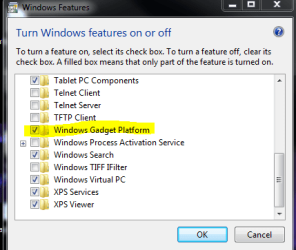
I think you are referring to Turn Windows Features On or Off. Search for that in the start menu.

Capture.PNG
 

My Computer

Computer Manufacturer/Model Number
Custom
OS
Windows 7 Professional x64
CPU
Intel i7 2600K OC'd @ 4620 MHz
Motherboard
Asus P8Z68-V Pro
Memory
16GB GSkill Sniper 2133 Mhz (4x4GB)
Graphics Card(s)
EVGA GeForce GTX 480 SuperClocked+
Sound Card
Realtek High Definition Audio
Monitor(s) Displays
2x Acer S273HLbmii 27"
Screen Resolution
2 x 1920x1080
Hard Drives
64GB Crucial M4 SSD

Storage: Hitachi 1TB 5400RPM, Samsung 1.5TB 5400RPM
PSU
Corsair HW Series 750w (modular)
Case
Cooler Master HAF 932 Advanced Blue Edition
Cooling
CM Hyper 212+ CPU cooler, 3x 230mm + 1x 140mm case fans
Keyboard
Logitech MK320 (wireless)
Mouse
Logitech MK320 (wireless)
Internet Speed
30 Mb/s : 2 Mb/s
Jonathan; Thanks. That was the correct screen. I checked the same boxes as are checked on the computer that is downloading the gadgets with no problems. Didn't help. I thought the problem may be with my browser, am using FireFox. Switched to IE8, and still couldn't download when I selected the 'Install" button.

Went back to FireFox, with the same add-ons as are used on the computer that works, and still wouldn't download. I did however, get a redirect(?) to watson.live.com instead of the download location.

Oh yes, after stopping all the other add-ons I have on the troubled machine, I restarted the computer before trying again.

Also checked the permissions on the good machine, and they are exactly the same as I have on the one that doesn't download gadgets.

Am thinking that maybe I have a problem with either the installation of FireFox or with Windows 7?
 

My Computer

Computer Manufacturer/Model Number
custom built
OS
Windows 7 Enterprise Edition
CPU
Intel E7200 @ 2.53GHz
Motherboard
ASUS P5GC-MX/1333
Memory
3 GB
Graphics Card(s)
NVIDIA GeForce 8400 GS
Sound Card
Realtek High Definition Audio (built into motherboard
Monitor(s) Displays
ViewSonic VA1930wm
Screen Resolution
1440 x 900
Hard Drives
ST3320613AS ATA 320GB
ST380815AS ATA 80GB
ST380815AS ATA 80GB
Case
ASUSTek Computer INC. Desktop
Keyboard
Microsoft Natural Egonomic 4000 v 1.0
Mouse
Microsoft Wireless Mouse 5000
Internet Speed
DSL
Other Info
BIOS
A_M_I_ - 12000724
BIOS Date: 12/24/07 14:46:29 Ver:
08.00.10
Back
Top