wont install on formatted drive

mysticeye

New member
Local time
12:30 AM
Messages
91
Hi
I recently installed Windows 7, but then 'internet download manager' screwed it up.
So im trying to do a fresh install.
Rather than have windows save all the stuff like it did when i installed windows 7 over xp(i dont want lots of files saved from my old OS taking up space), so i told it to format the partition first, so it was totally empty before installation,
but now it says 'Setup was unable to create a new system partition or locate existing system partition. See the log files for more information.''
i have no idea where the log files are...
but all i really want to know is how to instal windows 7 on this formatted partition.
thanks
 

My Computer

OS
windows 7 starter

My Computer

Computer type
PC/Desktop
Computer Manufacturer/Model Number
LENOVO K450 @3.0GHZ
OS
64-bit Windows 8.1 Pro
CPU
Core(TM) i5 CPU 4330 Haswell @ 3.20GHz
Motherboard
LENOVO
Memory
12.00 GB
Graphics Card(s)
Intel(R) HD Graphics
Sound Card
Intel HD integtrated
Monitor(s) Displays
HP 25' ISP Monitor
Screen Resolution
1900/1020
Hard Drives
(1) ST1000DM003-1CH162 (2) Generic STORAGE DEVICE USB Device (3) Generic STORAGE DEVICE USB Device
Internet Speed
100mb down/10mb up
it didnt work

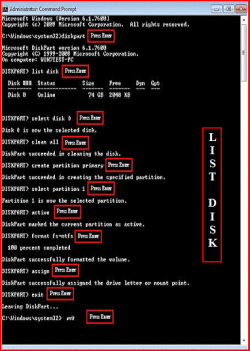
i got to the last step and typed 'active'

and it said'error, the specified partition is not a primary or logical volume

So i tried partition 2, becasue its got the same drive listed twice, for sum reason, but i got another error
'not valid for this operation'

here is my list of partitions on this disc
0 extended 172GB 8032kb
2 logical 172 GB 8064kb
1 primary 59GB 172GB

i tried 0 and 2

but no luck
 

My Computer

OS
windows 7 starter
So i tried partition 2, becasue its got the same drive listed twice, for sum reason, btu i got another error
'not valid for this operation'

here is my list of partitions on this disc
0 extended 172GB 8032kb
2 logical 172 GB 8064kb
1 primary 59GB 172GB

i tried 0 and 2

but no luck
I didn't quite get where you want Win7 to go, if you had it all work to your satisfaction?

Is that one primary partition where you want to get Win7 installed? Is it currently empty (you believe) because you formatted it?

Or is it to one of the two logical partitions inside of the extended partition?

Is there any more unallocated space on the drive, or is it totally allocated as you show above?

The extended partition (which holds the two logical partitions inside of it) is not relevant, and you can't just point to one of those two logical partitions as the target for the Win7 system partition, at least not without some true other primary partition on the drive which is currently marked as "active".

That's where Win7 normally wants to plant its own boot manager files... in a primary partition marked as "active", on the hard drive specified in the BIOS as "hard disk #1". In other words, on an install to a brand new empty drive there really normally would end up being TWO primary partitions involved, (1) "active" primary partition for the boot manager files, and (2) primary Win7 system partition.

So room needs to exist during an install for either (a) Win7 to create two primary partitions on its own, namely "system reserved" partition as "active" and also a Win7 system partition, or (b) you need to have one existing "active" primary partition and additional unallocated space for a second Win7 system partition to be created, or (c) you have an existing "active" primary partition and an existing logical/primary partition that's empty into which Win7 can be installed.

From the messages you describe, it would seem that the one primary partition you have on the drive is NOT marked as "active"... and there's likely no further unallocated space on the drive in which one can be created.

Is that one primary partition a data partition? Or is it where you want Win7 to go?

If that space currently used by what presumably is an empty primary partition is where you want Win7 to go, how about deleting that partition completely, leaving only the extended partition and the two logical partitions inside of it, which again is not relevant. The rest of the space on the drive (currently that one primary partition) would now be "unallocated", and there will be no partition on the drive that is either "active" or "primary". It should thus look like a brand new drive to the Win7 installer... or at least there should be free unallocated space in which Win7 can create what it wants, which is the creation of a "system reserved" partition to be marked "active", and then the Win7 system partition itself. Starting off as unallocated", this space would thus be divided into two primary partitions by the Win7 install process, and you'd get what you want I believe.

This is exactly how things would work if you started literally on a totally empty brand new drive, with no pre-existing partitions on it. But in your case, you've simply created sufficient empty unallocated space on this existing partially allocated drive, so that Win7 installer can create what it wants.

Now, if you run the Win7 installer it should ask you if you want to install to this unallocated space as one of your options, you say yes, and it creates (a) a small "system reserved" 100MB primary partition which is will mark as "active", and (b) Win7 system partition for the OS, also marked as a primary partition. I'd think if you didn't do any other partitioning during the install that just about the entire unallocated space (produced when you delete that primary partition) should be used for the Win7 C partition.

So, you'd end up with (1) 100MB "system reserved" (primary) partition, marked "active", (2) 172GB Win7 (primary) system partition, (3) extended partition (primary) with the two logical partitions sub-defined inside of it. I think this is what you want to end up with, yes?

Of course I'm still guessing that it is the primary partition space in your list where you really wanted Win7 to go. Yes? Or am I misinterpreting?


Assuming you have another working system somewhere you should download and burn the standalone boot CD ISO for Partition Wizard. You can then boot to it and delete that primary partition from the drive above on this machine, thus making it "unallocated" and now available for the Win7 installer.

You should also download and install the standard Partition Wizard program that runs under Win7 and WinXP, for future use in any partition work.

 

My Computer

Computer type
PC/Desktop
Computer Manufacturer/Model Number
Home-built, two systems (1) and (2)
OS
Windows 7 Pro x64 (1), Win7 Pro X64 (2)
CPU
i5-3350p 3.1Ghz/6MB-cache (1); E8400 3.0Ghz/6MB-cache (2)
Motherboard
ASUS P8Z77-V Pro (1); ASUS P5Q3 (2)
Memory
8GB PC3-12800 DDR3 (1); 4GB PC3-10600 DDR3 (2)
Graphics Card(s)
ATI HD7750 (1), (see TV cards); ATI R7 250 (2)
Sound Card
Realtek ALC892 HD Audio (1); Realtek ALC1200 HD Audio (2)
Monitor(s) Displays
Eizo HD2441W LCD, Eizo S2433W (1); Eizo 24" S2433W (2)
Screen Resolution
1920x1200, 1920x1200 (1); 1920x1200 (2)
Hard Drives
(1) 1TB SATA-II (7200RPM), 2x2TB SATA-III (7200RPM), 250GB SATA-III (10000RPM) for OS; 2x2TB external USB 3.0

(2) 320GB SATA-II (7200RPM), 750GB SATA-II (7200RPM), 150GB SATA-II (10000RPM) for OS; 2TB external USB 3.0
PSU
Nesteq ECS-6001 600W (1); Nesteq ECS-5001 500W (2)
Case
Acousti-Case 360 (1) and (2)
Cooling
Noctua NH-U12P SE2 for CPU, 2x120mm case fans (1) and (2)
Keyboard
IBM PS/2 (1) and (2)
Mouse
Logitech MX Revolution wireless (1); Microsoft wired (2)
Internet Speed
100mbps down / 10mbps up
Antivirus
Microsoft Security Essentials; Malwarebyte Anti-Malware Pro
Browser
Firefox
Other Info
Ceton InfiniTV 4-tuner cablecard-enabled TV card as well as Hauppauge HVR-2250 OTA/ATSC 2-tuner TV card in (1), running under Win7 WMC
jeez..#lol
thanks for the help
its to complicated for me

im trying to totally format the hard drive now
adn remove all partition
but i cant even bloody do that
if its totally empty, with no partitions
then windows 7 can install on it ok??

but i have it pluged into my netbook via usb external cradle..
and i cant work out how to delete all the partitions

please can sumoen help
computers make me sick
i just like them to work
im not a tweaker, and its not a hobby for me

thanks for all ure effort
 

My Computer

OS
windows 7 starter

jeez..#lol
thanks for the help
its to complicated for me

im trying to totally format the hard drive now
adn remove all partition
but i cant even bloody do that
if its totally empty, with no partitions
then windows 7 can install on it ok??

but i have it pluged into my netbook via usb external cradle..
and i cant work out how to delete all the partitions

please can sumoen help
computers make me sick
i just like them to work
im not a tweaker, and its not a hobby for me

thanks for all ure effort

The link above.
 

My Computer

OS
ME/XP/Vista/Win7
i just need to totally format this bugger,. AND delete the god damn partition
them im guesing windows 7 will install on it
ive NO idea why it has to be made so complicated

i thought window 7 was user friendly???

xp was simpler
'delete partiton, yes or no?'

i tried deleting it from inside my linux pc.. but it only does it as fat32..

and my windows 7 netbook can only look at the drive from an external cradle
 

My Computer

OS
windows 7 starter
If you read the tutorial you find Windows 7 is simpler.
 

My Computer

OS
ME/XP/Vista/Win7
wat r u u talking about??

ive tried following tutorials.. its not working

when i go to disk management, i try to delete the partition
but it wont let me extend the other patition to take over the one i dont want
'dynamic discs are not supported by this operating system'

can sumoen tell me how to just format my own hdd please?
windows wont let me
 

My Computer

OS
windows 7 starter
i'll try it in linux then..format it to fat32..
then try to change it to ntfs it on my windows 7 netbook ater that
 

My Computer

OS
windows 7 starter
ok that helped...
now i have 232gb (probly the max that a 250gb hd gives) of unallocated space

how to i make it active?
so i can install windows onto it
thanks
 

My Computer

OS
windows 7 starter
i dont need to do that now
linix formatted it for me

now all i want to do is make a fresh little [partition in it with windows 7
then install on the main partrition
if it works
but i cant even make a damn partition in windows 7
how to do it??
 

My Computer

OS
windows 7 starter
i cant do it that way
i have two drives.
one in my netbook
one external that im trying to format, and put a little partition in b4 i install windows on the main partition

but they are both the same size

so whenn i list disc, i get two hdd's both 232gb
ive no idea wat one to select to work with...
this just gets better and better...
 

My Computer

OS
windows 7 starter
ive stuk the hdd bak in my pc.. and will try to install windows 7 on it
hopefully i will get an option to make a partition while installing??
 

My Computer

OS
windows 7 starter
its ok.. i managed to shrink the volume
now ill try to install windows on the big partition
hope it works
 

My Computer

OS
windows 7 starter
Back
Top