Won't let me delete my old partition.

Aveyax

New member
Local time
2:55 PM
Messages
14
I'm not sure if this thread belongs here or not, but I'm having an issue that is driving me nuts.

I have 2 hard drives, a 200 gig 7200rpm and a 35 gig 10000rpm. The 200 gig is split into two partitions. 150 gig and 50 gig. Originally, I had the Vista Upgrade installed over XP on the 50 gig and all my media and junk on the 150 gig partition. A few choice programs were installed on the 10K.

I decided I wanted the Windows 7 Upgrade to be installed on the 10K from now on so that things move a bit faster, boot times and whatnot. So I did and now I have the 150 gig partition free and wiped, but the 50 gig partition with my old Vista won't wipe, format or delete whatsoever, and it won't let me boot from any of the discs so I can just delete and wipe everything and start over.

It feels like a jumbled mess and I just want to get it all right. How on earth can I delete, format or completely wipe my 50 gig partition so I can delete that partition and make it whole with the other 150 gigs and just have all of Windows installed on my 10K?

I tried changing my boot order in the bios and it just tells me to insert the system disc. It won't recognize it and let me delete the partitions manually. I am really aggravated about this and could really use the help.

Thank you.

-Avey
 

My Computer My Computer

At a glance

Windows 7 64-bitIntel Core 2 Quad CPU Q9300@ 2.81GHz4GB DDR2Geforce 9600 GT
Computer Manufacturer/Model Number
Custom
OS
Windows 7 64-bit
CPU
Intel Core 2 Quad CPU Q9300@ 2.81GHz
Motherboard
ASUS P5N-D
Memory
4GB DDR2
Graphics Card(s)
Geforce 9600 GT
Sound Card
Onboard
Monitor(s) Displays
Westinghouse 20.1
Screen Resolution
1400x1050
Hard Drives
200GB @ 7,200RPMs
35GB @ 10,000RPMs
PSU
750 Watt
Case
Ultra
Keyboard
G15
Mouse
G5
Internet Speed
Cable
Check in Disk Management, is the 50GB partition marked "Active'?

If it is, that's the partition with the Boot Manager. If you delete that partition you won't be able to boot anything.

Do you have the dual boot menu when you start the computer?

Is Win7 set as default OS?

If yes to the above two questions, follow this tutorial to remove Vista from the Boot Menu.

How to Delete a Listed Operating System at Boot in Windows 7

You should now be able to format or delete the 50GB partition.
 

My Computer My Computer

At a glance

Windows 7 Ult x64 - SP1/ Windows 8 Pro x64Intel Core i5-3570K 4.6GHz8GB (2X4GB) DDR3 1600 Corsair Vengeance CL8 1.5vSapphire HD 7770 Vapor-X OC 1GB DDR5
Computer type
PC/Desktop
Computer Manufacturer/Model Number
76~2.0
OS
Windows 7 Ult x64 - SP1/ Windows 8 Pro x64
CPU
Intel Core i5-3570K 4.6GHz
Motherboard
Gigabyte GA-Z77X UD3H, f18
Memory
8GB (2X4GB) DDR3 1600 Corsair Vengeance CL8 1.5v
Graphics Card(s)
Sapphire HD 7770 Vapor-X OC 1GB DDR5
Sound Card
Onboard VIA VT2021
Monitor(s) Displays
22" LCD Dell
Screen Resolution
1680x1050
Hard Drives
Samsung 840Pro 128GB SSD,
Seagate Barracuda 500GB SATA2 7200rpm 32MB cache, Seagate Barracuda 1TB SATA2 7200rpm 32MB cache,
PSU
Corsair HX650W
Case
Cooler Master Storm Scout
Cooling
Corsair H80 2x12cm Noctua NF P12 , 2x14cm case fans
Keyboard
Logitech Wave
Mouse
CM Sentinel
Internet Speed
Dismal
Antivirus
Avast
Browser
Opera Next
Other Info
Haswell laptop: HP Envy 17t-j, i7-4700MQ, GeForce 740M 2GB DDR3, 17.3" Full HD 1920x1080, 16GB RAM, Samsung 840 Pro 128GB, 1TB Hitachi 7200 HDD,
Desktop: eSATA ports,
External eSATA Seagate 500GB SATA2 7200rpm,
External WD USB 500GB
I do have the dual boot menu at start up, but how do I tell if Windows 7 is the default OS?
 

My Computer My Computer

At a glance

Windows 7 64-bitIntel Core 2 Quad CPU Q9300@ 2.81GHz4GB DDR2Geforce 9600 GT
Computer Manufacturer/Model Number
Custom
OS
Windows 7 64-bit
CPU
Intel Core 2 Quad CPU Q9300@ 2.81GHz
Motherboard
ASUS P5N-D
Memory
4GB DDR2
Graphics Card(s)
Geforce 9600 GT
Sound Card
Onboard
Monitor(s) Displays
Westinghouse 20.1
Screen Resolution
1400x1050
Hard Drives
200GB @ 7,200RPMs
35GB @ 10,000RPMs
PSU
750 Watt
Case
Ultra
Keyboard
G15
Mouse
G5
Internet Speed
Cable
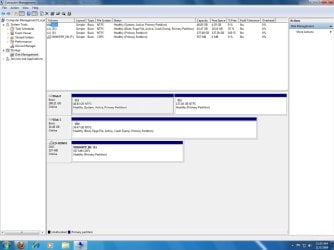
Post a screenshot of disk management. A few commands will probably sort this out for ya. We have to see that first, though.

Use Easybcd to edit the default OS.
 

My Computer My Computer

At a glance

7600.20510 x86P4 550 3.4 GHz HT running at 3.5 GHzOCZ 2 GB(2x1GB) DDR400mHz running @ 414 mHzHIS Radeon HD 3850 IceQ 3 Turbo HDMI Dual DL-...
Computer Manufacturer/Model Number
self built
OS
7600.20510 x86
CPU
P4 550 3.4 GHz HT running at 3.5 GHz
Motherboard
MSI PM8M3-V (MS-7211 v1.x) Micro-ATX mainboard
Memory
OCZ 2 GB(2x1GB) DDR400mHz running @ 414 mHz
Graphics Card(s)
HIS Radeon HD 3850 IceQ 3 Turbo HDMI Dual DL-DVI AGP
Sound Card
MOTU Traveler firewire studio interface 192 kHz 24 bit
Monitor(s) Displays
22" widescreen Acer X223W LCD, 17" Compaq P75 CRT
Screen Resolution
1680x1050 and 1280x1024
Hard Drives
SATA I x2 WD, 400 GB and 120 GB, SATA 2 WD Caviar Black 1 TB
PSU
350W generic
Case
Cybertronpc, it glows blue
Cooling
stock cpu fan, Ice-Q 3 gpu and system, many case fans
Keyboard
Logitch Classical Keyboard 200
Mouse
Logitech Mediaplay cordless
Internet Speed
1792/448 kbits/sec
Other Info
SATA II PCI fake RAID adapter, 1 GB Readyboost, original ATI Remote Wonder (even works with WMC perfectly), Logitech Rumblepad 2 game controller x2
Post a screenshot of disk management. A few commands will probably sort this out for ya. We have to see that first, though.

Use Easybcd to edit the default OS.
Disc Management.jpg
 

My Computer My Computer

At a glance

Windows 7 64-bitIntel Core 2 Quad CPU Q9300@ 2.81GHz4GB DDR2Geforce 9600 GT
Computer Manufacturer/Model Number
Custom
OS
Windows 7 64-bit
CPU
Intel Core 2 Quad CPU Q9300@ 2.81GHz
Motherboard
ASUS P5N-D
Memory
4GB DDR2
Graphics Card(s)
Geforce 9600 GT
Sound Card
Onboard
Monitor(s) Displays
Westinghouse 20.1
Screen Resolution
1400x1050
Hard Drives
200GB @ 7,200RPMs
35GB @ 10,000RPMs
PSU
750 Watt
Case
Ultra
Keyboard
G15
Mouse
G5
Internet Speed
Cable
Ok so I'm guessing you want to format D:?
 

My Computer My Computer

At a glance

7600.20510 x86P4 550 3.4 GHz HT running at 3.5 GHzOCZ 2 GB(2x1GB) DDR400mHz running @ 414 mHzHIS Radeon HD 3850 IceQ 3 Turbo HDMI Dual DL-...
Computer Manufacturer/Model Number
self built
OS
7600.20510 x86
CPU
P4 550 3.4 GHz HT running at 3.5 GHz
Motherboard
MSI PM8M3-V (MS-7211 v1.x) Micro-ATX mainboard
Memory
OCZ 2 GB(2x1GB) DDR400mHz running @ 414 mHz
Graphics Card(s)
HIS Radeon HD 3850 IceQ 3 Turbo HDMI Dual DL-DVI AGP
Sound Card
MOTU Traveler firewire studio interface 192 kHz 24 bit
Monitor(s) Displays
22" widescreen Acer X223W LCD, 17" Compaq P75 CRT
Screen Resolution
1680x1050 and 1280x1024
Hard Drives
SATA I x2 WD, 400 GB and 120 GB, SATA 2 WD Caviar Black 1 TB
PSU
350W generic
Case
Cybertronpc, it glows blue
Cooling
stock cpu fan, Ice-Q 3 gpu and system, many case fans
Keyboard
Logitch Classical Keyboard 200
Mouse
Logitech Mediaplay cordless
Internet Speed
1792/448 kbits/sec
Other Info
SATA II PCI fake RAID adapter, 1 GB Readyboost, original ATI Remote Wonder (even works with WMC perfectly), Logitech Rumblepad 2 game controller x2
D: is my 10K that Windows 7 is already on. It's been formatted. It's C: that won't format or delete. I want to free all of that up and make it apart of the other 150GBs.
 

My Computer My Computer

At a glance

Windows 7 64-bitIntel Core 2 Quad CPU Q9300@ 2.81GHz4GB DDR2Geforce 9600 GT
Computer Manufacturer/Model Number
Custom
OS
Windows 7 64-bit
CPU
Intel Core 2 Quad CPU Q9300@ 2.81GHz
Motherboard
ASUS P5N-D
Memory
4GB DDR2
Graphics Card(s)
Geforce 9600 GT
Sound Card
Onboard
Monitor(s) Displays
Westinghouse 20.1
Screen Resolution
1400x1050
Hard Drives
200GB @ 7,200RPMs
35GB @ 10,000RPMs
PSU
750 Watt
Case
Ultra
Keyboard
G15
Mouse
G5
Internet Speed
Cable
Yeah, I figured all that since C: is where I had Windows XP and Vista installed previously. The plan now is to have the entire 200GB drive free and clean completely and have everything Windows related on D:, the 10K. Was wondering what I need to do to make that happen.
 

My Computer My Computer

At a glance

Windows 7 64-bitIntel Core 2 Quad CPU Q9300@ 2.81GHz4GB DDR2Geforce 9600 GT
Computer Manufacturer/Model Number
Custom
OS
Windows 7 64-bit
CPU
Intel Core 2 Quad CPU Q9300@ 2.81GHz
Motherboard
ASUS P5N-D
Memory
4GB DDR2
Graphics Card(s)
Geforce 9600 GT
Sound Card
Onboard
Monitor(s) Displays
Westinghouse 20.1
Screen Resolution
1400x1050
Hard Drives
200GB @ 7,200RPMs
35GB @ 10,000RPMs
PSU
750 Watt
Case
Ultra
Keyboard
G15
Mouse
G5
Internet Speed
Cable
First make sure you can see hidden and protected files.

Copy bootmgr file from C: to D:
Copy boot folder from C: to D: ignoring the warning that it can't copy bcd or bcd.log. Tell it to skip them.

Then run this command from an elevated command prompt (you may copy from here and paste):

bcdedit /export D:\boot\bcd

If that went well (you can look at the folder in windows explorer to see bcd in there now), reboot into bios and make D: the default boot device.

Boot to Windows now and check that D shows as the system drive in disk management. If so, done. You may format C: or do whatever you like to it.
 

My Computer My Computer

At a glance

7600.20510 x86P4 550 3.4 GHz HT running at 3.5 GHzOCZ 2 GB(2x1GB) DDR400mHz running @ 414 mHzHIS Radeon HD 3850 IceQ 3 Turbo HDMI Dual DL-...
Computer Manufacturer/Model Number
self built
OS
7600.20510 x86
CPU
P4 550 3.4 GHz HT running at 3.5 GHz
Motherboard
MSI PM8M3-V (MS-7211 v1.x) Micro-ATX mainboard
Memory
OCZ 2 GB(2x1GB) DDR400mHz running @ 414 mHz
Graphics Card(s)
HIS Radeon HD 3850 IceQ 3 Turbo HDMI Dual DL-DVI AGP
Sound Card
MOTU Traveler firewire studio interface 192 kHz 24 bit
Monitor(s) Displays
22" widescreen Acer X223W LCD, 17" Compaq P75 CRT
Screen Resolution
1680x1050 and 1280x1024
Hard Drives
SATA I x2 WD, 400 GB and 120 GB, SATA 2 WD Caviar Black 1 TB
PSU
350W generic
Case
Cybertronpc, it glows blue
Cooling
stock cpu fan, Ice-Q 3 gpu and system, many case fans
Keyboard
Logitch Classical Keyboard 200
Mouse
Logitech Mediaplay cordless
Internet Speed
1792/448 kbits/sec
Other Info
SATA II PCI fake RAID adapter, 1 GB Readyboost, original ATI Remote Wonder (even works with WMC perfectly), Logitech Rumblepad 2 game controller x2
Where is the bootmgr file? Windows search brought up a lot of hits. Pull it from where in C: and put it where in D:?
 

My Computer My Computer

At a glance

Windows 7 64-bitIntel Core 2 Quad CPU Q9300@ 2.81GHz4GB DDR2Geforce 9600 GT
Computer Manufacturer/Model Number
Custom
OS
Windows 7 64-bit
CPU
Intel Core 2 Quad CPU Q9300@ 2.81GHz
Motherboard
ASUS P5N-D
Memory
4GB DDR2
Graphics Card(s)
Geforce 9600 GT
Sound Card
Onboard
Monitor(s) Displays
Westinghouse 20.1
Screen Resolution
1400x1050
Hard Drives
200GB @ 7,200RPMs
35GB @ 10,000RPMs
PSU
750 Watt
Case
Ultra
Keyboard
G15
Mouse
G5
Internet Speed
Cable

My Computer My Computer

At a glance

7600.20510 x86P4 550 3.4 GHz HT running at 3.5 GHzOCZ 2 GB(2x1GB) DDR400mHz running @ 414 mHzHIS Radeon HD 3850 IceQ 3 Turbo HDMI Dual DL-...
Computer Manufacturer/Model Number
self built
OS
7600.20510 x86
CPU
P4 550 3.4 GHz HT running at 3.5 GHz
Motherboard
MSI PM8M3-V (MS-7211 v1.x) Micro-ATX mainboard
Memory
OCZ 2 GB(2x1GB) DDR400mHz running @ 414 mHz
Graphics Card(s)
HIS Radeon HD 3850 IceQ 3 Turbo HDMI Dual DL-DVI AGP
Sound Card
MOTU Traveler firewire studio interface 192 kHz 24 bit
Monitor(s) Displays
22" widescreen Acer X223W LCD, 17" Compaq P75 CRT
Screen Resolution
1680x1050 and 1280x1024
Hard Drives
SATA I x2 WD, 400 GB and 120 GB, SATA 2 WD Caviar Black 1 TB
PSU
350W generic
Case
Cybertronpc, it glows blue
Cooling
stock cpu fan, Ice-Q 3 gpu and system, many case fans
Keyboard
Logitch Classical Keyboard 200
Mouse
Logitech Mediaplay cordless
Internet Speed
1792/448 kbits/sec
Other Info
SATA II PCI fake RAID adapter, 1 GB Readyboost, original ATI Remote Wonder (even works with WMC perfectly), Logitech Rumblepad 2 game controller x2
It just tells me "Destination Folder Access Denied" and that I need permission to perform this action when I try to paste the C: drive's bootmgr file to the D: drive's. If I'm doing it right, then cool. If not, then I'm not entirely clear on what it is you're saying. =\

And UAC is turned off completely.
 

My Computer My Computer

At a glance

Windows 7 64-bitIntel Core 2 Quad CPU Q9300@ 2.81GHz4GB DDR2Geforce 9600 GT
Computer Manufacturer/Model Number
Custom
OS
Windows 7 64-bit
CPU
Intel Core 2 Quad CPU Q9300@ 2.81GHz
Motherboard
ASUS P5N-D
Memory
4GB DDR2
Graphics Card(s)
Geforce 9600 GT
Sound Card
Onboard
Monitor(s) Displays
Westinghouse 20.1
Screen Resolution
1400x1050
Hard Drives
200GB @ 7,200RPMs
35GB @ 10,000RPMs
PSU
750 Watt
Case
Ultra
Keyboard
G15
Mouse
G5
Internet Speed
Cable

My Computer My Computer

At a glance

7600.20510 x86P4 550 3.4 GHz HT running at 3.5 GHzOCZ 2 GB(2x1GB) DDR400mHz running @ 414 mHzHIS Radeon HD 3850 IceQ 3 Turbo HDMI Dual DL-...
Computer Manufacturer/Model Number
self built
OS
7600.20510 x86
CPU
P4 550 3.4 GHz HT running at 3.5 GHz
Motherboard
MSI PM8M3-V (MS-7211 v1.x) Micro-ATX mainboard
Memory
OCZ 2 GB(2x1GB) DDR400mHz running @ 414 mHz
Graphics Card(s)
HIS Radeon HD 3850 IceQ 3 Turbo HDMI Dual DL-DVI AGP
Sound Card
MOTU Traveler firewire studio interface 192 kHz 24 bit
Monitor(s) Displays
22" widescreen Acer X223W LCD, 17" Compaq P75 CRT
Screen Resolution
1680x1050 and 1280x1024
Hard Drives
SATA I x2 WD, 400 GB and 120 GB, SATA 2 WD Caviar Black 1 TB
PSU
350W generic
Case
Cybertronpc, it glows blue
Cooling
stock cpu fan, Ice-Q 3 gpu and system, many case fans
Keyboard
Logitch Classical Keyboard 200
Mouse
Logitech Mediaplay cordless
Internet Speed
1792/448 kbits/sec
Other Info
SATA II PCI fake RAID adapter, 1 GB Readyboost, original ATI Remote Wonder (even works with WMC perfectly), Logitech Rumblepad 2 game controller x2
Ok, I took ownership of D:/windows/boot. Then I copied the file "bootmgr" from C:/windows/boot/PCAT and coiped to the same location on D:. The only thing it ever asked was if I wanted to Copy and Replace the file, which I did.

Things aren't happening as you've explained, so I'm wondering what I'm doing wrong. =\
 

My Computer My Computer

At a glance

Windows 7 64-bitIntel Core 2 Quad CPU Q9300@ 2.81GHz4GB DDR2Geforce 9600 GT
Computer Manufacturer/Model Number
Custom
OS
Windows 7 64-bit
CPU
Intel Core 2 Quad CPU Q9300@ 2.81GHz
Motherboard
ASUS P5N-D
Memory
4GB DDR2
Graphics Card(s)
Geforce 9600 GT
Sound Card
Onboard
Monitor(s) Displays
Westinghouse 20.1
Screen Resolution
1400x1050
Hard Drives
200GB @ 7,200RPMs
35GB @ 10,000RPMs
PSU
750 Watt
Case
Ultra
Keyboard
G15
Mouse
G5
Internet Speed
Cable
Alright, I think I got most everything fixed. I figured it out. When you told me that those files were in the root directories, I was confused because even with "Show Hidden Files and Folders" checked, I still couldn't see them. I had to dig around and find out that I needed to also check "Hide Protected Operating System Files". That did the trick. =) I got everything copied over, rebooted and changed the primary boot disk and upon restart it all worked beautifully.

From there, I deleted the 50GB partition and extended the 150GB back into the 50GB, essentially making them whole again, I think.

So, I think I've finally got it all taken care of. Thank you both so much for your time and help. I really appreciate it. Take care. =)
 

My Computer My Computer

At a glance

Windows 7 64-bitIntel Core 2 Quad CPU Q9300@ 2.81GHz4GB DDR2Geforce 9600 GT
Computer Manufacturer/Model Number
Custom
OS
Windows 7 64-bit
CPU
Intel Core 2 Quad CPU Q9300@ 2.81GHz
Motherboard
ASUS P5N-D
Memory
4GB DDR2
Graphics Card(s)
Geforce 9600 GT
Sound Card
Onboard
Monitor(s) Displays
Westinghouse 20.1
Screen Resolution
1400x1050
Hard Drives
200GB @ 7,200RPMs
35GB @ 10,000RPMs
PSU
750 Watt
Case
Ultra
Keyboard
G15
Mouse
G5
Internet Speed
Cable
You're welcome.
 

My Computer My Computer

At a glance

7600.20510 x86P4 550 3.4 GHz HT running at 3.5 GHzOCZ 2 GB(2x1GB) DDR400mHz running @ 414 mHzHIS Radeon HD 3850 IceQ 3 Turbo HDMI Dual DL-...
Computer Manufacturer/Model Number
self built
OS
7600.20510 x86
CPU
P4 550 3.4 GHz HT running at 3.5 GHz
Motherboard
MSI PM8M3-V (MS-7211 v1.x) Micro-ATX mainboard
Memory
OCZ 2 GB(2x1GB) DDR400mHz running @ 414 mHz
Graphics Card(s)
HIS Radeon HD 3850 IceQ 3 Turbo HDMI Dual DL-DVI AGP
Sound Card
MOTU Traveler firewire studio interface 192 kHz 24 bit
Monitor(s) Displays
22" widescreen Acer X223W LCD, 17" Compaq P75 CRT
Screen Resolution
1680x1050 and 1280x1024
Hard Drives
SATA I x2 WD, 400 GB and 120 GB, SATA 2 WD Caviar Black 1 TB
PSU
350W generic
Case
Cybertronpc, it glows blue
Cooling
stock cpu fan, Ice-Q 3 gpu and system, many case fans
Keyboard
Logitch Classical Keyboard 200
Mouse
Logitech Mediaplay cordless
Internet Speed
1792/448 kbits/sec
Other Info
SATA II PCI fake RAID adapter, 1 GB Readyboost, original ATI Remote Wonder (even works with WMC perfectly), Logitech Rumblepad 2 game controller x2
Your welcome.

Glad that you got it setup how you wanted it.

Great job torrentg, again as usual.
 

My Computer My Computer

At a glance

Windows 7 Ult x64 - SP1/ Windows 8 Pro x64Intel Core i5-3570K 4.6GHz8GB (2X4GB) DDR3 1600 Corsair Vengeance CL8 1.5vSapphire HD 7770 Vapor-X OC 1GB DDR5
Computer type
PC/Desktop
Computer Manufacturer/Model Number
76~2.0
OS
Windows 7 Ult x64 - SP1/ Windows 8 Pro x64
CPU
Intel Core i5-3570K 4.6GHz
Motherboard
Gigabyte GA-Z77X UD3H, f18
Memory
8GB (2X4GB) DDR3 1600 Corsair Vengeance CL8 1.5v
Graphics Card(s)
Sapphire HD 7770 Vapor-X OC 1GB DDR5
Sound Card
Onboard VIA VT2021
Monitor(s) Displays
22" LCD Dell
Screen Resolution
1680x1050
Hard Drives
Samsung 840Pro 128GB SSD,
Seagate Barracuda 500GB SATA2 7200rpm 32MB cache, Seagate Barracuda 1TB SATA2 7200rpm 32MB cache,
PSU
Corsair HX650W
Case
Cooler Master Storm Scout
Cooling
Corsair H80 2x12cm Noctua NF P12 , 2x14cm case fans
Keyboard
Logitech Wave
Mouse
CM Sentinel
Internet Speed
Dismal
Antivirus
Avast
Browser
Opera Next
Other Info
Haswell laptop: HP Envy 17t-j, i7-4700MQ, GeForce 740M 2GB DDR3, 17.3" Full HD 1920x1080, 16GB RAM, Samsung 840 Pro 128GB, 1TB Hitachi 7200 HDD,
Desktop: eSATA ports,
External eSATA Seagate 500GB SATA2 7200rpm,
External WD USB 500GB
Ahh, but it just keeps getting better, unfortunately. When I finally rebooted for the last time, it tells me Boot Disk Failure or something to that effect. I try manually boot from the D: drive that everything is supposed to be on, and it tells me that it is missing the /boot/bcd file and can not boot. It asks me to put in my Windows 7 disc, boot from that and go through the repair options. Problem is, I don't have a Windows 7 disc. Mine was legally downloaded and I did not make a back up disc before all of this mess.

I have downloaded a Windows 7 Repair .iso and even burned it into a bootable disc, and it still doesn't recognize it. I seriously have no clue to what to do now. I can access my BIOS and my bootable drive options, that's it.

Any ideas about this one? ;_;
 

My Computer My Computer

At a glance

Windows 7 64-bitIntel Core 2 Quad CPU Q9300@ 2.81GHz4GB DDR2Geforce 9600 GT
Computer Manufacturer/Model Number
Custom
OS
Windows 7 64-bit
CPU
Intel Core 2 Quad CPU Q9300@ 2.81GHz
Motherboard
ASUS P5N-D
Memory
4GB DDR2
Graphics Card(s)
Geforce 9600 GT
Sound Card
Onboard
Monitor(s) Displays
Westinghouse 20.1
Screen Resolution
1400x1050
Hard Drives
200GB @ 7,200RPMs
35GB @ 10,000RPMs
PSU
750 Watt
Case
Ultra
Keyboard
G15
Mouse
G5
Internet Speed
Cable
/bump
 

My Computer My Computer

At a glance

Windows 7 64-bitIntel Core 2 Quad CPU Q9300@ 2.81GHz4GB DDR2Geforce 9600 GT
Computer Manufacturer/Model Number
Custom
OS
Windows 7 64-bit
CPU
Intel Core 2 Quad CPU Q9300@ 2.81GHz
Motherboard
ASUS P5N-D
Memory
4GB DDR2
Graphics Card(s)
Geforce 9600 GT
Sound Card
Onboard
Monitor(s) Displays
Westinghouse 20.1
Screen Resolution
1400x1050
Hard Drives
200GB @ 7,200RPMs
35GB @ 10,000RPMs
PSU
750 Watt
Case
Ultra
Keyboard
G15
Mouse
G5
Internet Speed
Cable
You need to boot into that repair disk and run Startup Repair repeatedly. Check that your optical drive is set to boot first.

If not get to another computer and re download your ISO and burn it to disk so you can reinstall. If you have your key, you can reinstall using any Win7 installer borrowed from a friend, or the RTM if you can get ahold of that.
 
Back
Top