Won't play m4v's, everything else does.

Boise Jim

New member
Local time
10:11 PM
Messages
7
Recently upgraded to Windows 7 from XP for my HTPC I recently built. Only two reasons why I upgraded- hardware acceleration and WMC.
I copied my DVD library (to save all that storage space of DVD's) using Handbrake, and the only player that can't play the files is WMC. Boxee, XBMC, VLC and iTunes have no problems at all, with 5.1 sound.

I've installed the latest Windows codecs. I've used ffdshow, shark007, but still no luck.

I have a hard time believing that all other media players have no problems playing these files, but WMC can't.

Kudos to YAMMM, though- did a fantastic job with all the metadata!

If I didn't shave my head I'd be pulling my hair out!

Thanks,
Jim
 

My Computer

OS
Windows 7
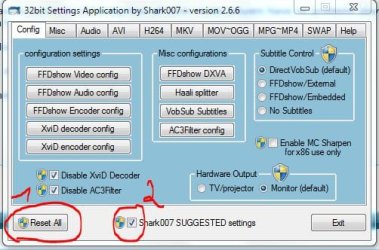
Did you (in the shark007 config tool) reset and use the suggested settings? (start it as Admin !!)


Capture.JPG
 

My Computer

Computer Manufacturer/Model Number
HP m8000n
OS
Windows 7 Ultimate x86
CPU
DualCore AMD Athlon 64 X2, 2600 MHz 5200+
Motherboard
Asus M2N68-LA (Narra)
Memory
Samsung 2GB DDR2
Graphics Card(s)
Onboard NVIDIA GeForce 6150SE nForce 430
Sound Card
Onboard nVIDIA nForce 6100-430 (MCP61P)
Monitor(s) Displays
Westinghouse 19" LED
Screen Resolution
1280x1024
Hard Drives
SATA II Seagate Barracuda 500GB
USB II WD Elements 500GB
USB II WD My Book 1TB
USB II WD My Book 2TB
PSU
Stock (HP)
Case
Stock (HP)
Cooling
Stock
Keyboard
Logitech Classic KB 200
Mouse
Standard HP opticle USB mouse
Well, sledge, ya' got video working for me, but no 5.1!
DVD's play in 5.1, but not the files.
Checked the same movie on boxee and XBMC, and they both have surround.
 

My Computer

OS
Windows 7
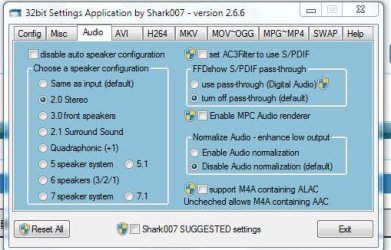
mmm did you check the Audio page? I believe shark suggested settings sets it to 2 speakers

Capture.JPG

-DG
 

My Computer

Computer Manufacturer/Model Number
HP m8000n
OS
Windows 7 Ultimate x86
CPU
DualCore AMD Athlon 64 X2, 2600 MHz 5200+
Motherboard
Asus M2N68-LA (Narra)
Memory
Samsung 2GB DDR2
Graphics Card(s)
Onboard NVIDIA GeForce 6150SE nForce 430
Sound Card
Onboard nVIDIA nForce 6100-430 (MCP61P)
Monitor(s) Displays
Westinghouse 19" LED
Screen Resolution
1280x1024
Hard Drives
SATA II Seagate Barracuda 500GB
USB II WD Elements 500GB
USB II WD My Book 1TB
USB II WD My Book 2TB
PSU
Stock (HP)
Case
Stock (HP)
Cooling
Stock
Keyboard
Logitech Classic KB 200
Mouse
Standard HP opticle USB mouse


for anolog users, the speaker configuration detects what a user has set up in Control Panel | Sound, and automatically sets the same on the Audio TAB's speaker configuration panel. So, if the speaker configuration is incorrectly displayed on the Audio TAB, it is also incorrect in Control Panel | Sound. Changing the speaker count in Control Panel | Sound, will automatically change what is displayed on the Audio TAB.

If you are connected to a receiver, in Control Panel | Sound, under your active digital device, you should set stereo for the speakers and NOT your actual speaker count such as 5.1 or 7.1 - After setting up the Control Panel you should select 'passthrough' on the Audio TAB which will automatically set 'Same as input' for the speaker configuration, which is the correct setting.
__________________________________________________________________

ALSO KNOW, The Audio TAB can be setup using 'Run as Administrator' which is a different user from simply openning the application without admin rights. Run as administrator, envokes a 'different user' as far as Windows is concerned. So set it up as an administrator AND as a regular user for FULL playback control. This instruction ONLY applies to the audio tab because on a system with several users, several audio configurations can co-exist within my application, such as an admin using headphones, and someone else setting digital audio.


The SUGGESTED settings have no effect on the Audio TAB.
 
Last edited:

My Computer

Computer Manufacturer/Model Number
Selfbuilt
OS
Windows 7 Ultimate 64bit
CPU
i7 2600k
Motherboard
asus P8Z68-V LE
Memory
16GB (4x4) corsair vengeance
Graphics Card(s)
Intel HD3000 iGPU / AMD HD6870 1024MB
Sound Card
bitstreamed to an Onkyo 609
Monitor(s) Displays
Asus VE278 27" LED / Bravia EX7 60" LED
Screen Resolution
native 1080p x2
Hard Drives
4x 2TB int. + 2x 2TB external and a SSD for the boot drive.
PSU
650w Antec
Case
NZXT tempest evo
Cooling
air/stock
Keyboard
Dell
Mouse
logitech m505
Internet Speed
dual: cable/blackberry tether for travel use
Other Info
BD re-writer //
asus notebook G73Jw
Hey Shark-
Thanks for that tutorial, but it didn't help. I followed your instructions to a T.
Should I uninstall the Windows 7 codec pack? Thinking there might be a conflict.
Thanks.
 

My Computer

OS
Windows 7
THIS POST on my forum may help you.

If that doesnt solve your issue, make a post on my forum with a URL to sample that is less than 40MB uploaded to mediafire.com. I'll test the sample personally.

On the Misc TAB is a dropbox for creating 40MB samples.
To use it, you must start the settings application without admin rights.
The created sample is placed in the source files directory.

Unless you installed FFDshow, Haali or AC3Filter on your own, there is no conflict.
 

My Computer

Computer Manufacturer/Model Number
Selfbuilt
OS
Windows 7 Ultimate 64bit
CPU
i7 2600k
Motherboard
asus P8Z68-V LE
Memory
16GB (4x4) corsair vengeance
Graphics Card(s)
Intel HD3000 iGPU / AMD HD6870 1024MB
Sound Card
bitstreamed to an Onkyo 609
Monitor(s) Displays
Asus VE278 27" LED / Bravia EX7 60" LED
Screen Resolution
native 1080p x2
Hard Drives
4x 2TB int. + 2x 2TB external and a SSD for the boot drive.
PSU
650w Antec
Case
NZXT tempest evo
Cooling
air/stock
Keyboard
Dell
Mouse
logitech m505
Internet Speed
dual: cable/blackberry tether for travel use
Other Info
BD re-writer //
asus notebook G73Jw
Thanks for all your help, Shark!
AC3filter was installed and was causing a conflict.
Uninstalled, and all is well!
Thanks again for your help.
 

My Computer

OS
Windows 7
Hats off to Shark 007. I have been following his instructions to the dot from the beginning. No other codec pack/s, No other helper program/s and no other media player/s and no problemo.

Incidentally, my 100th thanksgiving post. Glad that it goes to Shark007. :)
 

My Computer

Computer Manufacturer/Model Number
self-assembled
OS
Windows 7 Ultimate 32bit
CPU
AMD Phenom II X3 720 Processor
Motherboard
Gigabyte GA-MA78GM-S2H Revision 1.0
Memory
Transcend DDR2 (PC2 6400) 4 X 1GB
Graphics Card(s)
Integrated + ATI Radeon 4550
Sound Card
Integrated Realtek ALC 889A
Monitor(s) Displays
DELL 1704 FPT
Screen Resolution
1280 x 1024
Hard Drives
Western Digital Caviar SE16 250 GB x2 in RAID 0
PSU
Coolermaster 400 W
Case
Zebronics Cube
Cooling
stock
Keyboard
Microsoft - wired
Mouse
Microsoft - wired
Internet Speed
ADSL 256-512Kbps
Sharks codecs have been the best pack IMHO. :)

What small problems I have encountered in the past have either been something small on my end I overlooked, or a issue that was out of his hands. (IE, the codec build itself)
 

My Computer

Computer Manufacturer/Model Number
Custom (Self Build)
OS
Windows 7 Home Premium 64bit
CPU
Intel Core i7 2700k
Motherboard
eVGA P67 SLI
Memory
8GB Mushkin Redline Ridgebacks @1866
Graphics Card(s)
EVGA GTX570 SC
Sound Card
XiFi Titanium HD
Monitor(s) Displays
LG W2453V
Screen Resolution
1920x1080
Hard Drives
Intel 320 80GB -- Intel X25-V 40GB --WD Black 1TB x2 -- WD Blue 640GB
PSU
Seasonic x750
Case
Corsair 600T SE White
Cooling
eVGA Superclocked CPU Cooler
Keyboard
Saitek Cyborg
Antivirus
Kaspersky
Browser
IE
Other Info
LG BD/DVD
Back
Top