
I noticed about a week ago that my system won't go to sleep unless I force it to sleep using the using the Function and F1 buttons on the keyboard. I also noticed about the same time that I tried to set it to use the ribbon screen saver and that doesn't work either. The screen saver looks fine in preview but it won't start up on it's own.
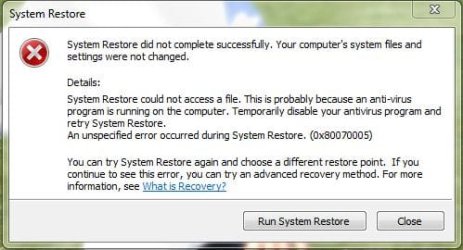
I tried working through the "Vista sleep problems" tutorial that was posted in a previous thread but none of that helped. I also tried doing a system restore several times and each time I get a window telling me that "system restore did not complete successfully becasue system restore couldn't access a file, probably due to anti-virus software. An unspecified error occured during system restore 0x80070005." I've tried disabling Norton Anti Virus and running system restore -- same result.
The rest of my system seems to be running fine and I really don't want to get into advanced recovery methods or doing a full restore of Windows if I don't have to. I don't know if this would matter but I did install a second internal HDD. It's not in any kind of RAID configuration or anything. I use it to capture/store video footage and I keep backup copies of several personal folders on it. I think sleep was working for a time after I installed the second drive.
Any advice to get sleep to function again? Thanks.
Thanks.
I tried working through the "Vista sleep problems" tutorial that was posted in a previous thread but none of that helped. I also tried doing a system restore several times and each time I get a window telling me that "system restore did not complete successfully becasue system restore couldn't access a file, probably due to anti-virus software. An unspecified error occured during system restore 0x80070005." I've tried disabling Norton Anti Virus and running system restore -- same result.
The rest of my system seems to be running fine and I really don't want to get into advanced recovery methods or doing a full restore of Windows if I don't have to. I don't know if this would matter but I did install a second internal HDD. It's not in any kind of RAID configuration or anything. I use it to capture/store video footage and I keep backup copies of several personal folders on it. I think sleep was working for a time after I installed the second drive.
Any advice to get sleep to function again? Thanks.
Thanks.
Attachments
My Computer
- Computer Manufacturer/Model Number
- Gateway DX4831-01e
- OS
- Windows 7 Home Premium; 64 bit
- CPU
- Intel Core I3-530; 2.93GHZ
- Memory
- 6GB DRR3; 1333MHz
- Graphics Card(s)
- NVIDIA GeForce 6600; 256MB
- Sound Card
- Realtek High Definition Audio
- Monitor(s) Displays
- Gateway FPD1975W
- Screen Resolution
- 1440 x 990 x 59 hertz
- Hard Drives
- Drive 0: Western Digitial WD10EADS-22M2B0; 1TB
Drive 1: Western Digital WD10EAVS-98M4B0; 1TB

