Word 2003 formatting question

Patti2

New member
Local time
6:55 PM
Messages
20
Location
Cornwall
I am writing a companion to a book I wrote several years ago.
I am still using Word 2003 and I am wanting the formatting, etc. to match the old book.

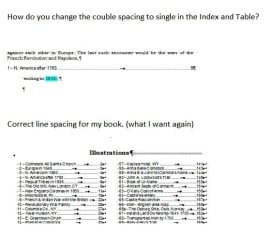
Unfortunately, I cannot remember how I did some of the pages i.e. List of Illustrations. See snip

As I inserted pictures in the book I inserted it as a reference using a caption and named the image and the page number was automatically listed – see snap.

Hoping someone has a better memory than mine and can help me out.
 

Attachments

  • Illustration numbered photo.JPG
    Illustration numbered photo.JPG
    51.7 KB · Views: 28
  • Illustrations list of..JPG
    Illustrations list of..JPG
    126.1 KB · Views: 2

My Computer

Computer type
PC/Desktop
Computer Manufacturer/Model Number
unknown
OS
Microsoft Windows 7 Ultimate 32-bit
CPU
AMD Athlon(tm) II X3 435 Processor
Motherboard
Gigabyte Technology Co., Ltd. GA-MA78LM-S2H
Memory
4.00 GB 2.75 GB
Graphics Card(s)
NVIDIA GeForce GT 220
Sound Card
(1) High Definition Audio Device (2) High Definition Audio
Hard Drives
External 931.51 GB
Fixed hard disk media, 3, 465.76 GB
Internet Speed
slow
Antivirus
avg free
Browser
internet explorer
My conclusion

From what I am seeing, You were using tab stops, centered text and image wrapped in line with text. Does that spark any memories? Or do you want me to explain in depth of what I am talking about?
 

My Computer

Computer type
PC/Desktop
Computer Manufacturer/Model Number
Custom Build
OS
Windows 7 Professional X64
CPU
AMD FX-6350 Six-Core Proccessor
Motherboard
Gigabyte GA-78LMT-USB3 rev 4.1
Memory
8 GB
Graphics Card(s)
AMD Radeon HD 6670
Sound Card
C-Media PCI Audio Device
Monitor(s) Displays
2
Screen Resolution
Primary: 1600 x 900 Secondary: 1440 x 900
Hard Drives
Western Digital 1TB Black WD1003FZEX
PSU
700W
Case
PowerSpec ???
Cooling
Fan with side panel off
Keyboard
Generic Wireless Keyboard
Mouse
Dell Wired Mouse
Internet Speed
20 Mbps
Antivirus
Spybot: Search and Destroy
Browser
Chrome
Other Info
+ Internal DVD/CD Drive ASUS
+ Rosewill Internal All-in-one Card reader
"You were using tab stops, centered text and image wrapped in line with text" I guess you are talking about the photo?
Sorry, I need more explanation. Don't know how I got the List with correct photo number and page number?
 

My Computer

Computer type
PC/Desktop
Computer Manufacturer/Model Number
unknown
OS
Microsoft Windows 7 Ultimate 32-bit
CPU
AMD Athlon(tm) II X3 435 Processor
Motherboard
Gigabyte Technology Co., Ltd. GA-MA78LM-S2H
Memory
4.00 GB 2.75 GB
Graphics Card(s)
NVIDIA GeForce GT 220
Sound Card
(1) High Definition Audio Device (2) High Definition Audio
Hard Drives
External 931.51 GB
Fixed hard disk media, 3, 465.76 GB
Internet Speed
slow
Antivirus
avg free
Browser
internet explorer
Oh okay, what I was referring mainly to the list of illustrations except for the text wrap thing.

In your list of illustrations, your title was Centered and with a big font (whichever you may have used)

As for the actual list, you used something called Tab Stops.Tab Stops is where instead of pressing space or tab so many times to get it aligned, you would click on the ruler that is on the top of the document where you would want to have your column and when you press tab, instead of going a set distance or space, it would automatically go line up to that tab stop. You can add as many tab stops as you wish just note that when you press tab it will just go to the next tab stop

As for getting page numbers, I don't know what you mean because can't you find the images itself and write what page number it was in and transfer it over to the list?
 
Last edited:

My Computer

Computer type
PC/Desktop
Computer Manufacturer/Model Number
Custom Build
OS
Windows 7 Professional X64
CPU
AMD FX-6350 Six-Core Proccessor
Motherboard
Gigabyte GA-78LMT-USB3 rev 4.1
Memory
8 GB
Graphics Card(s)
AMD Radeon HD 6670
Sound Card
C-Media PCI Audio Device
Monitor(s) Displays
2
Screen Resolution
Primary: 1600 x 900 Secondary: 1440 x 900
Hard Drives
Western Digital 1TB Black WD1003FZEX
PSU
700W
Case
PowerSpec ???
Cooling
Fan with side panel off
Keyboard
Generic Wireless Keyboard
Mouse
Dell Wired Mouse
Internet Speed
20 Mbps
Antivirus
Spybot: Search and Destroy
Browser
Chrome
Other Info
+ Internal DVD/CD Drive ASUS
+ Rosewill Internal All-in-one Card reader
How I would do it...
Text - blah, blah.

Enter Caption for next image and place using your desired method (tabs or Center, whatever).

Select caption and apply style:
Insert > Reference > Caption
Insert image.

Repeat for each caption and image in the document.
On your Table of Images page, insert Section break:
Insert > Break > Section break
Format section as two columns:
Format > Columns > [two]
Insert table of figures in first column:
Insert > Reference > Index and Tables > Table of Figures
At the end, reformat the number of rows for the columns to best fit the number of figure entries.

Regards,
GEWB
 

My Computer

Computer type
PC/Desktop
Computer Manufacturer/Model Number
(7 different computers booting up to 10 systems)
OS
Linux Mint / XP / Win7 Home, Pro, Ultimate / Win8.1 / Win10
Other Info
Four desktops, two laptops, one notebook and one tablet
I am attaching a completed page of my first book showing how I inserted the photo into the text using the Text Wrapping tool. Then inserted and named the caption.

To this point I have no Table of Images. If I follow your instruction I should start a new page>On your Table of Images page I have no Table of Images - just images inserted with a caption, insert Section break:
Insert > Break > Section break
Format section as two columns:
Format > Columns > [two]
Insert table of figures where do I get table of figures? in first column:
Insert > Reference > Index and Tables > Table of Figures


As you can see I am still confused. Perhaps I should read up and figure out how to make a Table of Figures? To input each caption and page no. seems very tedious.
 

Attachments

My Computer

Computer type
PC/Desktop
Computer Manufacturer/Model Number
unknown
OS
Microsoft Windows 7 Ultimate 32-bit
CPU
AMD Athlon(tm) II X3 435 Processor
Motherboard
Gigabyte Technology Co., Ltd. GA-MA78LM-S2H
Memory
4.00 GB 2.75 GB
Graphics Card(s)
NVIDIA GeForce GT 220
Sound Card
(1) High Definition Audio Device (2) High Definition Audio
Hard Drives
External 931.51 GB
Fixed hard disk media, 3, 465.76 GB
Internet Speed
slow
Antivirus
avg free
Browser
internet explorer
To this point I have no Table of Images. If I follow your instruction I should start a new page>On your Table of Images page I have no Table of Images - just images inserted with a caption,

My bad - looks like you call your page "Illustration" - I call it table of images.


Insert table of figures where do I get table of figures?

It generates from here:
Insert > Reference > Index and Tables > Table of Figures

I'll take a look at your doc today.

Regards,
GEWB
 

My Computer

Computer type
PC/Desktop
Computer Manufacturer/Model Number
(7 different computers booting up to 10 systems)
OS
Linux Mint / XP / Win7 Home, Pro, Ultimate / Win8.1 / Win10
Other Info
Four desktops, two laptops, one notebook and one tablet
You requested the forum try to reverse engineer how you created a document several years ago - based on the one page sample you provided, this is how you may have formatted your doc.

In the document at the desired line for a caption, on the Menu bar click:
Insert > References > Caption
Check Exclude label from caption.
Enter Caption text.
Click OK.
(You then used the space bar to position the caption.)
Repeat throughout document for each caption.
Create heading "Illustrations" in the document where you want the list of illustrations to be placed.
Insert a Section Break after "Illustrations".
Format section as two columns: Format > Columns > Two
Click OK.
Insert Table of Figures in the column:
Insert > Reference > Index and Tables...
Click Table of Figures tab.
Click Options button; Table of Figures Options window opens.
Check Style.
Click the Style drop list and select Caption.
Click OK.
Click OK.
The list of Illustrations is created.

Format the columns to fit the desired look for the list.

Regards,
GEWB
 

My Computer

Computer type
PC/Desktop
Computer Manufacturer/Model Number
(7 different computers booting up to 10 systems)
OS
Linux Mint / XP / Win7 Home, Pro, Ultimate / Win8.1 / Win10
Other Info
Four desktops, two laptops, one notebook and one tablet
Thanks, I've almost got it. I got the Table of Figures into an old copy of my book. However I had not numbered my photos but had used the Caption Style on the titles I gave them. They listed according to the name so I see I can have a list by name not necessarily by number.

I tried to go into the book and renumber some of the images but that does not seem to work. I see no way to renumber, is it possible? Also I don't see where you can adjust the formatting. And finally it appears you have to have all your images in the document before you press the Insert Tables?
 

Attachments

  • ILLUSTRATIONS 2.JPG
    ILLUSTRATIONS 2.JPG
    39.9 KB · Views: 5

My Computer

Computer type
PC/Desktop
Computer Manufacturer/Model Number
unknown
OS
Microsoft Windows 7 Ultimate 32-bit
CPU
AMD Athlon(tm) II X3 435 Processor
Motherboard
Gigabyte Technology Co., Ltd. GA-MA78LM-S2H
Memory
4.00 GB 2.75 GB
Graphics Card(s)
NVIDIA GeForce GT 220
Sound Card
(1) High Definition Audio Device (2) High Definition Audio
Hard Drives
External 931.51 GB
Fixed hard disk media, 3, 465.76 GB
Internet Speed
slow
Antivirus
avg free
Browser
internet explorer
Back
Top