Word 2007 Can't open encrypted docx from Word 2010

Chris Nicola

New member
Power User
VIP
Local time
4:39 AM
Messages
170
When I send some friends a password protected word document created in Word 2010 they can't open it using word 2007 which is compatible with docx by using the correct password. I have no choice but to send as a Word doc instead of docx so they can open it.

Word 2007 User 1: Word launches no password box no error messages just the blue screen.

Word 2007 User 2: Gets the error message: “Word cannot open this file . The encryption type used is not available. Contact the author of the file. More encryption types are available in the High Encryption Pack.”

Therefore I suspect some kind of encryption pack must be installed. I believe the user 1 has XP and user 2 has Win 2000 pro. are using XP. Do you know where these encryption packs are available? The other possibility might be for me to reduce the encription level when I create a password protected docx but I have no idea how to do that.

Is there a solution to this problem?


Kind Regards

Chris


Kind Regards
Chris
 

My Computer My Computer

At a glance

Desktop Win 10 Pro 64 bit, Laptop Win 7 Home ...Desktop Intel i7 4790 CPU 3.6 GHz, Laptop AMD...Desktop 16 Gbt, Laptop 4 GbtDesktop nvidea GeForce NTX960, Laptop AMD Rae...
Computer type
PC/Desktop
Computer Manufacturer/Model Number
Desktop Custom built, Laptop Lenovo G575 Model 20081
OS
Desktop Win 10 Pro 64 bit, Laptop Win 7 Home 64 bit
CPU
Desktop Intel i7 4790 CPU 3.6 GHz, Laptop AMD C-50 1GHz
Motherboard
ASUS H81 Gamer
Memory
Desktop 16 Gbt, Laptop 4 Gbt
Graphics Card(s)
Desktop nvidea GeForce NTX960, Laptop AMD Raedon HD 6250M
Sound Card
Desktop onboard Realtec high definition audio nvidea HD aud
Monitor(s) Displays
BENQ G900 Digital 19 inch
Screen Resolution
1024 x 768
Hard Drives
Silicon Power SSD SATA 3.0 450b Gbt
Seagate 4 Tbt SSHD
PSU
Thermaltake 1000W
Case
Thermaltake
Cooling
Onboard case fans
Keyboard
Standard PS/2
Mouse
A4 Tech optical wireless PS/2
Internet Speed
10 Mbps
Antivirus
Microsoft Security Essentials
Other Info
DVD Samsung TSST corp CDDVDW - SATA
Hi Chris,

I've been looking at this for a while, but cannot find an answer.

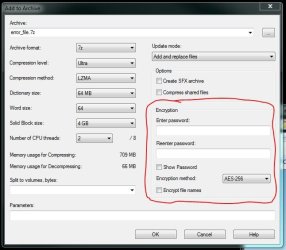
The only thing I can come up with, is an alternate suggestion, which I am sure you have probably thought of : use something like 7ZIP to encrypt the file, and then send that to your friends.

7ZIP

Regards,
Golden
 

Attachments

  • Capture.JPG
    Capture.JPG
    48.2 KB · Views: 195

My Computer My Computer

At a glance

Windows 10 Pro x64 ; Xubuntu x64Intel i7 860 @ 2.80 GHz O/C'ed to 4.0GHz16GB Corsair Vengance DDR3 @ 661 MHz Dual Cha...EVGA NVidia GTX 560 1024MB
Computer type
PC/Desktop
Computer Manufacturer/Model Number
Golden Mk. I.4
OS
Windows 10 Pro x64 ; Xubuntu x64
CPU
Intel i7 860 @ 2.80 GHz O/C'ed to 4.0GHz
Motherboard
Gigabyte P55A-UD3R Rev.1. Award BIOS F13
Memory
16GB Corsair Vengance DDR3 @ 661 MHz Dual Channel (9-9-9-24)
Graphics Card(s)
EVGA NVidia GTX 560 1024MB
Sound Card
Realtek Integrated
Monitor(s) Displays
Dual Samsung SyncMaster 2494HS
Screen Resolution
1920*1080 and 1920*1080
Hard Drives
1*Samsung 840 EVO 120GB SSD;
1*OCZ Vertex 2 60GB SSD;
2*Samsung F3 SpinPoint 1TB in RAID0;
1*Samsung F1 SpinPoint 1TB;
2*Western Digital 1TB External USB 3.0
1*Western Digital 500GB External USB 3.0
1*Seagate 500GB External USB 2.0
PSU
Thermaltake ToughPower QFan 750W
Case
Thermaltake Element S VK60001W2Z
Cooling
Corsair H60 Water Cooling, 2*230mm and 2*80mm case fans
Keyboard
Logitech G110
Mouse
Logitech MX518
Golden, thank you for your reply. Yes as you mention it would be a good idea to send the file as an encrypted zip file. If it is sent as an encrypted doc instead of docx they can also open it. It just seems strange that as both Word 2007 and 2010 can handle docx files why encryption compatibility should be a problem. I also posted this question on the Microsoft Answers forum but did not find a solution. I was hoping that the Word 2007 users might need some kind of update to solve the problem.

Word 2007 Can't open password protected docx from Word 2010 - Microsoft Answers

Kind Regards
Chris
 

My Computer My Computer

At a glance

Desktop Win 10 Pro 64 bit, Laptop Win 7 Home ...Desktop Intel i7 4790 CPU 3.6 GHz, Laptop AMD...Desktop 16 Gbt, Laptop 4 GbtDesktop nvidea GeForce NTX960, Laptop AMD Rae...
Computer type
PC/Desktop
Computer Manufacturer/Model Number
Desktop Custom built, Laptop Lenovo G575 Model 20081
OS
Desktop Win 10 Pro 64 bit, Laptop Win 7 Home 64 bit
CPU
Desktop Intel i7 4790 CPU 3.6 GHz, Laptop AMD C-50 1GHz
Motherboard
ASUS H81 Gamer
Memory
Desktop 16 Gbt, Laptop 4 Gbt
Graphics Card(s)
Desktop nvidea GeForce NTX960, Laptop AMD Raedon HD 6250M
Sound Card
Desktop onboard Realtec high definition audio nvidea HD aud
Monitor(s) Displays
BENQ G900 Digital 19 inch
Screen Resolution
1024 x 768
Hard Drives
Silicon Power SSD SATA 3.0 450b Gbt
Seagate 4 Tbt SSHD
PSU
Thermaltake 1000W
Case
Thermaltake
Cooling
Onboard case fans
Keyboard
Standard PS/2
Mouse
A4 Tech optical wireless PS/2
Internet Speed
10 Mbps
Antivirus
Microsoft Security Essentials
Other Info
DVD Samsung TSST corp CDDVDW - SATA
Mmmm. Just read the MS Answers thread....it does sound like a common issue. Perhaps 2007 isn't as compatible with 2010 as we might have hoped. In the meantime, there is always 7ZIP........

Regards,
Golden
 

My Computer My Computer

At a glance

Windows 10 Pro x64 ; Xubuntu x64Intel i7 860 @ 2.80 GHz O/C'ed to 4.0GHz16GB Corsair Vengance DDR3 @ 661 MHz Dual Cha...EVGA NVidia GTX 560 1024MB
Computer type
PC/Desktop
Computer Manufacturer/Model Number
Golden Mk. I.4
OS
Windows 10 Pro x64 ; Xubuntu x64
CPU
Intel i7 860 @ 2.80 GHz O/C'ed to 4.0GHz
Motherboard
Gigabyte P55A-UD3R Rev.1. Award BIOS F13
Memory
16GB Corsair Vengance DDR3 @ 661 MHz Dual Channel (9-9-9-24)
Graphics Card(s)
EVGA NVidia GTX 560 1024MB
Sound Card
Realtek Integrated
Monitor(s) Displays
Dual Samsung SyncMaster 2494HS
Screen Resolution
1920*1080 and 1920*1080
Hard Drives
1*Samsung 840 EVO 120GB SSD;
1*OCZ Vertex 2 60GB SSD;
2*Samsung F3 SpinPoint 1TB in RAID0;
1*Samsung F1 SpinPoint 1TB;
2*Western Digital 1TB External USB 3.0
1*Western Digital 500GB External USB 3.0
1*Seagate 500GB External USB 2.0
PSU
Thermaltake ToughPower QFan 750W
Case
Thermaltake Element S VK60001W2Z
Cooling
Corsair H60 Water Cooling, 2*230mm and 2*80mm case fans
Keyboard
Logitech G110
Mouse
Logitech MX518
Hi Chris :)

May be of no use at all, but here is a step by step guide to Word 2010 file encryption:
Add Security to Your Important Documents in Office 2010 - How-To Geek

.... just in case there is a small step which you are missing - I wondered about 'permissions'.

Encrypt Your Documents
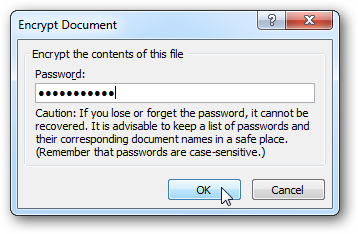
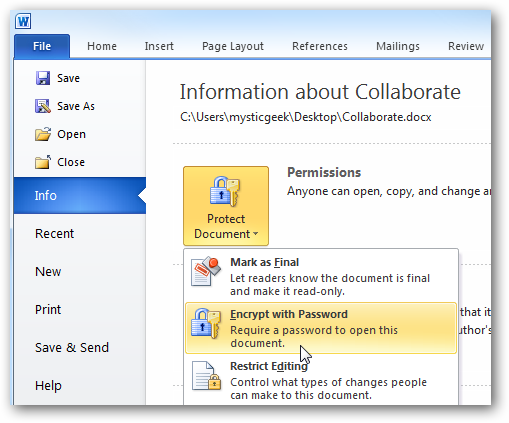
How to encrypt a Word document with a password. Click on the file tab to access Backstage View, click on Info, Protect Document, and select Encrypt with Password.
sshot20100713025754.png

Enter in a password to encrypt the document…
sshot20100713025909.png

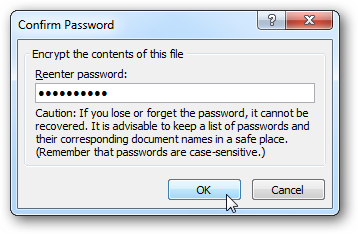
Then confirm the password making sure they match then click OK.
sshot20100713025935.png

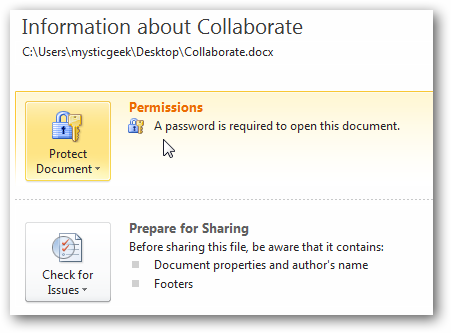
After the encryption password has been entered, you’ll see a Permissions message that a password is required to open the document.
sshot20100713030028.png

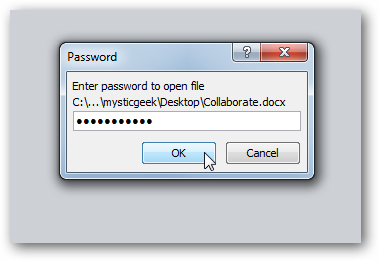
Now when you or someone else tries to open the document, the correct password will need to be entered to access it.
sshot20100713030136.png

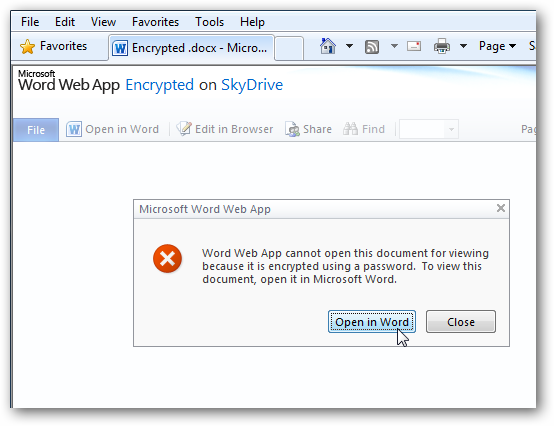
Also, encrypted documents cannot be opened in Web Apps. They will need to be opened in a local version of Word and the correct password entered in.
sshot20100713204933.png
 

My Computer My Computer

At a glance

Windows 7 Home Premium 64bitIntel(R) Core(TM) i3-2120 CPU @ 3.30GHz3.00 GB(1) Intel(R) HD Graphics (2) VNC Mirror Driver
Computer type
PC/Desktop
Computer Manufacturer/Model Number
Packard Bell
OS
Windows 7 Home Premium 64bit
CPU
Intel(R) Core(TM) i3-2120 CPU @ 3.30GHz
Motherboard
Packard Bell IPISB-AG
Memory
3.00 GB
Graphics Card(s)
(1) Intel(R) HD Graphics (2) VNC Mirror Driver
Sound Card
Realtek High Definition Audio
Monitor(s) Displays
AIO LCD
Screen Resolution
1920 x 1080
Hard Drives
WDC WD10EADX-22TDHB0 ATA Device
Fixed hard disk media
4 partitions
931.51 GB
Keyboard
Wireless
Mouse
Wireless
Antivirus
Microsoft Security Essentials
Browser
IE; Firefox
Other Info
Also:
Samsung N220 Plus Netbook - Windows 7 Home
HP laptop
iPad 5
Solution for Office 2007 to open Office 2010 password encrypted files

Just in case someone still finds this old post, as I did looking for a solution, I found that installing the 290 MB Office Service Pack 2, from Download: The 2007 Microsoft Office Suite Service Pack 2 (SP2) - Microsoft Download Center - Download Details enables Office 2007 to open files saved with encrypted passwords from Office 2010. I had this problem after my Office 2010 30 day trial ran out and I reverted back to Office 2007 and it hadn't had enough time to automatically find the SP2 update. Thanks.
 

My Computer My Computer

At a glance

WinXP Pro 32
OS
WinXP Pro 32
Back
Top