
You are using an out of date browser. It may not display this or other websites correctly.
You should upgrade or use an alternative browser.
You should upgrade or use an alternative browser.
Word 2007 Date format issues
- Thread starter slee85
- Start date

- Local time
- 9:12 PM
- Messages
- 119
Not sure what you're saying when you press date and time on the insert menu it doesn't insert the format you choose?
alt, shift, d will give you the 11/30/2010 format
alt, shift, d will give you the 11/30/2010 format
My Computer
- Computer type
- PC/Desktop
- Computer Manufacturer/Model Number
- Dell Vostro 3558 (Laptop)
- OS
- Windows 7 Professional 64bit
- Motherboard
- Dell
- Memory
- 8GB
- Graphics Card(s)
- Intel HD Graphics, NVIDIA GeForce
- Screen Resolution
- 1366 x 768
- Antivirus
- Avira Free, MalwareBytes AntiMalware Pro
- Browser
- Chrome

That will be a problem with auto correct. Can you open your autocorrect settings under the proofing tab of word options and see if 2010 is automatically changed to that for some reason?
My Computer
- Computer Manufacturer/Model Number
- Pugh Technologies
- OS
- W7 Professional x64
- CPU
- AMD Athlon II X3 445 Rana 3.10 GHz
- Motherboard
- MSI 870A-G54
- Memory
- PNY XLR DDR3 1600 4x2GB
- Graphics Card(s)
- NVIDIA GeForce GTS 450 (fermi) 1GB GDDR5
- Sound Card
- Realtek ALC892 onboard
- Monitor(s) Displays
- ASUS VE205t, Viewsonic VX2035WM
- Screen Resolution
- 1600x900, 1600x1050
- Hard Drives
- 977GB Hitachi Hitachi HDS721010CLA332
244GB Western Digital WDC WD2500AAJS-65B4A0
488GB Western Digital WDC WD5000AAJS-00A8B0
488GB Western Digital WDC WD5000AAKS-00UU3A0
- PSU
- Antec EarthWatts EA650 650W
- Case
- ThermalTake Armor A90 Mid Tower
- Cooling
- 3x 120mm in, 1x 120mm & 200mm out, self built hydro-cooler
- Keyboard
- Logitec 55
- Mouse
- Razer Deathadder
- Internet Speed
- 20 Mbps D/L, 9 Mbps U/L

mikedl
New member
- Local time
- 10:12 PM
- Messages
- 1,342
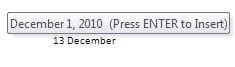
It doesn't appear "2010" is the culprit. It's the formatting of "December". Note:
After "December":

After "2010" - no prompt:
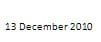
With today being "December 1, 2010", that's the prompt you'll get.
Tomorrow, when you type "December" you'll get the prompt for "December 2, 2010".
The specific date format presented in the prompt has to do with your local settings in Windows itself.
More info here...
After "December":
After "2010" - no prompt:
With today being "December 1, 2010", that's the prompt you'll get.
Tomorrow, when you type "December" you'll get the prompt for "December 2, 2010".
The specific date format presented in the prompt has to do with your local settings in Windows itself.
Changing the default country/region in Windows changes the default format for numbers, currencies, time, and dates to those usually used for that country/region. For example, if you want to change your default measuring units from centimeters to inches, or display a date as 2009/10/31 instead of 10/31/2009, select the country/region where you are located and the standard measurement systems used in that location are applied to your computer.
More info here...
My Computer
- Computer Manufacturer/Model Number
- Toshiba L355D
- OS
- Windows 7 Ultimate x64 SP1
- CPU
- Core2 Duo
- Motherboard
- Intel
- Memory
- 4 GB
- Graphics Card(s)
- GM965 on-board
- Sound Card
- RealTek on-board
- Monitor(s) Displays
- 19"+17"(laptop)
- Screen Resolution
- 1440x900 (x 2)
- Hard Drives
- 500GB Ext. 200GB Internal
- PSU
- N/A
- Case
- N/A
- Cooling
- N/A
Hmm... On a hunch, try under "Insert" tab, to insert date and time, then select "Default", then select "OK"
My Computer
- Computer Manufacturer/Model Number
- Pugh Technologies
- OS
- W7 Professional x64
- CPU
- AMD Athlon II X3 445 Rana 3.10 GHz
- Motherboard
- MSI 870A-G54
- Memory
- PNY XLR DDR3 1600 4x2GB
- Graphics Card(s)
- NVIDIA GeForce GTS 450 (fermi) 1GB GDDR5
- Sound Card
- Realtek ALC892 onboard
- Monitor(s) Displays
- ASUS VE205t, Viewsonic VX2035WM
- Screen Resolution
- 1600x900, 1600x1050
- Hard Drives
- 977GB Hitachi Hitachi HDS721010CLA332
244GB Western Digital WDC WD2500AAJS-65B4A0
488GB Western Digital WDC WD5000AAJS-00A8B0
488GB Western Digital WDC WD5000AAKS-00UU3A0
- PSU
- Antec EarthWatts EA650 650W
- Case
- ThermalTake Armor A90 Mid Tower
- Cooling
- 3x 120mm in, 1x 120mm & 200mm out, self built hydro-cooler
- Keyboard
- Logitec 55
- Mouse
- Razer Deathadder
- Internet Speed
- 20 Mbps D/L, 9 Mbps U/L
mikedl
New member
- Local time
- 10:12 PM
- Messages
- 1,342
Great advice, LiquidSnak! A perfect way to override local settings.Hmm... On a hunch, try under "Insert" tab, to insert date and time, then select "Default", then select "OK"

Clip from Word 2010 (2007 should be similar):
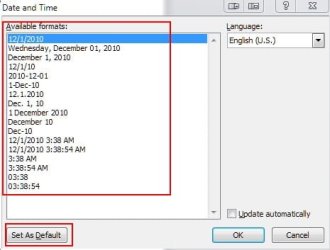
Edit: changing the "default" via the insert dialog doesn't change the auto prompt. Changing that will have to be done via the Windows settings as described, and linked to, in my post above.
My Computer
- Computer Manufacturer/Model Number
- Toshiba L355D
- OS
- Windows 7 Ultimate x64 SP1
- CPU
- Core2 Duo
- Motherboard
- Intel
- Memory
- 4 GB
- Graphics Card(s)
- GM965 on-board
- Sound Card
- RealTek on-board
- Monitor(s) Displays
- 19"+17"(laptop)
- Screen Resolution
- 1440x900 (x 2)
- Hard Drives
- 500GB Ext. 200GB Internal
- PSU
- N/A
- Case
- N/A
- Cooling
- N/A
Thanks for posting back with a solution 
My Computer
- Computer Manufacturer/Model Number
- Pugh Technologies
- OS
- W7 Professional x64
- CPU
- AMD Athlon II X3 445 Rana 3.10 GHz
- Motherboard
- MSI 870A-G54
- Memory
- PNY XLR DDR3 1600 4x2GB
- Graphics Card(s)
- NVIDIA GeForce GTS 450 (fermi) 1GB GDDR5
- Sound Card
- Realtek ALC892 onboard
- Monitor(s) Displays
- ASUS VE205t, Viewsonic VX2035WM
- Screen Resolution
- 1600x900, 1600x1050
- Hard Drives
- 977GB Hitachi Hitachi HDS721010CLA332
244GB Western Digital WDC WD2500AAJS-65B4A0
488GB Western Digital WDC WD5000AAJS-00A8B0
488GB Western Digital WDC WD5000AAKS-00UU3A0
- PSU
- Antec EarthWatts EA650 650W
- Case
- ThermalTake Armor A90 Mid Tower
- Cooling
- 3x 120mm in, 1x 120mm & 200mm out, self built hydro-cooler
- Keyboard
- Logitec 55
- Mouse
- Razer Deathadder
- Internet Speed
- 20 Mbps D/L, 9 Mbps U/L
mikedl
New member
- Local time
- 10:12 PM
- Messages
- 1,342
I guess I never realized the "solution" wanted was to just get rid of the prompt. My bad. I like 'em. I use 'em all the time.Thanks for posting back with a solution
My Computer
- Computer Manufacturer/Model Number
- Toshiba L355D
- OS
- Windows 7 Ultimate x64 SP1
- CPU
- Core2 Duo
- Motherboard
- Intel
- Memory
- 4 GB
- Graphics Card(s)
- GM965 on-board
- Sound Card
- RealTek on-board
- Monitor(s) Displays
- 19"+17"(laptop)
- Screen Resolution
- 1440x900 (x 2)
- Hard Drives
- 500GB Ext. 200GB Internal
- PSU
- N/A
- Case
- N/A
- Cooling
- N/A
I coudn't figure out how to get them, so I reversed that process and now I have them lol.
My Computer
- Computer Manufacturer/Model Number
- Pugh Technologies
- OS
- W7 Professional x64
- CPU
- AMD Athlon II X3 445 Rana 3.10 GHz
- Motherboard
- MSI 870A-G54
- Memory
- PNY XLR DDR3 1600 4x2GB
- Graphics Card(s)
- NVIDIA GeForce GTS 450 (fermi) 1GB GDDR5
- Sound Card
- Realtek ALC892 onboard
- Monitor(s) Displays
- ASUS VE205t, Viewsonic VX2035WM
- Screen Resolution
- 1600x900, 1600x1050
- Hard Drives
- 977GB Hitachi Hitachi HDS721010CLA332
244GB Western Digital WDC WD2500AAJS-65B4A0
488GB Western Digital WDC WD5000AAJS-00A8B0
488GB Western Digital WDC WD5000AAKS-00UU3A0
- PSU
- Antec EarthWatts EA650 650W
- Case
- ThermalTake Armor A90 Mid Tower
- Cooling
- 3x 120mm in, 1x 120mm & 200mm out, self built hydro-cooler
- Keyboard
- Logitec 55
- Mouse
- Razer Deathadder
- Internet Speed
- 20 Mbps D/L, 9 Mbps U/L
mikedl
New member
- Local time
- 10:12 PM
- Messages
- 1,342
I coudn't figure out how to get them, so I reversed that process and now I have them lol.
Your a gem, truly, LiquidSnak!My Computer
- Computer Manufacturer/Model Number
- Toshiba L355D
- OS
- Windows 7 Ultimate x64 SP1
- CPU
- Core2 Duo
- Motherboard
- Intel
- Memory
- 4 GB
- Graphics Card(s)
- GM965 on-board
- Sound Card
- RealTek on-board
- Monitor(s) Displays
- 19"+17"(laptop)
- Screen Resolution
- 1440x900 (x 2)
- Hard Drives
- 500GB Ext. 200GB Internal
- PSU
- N/A
- Case
- N/A
- Cooling
- N/A