Solved Word 2007 default margins

Herm61

New member
Member
VIP
Local time
5:24 PM
Messages
199
Location
virginia beach
Is there a way to set margins in the normal teplte? My margins changed unexpectly
 

My Computer

Computer Manufacturer/Model Number
HP Pavilion p7xt series)
OS
Windows 7 Home Premium (x64) Service Pack 1
CPU
3.30 gigahertz Intel Core i3-2120
Motherboard
PEGATRON CORPORATION 2AC2 2.00
Memory
128 kilobyte primary memory cache
Graphics Card(s)
enbedded Intel(R) HD Graphics
Sound Card
Realtek High Definition Audio
Monitor(s) Displays
DELL E193FP [Monitor] (19.1"vis
Hard Drives
6052 Megabytes Usable Installed Memory
PSU
?
Case
desktop
Cooling
?
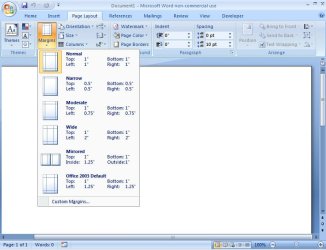
Look at the Page Layout tab. Then margins under that.
 

Attachments

  • Untitled-1.jpg
    Untitled-1.jpg
    72 KB · Views: 13

My Computer

Computer type
PC/Desktop
Computer Manufacturer/Model Number
Ignatz Special; 4 speed manual gearbox; factory air conditioning; one of one
OS
Windows 7 Home Premium SP1, 64-bit
CPU
Intel Skylake i5-6600K, not overclocked
Motherboard
AsRock Z170M Extreme 4, micro ATX
Memory
8 GB HyperX DDR4-2666 (2 x 4 GB)
Graphics Card(s)
none; graphics are integrated on CPU
Sound Card
onboard: Realtek ALC1150; external: USB Behringer UF0-202
Monitor(s) Displays
Dell S2340M 23 inch IPS
Screen Resolution
1600 x 900
Hard Drives
System: Crucial MX100 series SSD, 128 GB;
Data: Samsung Spinpoint 103SJ, 1 TB;
Backup: WD Caviar Green WD30EZRX-00D8PB0, 3 TB
PSU
Rosewill SilentNight 500 watt fanless, semi-modular
Case
Antec Solo II
Cooling
Noctua NH-U12S; Noctua F12 intake, Noctua S12A exhaust
Keyboard
Microsoft 200 6JH-00001 USB
Mouse
Dell or Microsoft optical wired; USB
Antivirus
Microsoft Security Essentials and Malwarebytes Premium
Browser
Pale Moon
Other Info
All fans PWM; speeds at idle: CPU circa 500 rpm; intake circa 600 rpm; exhaust circa 600 rpm; CPU temps 27 idle and 47 C load in a warm room (27 C/81 F) when running Intel Extreme Tuning Utility stress test.
word 2007 ruler expansion?

Is there a way to expand the rulrer and resultant docunment in word 2007?
 
Last edited by a moderator:

My Computer

Computer Manufacturer/Model Number
HP Pavilion p7xt series)
OS
Windows 7 Home Premium (x64) Service Pack 1
CPU
3.30 gigahertz Intel Core i3-2120
Motherboard
PEGATRON CORPORATION 2AC2 2.00
Memory
128 kilobyte primary memory cache
Graphics Card(s)
enbedded Intel(R) HD Graphics
Sound Card
Realtek High Definition Audio
Monitor(s) Displays
DELL E193FP [Monitor] (19.1"vis
Hard Drives
6052 Megabytes Usable Installed Memory
PSU
?
Case
desktop
Cooling
?
Sorry, it is not clear what are you talking about.

If you are talking about changing paper size - you can change it in tab - Page Layout - Size.

If you are talking about Zoom, please use tab View - Zoom or at the right bottom of Word window
there are + and - controls for that too.
 

My Computer

Computer type
PC/Desktop
OS
Windows 8.1 ; Windows 7 x86 (Dec2008-Jan2013)
Other Info
"The scale icon at the top right of a post or tutorial is how you can give rep to the member."
First of course, you have to have your ruler activated. If it isn't, go into the Ribbon to the View section, and click on the Ruler link. Once the rule appears at the top of the Word page, it extends all the way from the left edge of the document to the right edge of the document. If you wish to change the TAB settings, so that your text is closer or further from the edges of the page, there are a number of ways to do this, but the simplest is to either change your MARGIN settings, or merely move the 2 tabs at the left edge of the document and/or move the 1 tab at the right edge.
 

My Computer

Computer Manufacturer/Model Number
HP Pavillion dv5t (generation 1)
OS
Vista 64 bit and 32 bit (SP2)
CPU
Intel(R) Core(TM)2 Duo Processor T9400 (2.53 GHz
Memory
4GB DDR2 System Memory (2 Dimm)
Graphics Card(s)
512 MB NVIDIA GeForce 9600M GT
Monitor(s) Displays
15.4" diagonal WSXGA+ High-Definition HP BrightView Widescre
Screen Resolution
1680 x 1050
Hard Drives
320GB 5400RPM SATA Hard Drive with HP ProtectSmart Hard Drive Protection
Keyboard
Built-in HP
Mouse
Built in - Synaptics TouchPad V6.5 on PS/2 Port
Internet Speed
Max
Other Info
~ Intel Next-Gen Wireless-N Mini-card w/Bluetooth ~ Blu-Ray ROM DVD+/-R/RW ~ Integ. HDTV Hybrid Tuner ~ 12 Cell Battery ~ MS Office (Home Premium) 2007 ~
Yes you can change the margins in the Normal Template.

Open a Word doc, access your Quick Access Toolbar and open your Styles link. Click on the down-arrow 6 to the right of the Styles icon, and click on Modify. (If you don't have a Styles icon in your Quick Access Toolbar, you can add one by opening the Quick Access Toolbar and clicking on More Commands, and then following the on-screen directions. OR you can go into the Ribbon to Home, go to the Style section, and in the bottom of the Style section, at the far-right, click on the down-arrow, which should open up the same Menu of styles.)

Either way, once you've clicked Modify, when the new screen opens, in the lower-left hand corner click on Format. Then select Paragraph. There you will see all the options to set your margin preferences for your Normal Template.

When you're done, be sure to click the box that makes the new setting for ALL docs in your Normal Template, not just the one you have open.
 

My Computer

Computer Manufacturer/Model Number
HP Pavillion dv5t (generation 1)
OS
Vista 64 bit and 32 bit (SP2)
CPU
Intel(R) Core(TM)2 Duo Processor T9400 (2.53 GHz
Memory
4GB DDR2 System Memory (2 Dimm)
Graphics Card(s)
512 MB NVIDIA GeForce 9600M GT
Monitor(s) Displays
15.4" diagonal WSXGA+ High-Definition HP BrightView Widescre
Screen Resolution
1680 x 1050
Hard Drives
320GB 5400RPM SATA Hard Drive with HP ProtectSmart Hard Drive Protection
Keyboard
Built-in HP
Mouse
Built in - Synaptics TouchPad V6.5 on PS/2 Port
Internet Speed
Max
Other Info
~ Intel Next-Gen Wireless-N Mini-card w/Bluetooth ~ Blu-Ray ROM DVD+/-R/RW ~ Integ. HDTV Hybrid Tuner ~ 12 Cell Battery ~ MS Office (Home Premium) 2007 ~
ruler question

How do I expand the ruler horizontally? It is so small that it has a small matching word document.
 
Last edited by a moderator:

My Computer

Computer Manufacturer/Model Number
HP Pavilion p7xt series)
OS
Windows 7 Home Premium (x64) Service Pack 1
CPU
3.30 gigahertz Intel Core i3-2120
Motherboard
PEGATRON CORPORATION 2AC2 2.00
Memory
128 kilobyte primary memory cache
Graphics Card(s)
enbedded Intel(R) HD Graphics
Sound Card
Realtek High Definition Audio
Monitor(s) Displays
DELL E193FP [Monitor] (19.1"vis
Hard Drives
6052 Megabytes Usable Installed Memory
PSU
?
Case
desktop
Cooling
?
Can you post a screen shot of what you mean? That might help us to understand better.
 

My Computer

Computer type
PC/Desktop
Computer Manufacturer/Model Number
Lenovo IdeaCenter 450
OS
Windows 10 Pro X64
CPU
Intel Quad Core i7-4770 @ 3.4Ghz
Memory
16.0GB PC3-12800 DDR3 SDRAM 1600 MHz
Graphics Card(s)
Intel Integrated HD Graphics
Sound Card
Realtek HD Audio
Monitor(s) Displays
HP 22" LCD
Screen Resolution
1680 x 1050
Hard Drives
250GB Samsung EVO SATA-3 SSD
2TB Seagate ST2000DM001 SATA-2
1.5TB Seagate ST3150041AS SATA
Keyboard
Dell USB
Mouse
Lenovo USB
Internet Speed
Cable via Road Runner 3MB Upload, 30MB Download
Antivirus
Windows Defender, MBAM Pro, MBAE
Browser
Seamonkey
Other Info
UEFI/GPT
PLDS DVD-RW DH16AERSH

My Computer

Computer Manufacturer/Model Number
HP Pavilion p7xt series)
OS
Windows 7 Home Premium (x64) Service Pack 1
CPU
3.30 gigahertz Intel Core i3-2120
Motherboard
PEGATRON CORPORATION 2AC2 2.00
Memory
128 kilobyte primary memory cache
Graphics Card(s)
enbedded Intel(R) HD Graphics
Sound Card
Realtek High Definition Audio
Monitor(s) Displays
DELL E193FP [Monitor] (19.1"vis
Hard Drives
6052 Megabytes Usable Installed Memory
PSU
?
Case
desktop
Cooling
?

My Computer

Computer Manufacturer/Model Number
HP Pavilion p7xt series)
OS
Windows 7 Home Premium (x64) Service Pack 1
CPU
3.30 gigahertz Intel Core i3-2120
Motherboard
PEGATRON CORPORATION 2AC2 2.00
Memory
128 kilobyte primary memory cache
Graphics Card(s)
enbedded Intel(R) HD Graphics
Sound Card
Realtek High Definition Audio
Monitor(s) Displays
DELL E193FP [Monitor] (19.1"vis
Hard Drives
6052 Megabytes Usable Installed Memory
PSU
?
Case
desktop
Cooling
?

My Computer

Computer Manufacturer/Model Number
HP Pavilion p7xt series)
OS
Windows 7 Home Premium (x64) Service Pack 1
CPU
3.30 gigahertz Intel Core i3-2120
Motherboard
PEGATRON CORPORATION 2AC2 2.00
Memory
128 kilobyte primary memory cache
Graphics Card(s)
enbedded Intel(R) HD Graphics
Sound Card
Realtek High Definition Audio
Monitor(s) Displays
DELL E193FP [Monitor] (19.1"vis
Hard Drives
6052 Megabytes Usable Installed Memory
PSU
?
Case
desktop
Cooling
?
Use the Page Layout tab and set your margins to the size you want.
 

My Computer

Computer Manufacturer/Model Number
Dell Inspiron 580
OS
7 Ultimate x64/7 Home Premium x64
CPU
Intel i3 550 3.2 GHz
Motherboard
Dell/Intel H57
Memory
Corsair 16 GB DDR3 (4 X 4GB)
Graphics Card(s)
Intel HD Graphics
Sound Card
Intel P55 HD Audio
Monitor(s) Displays
LG E2360 LED
Screen Resolution
1920 X 1080
Hard Drives
Seagate 1TB X 2 Internal,
Seagate 1TB eSATA (Backup)
PSU
Dell 300W
Case
Dell Inspiron
Cooling
Dell/Intel
Keyboard
Microsoft Wireless Comfort Keyboard 5000
Mouse
Microsoft Wireless Mouse 5000
Internet Speed
4,000 Mbit DSL
Other Info
Custom Installation -
OS separate on C:
Pagefile Separate on P:
Program Files Separate on U:
Users and ProgramData separate on V:
I can't figure out how to include a screeen shot except for the clumsy way suggested by this forum.
 

My Computer

Computer Manufacturer/Model Number
HP Pavilion p7xt series)
OS
Windows 7 Home Premium (x64) Service Pack 1
CPU
3.30 gigahertz Intel Core i3-2120
Motherboard
PEGATRON CORPORATION 2AC2 2.00
Memory
128 kilobyte primary memory cache
Graphics Card(s)
enbedded Intel(R) HD Graphics
Sound Card
Realtek High Definition Audio
Monitor(s) Displays
DELL E193FP [Monitor] (19.1"vis
Hard Drives
6052 Megabytes Usable Installed Memory
PSU
?
Case
desktop
Cooling
?
I can view your screen shot by clicking on the link.

Have you tried using the Page Layout tab and setting the page margins to the size that you would like?
 

My Computer

Computer Manufacturer/Model Number
Dell Inspiron 580
OS
7 Ultimate x64/7 Home Premium x64
CPU
Intel i3 550 3.2 GHz
Motherboard
Dell/Intel H57
Memory
Corsair 16 GB DDR3 (4 X 4GB)
Graphics Card(s)
Intel HD Graphics
Sound Card
Intel P55 HD Audio
Monitor(s) Displays
LG E2360 LED
Screen Resolution
1920 X 1080
Hard Drives
Seagate 1TB X 2 Internal,
Seagate 1TB eSATA (Backup)
PSU
Dell 300W
Case
Dell Inspiron
Cooling
Dell/Intel
Keyboard
Microsoft Wireless Comfort Keyboard 5000
Mouse
Microsoft Wireless Mouse 5000
Internet Speed
4,000 Mbit DSL
Other Info
Custom Installation -
OS separate on C:
Pagefile Separate on P:
Program Files Separate on U:
Users and ProgramData separate on V:
I finally figured out with lots of trouble that I needed to fix the zoom level.
 

My Computer

Computer Manufacturer/Model Number
HP Pavilion p7xt series)
OS
Windows 7 Home Premium (x64) Service Pack 1
CPU
3.30 gigahertz Intel Core i3-2120
Motherboard
PEGATRON CORPORATION 2AC2 2.00
Memory
128 kilobyte primary memory cache
Graphics Card(s)
enbedded Intel(R) HD Graphics
Sound Card
Realtek High Definition Audio
Monitor(s) Displays
DELL E193FP [Monitor] (19.1"vis
Hard Drives
6052 Megabytes Usable Installed Memory
PSU
?
Case
desktop
Cooling
?

My Computer

Computer type
PC/Desktop
Computer Manufacturer/Model Number
Lenovo IdeaCenter 450
OS
Windows 10 Pro X64
CPU
Intel Quad Core i7-4770 @ 3.4Ghz
Memory
16.0GB PC3-12800 DDR3 SDRAM 1600 MHz
Graphics Card(s)
Intel Integrated HD Graphics
Sound Card
Realtek HD Audio
Monitor(s) Displays
HP 22" LCD
Screen Resolution
1680 x 1050
Hard Drives
250GB Samsung EVO SATA-3 SSD
2TB Seagate ST2000DM001 SATA-2
1.5TB Seagate ST3150041AS SATA
Keyboard
Dell USB
Mouse
Lenovo USB
Internet Speed
Cable via Road Runner 3MB Upload, 30MB Download
Antivirus
Windows Defender, MBAM Pro, MBAE
Browser
Seamonkey
Other Info
UEFI/GPT
PLDS DVD-RW DH16AERSH
Back
Top