Word 2010- help setting automatic font color

edwardb

New member
Local time
9:54 AM
Messages
9
For some reason, the automatic color has been set to gray.
Any word document that I open up is in gray...

I've tried going to the font dialog and setting the default color to black but it didnt chance the automatic color.

please help!
 

My Computer My Computer

OS
Windows 7 Ultimate x32
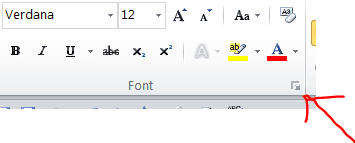
Edward, so you clicked on this box (red arrow pointing to it in the snip) and changed the font color default in there? And that did not work?
 

Attachments

  • Capture.PNG
    Capture.PNG
    3.5 KB · Views: 16

My Computer My Computer

Computer Manufacturer/Model Number
"WartHog Wonder"
OS
Windows 7 Ultimate x64 SP1
CPU
AMD Phenom II X4, 945, Quad Core, 3.0 GHz
Motherboard
Gigabyte MA785GM-US2H
Memory
8GB G.Skill PI Black PC2 6400 * 4-4-4-12 @1.9v
Graphics Card(s)
NVIDIA 512MB 9600GT
Sound Card
Realtek ALC889A Chipset (onboard)
Monitor(s) Displays
2 x 22" Hans-G LCD
Screen Resolution
1680x1050
Hard Drives
650GB 7200RPM WD Caviar Black
PSU
OCZ 700w GameXstream
Case
Cooler Master CM 690 Midtower
Cooling
Xigmatek Gaia SD1283 CPU Cooler, Assorted 120mm case fans
Keyboard
Dell SK-8115
Mouse
Microsoft Comfort Optical Mouse 3000
Other Info
Liteon iHAS 424-98B 24x DVD/CD Writer
Edward, so you clicked on this box (red arrow pointing to it in the snip) and changed the font color default in there? And that did not work?

thats correct, it didnt work
 

My Computer My Computer

OS
Windows 7 Ultimate x32
Forgive me, but then you selected "All documents based on the Normal Template?" and that does not fix your problem?
 

My Computer My Computer

Computer Manufacturer/Model Number
"WartHog Wonder"
OS
Windows 7 Ultimate x64 SP1
CPU
AMD Phenom II X4, 945, Quad Core, 3.0 GHz
Motherboard
Gigabyte MA785GM-US2H
Memory
8GB G.Skill PI Black PC2 6400 * 4-4-4-12 @1.9v
Graphics Card(s)
NVIDIA 512MB 9600GT
Sound Card
Realtek ALC889A Chipset (onboard)
Monitor(s) Displays
2 x 22" Hans-G LCD
Screen Resolution
1680x1050
Hard Drives
650GB 7200RPM WD Caviar Black
PSU
OCZ 700w GameXstream
Case
Cooler Master CM 690 Midtower
Cooling
Xigmatek Gaia SD1283 CPU Cooler, Assorted 120mm case fans
Keyboard
Dell SK-8115
Mouse
Microsoft Comfort Optical Mouse 3000
Other Info
Liteon iHAS 424-98B 24x DVD/CD Writer
Apparently not. When I click on the font color button in the ribbon, the little box next to (automatic) is still gray.
Also, I just tried opening another word document and I'm still getting the text in gray.
 

My Computer My Computer

OS
Windows 7 Ultimate x32
I'm sorry my Friend, but I am stumped. :( Have you changed the font and size too? I set my font and size different from the original default (I like Verdana 12 better. :)). Hopefully another with more knowledge than I possess will stop in and help you.
 

My Computer My Computer

Computer Manufacturer/Model Number
"WartHog Wonder"
OS
Windows 7 Ultimate x64 SP1
CPU
AMD Phenom II X4, 945, Quad Core, 3.0 GHz
Motherboard
Gigabyte MA785GM-US2H
Memory
8GB G.Skill PI Black PC2 6400 * 4-4-4-12 @1.9v
Graphics Card(s)
NVIDIA 512MB 9600GT
Sound Card
Realtek ALC889A Chipset (onboard)
Monitor(s) Displays
2 x 22" Hans-G LCD
Screen Resolution
1680x1050
Hard Drives
650GB 7200RPM WD Caviar Black
PSU
OCZ 700w GameXstream
Case
Cooler Master CM 690 Midtower
Cooling
Xigmatek Gaia SD1283 CPU Cooler, Assorted 120mm case fans
Keyboard
Dell SK-8115
Mouse
Microsoft Comfort Optical Mouse 3000
Other Info
Liteon iHAS 424-98B 24x DVD/CD Writer
You could try doing an Office repair:
Repair or remove Office 2010 - Project - Microsoft Office
.
.

.
Repair your Office 2010 programs

Repair your Office 2010 programs by doing the following:

  1. Click Start, then click Control Panel.
  2. Click Programs and Features.
  3. Click the Office 2010 program that you want to repair, then click Change.
  4. Click Repair, then click Continue. You might need to restart your computer after the repair is complete.
 

My Computer My Computer

Computer type
PC/Desktop
Computer Manufacturer/Model Number
Packard Bell
OS
Windows 7 Home Premium 64bit
CPU
Intel(R) Core(TM) i3-2120 CPU @ 3.30GHz
Motherboard
Packard Bell IPISB-AG
Memory
3.00 GB
Graphics Card(s)
(1) Intel(R) HD Graphics (2) VNC Mirror Driver
Sound Card
Realtek High Definition Audio
Monitor(s) Displays
AIO LCD
Screen Resolution
1920 x 1080
Hard Drives
WDC WD10EADX-22TDHB0 ATA Device
Fixed hard disk media
4 partitions
931.51 GB
Keyboard
Wireless
Mouse
Wireless
Antivirus
Microsoft Security Essentials
Browser
IE; Firefox
Other Info
Also:
Samsung N220 Plus Netbook - Windows 7 Home
HP laptop
iPad 5
Back
Top