Good People,
Add me to the list of people who don't like the new ribbon.
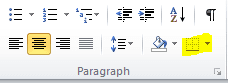
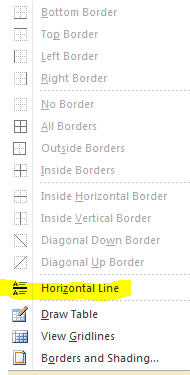
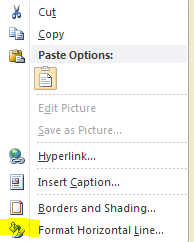
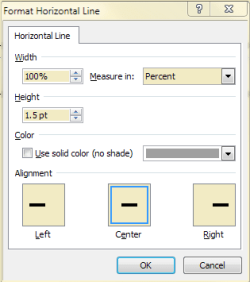
Before with 2007 I could insert a horizontal line of a certain width AND NOT using the auto option where 3 equals turns into a horizontal line. Now in 2010 the most I can get a minimal width horizontal line.
I do not want to use one of the "graphic" selections. How do I put a 5 point horizontal line on a page. I like these simple things as separators.
Please only respond if you have actually done this on WORD 2010.
Oh yes, must clarify I'm working with the beta version of Word 2010.
Add me to the list of people who don't like the new ribbon.
Before with 2007 I could insert a horizontal line of a certain width AND NOT using the auto option where 3 equals turns into a horizontal line. Now in 2010 the most I can get a minimal width horizontal line.
I do not want to use one of the "graphic" selections. How do I put a 5 point horizontal line on a page. I like these simple things as separators.
Please only respond if you have actually done this on WORD 2010.
Oh yes, must clarify I'm working with the beta version of Word 2010.
Last edited:
My Computer
- Computer Manufacturer/Model Number
- Toshiba Satellite S875D-S7239 laptop
- OS
- MS Windows 7 Ultimate SP1 64-bit
- CPU
- AMD A10-4600M
- Motherboard
- AMD Pumori (Socket FT1)
- Memory
- 6.00 GB Dual-Channel DDR3 @ 798MHz (11-11-12-28)
- Graphics Card(s)
- AMD Radeon HD 7660G
- Sound Card
- High Definition Audio Device
- Monitor(s) Displays
- Generic PnP Monitor (1600x900@60Hz)
- Screen Resolution
- 1600x900@60Hz
- Hard Drives
- SSD 119GB Corsair CSSD-V128GB2 ATA Device
- Keyboard
- Standard PS/2 Keyboard
- Mouse
- HP Wireless Optical Mobile Mouse Model FHA-3410
- Internet Speed
- What the local pub, local coffee shop offers.
- Other Info
- Optical Drive:MATSHITA BD-CMB UJ160B ATA Device
Also have an Asus ha1002xp netbook with Win 7 Ultimate installed.