Word 2010 paint command

seungki

New member
Local time
7:59 PM
Messages
8
Hello all,

I wanted to create a keyboard shortcut for Word 2010 to paint, but when I went to the list of commands to assign a keyboard shortcut to, I couldn't find it. Does anyone know what command paint is? If not, is there a macro that I can use? I'm looking for the paint function specifically, because I had a different use for the highlighting.

Thanks!
 

My Computer

OS
Windows 7
i don't think word has a paint function. :confused:

do you mean you want to open the ms paint program from within word?

or are you talking about the format painter?
 

My Computer

Computer Manufacturer/Model Number
mickey megabyte 1234
OS
ultimate 64 sp1
CPU
i5 2500K [email protected]
Motherboard
MSI P67A-GD53
Memory
8 gigs GSkill Ripjaws 1600
Graphics Card(s)
amd hd6950
Sound Card
creative x-fi gamer
Monitor(s) Displays
samsung 24"
Screen Resolution
1920x1080
Hard Drives
ocz vertex 2e 60 gig, samsung f3 1tb, buffalo 2tb ext
PSU
antec 550
Case
antec three hundred
Cooling
i'm a cooling fan
Keyboard
saitek eclipse ii
Mouse
logitech g3
Internet Speed
about 4 Mbps
Other Info
i love win7
I'm talking about the format painter

I was hoping I could find something in this

2mm8sxd.png
 

My Computer

OS
Windows 7
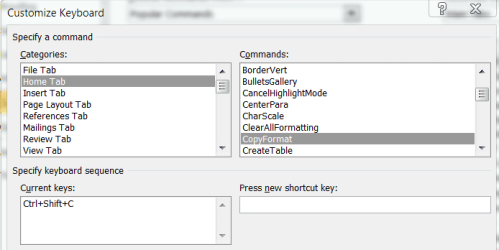
i think 'copy format' in the 'home tab' section is the command you're looking for - it's set to ctrl-shift-c by default.

copyformat.PNG
 

My Computer

Computer Manufacturer/Model Number
mickey megabyte 1234
OS
ultimate 64 sp1
CPU
i5 2500K [email protected]
Motherboard
MSI P67A-GD53
Memory
8 gigs GSkill Ripjaws 1600
Graphics Card(s)
amd hd6950
Sound Card
creative x-fi gamer
Monitor(s) Displays
samsung 24"
Screen Resolution
1920x1080
Hard Drives
ocz vertex 2e 60 gig, samsung f3 1tb, buffalo 2tb ext
PSU
antec 550
Case
antec three hundred
Cooling
i'm a cooling fan
Keyboard
saitek eclipse ii
Mouse
logitech g3
Internet Speed
about 4 Mbps
Other Info
i love win7
Back
Top