Word 2010 printing blank sheets

reasoner

New member
Local time
4:14 PM
Messages
59
I was printing a doc when half way through, I started getting blank pages. The printer is an HP Laser jet with a new cartridge.

I switched over to my Canon laser printer - same problem.

I cut and paste the doc to new doc - same problem.

I put the doc on my other PC with a Brother laser printer - same problem.

Evidently it is a Word problem not a printer problem.

All three printers printed the pages numbers only.

I have read that reinstalling Word does not work.

Does anyone know to how to fix this problem?

Thanks - reasoner
 

My Computer My Computer

Computer Manufacturer/Model Number
Dell
OS
Win7 64
CPU
Dell 2.8 Intel Dual Core
Memory
Dell 8G
Graphics Card(s)
NVideo 260
Sound Card
Delta 2496
Monitor(s) Displays
3 flat panels
Hard Drives
many
It is unusual that it should be happening on all three printers.
Is this a new install of Word 2010?
Is the Cannon networked to the machine that has the HP?

Check to make sure "Print only the data from a form" is un-checked in Words Options.

If that does not help, what I would like you to do is, go into each of the three printers properties, and click on the Advanced tabs, but lets start with the HP Laser jet since that seems to be your #1 printer.

The usual procedure is:

  • Control Panel >Printers & faxes.
  • Right click printer, click properties, click Advance tab.
  • Remove default check on "Spool print documents so program finishes printing faster.
  • Check "print directly to the printer".
See if that helps.
This could be a .dll file or spooling problem.

I have spooling checked, and print directly unchecked on my machine, and I have switched from Lexmark to HP Photosmart with no problems so far. :rolleyes:
 

My Computer My Computer

Computer type
PC/Desktop
Computer Manufacturer/Model Number
Gateway DX4831-01e (Mid-Tower Desktop)
OS
Originally Win 7 Hm Prem x64 Ver 6.1.7600 Build 7601-SP1 | Upgraded to Windows 10 December 14, 2019
CPU
Intel i3 530 2.93GHz, 2933MHz 2 Cores 4 Logical Processors
Motherboard
Gateway H57M01 133 megahertz
Memory
6GB of 1,333MHz DDR3 SDRAM
Graphics Card(s)
32MB Intel Graphics Media Accelerator HD IGChip
Sound Card
Realtek High Definition Audio
Monitor(s) Displays
Gateway HX2000 20inch TFT active matrix TN
Screen Resolution
1600 x 900 x 59 hertz
Hard Drives
WDC WD10EADS-00M2B0 [HDD] (1000.20 GB) -- drive 0,
HL-DT-ST DVDRAM GH41N [CD-ROM dr]
Four card readers, and Four USB 2.0
PSU
300watts.
Case
Mid-Tower Desktop
Cooling
Stock from Gateway
Keyboard
Natural Ergonomic Keyboard 4000, see Other Info
Mouse
Orig. Gateway wore out now using Insignia USB wired optical
Internet Speed
Vz FIOS 10ms png 57.64Mbps down 65.53Mbps up Speedtest.org
Antivirus
Zamana Anti-logger with Anti-malware, MSE, Windows Firewall,
Browser
IE11.0.9600.19399-Upd ver11.0.135, Firefox 68.0.1 x64
Other Info
System Specs by Belarc.

BIOS: American Megatrends Inc. P01-A0 11/17/2009

Replaced the MS 'Natural' Standard PS/2 Enhanced 101-102 Keyboard with a new Natural Ergonomic Keyboard 4000 on August 1st 2014.

Canon Pixma MG3222 Printer.

Updated to IE11 on 12102015 | Fios Quantum Router g1100

Additional AV: SpywareBlaster, manual Mbam, SAS
Thanks for the reply.

I have been using Word 2010 for about a year.

The Canon is on the same network as the HP.

I have tried the suggested "Advanced" tab steps but the problem persists.

reasoner
 

My Computer My Computer

Computer Manufacturer/Model Number
Dell
OS
Win7 64
CPU
Dell 2.8 Intel Dual Core
Memory
Dell 8G
Graphics Card(s)
NVideo 260
Sound Card
Delta 2496
Monitor(s) Displays
3 flat panels
Hard Drives
many
You may have missed it, have you, checked to make sure "Print only the data from a form" is un-checked in Words Options.
 

My Computer My Computer

Computer type
PC/Desktop
Computer Manufacturer/Model Number
Gateway DX4831-01e (Mid-Tower Desktop)
OS
Originally Win 7 Hm Prem x64 Ver 6.1.7600 Build 7601-SP1 | Upgraded to Windows 10 December 14, 2019
CPU
Intel i3 530 2.93GHz, 2933MHz 2 Cores 4 Logical Processors
Motherboard
Gateway H57M01 133 megahertz
Memory
6GB of 1,333MHz DDR3 SDRAM
Graphics Card(s)
32MB Intel Graphics Media Accelerator HD IGChip
Sound Card
Realtek High Definition Audio
Monitor(s) Displays
Gateway HX2000 20inch TFT active matrix TN
Screen Resolution
1600 x 900 x 59 hertz
Hard Drives
WDC WD10EADS-00M2B0 [HDD] (1000.20 GB) -- drive 0,
HL-DT-ST DVDRAM GH41N [CD-ROM dr]
Four card readers, and Four USB 2.0
PSU
300watts.
Case
Mid-Tower Desktop
Cooling
Stock from Gateway
Keyboard
Natural Ergonomic Keyboard 4000, see Other Info
Mouse
Orig. Gateway wore out now using Insignia USB wired optical
Internet Speed
Vz FIOS 10ms png 57.64Mbps down 65.53Mbps up Speedtest.org
Antivirus
Zamana Anti-logger with Anti-malware, MSE, Windows Firewall,
Browser
IE11.0.9600.19399-Upd ver11.0.135, Firefox 68.0.1 x64
Other Info
System Specs by Belarc.

BIOS: American Megatrends Inc. P01-A0 11/17/2009

Replaced the MS 'Natural' Standard PS/2 Enhanced 101-102 Keyboard with a new Natural Ergonomic Keyboard 4000 on August 1st 2014.

Canon Pixma MG3222 Printer.

Updated to IE11 on 12102015 | Fios Quantum Router g1100

Additional AV: SpywareBlaster, manual Mbam, SAS
I need to understand this better, when you say:
I was printing a doc when half way through, I started getting blank pages.
Your .docx is 10pages long, and it stops printing after page 5. Does the "printing" still run for the next 5 pages?

Does it just spit out 5 pages?

Is this a .docx created by you or is this something you copied and pasted?


Meanwhile I found this:
In Word 2010 there is an advance option to turn off background printing. Go to Word - File - Options - Advance and then scroll down till you go printer. Uncheck "print in the background"
Source: Word 2010 | Printing Problems | Microsoft Office 2010 forums |
 

My Computer My Computer

Computer type
PC/Desktop
Computer Manufacturer/Model Number
Gateway DX4831-01e (Mid-Tower Desktop)
OS
Originally Win 7 Hm Prem x64 Ver 6.1.7600 Build 7601-SP1 | Upgraded to Windows 10 December 14, 2019
CPU
Intel i3 530 2.93GHz, 2933MHz 2 Cores 4 Logical Processors
Motherboard
Gateway H57M01 133 megahertz
Memory
6GB of 1,333MHz DDR3 SDRAM
Graphics Card(s)
32MB Intel Graphics Media Accelerator HD IGChip
Sound Card
Realtek High Definition Audio
Monitor(s) Displays
Gateway HX2000 20inch TFT active matrix TN
Screen Resolution
1600 x 900 x 59 hertz
Hard Drives
WDC WD10EADS-00M2B0 [HDD] (1000.20 GB) -- drive 0,
HL-DT-ST DVDRAM GH41N [CD-ROM dr]
Four card readers, and Four USB 2.0
PSU
300watts.
Case
Mid-Tower Desktop
Cooling
Stock from Gateway
Keyboard
Natural Ergonomic Keyboard 4000, see Other Info
Mouse
Orig. Gateway wore out now using Insignia USB wired optical
Internet Speed
Vz FIOS 10ms png 57.64Mbps down 65.53Mbps up Speedtest.org
Antivirus
Zamana Anti-logger with Anti-malware, MSE, Windows Firewall,
Browser
IE11.0.9600.19399-Upd ver11.0.135, Firefox 68.0.1 x64
Other Info
System Specs by Belarc.

BIOS: American Megatrends Inc. P01-A0 11/17/2009

Replaced the MS 'Natural' Standard PS/2 Enhanced 101-102 Keyboard with a new Natural Ergonomic Keyboard 4000 on August 1st 2014.

Canon Pixma MG3222 Printer.

Updated to IE11 on 12102015 | Fios Quantum Router g1100

Additional AV: SpywareBlaster, manual Mbam, SAS
This is a pretty good read:
Diagnose
This error might be caused by one of the following conditions:

  • The printer is not reachable on the network
  • Windows cannot allocate sufficient memory
  • There was invalid or incomplete data received by the print spooler
  • A driver upgrade failed
  • There is a bad printer device driver
To diagnose the problem, use the procedures in the following sections.
Source: https://social.technet.microsoft.co...shoot-event-id-6161-print-spooler-status.aspx

The two I would concentrate on:

  • Windows cannot allocate sufficient memory
  • There was invalid or incomplete data received by the print spooler
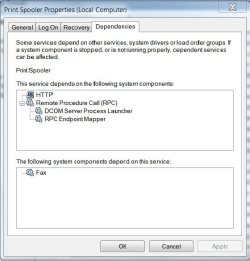
When checking Spooler services make sure to check its Dependencies, they all need to be set to Automatic.


Also consider checking that your version of Word 2010 is up to date:

  • To manually check for any latest updates.
  • This can be done using the Microsoft Word 2010 help menu.
  • Click the File menu and navigate to Help menu.
  • In the Tools for Working With Office section, click the Check for Updates link.
  • This would get the latest updates available for Microsoft Office.
  • If any are available.
 

My Computer My Computer

Computer type
PC/Desktop
Computer Manufacturer/Model Number
Gateway DX4831-01e (Mid-Tower Desktop)
OS
Originally Win 7 Hm Prem x64 Ver 6.1.7600 Build 7601-SP1 | Upgraded to Windows 10 December 14, 2019
CPU
Intel i3 530 2.93GHz, 2933MHz 2 Cores 4 Logical Processors
Motherboard
Gateway H57M01 133 megahertz
Memory
6GB of 1,333MHz DDR3 SDRAM
Graphics Card(s)
32MB Intel Graphics Media Accelerator HD IGChip
Sound Card
Realtek High Definition Audio
Monitor(s) Displays
Gateway HX2000 20inch TFT active matrix TN
Screen Resolution
1600 x 900 x 59 hertz
Hard Drives
WDC WD10EADS-00M2B0 [HDD] (1000.20 GB) -- drive 0,
HL-DT-ST DVDRAM GH41N [CD-ROM dr]
Four card readers, and Four USB 2.0
PSU
300watts.
Case
Mid-Tower Desktop
Cooling
Stock from Gateway
Keyboard
Natural Ergonomic Keyboard 4000, see Other Info
Mouse
Orig. Gateway wore out now using Insignia USB wired optical
Internet Speed
Vz FIOS 10ms png 57.64Mbps down 65.53Mbps up Speedtest.org
Antivirus
Zamana Anti-logger with Anti-malware, MSE, Windows Firewall,
Browser
IE11.0.9600.19399-Upd ver11.0.135, Firefox 68.0.1 x64
Other Info
System Specs by Belarc.

BIOS: American Megatrends Inc. P01-A0 11/17/2009

Replaced the MS 'Natural' Standard PS/2 Enhanced 101-102 Keyboard with a new Natural Ergonomic Keyboard 4000 on August 1st 2014.

Canon Pixma MG3222 Printer.

Updated to IE11 on 12102015 | Fios Quantum Router g1100

Additional AV: SpywareBlaster, manual Mbam, SAS
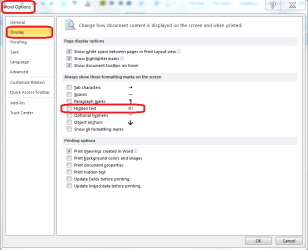
Could there possibly be hidden text in the document?

To show hidden text:
On the FILE TAB > OPTIONS > DISPLAY > Check the box beside HIDDEN TEXT
.
 

Attachments

  • hidden text.PNG
    hidden text.PNG
    23.3 KB · Views: 140

My Computer My Computer

Computer type
PC/Desktop
Computer Manufacturer/Model Number
Packard Bell
OS
Windows 7 Home Premium 64bit
CPU
Intel(R) Core(TM) i3-2120 CPU @ 3.30GHz
Motherboard
Packard Bell IPISB-AG
Memory
3.00 GB
Graphics Card(s)
(1) Intel(R) HD Graphics (2) VNC Mirror Driver
Sound Card
Realtek High Definition Audio
Monitor(s) Displays
AIO LCD
Screen Resolution
1920 x 1080
Hard Drives
WDC WD10EADX-22TDHB0 ATA Device
Fixed hard disk media
4 partitions
931.51 GB
Keyboard
Wireless
Mouse
Wireless
Antivirus
Microsoft Security Essentials
Browser
IE; Firefox
Other Info
Also:
Samsung N220 Plus Netbook - Windows 7 Home
HP laptop
iPad 5
Thank you Irene, I had thought of that while I was looking for anything else that might cause the OP's problem, but I failed to post it. :o
It cropped up on a thread about hidden paragraph marks.

reasoner could check that, and "show all formatting marks"

A little old, but still good:
Deleting “Blank” Pages | Suzanne S. Barnhill Microsoft MVP (Word)
Home | Suzanne S. Barnhill Microsoft MVP (Word)
Useful Links | Suzanne S. Barnhill Microsoft MVP (Word)

Support for Microsoft Word 2010 and 2007 technical problems
Specifically for:
Description of Office 2010 SP1

Here is a MS Troubleshooter specifically for:
Printing problems and printing errors
  • Identify if you need to update your print driver.
  • You receive an error stating that your Plug and Play printer %PRINTERNAME% has encountered a driver problem.
 

My Computer My Computer

Computer type
PC/Desktop
Computer Manufacturer/Model Number
Gateway DX4831-01e (Mid-Tower Desktop)
OS
Originally Win 7 Hm Prem x64 Ver 6.1.7600 Build 7601-SP1 | Upgraded to Windows 10 December 14, 2019
CPU
Intel i3 530 2.93GHz, 2933MHz 2 Cores 4 Logical Processors
Motherboard
Gateway H57M01 133 megahertz
Memory
6GB of 1,333MHz DDR3 SDRAM
Graphics Card(s)
32MB Intel Graphics Media Accelerator HD IGChip
Sound Card
Realtek High Definition Audio
Monitor(s) Displays
Gateway HX2000 20inch TFT active matrix TN
Screen Resolution
1600 x 900 x 59 hertz
Hard Drives
WDC WD10EADS-00M2B0 [HDD] (1000.20 GB) -- drive 0,
HL-DT-ST DVDRAM GH41N [CD-ROM dr]
Four card readers, and Four USB 2.0
PSU
300watts.
Case
Mid-Tower Desktop
Cooling
Stock from Gateway
Keyboard
Natural Ergonomic Keyboard 4000, see Other Info
Mouse
Orig. Gateway wore out now using Insignia USB wired optical
Internet Speed
Vz FIOS 10ms png 57.64Mbps down 65.53Mbps up Speedtest.org
Antivirus
Zamana Anti-logger with Anti-malware, MSE, Windows Firewall,
Browser
IE11.0.9600.19399-Upd ver11.0.135, Firefox 68.0.1 x64
Other Info
System Specs by Belarc.

BIOS: American Megatrends Inc. P01-A0 11/17/2009

Replaced the MS 'Natural' Standard PS/2 Enhanced 101-102 Keyboard with a new Natural Ergonomic Keyboard 4000 on August 1st 2014.

Canon Pixma MG3222 Printer.

Updated to IE11 on 12102015 | Fios Quantum Router g1100

Additional AV: SpywareBlaster, manual Mbam, SAS
Good help, Anak. ;)

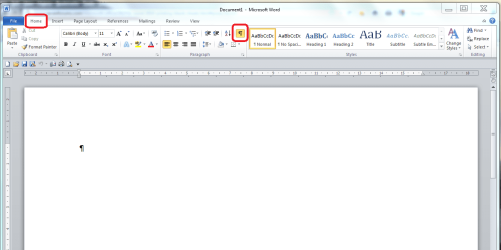
Something else which just came to mind, was to use the show/hide button - on the ribbon:
... it just might show whether there has been a long series of 'returns'.
.
 

Attachments

  • show hide.PNG
    show hide.PNG
    45.4 KB · Views: 65

My Computer My Computer

Computer type
PC/Desktop
Computer Manufacturer/Model Number
Packard Bell
OS
Windows 7 Home Premium 64bit
CPU
Intel(R) Core(TM) i3-2120 CPU @ 3.30GHz
Motherboard
Packard Bell IPISB-AG
Memory
3.00 GB
Graphics Card(s)
(1) Intel(R) HD Graphics (2) VNC Mirror Driver
Sound Card
Realtek High Definition Audio
Monitor(s) Displays
AIO LCD
Screen Resolution
1920 x 1080
Hard Drives
WDC WD10EADX-22TDHB0 ATA Device
Fixed hard disk media
4 partitions
931.51 GB
Keyboard
Wireless
Mouse
Wireless
Antivirus
Microsoft Security Essentials
Browser
IE; Firefox
Other Info
Also:
Samsung N220 Plus Netbook - Windows 7 Home
HP laptop
iPad 5
And I thank you again, Irene! :party:

I did see a post about the show/hide button, but was not sure if it applied, any suggestions are greatly appreciated!
One post I came across related how the user's anti-virus (Kaspersky)was kicking in, and stopping the .doc/.docx from printing. :shock:

I am working with a slight disadvantage; I had Word in my younger days, but now have Open Office, and I am thinking of migrating to LibreOffice. I do not mind trying to track down a problem.
 

My Computer My Computer

Computer type
PC/Desktop
Computer Manufacturer/Model Number
Gateway DX4831-01e (Mid-Tower Desktop)
OS
Originally Win 7 Hm Prem x64 Ver 6.1.7600 Build 7601-SP1 | Upgraded to Windows 10 December 14, 2019
CPU
Intel i3 530 2.93GHz, 2933MHz 2 Cores 4 Logical Processors
Motherboard
Gateway H57M01 133 megahertz
Memory
6GB of 1,333MHz DDR3 SDRAM
Graphics Card(s)
32MB Intel Graphics Media Accelerator HD IGChip
Sound Card
Realtek High Definition Audio
Monitor(s) Displays
Gateway HX2000 20inch TFT active matrix TN
Screen Resolution
1600 x 900 x 59 hertz
Hard Drives
WDC WD10EADS-00M2B0 [HDD] (1000.20 GB) -- drive 0,
HL-DT-ST DVDRAM GH41N [CD-ROM dr]
Four card readers, and Four USB 2.0
PSU
300watts.
Case
Mid-Tower Desktop
Cooling
Stock from Gateway
Keyboard
Natural Ergonomic Keyboard 4000, see Other Info
Mouse
Orig. Gateway wore out now using Insignia USB wired optical
Internet Speed
Vz FIOS 10ms png 57.64Mbps down 65.53Mbps up Speedtest.org
Antivirus
Zamana Anti-logger with Anti-malware, MSE, Windows Firewall,
Browser
IE11.0.9600.19399-Upd ver11.0.135, Firefox 68.0.1 x64
Other Info
System Specs by Belarc.

BIOS: American Megatrends Inc. P01-A0 11/17/2009

Replaced the MS 'Natural' Standard PS/2 Enhanced 101-102 Keyboard with a new Natural Ergonomic Keyboard 4000 on August 1st 2014.

Canon Pixma MG3222 Printer.

Updated to IE11 on 12102015 | Fios Quantum Router g1100

Additional AV: SpywareBlaster, manual Mbam, SAS
Thanks for all the great suggestions - I am on the road - once I get back I will put them all to work...

This is what happened: The doc is 228 pages, all text - I assigned pages 1- 50 to the HP, then pages 51 - 100 to the Cannon. The first 15 pages on the HP printed fine, then all I got were blank pages with printed page numbers. Pages 51 to 100 on the Canon were all blank except for the page numbers as well.

Makes me think it is a Word problem since the page numbers printed - the headers and footers are separate from the body in Word so maybe it has to do with the body text. Just guessing...

I made no changes to Word or the printer function - just business as usual.

reasoner
 

My Computer My Computer

Computer Manufacturer/Model Number
Dell
OS
Win7 64
CPU
Dell 2.8 Intel Dual Core
Memory
Dell 8G
Graphics Card(s)
NVideo 260
Sound Card
Delta 2496
Monitor(s) Displays
3 flat panels
Hard Drives
many
One question, well, maybe...

Have you tried printing in this fashion before, such as splitting a job between two printers or is this the first time?
If you have, is this the first time it (the printer job) has failed?

Did you wait until the job had started on the HP before you set it up for the Cannon or did you OK the job on the Cannon before the HP started to print? I ask this because it has to do with my earlier concern:
This is a pretty good read:
Diagnose
This error might be caused by one of the following conditions:

  • The printer is not reachable on the network
  • Windows cannot allocate sufficient memory
  • There was invalid or incomplete data received by the print spooler
  • A driver upgrade failed
  • There is a bad printer device driver
To diagnose the problem, use the procedures in the following sections.
Source: https://social.technet.microsoft.co...shoot-event-id-6161-print-spooler-status.aspx

The two I would concentrate on:

  • Windows cannot allocate sufficient memory
  • There was invalid or incomplete data received by the print spooler
When checking Spooler services make sure to check its Dependencies, they all need to be set to Automatic.
Especially the Remote Procedure Call (RPC)! And, its dependencies.

PrintSp.jpg
All five of those dependencies in the pix should be set to Automatic.

I can understand you logic in trying to print this way. It would be faster.
But, have you tried to print the job entirely on one printer?
Does it run okay or do you have the same problem?
 

My Computer My Computer

Computer type
PC/Desktop
Computer Manufacturer/Model Number
Gateway DX4831-01e (Mid-Tower Desktop)
OS
Originally Win 7 Hm Prem x64 Ver 6.1.7600 Build 7601-SP1 | Upgraded to Windows 10 December 14, 2019
CPU
Intel i3 530 2.93GHz, 2933MHz 2 Cores 4 Logical Processors
Motherboard
Gateway H57M01 133 megahertz
Memory
6GB of 1,333MHz DDR3 SDRAM
Graphics Card(s)
32MB Intel Graphics Media Accelerator HD IGChip
Sound Card
Realtek High Definition Audio
Monitor(s) Displays
Gateway HX2000 20inch TFT active matrix TN
Screen Resolution
1600 x 900 x 59 hertz
Hard Drives
WDC WD10EADS-00M2B0 [HDD] (1000.20 GB) -- drive 0,
HL-DT-ST DVDRAM GH41N [CD-ROM dr]
Four card readers, and Four USB 2.0
PSU
300watts.
Case
Mid-Tower Desktop
Cooling
Stock from Gateway
Keyboard
Natural Ergonomic Keyboard 4000, see Other Info
Mouse
Orig. Gateway wore out now using Insignia USB wired optical
Internet Speed
Vz FIOS 10ms png 57.64Mbps down 65.53Mbps up Speedtest.org
Antivirus
Zamana Anti-logger with Anti-malware, MSE, Windows Firewall,
Browser
IE11.0.9600.19399-Upd ver11.0.135, Firefox 68.0.1 x64
Other Info
System Specs by Belarc.

BIOS: American Megatrends Inc. P01-A0 11/17/2009

Replaced the MS 'Natural' Standard PS/2 Enhanced 101-102 Keyboard with a new Natural Ergonomic Keyboard 4000 on August 1st 2014.

Canon Pixma MG3222 Printer.

Updated to IE11 on 12102015 | Fios Quantum Router g1100

Additional AV: SpywareBlaster, manual Mbam, SAS
  • Like
Reactions: JMH
Thanks once again for all the great suggestions. Unfortunately, none of them provided the solution.

Seems it was a driver issue. I reinstalled the HP driver and things are back to normal.

Once again, thanks for the help and insight.

bruce
 

My Computer My Computer

Computer Manufacturer/Model Number
Dell
OS
Win7 64
CPU
Dell 2.8 Intel Dual Core
Memory
Dell 8G
Graphics Card(s)
NVideo 260
Sound Card
Delta 2496
Monitor(s) Displays
3 flat panels
Hard Drives
many
Your welcome Bruce, glad to hear you have your problem sorted out.
 

My Computer My Computer

Computer type
PC/Desktop
Computer Manufacturer/Model Number
Gateway DX4831-01e (Mid-Tower Desktop)
OS
Originally Win 7 Hm Prem x64 Ver 6.1.7600 Build 7601-SP1 | Upgraded to Windows 10 December 14, 2019
CPU
Intel i3 530 2.93GHz, 2933MHz 2 Cores 4 Logical Processors
Motherboard
Gateway H57M01 133 megahertz
Memory
6GB of 1,333MHz DDR3 SDRAM
Graphics Card(s)
32MB Intel Graphics Media Accelerator HD IGChip
Sound Card
Realtek High Definition Audio
Monitor(s) Displays
Gateway HX2000 20inch TFT active matrix TN
Screen Resolution
1600 x 900 x 59 hertz
Hard Drives
WDC WD10EADS-00M2B0 [HDD] (1000.20 GB) -- drive 0,
HL-DT-ST DVDRAM GH41N [CD-ROM dr]
Four card readers, and Four USB 2.0
PSU
300watts.
Case
Mid-Tower Desktop
Cooling
Stock from Gateway
Keyboard
Natural Ergonomic Keyboard 4000, see Other Info
Mouse
Orig. Gateway wore out now using Insignia USB wired optical
Internet Speed
Vz FIOS 10ms png 57.64Mbps down 65.53Mbps up Speedtest.org
Antivirus
Zamana Anti-logger with Anti-malware, MSE, Windows Firewall,
Browser
IE11.0.9600.19399-Upd ver11.0.135, Firefox 68.0.1 x64
Other Info
System Specs by Belarc.

BIOS: American Megatrends Inc. P01-A0 11/17/2009

Replaced the MS 'Natural' Standard PS/2 Enhanced 101-102 Keyboard with a new Natural Ergonomic Keyboard 4000 on August 1st 2014.

Canon Pixma MG3222 Printer.

Updated to IE11 on 12102015 | Fios Quantum Router g1100

Additional AV: SpywareBlaster, manual Mbam, SAS
Back
Top