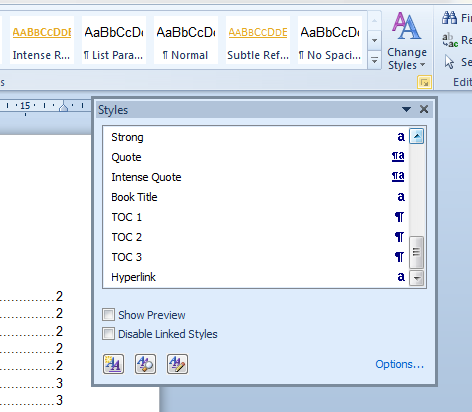
Word 2010 - Quick Styles Preview Question

DAVISinLA

New member
Local time
12:12 PM
Messages
8
A friend of mine indicated that on their computer at home, the are not able to see the preview formatting which normally appears above the style name in the quick styles gallery on the Home tab. (See sample.) She tells me that only the style names appear.

I could be wrong, but I seem to recall that there is a toggle to switch that feature on (or off) but I can't seem to locate it anywhere either in Word Options or the Manage Styles dialog boxes.

Any ideas?

Thanks in advance.
 

Attachments

  • sample.jpg
    sample.jpg
    9.2 KB · Views: 3

My Computer

OS
Windows 7
Yes, there is a switch, but for a different window.
It turns ON/OFF preview only in that extra window, but not in ribbon, where your friend needs it.
wordtoc_ii.png
 

My Computer

Computer type
PC/Desktop
OS
Windows 8.1 ; Windows 7 x86 (Dec2008-Jan2013)
Other Info
"The scale icon at the top right of a post or tutorial is how you can give rep to the member."
I found that one, but have yet to discover any way that the Quick Styles preview may have been turned off on her computer. I'm going to talk to her in the next day or two and try to get more info. The fact that so many folks have looked at this thread and didn't know the answer makes me think that something else is going on.

Thanks.
 

My Computer

OS
Windows 7
There is a workaround your friend can use, until she gets this problem sorted out.

First she needs to add the Styles icon (>) to her Quick Access Toolbar.
(This is NOT the same as the Styles or Change Styles options that we have in the Ribbon!) To do this she needs to click on 'Customize Quick Access Toolbar' then 'More Commands' and follow the on-screen directions. Once she has added the Styles icon, when she clicks on it, it will open up a drop-down menu that will show a list of all the titles of each Style, each one displayed in the 'preview formatting' of each Style's style.

By the way, she should make sure that at the very bottom of the drop-down menu (under the actual list) that she checks the option: "Show Preview"
 

My Computer

Computer Manufacturer/Model Number
HP Pavillion dv5t (generation 1)
OS
Vista 64 bit and 32 bit (SP2)
CPU
Intel(R) Core(TM)2 Duo Processor T9400 (2.53 GHz
Memory
4GB DDR2 System Memory (2 Dimm)
Graphics Card(s)
512 MB NVIDIA GeForce 9600M GT
Monitor(s) Displays
15.4" diagonal WSXGA+ High-Definition HP BrightView Widescre
Screen Resolution
1680 x 1050
Hard Drives
320GB 5400RPM SATA Hard Drive with HP ProtectSmart Hard Drive Protection
Keyboard
Built-in HP
Mouse
Built in - Synaptics TouchPad V6.5 on PS/2 Port
Internet Speed
Max
Other Info
~ Intel Next-Gen Wireless-N Mini-card w/Bluetooth ~ Blu-Ray ROM DVD+/-R/RW ~ Integ. HDTV Hybrid Tuner ~ 12 Cell Battery ~ MS Office (Home Premium) 2007 ~
Well, I was able to extract a bit more information.

As it turns out, the problem is not with ALL the styles in the Quick Styles List - only a few are not showing a preview above their name. What I am now guessing is that somehow, the font color for some of the styles got changed to white. If that happens, it looks as if the preview has disappeared.

She's going to report back to me in a few days. Stay tuned...if you're interested.
 

My Computer

OS
Windows 7
Back
Top