Word.doc file ends up a .pub file?

RonBin79

New member
Member
VIP
Local time
9:14 PM
Messages
311
Location
West Sussex
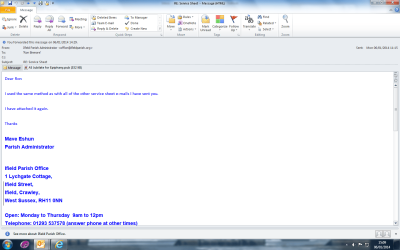
Our Parish Office sends me the following Sundays Pew Sheet for our web site every Friday afternoon, they arrive as a Word.doc. I then put them on our church web site and all goes well. I was sent one for last Sunday's service and it turned up as a .pub file, see the attached. I told the office about this and they have sent it again and it still turned up as a .pub file. They say they have used the same method they have always used and made no changes.

Has anyone any idea what might be going on and how to correct it pleases??

RonBin79, now nearly 82
 

Attachments
  • pub file.png
    pub file.png
    62 KB · Views: 4

My Computer My Computer

Computer Manufacturer/Model Number
Dell XP8300
OS
Windows Seven Premium
CPU
Intel Core i5-2300
Motherboard
Unknown
Memory
8GB
Graphics Card(s)
1GB ATI Raedon HD 5450
Sound Card
Integrated 7.1 with THX TrueStudio
Monitor(s) Displays
Dell 17"
Hard Drives
1 Terrabyte Serial ATA
Case
Dell (Metal)
Cooling
None
Keyboard
Dell
Mouse
Dell Laser
Internet Speed
2.8Gb
Open Notepad

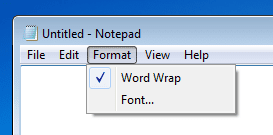
Select Format

Make sure that there is a check beside the option for Word Wrap.

1.png

Save the Publisher document to some place on your desktop.

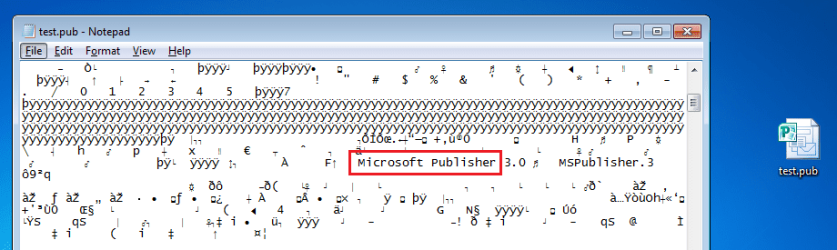
Drag and drop that Publisher document into the Notepad window.

2.png

Don't worry about the gibberish that you see...
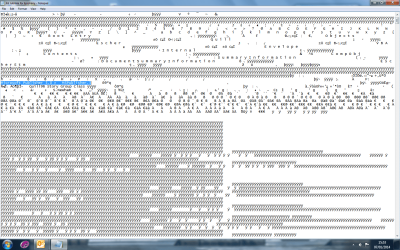
...just scroll down a bit - looking for something like this:

3.png

If you see that, the the document is most likely really in the Publisher format. I doubt that it got changed while in transit. Do those making this document use Microsoft Office or do they use something like OpenOffice or LibreOffice?

If you have Microsoft's Publisher application, you should be able to open the document and user File > Save as to convert it to a Word document format. However, you should be using the Portable Document Format (PDF) for info placed on the website.
 

My Computer My Computer

Computer type
Laptop
Computer Manufacturer/Model Number
Employer provided Dell Latitude
OS
W7 Pro SP1 64bit
CPU
i7
Memory
8GB
Graphics Card(s)
Intel HD Graphics
Hard Drives
crappy SSD
Antivirus
Employer mandated Symantec Endpoint Protection
Browser
Pale Moon 64bit, IE11 64bit & Chrome 64bit
.pub file

Thank you for your response. I have found it and yes, it is in M'Soft Publisher3. Unfortunately I do not have Publisher but do have Adobe and could probably turn it into a PDF file if I knew how??

Best wishes,

RonBin79 nearly 82
 

Attachments

  • Publisher.png
    Publisher.png
    49.3 KB · Views: 1

My Computer My Computer

Computer Manufacturer/Model Number
Dell XP8300
OS
Windows Seven Premium
CPU
Intel Core i5-2300
Motherboard
Unknown
Memory
8GB
Graphics Card(s)
1GB ATI Raedon HD 5450
Sound Card
Integrated 7.1 with THX TrueStudio
Monitor(s) Displays
Dell 17"
Hard Drives
1 Terrabyte Serial ATA
Case
Dell (Metal)
Cooling
None
Keyboard
Dell
Mouse
Dell Laser
Internet Speed
2.8Gb
They are using Windows 2000 and Office as far as I know.
Regards,
RonBin79 nearly 82
 

My Computer My Computer

Computer Manufacturer/Model Number
Dell XP8300
OS
Windows Seven Premium
CPU
Intel Core i5-2300
Motherboard
Unknown
Memory
8GB
Graphics Card(s)
1GB ATI Raedon HD 5450
Sound Card
Integrated 7.1 with THX TrueStudio
Monitor(s) Displays
Dell 17"
Hard Drives
1 Terrabyte Serial ATA
Case
Dell (Metal)
Cooling
None
Keyboard
Dell
Mouse
Dell Laser
Internet Speed
2.8Gb
Your choices are:

1) Convince the office staff that they have indeed changed their process/steps.
(They are saving the document as a Publisher doc and not a Word doc.)
Convince the office staff to go back to saving the file as a Word doc.

2) Buy MS Publisher for your computer :-(
There are free apps that will let you open MS Publisher files, but the formatting is not always correct.

What version of Office do you have?
Open Word - then click on File > Help
 

My Computer My Computer

Computer type
Laptop
Computer Manufacturer/Model Number
Employer provided Dell Latitude
OS
W7 Pro SP1 64bit
CPU
i7
Memory
8GB
Graphics Card(s)
Intel HD Graphics
Hard Drives
crappy SSD
Antivirus
Employer mandated Symantec Endpoint Protection
Browser
Pale Moon 64bit, IE11 64bit & Chrome 64bit
Publisher let's you save as Word Document. Ask the Parish Office to save their documets they create on Publisher as Word Document (or Rich Text):

2014-01-07_17h52_05.png

Kari
 

My Computer My Computer

Computer type
Laptop
Computer Manufacturer/Model Number
HP ENVY 17-1150eg
OS
Windows 10 Pro x64 EN-GB
CPU
1.6 GHz Intel Core i7-720QM Processor
Memory
6 GB
Graphics Card(s)
ATI Mobility Radeon HD 5850 Graphics
Sound Card
Beats sound system with integrated subwoofer
Monitor(s) Displays
17" laptop display, 22" LED and 32" Full HD TV through HDMI
Screen Resolution
1600*900 (1), 1920*1080 (2&3)
Hard Drives
Internal: 2 x 500 GB SATA Hard Disk Drive 7200 rpm
External: 2TB for backups, 3TB USB3 network drive for media
Cooling
As Envy runs a bit warm, I have it on a Cooler Master pad
Keyboard
Logitech diNovo Media Desktop Laser (bluetooth)
Mouse
Logitech Performance Mouse MX
Internet Speed
50/10 Mbps VDSL
Antivirus
Windows Defender 4.3.9431.0
Browser
Maxthon 3.5.2., IE11
.pub file

Thanks guys, that's really kind of you to reply and provide all that info. I will send an email asking the girl in the office to make sure she saves all her future pew sheets as Word Docs before sending them on to me. I have Windows 7 Home Premium along with Microsoft Office 2010 with Outlook 2010, so there shouldnt be any problem as long as she does as you say.

Thanks again.

Cheers for now, have a good 2014.

RonBin79 nearly 82
 

My Computer My Computer

Computer Manufacturer/Model Number
Dell XP8300
OS
Windows Seven Premium
CPU
Intel Core i5-2300
Motherboard
Unknown
Memory
8GB
Graphics Card(s)
1GB ATI Raedon HD 5450
Sound Card
Integrated 7.1 with THX TrueStudio
Monitor(s) Displays
Dell 17"
Hard Drives
1 Terrabyte Serial ATA
Case
Dell (Metal)
Cooling
None
Keyboard
Dell
Mouse
Dell Laser
Internet Speed
2.8Gb
Back
Top