Solved word documents

luckyeddee

New member
Local time
6:23 PM
Messages
4
hi
anyone have any thoughts on how i can get the old word documents i transfered from my old computer to modify properly. i can't add additional lines and get the type print to work properly in windows 7. the new line is very narrow initially and even if i drag the bottom line down to make the line wider the print types in right up at the top of the cell. the top half of capital letters are cut off. replacing type in existing cells works fine but not new line additions. any help appreciated. thanks ed
 

My Computer

Computer Manufacturer/Model Number
dell inspiron 620 fast track 0125intel core i5-2320 processor
OS
windows 7
Memory
6gb
Graphics Card(s)
intel hd 2000
Monitor(s) Displays
asus
Hard Drives
1000gb
Welcome
Just a guess. Can you copy and paste to a new document and modify from there. Everything should look the same, then.
 

My Computer

Computer type
PC/Desktop
Computer Manufacturer/Model Number
Dell XPS 420
OS
Windows 10, Home Clean Install
CPU
Intel Core2 processsor Q8200(2.33Ghz 1333FSB) Quad Core Tech
Motherboard
Dell
Memory
6 gb
Graphics Card(s)
ATI Radeon 256MB HD3650
Sound Card
Intergrated 7.1 Channel Audio
Monitor(s) Displays
Dell SP2009W 20"
Hard Drives
640 GB Serial ATA Hard drive
Cooling
Fan
Keyboard
Dell USB Keyboard
Mouse
Dell Premium Optical USB
Internet Speed
DSL 2.85

My Computer

Computer Manufacturer/Model Number
HP Pavilion Elite 495UK
OS
Windows 7 Ultimate SP1 64-Bit
CPU
Intel Core i7 870 @ 2.93GHz
Motherboard
MSI 2A9C (CPU1)
Memory
8Gb Dual-Channel DDR3 @ 664MHz
Graphics Card(s)
nVidia GeForce GTX 460 1024MB dedicated RAM
Sound Card
Realtek HD Audio
Monitor(s) Displays
HP2310i
Screen Resolution
1920 x 1080
Hard Drives
1x1954GB Hitachi HDS22020ALA 330 (RAID), 1x1954GB Hitachi External for backup and storage
PSU
460W
Case
HP Elite
Cooling
Air cooled
Keyboard
Logitech K750 solar-powered keyboard
Mouse
Logitech Wireless M180 mouse
Internet Speed
2Mb
Other Info
Pure Avanti Flow Internet Radio with iPod Dock, 64Gb iPod, HP USB Speakers, Sony MDR-V500 Headphones, Sony Vaio F-Series Laptop
followup

Welcome
Just a guess. Can you copy and paste to a new document and modify from there. Everything should look the same, then.

hi
when i right click on a documet the "copy" and "paste" are greyed out. there is a "copy" "control c" option in the upper left in the "paste" box. if i hit control c..with the document open...then open another blank word document nothing happens when i hit paste in the upper left box. (there is some little icon that appears that says word checking but no transfer of info. sorry, i am the moron of morons when it comes to computers. ed
 

My Computer

Computer Manufacturer/Model Number
dell inspiron 620 fast track 0125intel core i5-2320 processor
OS
windows 7
Memory
6gb
Graphics Card(s)
intel hd 2000
Monitor(s) Displays
asus
Hard Drives
1000gb
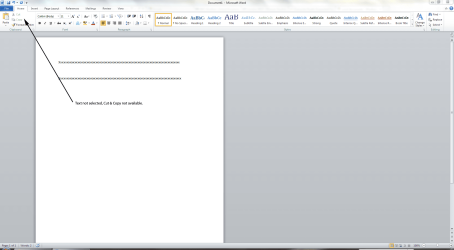
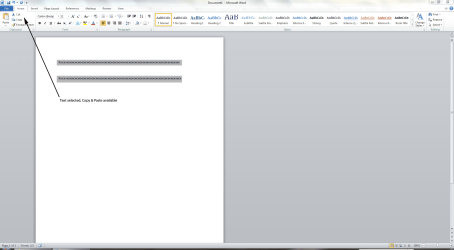
When you copy or paste text you have to select it first.

If you don't select it, the copy and paste options will be greyed out.

Copy and paste text and graphics - Word - Office.com

1. Open a new Word document.

2. Copy the text from the old document.

3. Paste the text in the new document.

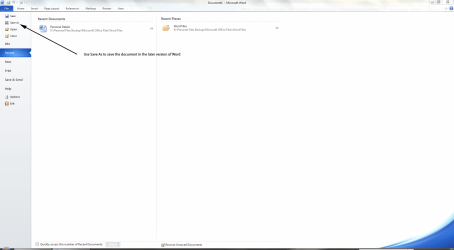
Alternatively, use the Save As command to save the old document in the new format.

Word1.PNG

Word2.PNG

Word3.PNG
 

My Computer

Computer Manufacturer/Model Number
HP Pavilion Elite 495UK
OS
Windows 7 Ultimate SP1 64-Bit
CPU
Intel Core i7 870 @ 2.93GHz
Motherboard
MSI 2A9C (CPU1)
Memory
8Gb Dual-Channel DDR3 @ 664MHz
Graphics Card(s)
nVidia GeForce GTX 460 1024MB dedicated RAM
Sound Card
Realtek HD Audio
Monitor(s) Displays
HP2310i
Screen Resolution
1920 x 1080
Hard Drives
1x1954GB Hitachi HDS22020ALA 330 (RAID), 1x1954GB Hitachi External for backup and storage
PSU
460W
Case
HP Elite
Cooling
Air cooled
Keyboard
Logitech K750 solar-powered keyboard
Mouse
Logitech Wireless M180 mouse
Internet Speed
2Mb
Other Info
Pure Avanti Flow Internet Radio with iPod Dock, 64Gb iPod, HP USB Speakers, Sony MDR-V500 Headphones, Sony Vaio F-Series Laptop
copy and paste

i "was" finally able to copy and paste it to a new word document but it still won't let me add lines to the document properly. i even downloaded the compability software from microsoft. guess i'm just stuck. i can/have transfered a couple of the documents to excel but excel doesn't display the pages anywhere near a good as word. plus i still have to mess around with the excel docs to sort them out so they are somewhat presentable to me. thats to everyone for the help. cheers ed
 

My Computer

Computer Manufacturer/Model Number
dell inspiron 620 fast track 0125intel core i5-2320 processor
OS
windows 7
Memory
6gb
Graphics Card(s)
intel hd 2000
Monitor(s) Displays
asus
Hard Drives
1000gb
This could be the problem with line spacing settings. Select all the text with CTRL+A, right click and select paragraph properties (I am still used to Word 2003 and have not upgraded to a higher version!), go to Spacing section and select "Single line" for spacing and press OK.

Another way to remove all these problems is to save the file to a txt format and open the text file in MSWord and then apply Body Text style to all the text. Then selectively apply Heading styles. This will make the document to have a consistent look.
 

My Computer

Computer Manufacturer/Model Number
Toshiba Satellite P775-S7232
OS
MS Windows 7 Ultimate 64-bit SP1
CPU
i5-2410M 2.3GHz (2.9GHz Turbo-Boost) Sandy Bridge 32nm
Motherboard
Toshiba PHRAA ver. PSBY1U-00F003
Memory
4GB+4GB Samsung DDR3 PC3-10700 (1333 MHz)
Graphics Card(s)
Video Intel(R) HD Graphics Family, 1696MB available memory
Sound Card
Realtek High Definition Audio version=6.0.1.6323
Monitor(s) Displays
17.3 " Trubrite TFT LCD, LED Backlit
Screen Resolution
1600x900 32 bit, Native support for 720P content
Hard Drives
TOSHIBA MK6476GSXN
580.614 [GB] partitioned C: 80GB and D: 500GB with hidden recovery partitons.

Spare bay for 2nd HDD but no SATA connector :-(
PSU
Toshiba AC/DC Adapter
Case
Notebook
Cooling
Built-in Fan
Keyboard
Premium Raised Tile keyboard
Mouse
Logitech M215 wireless mouse
Internet Speed
Not fast enough
Other Info
Built-in Harman Kardon speakers with Dolby Advanced Audio, Waves MaxxAudio® 3. HDMI, 1xUSB3+3xUSB2 ports, WebCam, Battery life 4hrs 11mins, 4GB Readyboost SDHC card, WD My Book Essential Ext HDDs 2 TB, 2x1TB, My Passport SE 1TB and WDTV 1st Gen for Multimedia playing on a Sony Wega 32" LCD.
Recent addition to my toys are Asus Transformer Pad TF300T with 32GB onboard sd card + 32GB microsd card.
hi again
i think i sort of got it fixed enough to be able to get by. i couldn't get the paragraph thing to come up, however it made me think. at the top of the home page there is a "no spacing" option. it is one of 4 options at the top of the home page. (which are normal, no spacing, heading 1, heading 2.) after highliting the document line and selecting "no spacing" i can right click in the shaded line to add a line below. the line comes up "ok" width (way better than when the "normal" option is hihighlited, and i can drag it wider if need be. it takes the type ok but i have to switch the page to "layout" and click on one of the line grouping templates to move the type around in the cell. there's probably a better way but i can get by with this. thanks to everyone who took the time to help. (i'll probably be back again) cheers for now ed
 

My Computer

Computer Manufacturer/Model Number
dell inspiron 620 fast track 0125intel core i5-2320 processor
OS
windows 7
Memory
6gb
Graphics Card(s)
intel hd 2000
Monitor(s) Displays
asus
Hard Drives
1000gb
Back
Top