Solved Word options registry key?

Sbrideau

New member
Pro User
Local time
5:53 AM
Messages
189
Location
Saint-Georges-de-Beauce
Word 2010 - Check the "Print Hidden Text" option using GPO?

Hi,

When going in File -*> Options -> Display in Word 2010, there is the option to print hidden text that we can check. I would like to know if there is a way to have it checked, other than having to go on every computer to check the option. What I mean is: is there a way to change it using a registry key or by GPO? Searching on the internet for a while didn't give me a good answer.

Thanks in advance.
 
Last edited:

My Computer

Computer type
PC/Desktop
Computer Manufacturer/Model Number
Custom built Desktop(Myself) Specs below - Also Asus G53SW-A1 laptop
OS
Windows 10 Pro / OpenSUSE
CPU
Intel Core i7 4790K
Motherboard
Asus Z97-A
Memory
32GB DDR3
Graphics Card(s)
EVGA GTX 1070
Sound Card
OnBoard
Monitor(s) Displays
3 X 1080P 24" displays
Screen Resolution
1280x1050 & 1920x1080
Hard Drives
SSD: Crucial M500 128GB
HD 1: WD Caviar Black 1TB
HD 2: WD Caviar Black 2TB
HD 3: WD Caviar Blue 500GB
PSU
Corsair CX650M
Case
Corsair Obisidian 450D
Cooling
Noctua NH-D14
Keyboard
Corsair K70 Vengeance (blue switches)
Mouse
Logitech M500
Internet Speed
65/10
Antivirus
Kaskersky Internet Securty
Browser
Opera
Use Process Monitor to find out what registry values are changed when you make a change in a GUI.

Let us know if you need help figuring out how to do that via Process Manager.
 

My Computer

Computer type
Laptop
Computer Manufacturer/Model Number
Employer provided Dell Latitude
OS
W7 Pro SP1 64bit
CPU
i7
Memory
8GB
Graphics Card(s)
Intel HD Graphics
Hard Drives
crappy SSD
Antivirus
Employer mandated Symantec Endpoint Protection
Browser
Pale Moon 64bit, IE11 64bit & Chrome 64bit
Oh Thanks, didn't think about that one. Will do and I'll let you know how it turns out.
 

My Computer

Computer type
PC/Desktop
Computer Manufacturer/Model Number
Custom built Desktop(Myself) Specs below - Also Asus G53SW-A1 laptop
OS
Windows 10 Pro / OpenSUSE
CPU
Intel Core i7 4790K
Motherboard
Asus Z97-A
Memory
32GB DDR3
Graphics Card(s)
EVGA GTX 1070
Sound Card
OnBoard
Monitor(s) Displays
3 X 1080P 24" displays
Screen Resolution
1280x1050 & 1920x1080
Hard Drives
SSD: Crucial M500 128GB
HD 1: WD Caviar Black 1TB
HD 2: WD Caviar Black 2TB
HD 3: WD Caviar Blue 500GB
PSU
Corsair CX650M
Case
Corsair Obisidian 450D
Cooling
Noctua NH-D14
Keyboard
Corsair K70 Vengeance (blue switches)
Mouse
Logitech M500
Internet Speed
65/10
Antivirus
Kaskersky Internet Securty
Browser
Opera
In the end it seems that there isn't a registry key change captured when I enable that option. I don't think that normal.dotm is useful for this either.

Now I wonder where that information is stored, I'd like to be able to push it by gpo but it doesn't seem likely now. I have asked that question on technet forums as well in a similar way, and they don't have an answer either.
 

My Computer

Computer type
PC/Desktop
Computer Manufacturer/Model Number
Custom built Desktop(Myself) Specs below - Also Asus G53SW-A1 laptop
OS
Windows 10 Pro / OpenSUSE
CPU
Intel Core i7 4790K
Motherboard
Asus Z97-A
Memory
32GB DDR3
Graphics Card(s)
EVGA GTX 1070
Sound Card
OnBoard
Monitor(s) Displays
3 X 1080P 24" displays
Screen Resolution
1280x1050 & 1920x1080
Hard Drives
SSD: Crucial M500 128GB
HD 1: WD Caviar Black 1TB
HD 2: WD Caviar Black 2TB
HD 3: WD Caviar Blue 500GB
PSU
Corsair CX650M
Case
Corsair Obisidian 450D
Cooling
Noctua NH-D14
Keyboard
Corsair K70 Vengeance (blue switches)
Mouse
Logitech M500
Internet Speed
65/10
Antivirus
Kaskersky Internet Securty
Browser
Opera
It is not easy to see using Process Monitor - so I used these steps:

Open MS Word 2010...
...made sure that the setting of interest was turned OFF
...closed MS Word 2010.

Export this registry key in its entirety:
HKEY_CURRENT_USER\Software\Microsoft\Office

Open MS Word 2010...
...made sure that the setting of interest was turned ON
...closed MS Word 2010.

Export this registry key in its entirety*:
HKEY_CURRENT_USER\Software\Microsoft\Office
*If you left regedit open - refresh the data before exporting.

Use WinMerge to see the differences in the two text files.


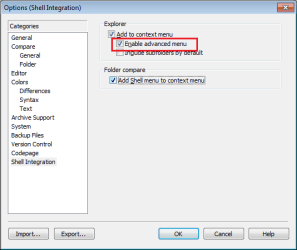
If you opt to install WinMerge, I would suggest turning on this one feature:
(Menu bar > Edit > Options)
WinMerge.png

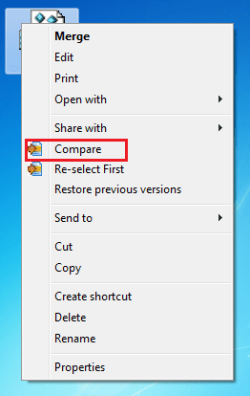
Right click on one file and select "Compare To" from the context menu:
WinMerge2.png

Right click on the second file and select "Compare" from the context menu:
WinMerge3.png

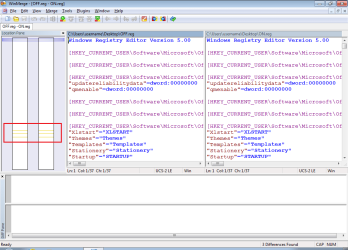
The lines that I have highlighted in the left most pane indicate differences:
WinMerge4.png

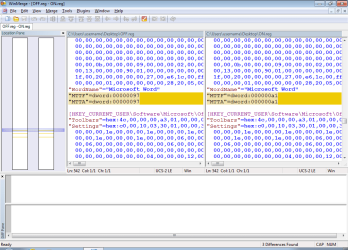
Click on each line to see the differences:
WinMerge5.png

Testing showed that merging the reg file attached to this post does indeed turn the feature on - but MS Word 2010 must be closed during the import of that reg file. I'm not suggesting that you use the attached reg file - as doing so might change other settings. It might not be practical to push this setting out in this manner. You might have a lot of users unhappy that you changed their other settings. I don't know of a way to change only the bits of data pertaining to that one setting.

Also, I do not understand what these two values do:
Code:
"MTTF"=dword:00000456
"MTTA"=dword:00000456
They change in ways that I have not bothered to research. They do not seem to be needed to toggle the setting of interest, but I left them in the reg file attached to this post so that you can see their value (vs. the values shown in that last WinMerge screenshot).

Repeating the steps of that generated the two reg files (feature on & feature off), changed those two values. I'll leave it to you to ferret out why... but I think that you can safely exclude that info from any reg file that you opt to use.
 

Attachments

Last edited:

My Computer

Computer type
Laptop
Computer Manufacturer/Model Number
Employer provided Dell Latitude
OS
W7 Pro SP1 64bit
CPU
i7
Memory
8GB
Graphics Card(s)
Intel HD Graphics
Hard Drives
crappy SSD
Antivirus
Employer mandated Symantec Endpoint Protection
Browser
Pale Moon 64bit, IE11 64bit & Chrome 64bit
Thanks so much for this guide. I'm happy to add to your rep. This definitely will help in finding what I want, while it changes other settings as you said, so I won't use your registry keys, I'll probably test this on a fresh install as well.

WinMerge is a program I'll keep in mind, looks like it could be useful in the future as well.

I'll mark this as solved even though I haven't tested it myself yet. You were of great help.
 

My Computer

Computer type
PC/Desktop
Computer Manufacturer/Model Number
Custom built Desktop(Myself) Specs below - Also Asus G53SW-A1 laptop
OS
Windows 10 Pro / OpenSUSE
CPU
Intel Core i7 4790K
Motherboard
Asus Z97-A
Memory
32GB DDR3
Graphics Card(s)
EVGA GTX 1070
Sound Card
OnBoard
Monitor(s) Displays
3 X 1080P 24" displays
Screen Resolution
1280x1050 & 1920x1080
Hard Drives
SSD: Crucial M500 128GB
HD 1: WD Caviar Black 1TB
HD 2: WD Caviar Black 2TB
HD 3: WD Caviar Blue 500GB
PSU
Corsair CX650M
Case
Corsair Obisidian 450D
Cooling
Noctua NH-D14
Keyboard
Corsair K70 Vengeance (blue switches)
Mouse
Logitech M500
Internet Speed
65/10
Antivirus
Kaskersky Internet Securty
Browser
Opera
Glad to hear that it helped a bit.

A tool like AutoIt might be able to...
...pull the info from each remote computer
...change only the bits of interest
...write the changed info back

Or the script could be compiled and deployed locally at log on.
 

My Computer

Computer type
Laptop
Computer Manufacturer/Model Number
Employer provided Dell Latitude
OS
W7 Pro SP1 64bit
CPU
i7
Memory
8GB
Graphics Card(s)
Intel HD Graphics
Hard Drives
crappy SSD
Antivirus
Employer mandated Symantec Endpoint Protection
Browser
Pale Moon 64bit, IE11 64bit & Chrome 64bit
Back
Top