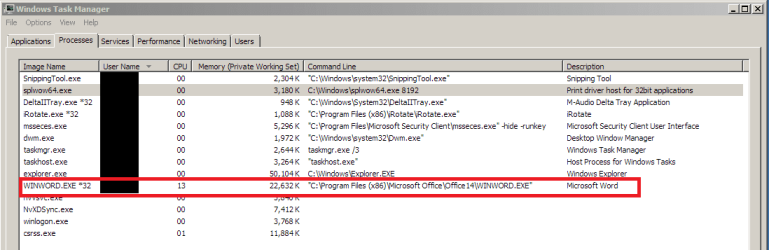
Why does MS Word not shut down properly? This happens occasionally and, I think, haphazardly. I go into task manager and even though I've closed the program, the Winword file remains, thus preventing my deleting Word's temp files.
Thanks.
Attachments
manager.png
16.5 KB
· Views: 70
My Computer
Computer type
PC/Desktop
Computer Manufacturer/Model Number
Dell Studio XPS 8100, Dell XPS 15 laptop
OS
Windows 10 Home, 64 bit
CPU
Intel Core i7 860 @ 2.8 GHz
Motherboard
Dell 0T568R (CPU1)
Memory
8.0 GB Dual Channel DDR3 @ 664 MHz (9-9-9-24)
Graphics Card(s)
nVidia GeForce GTS 240
Sound Card
M-Audio Delta Audiophile 2496
Monitor(s) Displays
Dell 2407WFP
Screen Resolution
1920x1200
Hard Drives
977 GB Western Digital WDC WD1001FAES-75W7A0 (SCSI)
Antivirus
Windows Defender, MalwareBytes Anti-Malware, AdwCleaner
Browser
Firefox, occasionally IE and Edge
Other Info
Mozilla Firefox, Mozilla Thunderbird. Western Digital Passport 250 GB external HD, two Mushkin Enhanced Mulholland 32GB USB flash drives, AKG K240 Studio headphones, Asus AC-1900 dual band wireless router.
Hi Irene. I've tried a repair before--forgot to mention that. It's OK for a while after the repair, but goes back to its bad behavior.
My Computer
Computer type
PC/Desktop
Computer Manufacturer/Model Number
Dell Studio XPS 8100, Dell XPS 15 laptop
OS
Windows 10 Home, 64 bit
CPU
Intel Core i7 860 @ 2.8 GHz
Motherboard
Dell 0T568R (CPU1)
Memory
8.0 GB Dual Channel DDR3 @ 664 MHz (9-9-9-24)
Graphics Card(s)
nVidia GeForce GTS 240
Sound Card
M-Audio Delta Audiophile 2496
Monitor(s) Displays
Dell 2407WFP
Screen Resolution
1920x1200
Hard Drives
977 GB Western Digital WDC WD1001FAES-75W7A0 (SCSI)
Antivirus
Windows Defender, MalwareBytes Anti-Malware, AdwCleaner
Browser
Firefox, occasionally IE and Edge
Other Info
Mozilla Firefox, Mozilla Thunderbird. Western Digital Passport 250 GB external HD, two Mushkin Enhanced Mulholland 32GB USB flash drives, AKG K240 Studio headphones, Asus AC-1900 dual band wireless router.
Hit enter. This starts word in safe mode to a blank document. Now close word and check in task manager whether the exe is still running. If it isnt, the problem is likely because of some add-in.
It's still running after starting winword /a. I could run a repair, but that isn't a permanent cure. Any suggestions? Thanks.
My Computer
Computer type
PC/Desktop
Computer Manufacturer/Model Number
Dell Studio XPS 8100, Dell XPS 15 laptop
OS
Windows 10 Home, 64 bit
CPU
Intel Core i7 860 @ 2.8 GHz
Motherboard
Dell 0T568R (CPU1)
Memory
8.0 GB Dual Channel DDR3 @ 664 MHz (9-9-9-24)
Graphics Card(s)
nVidia GeForce GTS 240
Sound Card
M-Audio Delta Audiophile 2496
Monitor(s) Displays
Dell 2407WFP
Screen Resolution
1920x1200
Hard Drives
977 GB Western Digital WDC WD1001FAES-75W7A0 (SCSI)
Antivirus
Windows Defender, MalwareBytes Anti-Malware, AdwCleaner
Browser
Firefox, occasionally IE and Edge
Other Info
Mozilla Firefox, Mozilla Thunderbird. Western Digital Passport 250 GB external HD, two Mushkin Enhanced Mulholland 32GB USB flash drives, AKG K240 Studio headphones, Asus AC-1900 dual band wireless router.
This is a common problem with Word, unfortunately. Here are some suggestions:
Open file and close it by clicking on File, Close, NOT by using the X icon in the upper-right corner. See if that works.
If it doesn't, with the file open, open Task Manager. Highlight the file in Task Manager and “End Process.” Then go to Windows Explorer and see if you can delete the file. (If Task Manager doesn't see that file open, go into your Start menu's Recent Items list, select that file, and with that file open, go back into Task Manager. Highlight that file in Task Manager and “End Process.” Then go to Windows Explorer and you should be able to close or delete the file. You may have to repeat this process several times, each time selecting the next most recent item in the Recent Items list.)
If that doesn’t work, right-click Computer, select Manage, Shared and from the list select Open Files. Close the open files and try to close or delete the file again.
If none of the above works, go back into Task Manager, Processes + close explorer.exe. Then restart explorer.exe by going back into Task Manager, and in File section, select New Task (Run). Type explorer.exe (or C:\Windows\explorer.exe) in the Run box (it may be there already). Below the command, it should say: This task will be run with Administrator privileges. Click Okay
You can also try some 3rd party apps:
Unlocker - when you're trying to delete a file but Windows says no because the file is supposedly in use. If you can't figure out what program is using it, the error is usually caused by the file handle being held open by a program, process, or another user. The challenge is finding what has it open, and the freeware utility Unlocker makes it easy to identify. Simply right-click the folder or file and select Unlocker. If the folder or file is locked, a window listing of lockers will appear. Simply click 'Unlock All' and you are done!
LockHunter - a free tool to delete files blocked by any processes - LockHunter is a free tool similar to Unlocker to delete files blocked by someone you do not know. LockHunter is useful for fighting against malware, and other programs that blocks files without a reason. Unlike other similar tools it deletes files into the Recycle Bin so you may restore them if deleted by mistake. Supports 32-bit and 64-bit Vista.
My Computer
Computer Manufacturer/Model Number
HP Pavillion dv5t (generation 1)
OS
Vista 64 bit and 32 bit (SP2)
CPU
Intel(R) Core(TM)2 Duo Processor T9400 (2.53 GHz
Memory
4GB DDR2 System Memory (2 Dimm)
Graphics Card(s)
512 MB NVIDIA GeForce 9600M GT
Monitor(s) Displays
15.4" diagonal WSXGA+ High-Definition HP BrightView Widescre
Screen Resolution
1680 x 1050
Hard Drives
320GB 5400RPM SATA Hard Drive with HP ProtectSmart Hard Drive Protection
Keyboard
Built-in HP
Mouse
Built in - Synaptics TouchPad V6.5 on PS/2 Port
Internet Speed
Max
Other Info
~ Intel Next-Gen Wireless-N Mini-card w/Bluetooth ~ Blu-Ray ROM DVD+/-R/RW ~ Integ. HDTV Hybrid Tuner ~ 12 Cell Battery ~ MS Office (Home Premium) 2007 ~
I've used this before with other applications. Didn't connect the two. I'll try this for a while first and see what happens after a while because this is the likely candidate.
Thanks!
My Computer
Computer type
PC/Desktop
Computer Manufacturer/Model Number
Dell Studio XPS 8100, Dell XPS 15 laptop
OS
Windows 10 Home, 64 bit
CPU
Intel Core i7 860 @ 2.8 GHz
Motherboard
Dell 0T568R (CPU1)
Memory
8.0 GB Dual Channel DDR3 @ 664 MHz (9-9-9-24)
Graphics Card(s)
nVidia GeForce GTS 240
Sound Card
M-Audio Delta Audiophile 2496
Monitor(s) Displays
Dell 2407WFP
Screen Resolution
1920x1200
Hard Drives
977 GB Western Digital WDC WD1001FAES-75W7A0 (SCSI)
Antivirus
Windows Defender, MalwareBytes Anti-Malware, AdwCleaner
Browser
Firefox, occasionally IE and Edge
Other Info
Mozilla Firefox, Mozilla Thunderbird. Western Digital Passport 250 GB external HD, two Mushkin Enhanced Mulholland 32GB USB flash drives, AKG K240 Studio headphones, Asus AC-1900 dual band wireless router.