
Wordpad Not Working

Chipper

Banned
Local time
4:36 PM
Messages
33
Location
Massachusetts
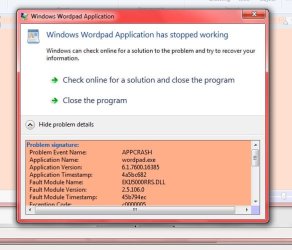
I tried to open WordPad two days ago (1st time since installing W7) and got a warning flag that simply said: "Windows WordPad Application has stopped working".

Are there any solutions to fixing this, short of having to go to a restore point? (which may not fix it, either)

I tried the Troubleshooting sector in Control Panel, but it was useless.

Here is a pic of the DETAILS:

Thanks all,

Chipper
 

Attachments
  • WP details.jpg
    WP details.jpg
    41.7 KB · Views: 53

My Computer

Computer Manufacturer/Model Number
ACER/AM3100-U3201A
OS
Windows7 (Home Premium)
CPU
AMD Athlon Dual Core 4400+ 2.30Ghz
Motherboard
AMD 690 G
Memory
3.0GB (2.75GB usable)
Graphics Card(s)
ATI Radeon X1200 Series
Sound Card
Audigy SE
Monitor(s) Displays
Liquid Video LCD
Hard Drives
C: (system) 298GB [277GB free]
D: (nonsystem) 232GB [213GB free]
J: MyBook 149GB [109GB free] external
K: MyBook 298GB [291GB free] external
PSU
120v AC ?
Case
?
Cooling
3 fans
Just a guess, but try deleting or renaming EKU5000RRS.DLL by adding .OLD.
 

My Computer

Computer Manufacturer/Model Number
DIY
OS
W7x64 Pro, SuSe 12.1/** W7 x64 Pro, XP MCE
CPU
Phenom II 1090T w/Noctua NH-D14 /**4400+ X2 w/CM Hyper TX 3
Motherboard
ASRock 890FX Deluxe 4/**A8N-SLI
Memory
2 x 2GB Patriot PGS34g1600LLKA/**4x1GB Corsair VS
Graphics Card(s)
EVGA GTX460 SC/**EVGA 8800GTS
Sound Card
Asus Xonar D2X/**Xonar D1
Monitor(s) Displays
Acer X233H, Dell E152FPc /**LG M237-WD
Screen Resolution
1920x1080 & 1024x768/**1980x1080
Hard Drives
WDC 2TB, 1.5TB, 1TB, 500GB,Seagate 500GB , Maxtor 80GB /**500GB Seagate & WDC 1TB Black
PSU
CM RS600 w/ APC BX1000G/**Antec 500 TP w/ APC BX1000
Case
HAF922/**Antec 1040IIB
Cooling
3x200mm, 1x140 and 1x120mm/**5x80mm fans
Keyboard
Logitech Media USB/**Saitek Eclipse
Mouse
Cordless Trackman Wheel/**Ditto
Internet Speed
3.3Mbps
Other Info
SB 560 5.1 w/ Sennheiser RS140/**Creative T20 speakers, Dvico FusionHDTV7 Gold RT, Cisco E3000, HP 5510V AIO, Linksys E3000, Belkin F5U237 hub and **F5D8055 adapter
(** = 2nd rig)
Is this a Kodak printer? EKIJ5000RRS.dll
 

My Computer

Computer type
PC/Desktop
Computer Manufacturer/Model Number
Bruce ... somewhere in his 40's
OS
Windows 7 Ultimate 32bit SP1
CPU
Intel(R) Core(TM)2 Quad CPU @ 2.40GHz, 2400 MHz
Motherboard
INTEL/D975XBX2
Memory
4 GB
Graphics Card(s)
ATI Radeon HD 2600 Pro
Monitor(s) Displays
Samsung SyncMaster 914v
Screen Resolution
1280 x 1024
Hard Drives
2/500GB each ... ST3500630AS ATA Device.
One is not connected
PSU
Rocketfish 700 W
Case
G.Skill Gigabyte Chassis
Keyboard
Standard PS/2 Keyboard
Mouse
Microsoft PS/2 Mouse
Internet Speed
DSL
Antivirus
Avira Internet Security
Browser
IE 11
Other Info
ATI HDMI Audio

My Computer

Computer type
PC/Desktop
Computer Manufacturer/Model Number
Dwarf Dwf/11/2012 r09/2013
OS
Windows 8.1 Pro RTM x64
CPU
Intel Core-i5-3570K 4-core @ 3.4GHz (Ivy Bridge) (OC 4.4GHz)
Motherboard
ASRock Z77 Extreme4-M
Memory
4 x 4GB DDR3-1600 Corsair Vengeance CMZ8GX3M2A1600C9B (16GB)
Graphics Card(s)
MSI GeForce GTX770 Gaming OC 2GB
Sound Card
Realtek High Definition on board solution (ALC 898)
Monitor(s) Displays
ViewSonic VA1912w Widescreen (VGA)
Screen Resolution
1440x900
Hard Drives
OCZ Agility 3 SSD 120GB SATA III x2 (RAID 0)
Samsung HD501LJ 500GB SATA II x2
Hitachi HDS721010CLA332 1TB SATA II
Iomega 1.5TB Ext USB 2.0
WD 2.0TB Ext USB 3.0
PSU
XFX Pro Series 850W Semi-Modular
Case
Gigabyte IF233
Cooling
1 x 120mm Front Inlet 1 x 120mm Rear Exhaust
Keyboard
Microsoft Comfort Curve Keyboard 3000 (USB)
Mouse
Microsoft Comfort Mouse 3000 for Business (USB)
Internet Speed
NetGear DG834Gv3 ADSL Modem/Router (Ethernet) ~4.0 Mb/s (O2)
Antivirus
Avast! 8.0.1497
Browser
IE 11
Other Info
Optical Drive: HL-DT-ST BD-RE BH10LS30 SATA Bluray
Lexmark S305 Printer/Scanner/Copier (USB)
WEI Score: 8.1/8.1/8.5/8.5/8.25
Asus Eee PC 1011PX Netbook (Windows 7 x86 Starter)
I want to thank everyone for your responses about WordPad.
I do indeed have a Kodak 5100 AiO, and it is definitely the problem.

I uninstalled it, and WordPad wokrked just fine.

Then I downloaded what looked like Kodak's W7 update driver for the 5100.
I then tried to install it.

But the install bar timer stalled at about 3/4 complete. I waited for a good 15-20 minutes and then aborted the mission.

I've been reading about this problem from others at various websites, and they too are having problems with the Kodak driver(s).

I can't for the life of me figure out how a printer driver could affect a simple program like WordPad. I know, it's WINDOWS.

And thanks for the welcoming. This looks like a great Forum.
 

My Computer

Computer Manufacturer/Model Number
ACER/AM3100-U3201A
OS
Windows7 (Home Premium)
CPU
AMD Athlon Dual Core 4400+ 2.30Ghz
Motherboard
AMD 690 G
Memory
3.0GB (2.75GB usable)
Graphics Card(s)
ATI Radeon X1200 Series
Sound Card
Audigy SE
Monitor(s) Displays
Liquid Video LCD
Hard Drives
C: (system) 298GB [277GB free]
D: (nonsystem) 232GB [213GB free]
J: MyBook 149GB [109GB free] external
K: MyBook 298GB [291GB free] external
PSU
120v AC ?
Case
?
Cooling
3 fans
Does your printer appear in device manager?

If it does, try uninstalling all drivers for it there and then disconnect the printer.

Reboot without a printer connected, then shut down the PC.

Then reconnect the printer and restart the PC. Windows may say it has found new hardware and is installing new software for it.

When it finishes, go back to device manager and look at your printer again. Choose to update the driver and then choose "browse my computer for driver software". Choose the "browse" button and navigate to where you have that new Kodak driver stashed on your PC and select it.
 

My Computer

Computer type
PC/Desktop
Computer Manufacturer/Model Number
Ignatz Special; 4 speed manual gearbox; factory air conditioning; one of one
OS
Windows 7 Home Premium SP1, 64-bit
CPU
Intel Skylake i5-6600K, not overclocked
Motherboard
AsRock Z170M Extreme 4, micro ATX
Memory
8 GB HyperX DDR4-2666 (2 x 4 GB)
Graphics Card(s)
none; graphics are integrated on CPU
Sound Card
onboard: Realtek ALC1150; external: USB Behringer UF0-202
Monitor(s) Displays
Dell S2340M 23 inch IPS
Screen Resolution
1600 x 900
Hard Drives
System: Crucial MX100 series SSD, 128 GB;
Data: Samsung Spinpoint 103SJ, 1 TB;
Backup: WD Caviar Green WD30EZRX-00D8PB0, 3 TB
PSU
Rosewill SilentNight 500 watt fanless, semi-modular
Case
Antec Solo II
Cooling
Noctua NH-U12S; Noctua F12 intake, Noctua S12A exhaust
Keyboard
Microsoft 200 6JH-00001 USB
Mouse
Dell or Microsoft optical wired; USB
Antivirus
Microsoft Security Essentials and Malwarebytes Premium
Browser
Pale Moon
Other Info
All fans PWM; speeds at idle: CPU circa 500 rpm; intake circa 600 rpm; exhaust circa 600 rpm; CPU temps 27 idle and 47 C load in a warm room (27 C/81 F) when running Intel Extreme Tuning Utility stress test.
Thanks ignatzatsonic...the printer is currently uuninstalled and disconnected. When I get back to it, I will definitely try your suggestion.
And thanks, too, seekermeister. I'll give your suggestion a shot, as well. I guess I would change it in the REGISTRY? Along with backing it up first.
 

My Computer

Computer Manufacturer/Model Number
ACER/AM3100-U3201A
OS
Windows7 (Home Premium)
CPU
AMD Athlon Dual Core 4400+ 2.30Ghz
Motherboard
AMD 690 G
Memory
3.0GB (2.75GB usable)
Graphics Card(s)
ATI Radeon X1200 Series
Sound Card
Audigy SE
Monitor(s) Displays
Liquid Video LCD
Hard Drives
C: (system) 298GB [277GB free]
D: (nonsystem) 232GB [213GB free]
J: MyBook 149GB [109GB free] external
K: MyBook 298GB [291GB free] external
PSU
120v AC ?
Case
?
Cooling
3 fans
i am also facing this problem but my problem is quiet large ....
from previous 15 days i m facing problem with my wordpad, msoffice word only powerpoint and excel are working fine and with paint when i try to write something in it.............
all of these showing msg stop working....
msg is--" a program caused the program to stop working correctly. windows will close the program and notify you if a solution is available. " and then it ask for debug and close the program....

what i have done......
i have reinstalled ms office but again it is giving me same error.

on my operating system currently programs are(i m mentioning those what i think could effect)...
tuneuputility
ccleaner

changes i have done in previous 20 days ...i have uninstall avast anti virus

thanx in advance....i m unable to work on my projects....
 

My Computer

OS
Windows 7 Home Premium 64bit
Back
Top