Hello. I wondered if anyone else has this problem and knows how to fix it.
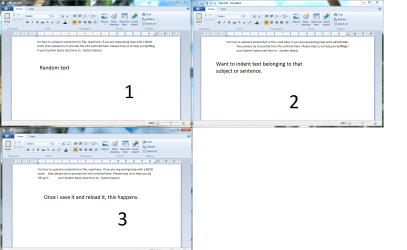
I use tab to indent text sometimes in WordPad. I will save it and then when I reload it later the text will be a mess/out of place. What I think it does is push text from the previous line onto the next line.
I will post a reproduced example in paint.
System spec.:
Processor: Intel Core i5-3570k 3.4GHz
Installed memory (RAM): 8GB
System type 64-bit Operating System(windows 7 Home premium)
Graphics card: Nvidia GeForce GTX 660
Primary hard drive(windows): Samsung SSD 840 PRO Series
Secondary hard drive: Seagate 1TB(st1000dm003-1ch162)
Optical drive: LG super multi dvd-RW(HL-DT-ST DVDRAM GH24NS95 ATA Device)
Motherboard: Z77A-GD65 Gaming(MSI)
Sound: Sound Blaster Z
Attachments
Example.png
110.7 KB
· Views: 1
My Computer
At a glance
Windows 7 Home premium 64bit SP1AMD Phenom II X4 965 Black Edition2x2GB G. Skill DDR3 1600mhzEVGA 470GTX
Have you tried using the Indent increase/decrease buttons instead? Also for something free that may be a bit more versatile take a look at Atlantis Nova
Most editors have a setting to use hard tabs or substitute spaces. That usually avoids these kind of problems. But I did not see that setting in WP. Then again I don't use it that often since it went to the Ribbon based Gui.
Indent increase/decrease buttons didn't help. I think I shall follow your suggestion of trying a new word processor.
Thanks very much for the assistance.
My Computer
At a glance
Windows 7 Home premium 64bit SP1AMD Phenom II X4 965 Black Edition2x2GB G. Skill DDR3 1600mhzEVGA 470GTX