Work arounds to install old programs into Windows 7?

WestSide

New member
Local time
7:27 AM
Messages
4
I have a few old programs that Windows 7 is not allowing to be installed. One is Microsoft FrontPage, which was discontinued a few years ago. It runs fine on Windows XP, but won't install on Windows 7. ("Cannot be started. Error number 5")

It's actually a bit tricky to install FrontPage on Windows XP because I have to install FrontPage 97, then the 2000 upgrade, then FrontPage 2003 upgrade.

Unfortunately Windows 7 won't even let me start the Windows 97 installation. Any ideas?
 

My Computer

Computer Manufacturer/Model Number
Asus
OS
Windows 7
CPU
Core i7
Motherboard
Asus P6TD
Memory
Corsair PC3-1600 (DDR3-2000) X 2 chips
Graphics Card(s)
GeForce 9500 GT
Hard Drives
2
PSU
Corsair 1,000 W

My Computer

Computer Manufacturer/Model Number
Samsung NP550P5C-S02IN
OS
Windows 7 Ultimate - 64-bit | Windows 8 Pro - 64-bit
CPU
Intel® Core™ i7 Processor 3,610QM (2.30Hz, 6MB L3 Cach
Memory
8 GB
Graphics Card(s)
NVIDIA® GeForce® GT 650M 2GB Graphics, Optimus™ techno
Sound Card
SoundAlive™ JBL 3 Speakers (With sub-Woofer)
Monitor(s) Displays
39.62cm (15.6) SuperBright 300nit HD+ LED Display
Screen Resolution
1,600 x 900, Anti-Reflective
Hard Drives
1TB S-ATA II Hard Drive (5,400RPM)
Welcome to SF! WestSide

You may still run into problems with the compatibility mode options or the new "troubleshoot compatibility" tool due to that being an outdated MS app. Different MS softwares are generally tied to one or two versions plus the newer Vista kernel followed the new MinWin seen in 7.

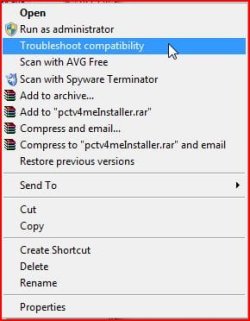
The image here shows the new tool located in the right click properties screen for a go with that to see if you are able to get anywhere. That will have you run the installer which you right click on first as part of the process. You will also be prompted as to whether the program installed correctly.
 

Attachments

  • TROUBLESHOOT COMPATIBILITY.jpg
    TROUBLESHOOT COMPATIBILITY.jpg
    24.7 KB · Views: 79

My Computers

System One System Two

  • Computer type
    PC/Desktop
    Computer Manufacturer/Model Number
    Custom builds = 2
    OS
    W7 Ultimate x64/W10 Pro x64/W11 Pro Triple Boot - Main PC W7 Remote PC Micro ATX W7 Pro x64/W11 Pro
    CPU
    AMD Phenom II X4 975 Deneb 3.6ghz - 965 2nd remote pc
    Motherboard
    Gigabyte GA-790XTA-UD4-Gigabyte GA-880GM-D2H remote pc
    Memory
    Kingston Hyper X DDR3 1600 1.5v 16gb - Hyper X Fury 8gb 2nd
    Graphics Card(s)
    MSI HD Radeon 5750 1gb - MSI HD Radeon 6450 on mini tower
    Sound Card
    Creative Labs X-Fi Xtreme Audio P - Realtek onooard 2nd case
    Monitor(s) Displays
    ASUS VW199T-P 19" HP 2082a Main-HP 2082a 20" remote pc
    Screen Resolution
    Asus 1440x900 - HP 1600x900
    Hard Drives
    WD Black 1TB HD per OS W7, W10, and pending W11 presently on 500gb OS Drive - Pending Triple 1TB HDs for Spanned Storage/backup volume
    Single 2TB external USB enclosure, single 1TB System 7 Host/Boot drive, Pending 8TB external HD for system image b
    PSU
    Corsair 750TX - primary / Corsair CX600 - second
    Case
    Antec 900-2 - SSD compatible / NZXT Vulcan mini tower
    Cooling
    Zalman CNPS9900A
    Keyboard
    AZIO L70 Backlit Letters Gaming - ONN Cordless/USB
    Mouse
    MSI DS200 Programmable, Logitech Cordless
    Internet Speed
    30mbps upgrade - primary hard wired - mini tower usb WiFi
    Antivirus
    GFI VIPRE Internet Security 2014 on W7 2016 beta on W10,
    Browser
    Cyberfox, WaterFox 64bit FF variants, FireFox x64, Pale Moon
    Other Info
    Accomdata fan cooled usb 2.0 PIDE/Sata II, III external enclosure.
    Sambient usb/eSata PATA/Sata II, III external enclosure.
  • Computer type
    PC/Desktop
    System Manufacturer/Model Number
    CUSTOM ASSEMBLY
    OS
    W7 Pro x64/W11 Pro
    CPU
    AMD Deneb 3.6ghz - 965
    Motherboard
    Gigabyte GA-880GM-D2H remote pc
    Memory
    Kingston Hyper X Fury 8gb
    Graphics Card(s)
    MSI HD Radeon 6450 DVI Output
    Sound Card
    Realtek onooard Creative or Other separate PENDING
    Monitor(s) Displays
    VIZIO 32" LCD TV Separate LCD Pending
    Screen Resolution
    1600x1080
    Hard Drives
    WD 500GB OS Host/Boot WD Green 1TB Storage/Backup
    PSU
    Corsair 600W - THERMALTAKE 600W spare case
    Case
    NZXT Vulcan mini tower
    Cooling
    Twin 120mm Top Fans - 240mm Side Cover
    Keyboard
    ONN Cordless/USB Logitech Cordless
    Mouse
    ONN USB/Cordless - Logitech Cordless
    Internet Speed
    DSL 5G
    Browser
    MS Edge, FireFox, WaterFox x64, FireFox Nightly
    Other Info
    OS Testing-Remote Access to Main TeamViewer

My Computer

Computer type
PC/Desktop
Computer Manufacturer/Model Number
Custom Built
OS
Windows 7 Enterprise x64
CPU
i7-5820K
Motherboard
Asus X99 A
Memory
16GB DDR4
Graphics Card(s)
ASUS 2GB Nvidia 960GTX OC'd
Monitor(s) Displays
24"
Screen Resolution
1920x1080
Hard Drives
Samsung 1TB 840 SSD
Western Digital 1TB Black Drive
Seagate 2TB NAS Drive
PSU
Antec Earthwatts 650w
Case
Antec DF-85
I'm using Professional 64-bit. I'll try those suggestions...

UPDATE: Yee Haw!!! Got it all up and running! I installed the Windows Virtual PC so that I could install and run FrontPage in XP mode. This virtual PC is pretty neat!

Many thanks!
 
Last edited:

My Computer

Computer Manufacturer/Model Number
Asus
OS
Windows 7
CPU
Core i7
Motherboard
Asus P6TD
Memory
Corsair PC3-1600 (DDR3-2000) X 2 chips
Graphics Card(s)
GeForce 9500 GT
Hard Drives
2
PSU
Corsair 1,000 W
Here is how to get Frontpage back working with Win7

I have a few old programs that Windows 7 is not allowing to be installed. One is Microsoft FrontPage, which was discontinued a few years ago. It runs fine on Windows XP, but won't install on Windows 7. ("Cannot be started. Error number 5")

It's actually a bit tricky to install FrontPage on Windows XP because I have to install FrontPage 97, then the 2000 upgrade, then FrontPage 2003 upgrade.

Unfortunately Windows 7 won't even let me start the Windows 97 installation. Any ideas?

Hello,
I have Windows 7 Ultimate and have finally found that if you can get Frontpage 2003 and get it to update this version 11.8164.8221 SP3 it works fine. I have been use to using Frontpage 2002 with xp for years.

This is what I've found out to work. Get Frontpage 2003 to update to 11.8164.8221 SP3.

hitek :D
 

My Computer

Computer Manufacturer/Model Number
Dell Inspiron 1501
OS
Windows 7
Memory
2 Gig
HP G85 legacy software installation failures

I have several installation CD's including the original v2.50 for win95/98, Me, NT4.X,and 2000. and separate Win XP CD's (v3.10).
I upgraded Vista Premium x64 to win 7 Pro hoping to use XP mode to install and run under Win 7, only to find that I can't install Virtual Machine because my CPU does not have the VT hardware support that is mandatory. :confused: If I can get a compatible VT Hardware CPU, that would probably work, but that's another $150 on top of $189 for Win 7, which I did not really need otherwise.

I can get the win 7 drivers to use the scanner and print functions, but no FAX (installs a FAX Printer) and no scanner-OCR-Word interface apps.

I can see the application cabs and files on the CD. Does anyone know how I might configure Installshield or another installer program to install the software, which I think would run in compatibility mode? I know that I would have to install in the (x86) program directory, since these are 32 bit apps.
 

My Computer

Computer Manufacturer/Model Number
HP Pavillion a6600f
OS
Windows 7
CPU
intel core 2 duo
Motherboard
Napa-GL8E
Memory
3 GB
Monitor(s) Displays
Samsung T220HD
Welcome to the forums, next time, please start a new thread instead of reviving an old one. It usually helps for us to respond to your questions and not get them confused with the rest of the posts.

There are solutions that do not require VT, check out the following link.

VMLite XP Mode Alternative to Windows XP Mode for Windows 7
 

My Computer

Computer Manufacturer/Model Number
Black_Box (homebuilt)
OS
windows 7 RTM x64
CPU
Phenom II 965 Quad Core 3.4Ghz
Motherboard
Asus M4A79T Deluxe
Memory
Mushkin Blackline 8GB (4x2gb)
Graphics Card(s)
XFX Radeon 5970 Black Edition
Sound Card
onboard
Monitor(s) Displays
Dell 2408WPF-main Dell E248WFP-secondary
Screen Resolution
1920x1200-main 1920x1200-secondary
Hard Drives
OCZ Vertex Limited Edition 100GB (OS)
x1 WD Black Edition 500GB drive (Storage)
PSU
XFX 850w Black Edition (Modular)
Case
Mountian Mods H2go
Cooling
CoolITSystems ECO A.L.C.
Keyboard
Logitech MX 5500 wireless keyboard
Mouse
Razor Copperhead
Internet Speed
16Mb down/2Mb up Wowway Cable Internet
Back
Top