
Work Desktop computer on network to single home computer?

Hollywoodc

New member
Local time
6:44 PM
Messages
1
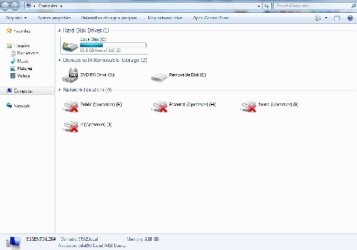
Hi, First post but I hope to be able to use this Forum to help get familiar with Windows 7. Im used to Windows XP but my Old HP Compaq Desktop Computer finally died. My Buddy gave me one of his Work Office computers that was on a Network system with 4 other computers.

Im going to be using it for my home with internet access. I'd like to change the administrator name and password along with deleting other user accounts but I seem to have problems doing so. He gave me his original User name and password to be able to access the computer and clean things out.

Will I have a problem using this computer at home is it was setup for a network system?
I'd like to get it back to basics so I can utilize as much of the Hard drive as possible, but I do not have the windows 7 disk.
Im not much of a computer Wiz but I can do pretty well with guidance and or the proper links, so please have patience with me.
Im also trying to figure out Windows paint on this computer so I can post pics.
 

Attachments
  • Windows 7.jpg
    Windows 7.jpg
    26.1 KB · Views: 1

My Computer

Computer type
PC/Desktop
Computer Manufacturer/Model Number
Dell
OS
windows 7 Ultimate x64
It would be best to re install windows on that pc.

What operating system is on it now ?

Does it have a COA sticker on it ?

Can you read the activation key on it ?
 
Last edited:

My Computer

Computer type
PC/Desktop
Computer Manufacturer/Model Number
Skylake Special #666
OS
Windows 10 Pro x64
CPU
Intel Core i7 6700K
Motherboard
Asus Sabertooth Z170 Mark 1
Memory
GSkill TridentZ RGB 16GB 3600 16-16-16-36
Graphics Card(s)
EVGA GTX 980 Ti SC x2
Sound Card
Realtek High Definition
Monitor(s) Displays
AOC G2460PG
Screen Resolution
1920 x 1080 144Hz
Hard Drives
Samsung 860 Pro 256GB, Seagate Barracuda 4TB x2
PSU
EVGA 1000 P2, EVGA White Custom Braided Cables
Case
Corsair Vengeance C70 Gunmetal Black
Cooling
Corsair H100i v2, Corsair ML120 x2, Thermal Grizzly Kryonaut
Keyboard
Logitech G910 Orion Spectrum
Mouse
Logitech G700s
Internet Speed
Verizon Fios Quantum Gateway 75/75
Antivirus
Windows Defender, Malwarebytes Free 3.8.3
Browser
Chrome
Other Info
Corsair SP120 x4, LG Blu-ray Drive, Durabrand HT-395 100 Watt Dolby Digital Amp, Corsair H2100 Wireless 7.1 Headset

My Computer

Computer type
PC/Desktop
Computer Manufacturer/Model Number
Custom Built
OS
Windows 10 Pro
CPU
AMD Ryzen 5 2400G Processor with Radeon RX Vega 11 Graphics
Motherboard
ASRock X470 Master SLI/AC AM4 AMD Promontory X470 SATA 6Gb/s
Memory
G.SKILL Ripjaws V Series 16GB (2 x 8GB) 288-Pin DDR4 SDRAM D
Graphics Card(s)
2047MB NVIDIA GeForce GTX 1060 6GB (EVGA)
Sound Card
Motherboard Built in
Monitor(s) Displays
Acer R240HY bidx 23.8-Inch IPS HDMI DVI VGA (1920 x 1080) Wi
Screen Resolution
1920 x 1080
Hard Drives
1TB Sandisk SSD PLUS (Main drive)
500 GB Seagate 7200 RPM (Games)
500 GB Western Digital 7200 RPM (Virtual Machines)
PSU
CORSAIR TX Series TX650M 650W 80+ Gold Modular Power Supply
Case
CORSAIR CARBIDE SPEC-02 Mid-Tower Gaming Case, Red LED Fan
Cooling
220mm, two 120mm, and four 60mm fans
Keyboard
Wired Dell keyboard
Mouse
Wireless Logitech mouse
Internet Speed
250mb down, 30mb up
Antivirus
Panda Cloud Antivirus
Browser
Chrome-ish x64
Other Info
Your awesome for reading this.
Hi, First post but I hope to be able to use this Forum to help get familiar with Windows 7. Im used to Windows XP but my Old HP Compaq Desktop Computer finally died. My Buddy gave me one of his Work Office computers that was on a Network system with 4 other computers.

Im going to be using it for my home with internet access. I'd like to change the administrator name and password along with deleting other user accounts but I seem to have problems doing so. He gave me his original User name and password to be able to access the computer and clean things out.

Will I have a problem using this computer at home is it was setup for a network system?
I'd like to get it back to basics so I can utilize as much of the Hard drive as possible, but I do not have the windows 7 disk.
Im not much of a computer Wiz but I can do pretty well with guidance and or the proper links, so please have patience with me.
Im also trying to figure out Windows paint on this computer so I can post pics.

It is easy enough to remove all those old User accounts.

You can also right click those old network drive locations in order to remove them.

You would first want to create your own Admin account with your own User name.
http://www.sevenforums.com/tutorials/181024-user-account-create.html

After that you will want to remove all the old User accounts including the original Admin account.
http://www.sevenforums.com/tutorials/181036-user-account-delete.html

I imagine you would also want to remove any installed software in order to reclaim space on your harddrive, you can do this by going to Add-Remove programs in the Control Panel. Just don't remove any drivers. You can get help here by showing a screen shot of the Add-Remove programs.

This may be easier than reinstalling the Op system.
 

My Computer

Computer type
PC/Desktop
Computer Manufacturer/Model Number
Home built
OS
Windows 7 Ult, Windows 8.1 Pro,
CPU
Q9650-4.275GHz, E8600 4.5GHz, E6750-3.8GHz
Motherboard
Evga 780i FTW
Memory
G.Skill PC2 9600 1200Mhz 5 5 5 15 2T
Graphics Card(s)
GTX480
Sound Card
Asus Xonar D2
Monitor(s) Displays
HannsG
Screen Resolution
1680X1050
Hard Drives
GSkill Phoenix Pro 120GB SSD
PSU
ThermalTake Toughpower 1000Watt modular
Case
ThermalTake XaserV
Cooling
Xigmatek S1283
Keyboard
Logitech G15
Mouse
Logitech G9
Internet Speed
T1
Back
Top