
Workgroup Network Password Prompt tried almost EVERYTHING???

Trabang

New member
Local time
5:53 PM
Messages
17
Yeah I have tried every possible username/password combo I have ever created. The thing is that it works great all day, then put both PC's to sleep and when they are awaken it will do it. Every passwword is rejected and then randomly I will click on the computers folder containing shared stuff and it opens proper, then the mapped drives all get the blue border like normal and they work. Ive been battling it for weeks now and every googled solution has either not worked or maybe worked once and then the next day doesnt. The only thing I havnt done is the create DWORD registry value which Im clueless as to how to properly do it. Setup is 2 win7 home premium and 1 win7 ultimate all 64 bit. workgroup name is same for all and PC's all have different names. Sharing settings are full control read/write for "EVERYONE" and password protected sharing is OFF. All of the other advanced network and sharing options are all properly set for sharing. I have put the same profile username/password on each workgroup pc with admin rights. I can join them on a "homegroup" but cant map network drive with a homegroup shared folder. I swear I have spent hours reading forums before I went through with registering and posting but I'm getting desperate. If anyone can help just let me know I'll check back often and will surely update if ever solved. If I left out something helpfull let me know. The 3 computers are hooked to a wireless router and have never had internet issues, and the computer with shares is always visible but randomly decides it needs this network password.
 

My Computer My Computer

OS
win7 Home prem and win7 Ultimate both 64
Hi Trabang, Welcome to Seven Forums.
This is how I do it. View attachment 196468
Thanks for the response, it's funny because I have your pdf on my PC and I went ahead a week or so ago and re-setup my shared files following this method but I'm pretty sure thats how I originally did it and it doesnt change everything. What is going on with this network password prompt? Is it a glitch or something?
 

My Computer My Computer

OS
win7 Home prem and win7 Ultimate both 64

Open Device Manager, uninstall all under 'Network adapters' KEEP the drivers. Reboot when done. My advanced Sharing settings should be done on all pc's.
 

My Computer My Computer

Computer Manufacturer/Model Number
Look in my Signature.
OS
Win7 H.Prem. 32bit+SP1
Ok in dev mgr I have 4 things under "network adapters"
Intel(R) WiFi Link 1000 BGN
Microsoft Virtual WiFi Miniport Adapter
Microsoft Virtual WiFi Miniport Adapter #2
Realtek PCIe GBE Family Controller

Now I'm not good with computers at all so what will uninstalling all these do, and dont I need these? Is there no way to disable the password prompt? The settings are like that on all computers. Also on the win7 home prem PC I can almost always open the win7 Ultimates shared folders, its just when its home prem on home prem, or on the Ultimate trying to open home prem shared stuff. In the password prompt it always sais "domain" with the name of the computer next to it. When I enter username ive tried many combos of WORKGROUP\Username.
 

My Computer My Computer

OS
win7 Home prem and win7 Ultimate both 64
Hi Trabang,

Did you follow my PDF's Advanced Sharing settings on all your pc's. These are the 2 I would need to uninstall on my pc's. They get reinstalled automatically after a restart.

RR.jpg
 

My Computer My Computer

Computer Manufacturer/Model Number
Look in my Signature.
OS
Win7 H.Prem. 32bit+SP1
Hi Trabang,

Did you follow my PDF's Advanced Sharing settings on all your pc's. These are the 2 I would need to uninstall on my pc's. They get reinstalled automatically after a restart.

View attachment 196570
Yeah the only difference is my computers all have the same name and password profile on them, but on the ultimate machine the primary user profile used isnt the common one. I logged into the ultimate with the same so at the time all 3 workgroup computers where logged in with same username and password but nothing changed so I didnt go through the proccess of putting everything on the ultimates common profile. I listed my adapters in device mgr above, should I uninstall all of them or just select ones? I'm so frustrated with this I'm almost willing to re-install windows 7 and make the primary account name the same as the other 2 computers. What do u think?
 

My Computer My Computer

OS
win7 Home prem and win7 Ultimate both 64
Hi Trabang,
sorry for late reply. I have added a standard account on my Laptop. This prompted me to reassess my pdf, so I made a new one, hope its clearer. If not I have other ideas. View attachment File Sharing.pdf
 

My Computer My Computer

Computer Manufacturer/Model Number
Look in my Signature.
OS
Win7 H.Prem. 32bit+SP1
Hi Trabang,
sorry for late reply. I have added a standard account on my Laptop. This prompted me to reassess my pdf, so I made a new one, hope its clearer. If not I have other ideas. View attachment 196670
Yeah that would be the evil password prompt I get. So when u entered a standard account username and PW the propmt opened the shares? How are u entering I read u might need to do it like LAPTOP\Username for ur pdf scenario but all it does for me is change the word next to "domain" at the bottom of prompt. I dont get the whole password thing because eventually it will randomly allow me to open the shared computer. But as soon as it wakes up I try to open and there is my favorite prompt. I'm also still wondering which of those adapters u think i should uninstall as well?
 

My Computer My Computer

OS
win7 Home prem and win7 Ultimate both 64
Stage 2. On the pc you want to access, delete the sharing folder if you made one as in my pdf. Reboot. On the same pc, change your password, make a sharing folder as my pdf. Reboot.
-
On the pc your trying to connect from, uninstall:-
Intel(R) WiFi Link 1000 BGN Keep the drivers.
Microsoft Virtual WiFi Miniport Adapter Keep the drivers.
Microsoft Virtual WiFi Miniport Adapter #2 Delete the drivers.
Reboot. Re enter any passwords if asked.
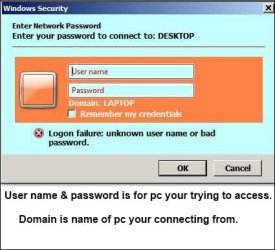
Now click Network, it should show your 2 pc's by name. click the one you want to connect to, this window will open.

Capture.JPG
 

My Computer My Computer

Computer Manufacturer/Model Number
Look in my Signature.
OS
Win7 H.Prem. 32bit+SP1
Stage 2. On the pc you want to access, delete the sharing folder if you made one as in my pdf. Reboot. On the same pc, change your password, make a sharing folder as my pdf. Reboot.
-
On the pc your trying to connect from, uninstall:-
Intel(R) WiFi Link 1000 BGN Keep the drivers.
Microsoft Virtual WiFi Miniport Adapter Keep the drivers.
Microsoft Virtual WiFi Miniport Adapter #2 Delete the drivers.
Reboot. Re enter any passwords if asked.
Now click Network, it should show your 2 pc's by name. click the one you want to connect to, this window will open.

View attachment 196865
OK I seem to have 1 home prem sharing fine with the ultimate but the second home prem with identical username and passwords and for that matter they even have the exact same shared folders in the exact same spot same names everything. My setup and need for shares is like this...the 2 home premium pc's have flight simulator X on them and the ultimate laptop has a bunch of apps, weather engine ect on it. So is there something where you cant share a third workgroup computer if the other 2 are sharing and the 3 shared folders are mapped drives? I just cant imagine what the issue is. When I open "computer" on the working 2 pc's it will wake up the third non-sharable pc. Also if the third PC is on first, the laptop can access its mapped drived shared folders fine, but when i turn on the current working PC it cant be shared meaning password prompt with no possible username/password combo working
 

My Computer My Computer

OS
win7 Home prem and win7 Ultimate both 64
You may not know this, but because of you I have actually got smarter. E.G. do you know of any 2 different homes with the same telephone number ? Well the same applys to computers. Trying to connect from a Laptop to 2 different computers with the same username & password wont work unless each computer has a different name.
To save confusing myself, my desktop is called Desktop and my laptop is called Laptop. On my desktop username is George. On my Laptop I have one Administrator account called Admin & a Standard account called Stan. I can connect from both to my desktop.
 

My Computer My Computer

Computer Manufacturer/Model Number
Look in my Signature.
OS
Win7 H.Prem. 32bit+SP1
You may not know this, but because of you I have actually got smarter. E.G. do you know of any 2 different homes with the same telephone number ? Well the same applys to computers. Trying to connect from a Laptop to 2 different computers with the same username & password wont work unless each computer has a different name.
To save confusing myself, my desktop is called Desktop and my laptop is called Laptop. On my desktop username is George. On my Laptop I have one Administrator account called Admin & a Standard account called Stan. I can connect from both to my desktop.
I knew it had to be some odd glitch or something. Whats annoying is microsoft specifically sais u need identical usernames and passwords on all workgroup computers, however this may be the root of this issue which is a huge pain for probably thousands of people from the amount of posts on this problem. I havnt had time to change up the third pc's profile but man that could have been it. I'll report back here once I do change it up and see if I can get them both connected to my laptop at the same time. We shall see, but your support has been a hell of a lot better than anything micro$oft has offered.
 

My Computer My Computer

OS
win7 Home prem and win7 Ultimate both 64
Hi Trabang,
Type netplwiz in the start menu search box. Look at your saved passwords.

RR.jpg
 

My Computer My Computer

Computer Manufacturer/Model Number
Look in my Signature.
OS
Win7 H.Prem. 32bit+SP1
Hi Trabang,
Type netplwiz in the start menu search box. Look at your saved passwords.

View attachment 197245
Hey, After re-reading your previous post I see I misunderstood you, I thought you were saying about username/passwords not computer name. My 3 computers all have unique names but ofcourse the workgroup name is the same and the profiles are the same. I will try the password thing when I get home tonight I saw that option when I did the control userpasswords2 thing to auto sign in but never explored anything. Will that show me the password that the network password prompt could be needing? I'm thinking maybe windows made one for me. Whats odd is my laptop to laptop sharing has been working the past few days from the awaken state. Because of that I havnt restarted or tinkered with any settings because its working but the gaming PC shares wont open on the ultimate laptop running my simulator apps and stuff. When the prompt comes up is this the way youd enter it...GAMING\Joe. USERNAME=Joe PC's Name=GAMING? and the computers name will then appear below next to domain right?
 

My Computer My Computer

OS
win7 Home prem and win7 Ultimate both 64
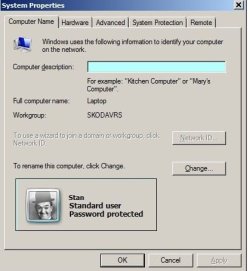
This image shows the name & workgroup name of my Laptop. I pasted the part with the photo on it.

RR.jpg
 

My Computer My Computer

Computer Manufacturer/Model Number
Look in my Signature.
OS
Win7 H.Prem. 32bit+SP1
This image shows the name & workgroup name of my Laptop. I pasted the part with the photo on it.

View attachment 197296
So if u want to open that computers shared files on another computer when the network password prompt comes up youd enter...Laptop/Stan in "username"? And whats up with that earlier posts picture, I went there on my computers and it showed both computers names with the usernames entered like the example I just wrote under windows credentials. Theres an edit button can I change it up like that? What exactly should I do once at the screen posted 1 post before your latest? Thanks
 

My Computer My Computer

OS
win7 Home prem and win7 Ultimate both 64
I apologize if I have confused you. The last image was taken from my Laptop to show you it's name and Workgroup name. Stan was serving no other purpose than to show the account is password protected.
To connect to my desktop pc, I enter George & password. I think but not entirely sure, both are case sensitive.
-
Do you have to enter a password when starting your computers ???
 

My Computer My Computer

Computer Manufacturer/Model Number
Look in my Signature.
OS
Win7 H.Prem. 32bit+SP1
I apologize if I have confused you. The last image was taken from my Laptop to show you it's name and Workgroup name. Stan was serving no other purpose than to show the account is password protected.
To connect to my desktop pc, I enter George & password. I think but not entirely sure, both are case sensitive.
-
Do you have to enter a password when starting your computers ???
There password protected but I did the "control userpasswords2" thing in "RUN" so they startup without having to enter it. I did this after the network PW prompt was torturing me so thats not it. When I click the "manage passwords" button it shows the 2 other computers with a ******* as the passwords. The thing I'm asking is the usernames are in there like this...Laptop/Stan. With laptop being the computers name I wanna access and Stan is the user profile on that computer that went into properties and chose what to share. If the username isnt supposed to have "COMPUTERNAME/" in front of it then the vault password thing is showing the saved username and password wrong. When I clicked edit it sais make sure what to enter can access a computer or something to that effect. So to edit that is that something I can try without screwing anything up? I'm such a computer newbie so I dont switch stuff up infear I wont know how to un-do it you know. Are there anythings you can think of that I can try?
 

My Computer My Computer

OS
win7 Home prem and win7 Ultimate both 64
Back
Top