Workgroup problems.

ownedandout

New member
Power User
VIP
Local time
6:34 PM
Messages
89
Location
United Kingdom
So I've pretty much given up trying to get Homegroup working and have decided to use a work group.
the new problem is when I load WMP and go to the other computers library and go to music it is only showing about 250 songs when it should show 1000's?.

Then when I try and play a song I get a message saying
'Windows Media Player cannot access the file. The file might be in use, you might not have access to the computer where the file is stored, or your proxy settings might not be correct.'

Ive made sure that the file sharing is allowed.

How can I get all the music to appear and why isn't it playing?

Thanks
 
Last edited:

My Computer

OS
Windows 7: Home Premium
CPU
AMD Quad Core Phenom II X4 965
Motherboard
AMD 770 and SB710 Chipset Motherboard
Memory
2 x 2Gb PC-10666 Memory
Graphics Card(s)
Sapphire Radeon HD 5850 1GB
Monitor(s) Displays
Dell
Screen Resolution
1280 x 1024
Hard Drives
Western Digital Caviar Blue 500GB
PSU
Corsair 750Watt
Case
ATX Black Gaming Tower Case
Keyboard
Dell
Mouse
Logitech
Internet Speed
10 Meg
So I've pretty much given up trying to get Homegroup working and have decided to use a work group.
the new problem is when I load WMP and go to the other computers library and go to music it is only showing about 250 songs when it should so 1000's?.

Then when I try and play a song I get a message saying
'Windows Media Player cannot access the file. The file might be in use, you might not have access to the computer where the file is stored, or your proxy settings might not be correct.'

Ive made sure that the file sharing is allowed.

How can I get all the music to appear and why isn't it playing?

Thanks

look in task manager. is the WMPsharing process running?
 

My Computer

Computer Manufacturer/Model Number
HP Pavillion dv-7 1005 Tx
OS
Win 8 Release candidate 8400
CPU
[email protected]
Memory
4 gigs
Graphics Card(s)
Nvidia 9600M
Sound Card
HD built-in
Monitor(s) Displays
17" Wxga
Screen Resolution
1440x900
Cooling
none
Internet Speed
45Mb down 5Mb up
So I've pretty much given up trying to get Homegroup working and have decided to use a work group.
the new problem is when I load WMP and go to the other computers library and go to music it is only showing about 250 songs when it should so 1000's?.

Then when I try and play a song I get a message saying
'Windows Media Player cannot access the file. The file might be in use, you might not have access to the computer where the file is stored, or your proxy settings might not be correct.'

Ive made sure that the file sharing is allowed.

How can I get all the music to appear and why isn't it playing?

Thanks


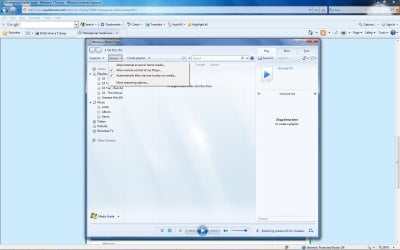
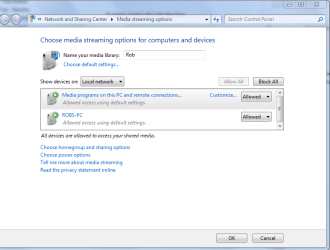
The media streaming settings might also make a difference.

Did you add the music to the username/my music file?

It seems to take WMP quite awhile to load up all the songs and make them playable after you download them.

Is your NIC still cutting out?
 

Attachments

  • media sharing.jpg
    media sharing.jpg
    113.7 KB · Views: 18
  • media streaming options.PNG
    media streaming options.PNG
    26.7 KB · Views: 15
Last edited:

My Computer

Computer type
PC/Desktop
Computer Manufacturer/Model Number
Home built
OS
Windows 7 Ult, Windows 8.1 Pro,
CPU
Q9650-4.275GHz, E8600 4.5GHz, E6750-3.8GHz
Motherboard
Evga 780i FTW
Memory
G.Skill PC2 9600 1200Mhz 5 5 5 15 2T
Graphics Card(s)
GTX480
Sound Card
Asus Xonar D2
Monitor(s) Displays
HannsG
Screen Resolution
1680X1050
Hard Drives
GSkill Phoenix Pro 120GB SSD
PSU
ThermalTake Toughpower 1000Watt modular
Case
ThermalTake XaserV
Cooling
Xigmatek S1283
Keyboard
Logitech G15
Mouse
Logitech G9
Internet Speed
T1
Thanks for the replies.
@ zigzag3143 - I opened up task manager and their was no WMPsharing running, even though I've set everything to allow sharing.

@ chev65 - All my music is in the my music folder and i've waited ages for it to show up. It is still only showing artists from A-B?
 

My Computer

OS
Windows 7: Home Premium
CPU
AMD Quad Core Phenom II X4 965
Motherboard
AMD 770 and SB710 Chipset Motherboard
Memory
2 x 2Gb PC-10666 Memory
Graphics Card(s)
Sapphire Radeon HD 5850 1GB
Monitor(s) Displays
Dell
Screen Resolution
1280 x 1024
Hard Drives
Western Digital Caviar Blue 500GB
PSU
Corsair 750Watt
Case
ATX Black Gaming Tower Case
Keyboard
Dell
Mouse
Logitech
Internet Speed
10 Meg
That is strange, I can't say what that problem might be. For me, when I click on the one that says "music" all the albums and the songs show up and I can play them all. If I click on artists only the album covers and number of songs per album show up.

I assume that your network connection problem is fixed with the 15.51 driver?
 

My Computer

Computer type
PC/Desktop
Computer Manufacturer/Model Number
Home built
OS
Windows 7 Ult, Windows 8.1 Pro,
CPU
Q9650-4.275GHz, E8600 4.5GHz, E6750-3.8GHz
Motherboard
Evga 780i FTW
Memory
G.Skill PC2 9600 1200Mhz 5 5 5 15 2T
Graphics Card(s)
GTX480
Sound Card
Asus Xonar D2
Monitor(s) Displays
HannsG
Screen Resolution
1680X1050
Hard Drives
GSkill Phoenix Pro 120GB SSD
PSU
ThermalTake Toughpower 1000Watt modular
Case
ThermalTake XaserV
Cooling
Xigmatek S1283
Keyboard
Logitech G15
Mouse
Logitech G9
Internet Speed
T1
15.51 drivers?
 

My Computer

OS
Windows 7: Home Premium
CPU
AMD Quad Core Phenom II X4 965
Motherboard
AMD 770 and SB710 Chipset Motherboard
Memory
2 x 2Gb PC-10666 Memory
Graphics Card(s)
Sapphire Radeon HD 5850 1GB
Monitor(s) Displays
Dell
Screen Resolution
1280 x 1024
Hard Drives
Western Digital Caviar Blue 500GB
PSU
Corsair 750Watt
Case
ATX Black Gaming Tower Case
Keyboard
Dell
Mouse
Logitech
Internet Speed
10 Meg
Musta been someone else, hard to keep track of all the names, same flag different name I think.

I can't figure out what is wrong with your WMP for the life of me.
 

My Computer

Computer type
PC/Desktop
Computer Manufacturer/Model Number
Home built
OS
Windows 7 Ult, Windows 8.1 Pro,
CPU
Q9650-4.275GHz, E8600 4.5GHz, E6750-3.8GHz
Motherboard
Evga 780i FTW
Memory
G.Skill PC2 9600 1200Mhz 5 5 5 15 2T
Graphics Card(s)
GTX480
Sound Card
Asus Xonar D2
Monitor(s) Displays
HannsG
Screen Resolution
1680X1050
Hard Drives
GSkill Phoenix Pro 120GB SSD
PSU
ThermalTake Toughpower 1000Watt modular
Case
ThermalTake XaserV
Cooling
Xigmatek S1283
Keyboard
Logitech G15
Mouse
Logitech G9
Internet Speed
T1
Ye its weird. When I go onto the other computer and try to connect to this computer through WMP it always ends up saying 'Failed to connect'.

I dont think its got nothing to do with Windows 7, possibly could be my router settings?
 

My Computer

OS
Windows 7: Home Premium
CPU
AMD Quad Core Phenom II X4 965
Motherboard
AMD 770 and SB710 Chipset Motherboard
Memory
2 x 2Gb PC-10666 Memory
Graphics Card(s)
Sapphire Radeon HD 5850 1GB
Monitor(s) Displays
Dell
Screen Resolution
1280 x 1024
Hard Drives
Western Digital Caviar Blue 500GB
PSU
Corsair 750Watt
Case
ATX Black Gaming Tower Case
Keyboard
Dell
Mouse
Logitech
Internet Speed
10 Meg
It could even be your router,. Lots of strange router problems lately. If you give me the router brand model and version I can check with the Windows 7 compatiblity page and see if it's compatible or not.
 

My Computer

Computer type
PC/Desktop
Computer Manufacturer/Model Number
Home built
OS
Windows 7 Ult, Windows 8.1 Pro,
CPU
Q9650-4.275GHz, E8600 4.5GHz, E6750-3.8GHz
Motherboard
Evga 780i FTW
Memory
G.Skill PC2 9600 1200Mhz 5 5 5 15 2T
Graphics Card(s)
GTX480
Sound Card
Asus Xonar D2
Monitor(s) Displays
HannsG
Screen Resolution
1680X1050
Hard Drives
GSkill Phoenix Pro 120GB SSD
PSU
ThermalTake Toughpower 1000Watt modular
Case
ThermalTake XaserV
Cooling
Xigmatek S1283
Keyboard
Logitech G15
Mouse
Logitech G9
Internet Speed
T1
I think it was you that helped me the other day, you checked to see if my WRG614 v9 was compatible and it was. Could it be settings on the router or something to do with the network drivers?

Both computers have Realtek PCIe GBE Family Controller drivers installed.
 

My Computer

OS
Windows 7: Home Premium
CPU
AMD Quad Core Phenom II X4 965
Motherboard
AMD 770 and SB710 Chipset Motherboard
Memory
2 x 2Gb PC-10666 Memory
Graphics Card(s)
Sapphire Radeon HD 5850 1GB
Monitor(s) Displays
Dell
Screen Resolution
1280 x 1024
Hard Drives
Western Digital Caviar Blue 500GB
PSU
Corsair 750Watt
Case
ATX Black Gaming Tower Case
Keyboard
Dell
Mouse
Logitech
Internet Speed
10 Meg
Thats right I knew you were here before.

It could be the drivers as well. Have you been to the realtek site to see if there are newer drivers there? Are you able to file share or is this problem only with WMP?
Realtek
 

My Computer

Computer type
PC/Desktop
Computer Manufacturer/Model Number
Home built
OS
Windows 7 Ult, Windows 8.1 Pro,
CPU
Q9650-4.275GHz, E8600 4.5GHz, E6750-3.8GHz
Motherboard
Evga 780i FTW
Memory
G.Skill PC2 9600 1200Mhz 5 5 5 15 2T
Graphics Card(s)
GTX480
Sound Card
Asus Xonar D2
Monitor(s) Displays
HannsG
Screen Resolution
1680X1050
Hard Drives
GSkill Phoenix Pro 120GB SSD
PSU
ThermalTake Toughpower 1000Watt modular
Case
ThermalTake XaserV
Cooling
Xigmatek S1283
Keyboard
Logitech G15
Mouse
Logitech G9
Internet Speed
T1
Thanks for your help but i cant see it working.:mad:

Now on both computers when i try connect to the other library it says 'Failed to connect to the remote library'

I think if I got this working then homegroup might work.
 

My Computer

OS
Windows 7: Home Premium
CPU
AMD Quad Core Phenom II X4 965
Motherboard
AMD 770 and SB710 Chipset Motherboard
Memory
2 x 2Gb PC-10666 Memory
Graphics Card(s)
Sapphire Radeon HD 5850 1GB
Monitor(s) Displays
Dell
Screen Resolution
1280 x 1024
Hard Drives
Western Digital Caviar Blue 500GB
PSU
Corsair 750Watt
Case
ATX Black Gaming Tower Case
Keyboard
Dell
Mouse
Logitech
Internet Speed
10 Meg
Quote: So I've pretty much given up trying to get Homegroup working and have decided to use a work group.
the new problem is when I load WMP and go to the other computers library and go to music it is only showing about 250 songs when it should show 1000's?.


In your first post you mentioned using workgroup then you mentioned trying to get to the other computers Library. You do realize that Library's are only made to work with Homegroup networking...?

You can only use one or the other for networking. If you started a Homegroup you also need to leave the Homegroup if you want to use Workgroup for networking.

I think that one or both of your machines has not left the Homegroup that you originally created, so you are stuck between the two.
In other words things are messed up.

You need to get those machines out of the Homegroup because Libraries should not be an available option if you are using Workgroup.
http://www.sevenforums.com/tutorials/43980-homegroup-leave.html?filter
 

My Computer

Computer type
PC/Desktop
Computer Manufacturer/Model Number
Home built
OS
Windows 7 Ult, Windows 8.1 Pro,
CPU
Q9650-4.275GHz, E8600 4.5GHz, E6750-3.8GHz
Motherboard
Evga 780i FTW
Memory
G.Skill PC2 9600 1200Mhz 5 5 5 15 2T
Graphics Card(s)
GTX480
Sound Card
Asus Xonar D2
Monitor(s) Displays
HannsG
Screen Resolution
1680X1050
Hard Drives
GSkill Phoenix Pro 120GB SSD
PSU
ThermalTake Toughpower 1000Watt modular
Case
ThermalTake XaserV
Cooling
Xigmatek S1283
Keyboard
Logitech G15
Mouse
Logitech G9
Internet Speed
T1
Ok I get you, the reason the WMP library inst working is because Homegroup doesn't work.

Thanks for your help and I will keep trying to somehow fix my Homegroup.
 

My Computer

OS
Windows 7: Home Premium
CPU
AMD Quad Core Phenom II X4 965
Motherboard
AMD 770 and SB710 Chipset Motherboard
Memory
2 x 2Gb PC-10666 Memory
Graphics Card(s)
Sapphire Radeon HD 5850 1GB
Monitor(s) Displays
Dell
Screen Resolution
1280 x 1024
Hard Drives
Western Digital Caviar Blue 500GB
PSU
Corsair 750Watt
Case
ATX Black Gaming Tower Case
Keyboard
Dell
Mouse
Logitech
Internet Speed
10 Meg
It's not so much that, as after you set up Homegroup the first time you never left the Homegroup completely which is why the Library was still visable. That will no doubt cause all sorts of file sharing problems until you leave the Homegroup on both machines.

You can't use Libraries with Workgroup but you can stream music and all that still using Workgroup.

I can't say for sure why Homegroup isn't working for you but most of the time it has to do with incompatible hardware or drivers.
 

My Computer

Computer type
PC/Desktop
Computer Manufacturer/Model Number
Home built
OS
Windows 7 Ult, Windows 8.1 Pro,
CPU
Q9650-4.275GHz, E8600 4.5GHz, E6750-3.8GHz
Motherboard
Evga 780i FTW
Memory
G.Skill PC2 9600 1200Mhz 5 5 5 15 2T
Graphics Card(s)
GTX480
Sound Card
Asus Xonar D2
Monitor(s) Displays
HannsG
Screen Resolution
1680X1050
Hard Drives
GSkill Phoenix Pro 120GB SSD
PSU
ThermalTake Toughpower 1000Watt modular
Case
ThermalTake XaserV
Cooling
Xigmatek S1283
Keyboard
Logitech G15
Mouse
Logitech G9
Internet Speed
T1
Now its just got weirder:confused:
When I open explore and click on network my own computer is not now showing up (the other PC is tuned off). All it shows is the Network infrastructure' . Then when I go to the network ceneter and click see full map I get a message saying 'Windows could not discover any computers or devices'?

Something on my network is very temperamental and keeps switching between working and not working!
I want to update my Ethernet drivers but im not sure what I need to install?, currently I have Realtek PCIe GBE Family Controller drivers installed.

Sorry to keep asking for help:rolleyes:

Thanks
 

My Computer

OS
Windows 7: Home Premium
CPU
AMD Quad Core Phenom II X4 965
Motherboard
AMD 770 and SB710 Chipset Motherboard
Memory
2 x 2Gb PC-10666 Memory
Graphics Card(s)
Sapphire Radeon HD 5850 1GB
Monitor(s) Displays
Dell
Screen Resolution
1280 x 1024
Hard Drives
Western Digital Caviar Blue 500GB
PSU
Corsair 750Watt
Case
ATX Black Gaming Tower Case
Keyboard
Dell
Mouse
Logitech
Internet Speed
10 Meg

My Computer

Computer type
PC/Desktop
Computer Manufacturer/Model Number
Home built
OS
Windows 7 Ult, Windows 8.1 Pro,
CPU
Q9650-4.275GHz, E8600 4.5GHz, E6750-3.8GHz
Motherboard
Evga 780i FTW
Memory
G.Skill PC2 9600 1200Mhz 5 5 5 15 2T
Graphics Card(s)
GTX480
Sound Card
Asus Xonar D2
Monitor(s) Displays
HannsG
Screen Resolution
1680X1050
Hard Drives
GSkill Phoenix Pro 120GB SSD
PSU
ThermalTake Toughpower 1000Watt modular
Case
ThermalTake XaserV
Cooling
Xigmatek S1283
Keyboard
Logitech G15
Mouse
Logitech G9
Internet Speed
T1
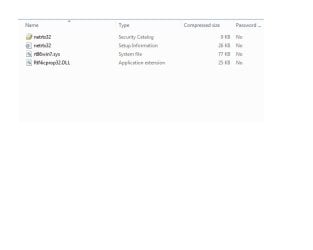
Ive just downloaded the latest driver but im not sure how I install it, the download had these 4 files?
driver.jpg
 

My Computer

OS
Windows 7: Home Premium
CPU
AMD Quad Core Phenom II X4 965
Motherboard
AMD 770 and SB710 Chipset Motherboard
Memory
2 x 2Gb PC-10666 Memory
Graphics Card(s)
Sapphire Radeon HD 5850 1GB
Monitor(s) Displays
Dell
Screen Resolution
1280 x 1024
Hard Drives
Western Digital Caviar Blue 500GB
PSU
Corsair 750Watt
Case
ATX Black Gaming Tower Case
Keyboard
Dell
Mouse
Logitech
Internet Speed
10 Meg
You apparently did not click on the correct link. Those aren't the correct files. Please follow directions below. :)

Click on where it says "drivers RSS" like I said before, then choose the Op system bottom of page. After that choose the LAN drivers which will have the new REALTEK eithernet driver. Choose the America server if you are in America. When the download pops up just save to desktop and run the file after it finishes downloading.


Installing drivers should be easy, I can't imagine why you would have any problems doing that. I checked out the page and it's all very straight foward from what I can see. Just click on run after the file is downloaded.

You might also need the chip-set or the Audio drivers from that page.

I even downloaded your LAN file to my desktop and it's all very basic easy as can be, everything is working fine.
 

My Computer

Computer type
PC/Desktop
Computer Manufacturer/Model Number
Home built
OS
Windows 7 Ult, Windows 8.1 Pro,
CPU
Q9650-4.275GHz, E8600 4.5GHz, E6750-3.8GHz
Motherboard
Evga 780i FTW
Memory
G.Skill PC2 9600 1200Mhz 5 5 5 15 2T
Graphics Card(s)
GTX480
Sound Card
Asus Xonar D2
Monitor(s) Displays
HannsG
Screen Resolution
1680X1050
Hard Drives
GSkill Phoenix Pro 120GB SSD
PSU
ThermalTake Toughpower 1000Watt modular
Case
ThermalTake XaserV
Cooling
Xigmatek S1283
Keyboard
Logitech G15
Mouse
Logitech G9
Internet Speed
T1
My motherboards MSI
 

My Computer

OS
Windows 7: Home Premium
CPU
AMD Quad Core Phenom II X4 965
Motherboard
AMD 770 and SB710 Chipset Motherboard
Memory
2 x 2Gb PC-10666 Memory
Graphics Card(s)
Sapphire Radeon HD 5850 1GB
Monitor(s) Displays
Dell
Screen Resolution
1280 x 1024
Hard Drives
Western Digital Caviar Blue 500GB
PSU
Corsair 750Watt
Case
ATX Black Gaming Tower Case
Keyboard
Dell
Mouse
Logitech
Internet Speed
10 Meg
Back
Top