
Workgroups problem with Win 7 and Win XP

majorm

New member
Local time
11:49 AM
Messages
4
I have three computers im trying to set up to talk with each other and I am having some issues. I've read numerous threads on here and other places about networking with win 7 and xp and havent found a fix yet. My issue is both of my win 7 computers can share just fine but the xp computer cant be seen or see the win 7 computers.

Everything branches off of a 8 port switch that also has a printer and external backup drive attached. All the computers can see and write to the backup drive and print on the printer. They also can all connect to the internet without any issues. Ive verified i have the win 7 computers set to Workgroup instead of homegroup and all the workgroup names match. I dont have any extra firewalls installed other than windows firewall and i tried disabling that with no change.

If there is another way to network the computers that will work easier im open to that as well. I just need to be able to access the computers and each of then needs to be able to access the internet as well.

Thanks for any help,

Major
 

My Computer

OS
Windows 7 64 Bit and Win XP 32 Bit
Welcome to Seven Forums,

Can you please provide an ipconfig /all output of one working computer and an XP computer for review? Please attach a .txt file on your next post. Here's an ipconfig /all Tutorial.
 

My Computer

Computer Manufacturer/Model Number
Lenovo Desktop/Samsung Laptop
OS
Win7 & Win8 64bit
CPU
Intel i5
Internet Speed
Charter-20 Mbps
Antivirus
Avast
Browser
FF, IE9 and Chrome
Sorry for the delay. I have attached the two ipconfig files.

Thanks,

Major
 

Attachments

My Computer

OS
Windows 7 64 Bit and Win XP 32 Bit
I just tried you tutorial but still dont have any changes. Thats good to know about the 128 bit part though because i did have that set to 128 before.

The error message i see when i try to explore the workgroup on the XP machine is: "Workgroup is not accessable. You might not have permission to use this network resource. Contact the administrator of this server to find out if you have access permissions."

"The network path not found"

The odd thing about all this is that the initial time i brought that screen up i did see the network for about 1 or 2 seconds and then it changed to just show an icon called "my websites on MSN". Doing a clean install of win 7 isnt an option on it because i need the 32 bit version of xp to run some of the programs. I would also need to upgrade some of the hardware to run 7 smoothly as well. The part about the network being not found has me pretty confused since i have access to the printer and backup drive on the same network.

Added:

I decided to ping the computers again just to recheck them and it works both ways with no lost packets. I still cant see them as far as being shared in the network or my computer window though.
 
Last edited:

My Computer

OS
Windows 7 64 Bit and Win XP 32 Bit
Make sure your Anti-virus program isn't causing the problem.
 

My Computer

Computer type
PC/Desktop
Computer Manufacturer/Model Number
Bruce ... somewhere in his 40's
OS
Windows 7 Ultimate 32bit SP1
CPU
Intel(R) Core(TM)2 Quad CPU @ 2.40GHz, 2400 MHz
Motherboard
INTEL/D975XBX2
Memory
4 GB
Graphics Card(s)
ATI Radeon HD 2600 Pro
Monitor(s) Displays
Samsung SyncMaster 914v
Screen Resolution
1280 x 1024
Hard Drives
2/500GB each ... ST3500630AS ATA Device.
One is not connected
PSU
Rocketfish 700 W
Case
G.Skill Gigabyte Chassis
Keyboard
Standard PS/2 Keyboard
Mouse
Microsoft PS/2 Mouse
Internet Speed
DSL
Antivirus
Avira Internet Security
Browser
IE 11
Other Info
ATI HDMI Audio
I just tried it with no antivirus up and still didnt get any change. :( I shut it down in task manager to be sure it was off too. All I use is Microsofts Essentials software.
Thanks for the idea though. Im definatly up to trying anything.

Major
 

My Computer

OS
Windows 7 64 Bit and Win XP 32 Bit
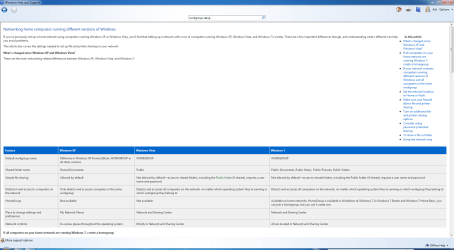
Click Start>Help & Support then type Workgroup Setup in the Search field for loads of useful information for setting up a Workgroup.

Workgroup.PNG
 

My Computer

Computer Manufacturer/Model Number
HP Pavilion Elite 495UK
OS
Windows 7 Ultimate SP1 64-Bit
CPU
Intel Core i7 870 @ 2.93GHz
Motherboard
MSI 2A9C (CPU1)
Memory
8Gb Dual-Channel DDR3 @ 664MHz
Graphics Card(s)
nVidia GeForce GTX 460 1024MB dedicated RAM
Sound Card
Realtek HD Audio
Monitor(s) Displays
HP2310i
Screen Resolution
1920 x 1080
Hard Drives
1x1954GB Hitachi HDS22020ALA 330 (RAID), 1x1954GB Hitachi External for backup and storage
PSU
460W
Case
HP Elite
Cooling
Air cooled
Keyboard
Logitech K750 solar-powered keyboard
Mouse
Logitech Wireless M180 mouse
Internet Speed
2Mb
Other Info
Pure Avanti Flow Internet Radio with iPod Dock, 64Gb iPod, HP USB Speakers, Sony MDR-V500 Headphones, Sony Vaio F-Series Laptop
Hi Major,

Sorry for being late. Thanks for the ipconfig /all output. I don't see that Netbios is enabled in your XP computer, the working computer has the Netbios enabled.

Click on Start and type ncpa.cpl press enter
Right click the Local Area Network connection and click Properties.
Double click Internet Protocol (TCP/IP)
Click Advanced
Click WINS
Click the Enable NetBIOS Over TCP/IP button

Also, please create an Identical User Name and Password on all the computers that will be doing File/Printer sharing.

Please give us an update and see if they are now communicating.
 

My Computer

Computer Manufacturer/Model Number
Lenovo Desktop/Samsung Laptop
OS
Win7 & Win8 64bit
CPU
Intel i5
Internet Speed
Charter-20 Mbps
Antivirus
Avast
Browser
FF, IE9 and Chrome
Hi Major,
when I started attempting to use homegroup, I was as baffled as you are. Then I found how to do it as in my PDF, I also failed the first time or two. On my desktop pc I had Outpost FW Pro. It is set to allow connection by default.

RR.jpg

On my Laptop, I can't remember what FW I was using, but tried a few freebies including Outpost Security Suite and none of them would let me connect. I eventually got it to work & that was when I made my PDF.
 
Last edited:

My Computer

Computer Manufacturer/Model Number
Look in my Signature.
OS
Win7 H.Prem. 32bit+SP1
Back
Top