
Working with libraries???

jimdot

New member
Power User
Local time
10:09 AM
Messages
35
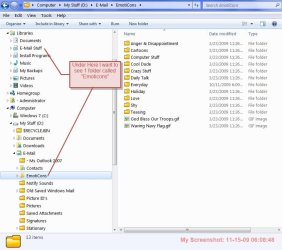
I have a library that I've created called "E-Mail Stuff". Within that library I want to see 1 folder called "Emoticons".

Problem: When I go thru the process of adding the folder "Emoticons" to the "E-Mail" library, what I end up with is all of the folder inside the "Emoticon" folder. Not the "Emoticons" folder itself.

Can anybody tell me how do I do this? Am I missing something here?

I've included a screen shot here for further clarification.

Thanks,
Jim
 

Attachments
  • ScreenShot002.jpg
    ScreenShot002.jpg
    75.2 KB · Views: 19

My Computer

OS
Windows 7 Professional 64Bit
You could just include the whole "e-mail" folder. That would show all folders.

To get the effect you want you would have to create a folder within "Emoticons" with a similar name or rename "Emoticons" and create "Emoticons" withing the renamed folder you include in the library.

http://www.sevenforums.com/tutorials/585-library-include-folder.html
 
Last edited by a moderator:

My Computer

Computer Manufacturer/Model Number
Keeps changing - (Custom)
OS
Windows 7 Professional x64
CPU
Intel Core i7 860
Motherboard
Gigabyte GA-P55-UD4P
Memory
4GB DDR3 Mushkin 1600Mhz @ 7-8-7-20
Graphics Card(s)
MSI GTS250 1GB DDR3 Twin Frozr
Sound Card
Onboard realtek
Monitor(s) Displays
Samsung SyncMaster 24" P2450 + Samsung 20" 2033
Screen Resolution
1920 X 1080 and 1600 X 900 (#2 system 1440 X 900)
Hard Drives
Patriot Inferno 120GB SSD + 3 WD Blue 640GB drives
PSU
Corsair 750 HX Modular
Case
Lancool PC-K62
Cooling
Cooler Master TX3 CPU cooler and 4-140mm and 1-120mm case
Keyboard
Gigabyte USB keyboard
Mouse
Microsoft wireless laser mouse 5000
Internet Speed
7 Mb down 1.5 up
Other Info
System #2: AMD Phenom II X6 1055T (Freezer 7 Pro cooler) - Gigabyte 880GMA-UD2H - WD 500GB Black - 9500GT (1GB) 500W OCZ modular PSU - Antec 200 case. System #3 (LapTop) Core 2 Duo T6670 - 320GB 7200RPM HD - 4GB DDR3 RAM.
Back
Top