working with win 7 ultimate

padasalgi

New member
Member
Local time
3:09 AM
Messages
49
Location
Hubli
I have recently installed win 7 ultimate with new computer. I find it very difficult to operate and I still feel I was quite comfortable with win xp pro. I do not know how to configure my email in this win 7. It says this package is not included.
Other performce are also slow and audio is very low. I am thinking of reverting to my old win xp pro.
Please guide me. I think it is too early to decide to change.
thanks
 

My Computer

OS
Windows 7 Ultimate
One change from XP is that the Email client is not included. Here is the link to download Windows Live Mail
Windows Live Mail
 

My Computer

Computer type
PC/Desktop
Computer Manufacturer/Model Number
Dell XPS 420
OS
Windows 10, Home Clean Install
CPU
Intel Core2 processsor Q8200(2.33Ghz 1333FSB) Quad Core Tech
Motherboard
Dell
Memory
6 gb
Graphics Card(s)
ATI Radeon 256MB HD3650
Sound Card
Intergrated 7.1 Channel Audio
Monitor(s) Displays
Dell SP2009W 20"
Hard Drives
640 GB Serial ATA Hard drive
Cooling
Fan
Keyboard
Dell USB Keyboard
Mouse
Dell Premium Optical USB
Internet Speed
DSL 2.85
Welcome to Windows 7 forum padasalgi :D....you need to download & install Windows live & then you can configure your mail or you can use Office Outlook or Mozilla Thuderbird to do the same.
 

My Computer

Computer Manufacturer/Model Number
Acer Aspire 4530
OS
windows 7 Ultimate x86
CPU
AMD Athlon x2 QL60 1900Mhz 1 MB L2 cache
Motherboard
Acer Grasmoor
Memory
2GB DDR2
Graphics Card(s)
nVidia GeForce 9100M G
Sound Card
Onboard
Monitor(s) Displays
14.1"
Screen Resolution
1280*800
Hard Drives
160 GB
PSU
Onboard
Case
Onboard
Cooling
Onboard
Keyboard
Standard laptop keyboard
Mouse
Touchpad & external iball usb mouse
Internet Speed
its slower then SNAIL
Did you run Windows 7 Upgrade Advisor before installing Win7, so that you'd know any issues that might arise?

Check for newer drivers in optional Updates, then any drivers missing in Device Manager can be found on the SUpport Downloads webpage for computer or device model.

Look for full Sound software package on computer or sound device support downloads webpage.

Google any repeat errors in Event Viewer>Admin view to find how others have resolved them.

Uncheck freeloading programs in msconfig>Startup - only AV and gadgets/stickynotes needs to be checked.

Clean and order your HD perfectly with CCleaner and Auslogics Disk and Registry defraggers.
 
Perhaps you should post a more detailed report of the problems you are encountering?
A suggestion has been made for the Email specific. Sound. Have you opened the sound window, to investigate if there is anything which needs configuring.
I would suggest that you open, also, the device manager in the control panel, and see if you have any items there marked with a yellow exclamation. If only a couple, then I am sure it is something which can be fixed.

But first, it would be a good idea to try Gregrockers suggestion and see what it comes up with. Then, after a more detailed post, the members here will swamp you with suggestions to get it sorted.
 

My Computer

Computer Manufacturer/Model Number
Three desktops and one laptop with good specs..
OS
Vista and now 7 in 32 and 64 bit.

My Computer

Computer Manufacturer/Model Number
HP
OS
Windows 7 Ultimate 64-bit
CPU
Intel(R) Core(TM) i5-540M @ 2.53GHz
Motherboard
Hewlett-Packard 1522
Memory
4GB DDR3 System Memory
Graphics Card(s)
1GB ATI Mobility Radeon HD 5830 Graphics
Monitor(s) Displays
15.6" diagonal Full High Definition LED
Screen Resolution
1920x1080
Hard Drives
500GB 7200RPM SATA Hard Drive
PSU
6 Cell Lithium Ion Polymer Battery
Cooling
NZXT Aluminum Notebook Cooler With 3 120mm Adjustable Fans
Other Info
Envy 15
If you bought preinstalled the computer manufacturer may have done it. If you buy just Windows 7 and install yourself, it is not included.
 

My Computer

Computer type
PC/Desktop
Computer Manufacturer/Model Number
Dell XPS 420
OS
Windows 10, Home Clean Install
CPU
Intel Core2 processsor Q8200(2.33Ghz 1333FSB) Quad Core Tech
Motherboard
Dell
Memory
6 gb
Graphics Card(s)
ATI Radeon 256MB HD3650
Sound Card
Intergrated 7.1 Channel Audio
Monitor(s) Displays
Dell SP2009W 20"
Hard Drives
640 GB Serial ATA Hard drive
Cooling
Fan
Keyboard
Dell USB Keyboard
Mouse
Dell Premium Optical USB
Internet Speed
DSL 2.85
Did you run Windows 7 Upgrade Advisor before installing Win7, so that you'd know any issues that might arise?

Check for newer drivers in optional Updates, then any drivers missing in Device Manager can be found on the SUpport Downloads webpage for computer or device model.

Look for full Sound software package on computer or sound device support downloads webpage.

Google any repeat errors in Event Viewer>Admin view to find how others have resolved them.

Uncheck freeloading programs in msconfig>Startup - only AV and gadgets/stickynotes needs to be checked.

Clean and order your HD perfectly with CCleaner and Auslogics Disk and Registry defraggers.

I have purchased a new computer with following:
Dual core desktop intel-pentium processorfreq.2.80GHz
2GB DDR2 Ram E/V/M
Box DG41RQI-Intel mother board
iball atx cabinet.
seagate 500gb hdd
all other required items to run my homepc.Win 7 ultimate installed by the vendor.
I find that the the cd came with desktop board the sound card driver is for win vista and still it is installed. I have to some extent is able to improve on audio.
My main problem now is about importing my mails from gmail. Despite my best efforts I am unable to get my mails and get error message as under.
"Unable to send or receive messages for the Gmail (padasalgi) account. The e-mail server returned an error.
Server Error: 0x800CCC90
Server Response: -ERR Cannot connect to POP server 209.85.231.83 (209.85.231.83:110), connect error 10060
Server: 'gmail.com'
Windows Live Mail Error ID: 0x800CCC90
Protocol: POP3Unable to send or receive messages for the Gmail (padasalgi) (1) account. The host ' pop.gmail.com' could not be found. Please verify that you have entered the server name correctly.
Server: ' pop.gmail.com'
Windows Live Mail Error ID: 0x800CCC0D
Protocol: POP3
Port: 995
Secure(SSL): No
Socket Error: 11004
Port: 110

Secure(SSL): No"
I humbly request you to please guide me how I can rectify this.
thanks

 

My Computer

OS
Windows 7 Ultimate
Padasalgi,

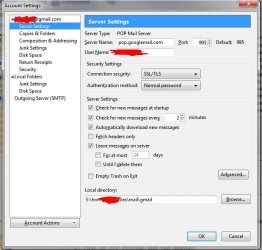
The snapshot shows the Gmail set-up from Thunderbird. No matter which client you are using, parameters are going to be the same. The outgoing server should be smtp.googlemail.com, port 465. And of course one can always use the gmail.com web interface.
 

Attachments

  • gmail.jpg
    gmail.jpg
    53.3 KB · Views: 7

My Computer

Computer Manufacturer/Model Number
Dell Inspiron 530
OS
Windows 7 Ultimate (x64)
CPU
Q6600
Memory
8 GB
Graphics Card(s)
ATI Radeon HD 2600 XT
Monitor(s) Displays
Samsung Syncmaster P2450
Screen Resolution
1920x1080
Hard Drives
Samsung HD103UJ
Samsung HD501LJ
Internet Speed
25 Mb/s
Keep watching optional Windows Updates for newer Win7 drivers including for your sound card.

Visit the Support Downloads webpages for your computer and sound card models to look for Win7 drivers.
 
My main problem now is about importing my mails from gmail. Despite my best efforts I am unable to get my mails and get error message as under.
"Unable to send or receive messages for the Gmail (padasalgi) account. The e-mail server returned an error.
Server Error: 0x800CCC90
Server Response: -ERR Cannot connect to POP server 209.85.231.83 (209.85.231.83:110), connect error 10060
Server: 'gmail.com'
Windows Live Mail Error ID: 0x800CCC90
Protocol: POP3Unable to send or receive messages for the Gmail (padasalgi) (1) account. The host ' pop.gmail.com' could not be found. Please verify that you have entered the server name correctly.
Server: ' pop.gmail.com'
Windows Live Mail Error ID: 0x800CCC0D
Protocol: POP3
Port: 995
Secure(SSL): No
Socket Error: 11004
Port: 110

Secure(SSL): No"
I humbly request you to please guide me how I can rectify this.
thanks
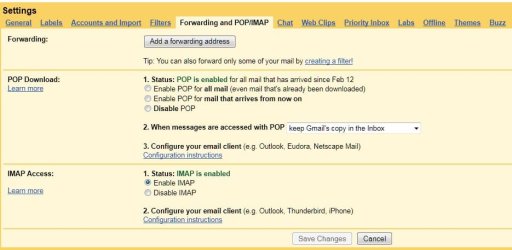
Have you checked your settings in Gmail to be sure POP (or IMAP, depending on what you are using - I use both) is enabled?

Screenshot_5.jpg
 

My Computer

Computer Manufacturer/Model Number
Toshiba L355D
OS
Windows 7 Ultimate x64 SP1
CPU
Core2 Duo
Motherboard
Intel
Memory
4 GB
Graphics Card(s)
GM965 on-board
Sound Card
RealTek on-board
Monitor(s) Displays
19"+17"(laptop)
Screen Resolution
1440x900 (x 2)
Hard Drives
500GB Ext. 200GB Internal
PSU
N/A
Case
N/A
Cooling
N/A
My main problem now is about importing my mails from gmail. Despite my best efforts I am unable to get my mails and get error message as under.
"Unable to send or receive messages for the Gmail (padasalgi) account. The e-mail server returned an error.
Server Error: 0x800CCC90
Server Response: -ERR Cannot connect to POP server 209.85.231.83 (209.85.231.83:110), connect error 10060
Server: 'gmail.com'
Windows Live Mail Error ID: 0x800CCC90
Protocol: POP3Unable to send or receive messages for the Gmail (padasalgi) (1) account. The host ' pop.gmail.com' could not be found. Please verify that you have entered the server name correctly.
Server: ' pop.gmail.com'
Windows Live Mail Error ID: 0x800CCC0D
Protocol: POP3
Port: 995
Secure(SSL): No
Socket Error: 11004
Port: 110

Secure(SSL): No"
I humbly request you to please guide me how I can rectify this.
thanks
Have you checked your settings in Gmail to be sure POP (or IMAP, depending on what you are using - I use both) is enabled?

View attachment 99292

i agree with mikedl just check your gmail mail settings if its pop or imap. if its pop then make it to imap (preferably use both) & use Thunderbird 3.1.2 because with the new version of Thuderbird you just have put your email & password & it does everything for you, while in older version & with Outlook you need to have the ip for server. check this & let the team know.:)
 

My Computer

Computer Manufacturer/Model Number
Acer Aspire 4530
OS
windows 7 Ultimate x86
CPU
AMD Athlon x2 QL60 1900Mhz 1 MB L2 cache
Motherboard
Acer Grasmoor
Memory
2GB DDR2
Graphics Card(s)
nVidia GeForce 9100M G
Sound Card
Onboard
Monitor(s) Displays
14.1"
Screen Resolution
1280*800
Hard Drives
160 GB
PSU
Onboard
Case
Onboard
Cooling
Onboard
Keyboard
Standard laptop keyboard
Mouse
Touchpad & external iball usb mouse
Internet Speed
its slower then SNAIL
configure email in win 7 ultimate.

Padasalgi,

The snapshot shows the Gmail set-up from Thunderbird. No matter which client you are using, parameters are going to be the same. The outgoing server should be smtp.googlemail.com, port 465. And of course one can always use the gmail.com web interface.
Thanks for your guidance. I have alredy done this with microsoft outlook 2007.
thanks again
 

My Computer

OS
Windows 7 Ultimate
are you able to receive your mails????is the issue resolved???
Its good that you followed the instruction.:D
 

My Computer

Computer Manufacturer/Model Number
Acer Aspire 4530
OS
windows 7 Ultimate x86
CPU
AMD Athlon x2 QL60 1900Mhz 1 MB L2 cache
Motherboard
Acer Grasmoor
Memory
2GB DDR2
Graphics Card(s)
nVidia GeForce 9100M G
Sound Card
Onboard
Monitor(s) Displays
14.1"
Screen Resolution
1280*800
Hard Drives
160 GB
PSU
Onboard
Case
Onboard
Cooling
Onboard
Keyboard
Standard laptop keyboard
Mouse
Touchpad & external iball usb mouse
Internet Speed
its slower then SNAIL
Working with win 7 ultimate

are you able to receive your mails????is the issue resolved???
Its good that you followed the instruction.:D

Thanks.I am able to receive and send my mails through microsoft outlook 2007.
I want one more favour from you please advise me how to create shortcut on the desktop/quicklaunch for the following
bsnl broad band connection
microsoft out look 2007.
 
Last edited:

My Computer

OS
Windows 7 Ultimate
@ padasalgi...follow the path: start>all programs>bsnl broadband>look for the icon for bsnl broadband & do a right click & select "pin to taskbar" or "sent to desktop".
same for your MS Outlook just follow this: start>all programs>microsoft office>do a right click on MS Outlook & pin it wherever you want it to be.
Hope this work, ;) if not let us know.:geek:
 

My Computer

Computer Manufacturer/Model Number
Acer Aspire 4530
OS
windows 7 Ultimate x86
CPU
AMD Athlon x2 QL60 1900Mhz 1 MB L2 cache
Motherboard
Acer Grasmoor
Memory
2GB DDR2
Graphics Card(s)
nVidia GeForce 9100M G
Sound Card
Onboard
Monitor(s) Displays
14.1"
Screen Resolution
1280*800
Hard Drives
160 GB
PSU
Onboard
Case
Onboard
Cooling
Onboard
Keyboard
Standard laptop keyboard
Mouse
Touchpad & external iball usb mouse
Internet Speed
its slower then SNAIL
working with win 7

@ padasalgi...follow the path: start>all programs>bsnl broadband>look for the icon for bsnl broadband & do a right click & select "pin to taskbar" or "sent to desktop".
same for your MS Outlook just follow this: start>all programs>microsoft office>do a right click on MS Outlook & pin it wherever you want it to be.
Hope this work, ;) if not let us know.:geek:
Deepak Kumar,
Thanks a lot. I have now done it.I shall be contacting you if I have any doubts and problem.Please bear with me.

Please visit my website:
Bhagavat Dharma/Dasakuta By Raghavendra.Padasalgi
Bhagavat Dharma/Dasakuta
 

My Computer

OS
Windows 7 Ultimate
U r Welcome @ padasalgi :)
 

My Computer

Computer Manufacturer/Model Number
Acer Aspire 4530
OS
windows 7 Ultimate x86
CPU
AMD Athlon x2 QL60 1900Mhz 1 MB L2 cache
Motherboard
Acer Grasmoor
Memory
2GB DDR2
Graphics Card(s)
nVidia GeForce 9100M G
Sound Card
Onboard
Monitor(s) Displays
14.1"
Screen Resolution
1280*800
Hard Drives
160 GB
PSU
Onboard
Case
Onboard
Cooling
Onboard
Keyboard
Standard laptop keyboard
Mouse
Touchpad & external iball usb mouse
Internet Speed
its slower then SNAIL
drivers for window 7

Keep watching optional Windows Updates for newer Win7 drivers including for your sound card.

Visit the Support Downloads webpages for your computer and sound card models to look for Win7 drivers.
will you please advise me if the drivers compitable with window 7 for the following are available.
1)HP scanjet 3770
2)TVS printer NOVO 130
thanks
 

My Computer

OS
Windows 7 Ultimate
@ padasalgi please mention whether its on 32bit/64bit processor....
Yes HP scanjet 3770 on 32bit/64bit whereas TVS printer NOVO 130 is not on the Microsoft Compatibility list so kindly check with the manufacturer.

However check this: tvs novo 130 driver (Tvs Electronics) 7, Vista, XP, download they have the Tvs Electronics Windows 7 drivers.

you might wanna check this for future hardware compatibility: http://www.microsoft.com/windows/compatibility/windows-7/en-us/Default.aspx?type=Hardware

Hope it works :geek:
 

My Computer

Computer Manufacturer/Model Number
Acer Aspire 4530
OS
windows 7 Ultimate x86
CPU
AMD Athlon x2 QL60 1900Mhz 1 MB L2 cache
Motherboard
Acer Grasmoor
Memory
2GB DDR2
Graphics Card(s)
nVidia GeForce 9100M G
Sound Card
Onboard
Monitor(s) Displays
14.1"
Screen Resolution
1280*800
Hard Drives
160 GB
PSU
Onboard
Case
Onboard
Cooling
Onboard
Keyboard
Standard laptop keyboard
Mouse
Touchpad & external iball usb mouse
Internet Speed
its slower then SNAIL
Back
Top