Worried 'bout clocking

Hyperion 1

New member
Member
Local time
8:36 PM
Messages
47
Location
Serbia
Guys, i just have used Asus AI suite II and used only "Auto tuning" option, to see how it works. After that all went right. My CPU oc'ed from 3.6 GHz to 4.2 (AMD FX-4100 Quad Processor). And I wonder now how to get it back on
previous state again? I mean, I'm not experiencing any problems of course, I'm just worried that something might go wrong. Is it normal CPU temp. on 4.2 GHz (34-38) C?

Please that someone checks the utility and answer back :D

P.S.

Utility is very good and i recommend it :D
 

My Computer

Computer type
PC/Desktop
OS
Win 7 Ultimate, x64-bit
CPU
AMD FX-4100 3.6Ghz
Motherboard
Asus M5A97
Memory
12 GB DDR3 Kingston 1333 Mhz
Graphics Card(s)
Nvidia GeForce GTX 760 2GB DDR5, Hawk Edition
Monitor(s) Displays
LG Flatron L222WS
Screen Resolution
MAX is 1680x1050, 60Hz
Hard Drives
Seagate 1.5 TB
PSU
Thermaltake 600 W, Peak power - 750W
Case
Thermaltake element T black
Cooling
Stock
Keyboard
A4 Tech Wireless
Mouse
A4 Tech X6-80D
Internet Speed
6 Mb/s
Antivirus
BitDefender
Browser
Torch
the temps don't look bad also in the software there should be a restore setting. if not you can reset it in your bios.

scrooge
 

My Computer

Computer Manufacturer/Model Number
home build
OS
win 7 ( 64 bit)
CPU
Intel Core i7-870 Lynnfield 2.93GHz 8MB L3 Cache LGA 1156 95
Motherboard
ASUS P7P55 LX LGA 1156
Memory
G.SKILL Sniper Series 16GB (4 x 4GB) 240-Pin DDR3 SDRAM
Graphics Card(s)
ATI Radeon HD6800 Series
Sound Card
hdmi
Monitor(s) Displays
42" lg 3d tv
Screen Resolution
1920 x 1080
Hard Drives
1 ssd pci-e revodrive
4 seagate 1.5 tb
PSU
Rosewill BRONZE Series RBR1000-M 1000W Continuous@40°C, 80Pl
Case
CoolMaster 922
Cooling
CORSAIR CWCH60 Hydro Series H60 High Performance Liquid CPU
Keyboard
logtech
Mouse
logitect
Internet Speed
5 mbit
You'll for sure find a restore to factory or baseline settings in bios. Also clearing of the bios settings with buttons/jumpers or even removing the cmos battery for a time and re-installing can be done in a pinch.
 
Last edited:

My Computer

Computer type
PC/Desktop
Computer Manufacturer/Model Number
A blend of brains, brawn and dumb luck.
OS
Windows 7 Ultimate 64
CPU
i7 3770k OC'd 4.6 @ 1.17v, also FX 8120 & i5 miniITX
Motherboard
MSI P67A-GD80 b3
Memory
32 gb G.Skill Sniper DDR3 10-12-12-31 @ 2133
Graphics Card(s)
XFX Radeon 7870 2GB DDR5
Sound Card
Sound Blaster Z Series Card
Monitor(s) Displays
(2) LG LED 23" 1920 x 1080 2ms Monitors via mini d-port
Screen Resolution
1680 X 1050 p
Hard Drives
Samsung 256 gb 830 SSD sata III
(1) 1 tb WD Black
(2) 1 tb Hitachi deskmates/sata II
(2) 1 tb WD green/sata II
(2) 3 tb Seagate Barracuda
(1) 120 gb OCZ Vertex SS
(1) Drobo 5N w/5 Seagate 3tb
PSU
EVGA modular 1000G2 80% gold rating & APC 1200 RS
Case
CoolerMaster Storm Styker
Cooling
7 case fans 140mm & 120mm, NZXT Kraken X60
Keyboard
(2) Logitech Illuminated Keyboards (1) usb (1) wireless
Mouse
Logitech G700 & T-BC21 - nano nx for the laptop
Internet Speed
Basic 120mbps down
Antivirus
Trend Micro Titanium Max Security & Malwarebytes Premium
Browser
Chrome and IE 10
Other Info
5 Noctua case fans + 3 Noctua in p/p on NZXT cooler
Integrated hot swap drive bays for 2.5" Drives
(2) Lite-on dvd/cd/Blu Ray optical 22X
Integrated fan controller and led on/off
HP Officejet Pro 8630 all-n-one
Hot-swappable 3.5" hard drive bay
Netgear Nighthawk router
Asus USB 3 & sata 6 PCIe card
Vantec IDE to sata adptr./Ultra sata adptr
Lenovo L420 i5 lappy with m sata
Drobo 5N advanced NAS
Guys, i just have used Asus AI suite II and used only "Auto tuning" option, to see how it works. After that all went right. My CPU oc'ed from 3.6 GHz to 4.2 (AMD FX-4100 Quad Processor). And I wonder now how to get it back on
previous state again? I mean, I'm not experiencing any problems of course, I'm just worried that something might go wrong. Is it normal CPU temp. on 4.2 GHz (34-38) C?

Please that someone checks the utility and answer back :D

P.S.

Utility is very good and i recommend it :D


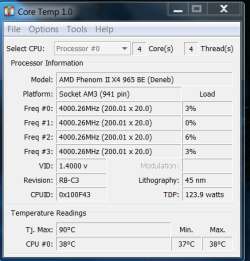
Those are good temps auto tune tends to over volt but the temps are normal im useing a 965 BE 3.4 pushed to 4 Ghz temps around 34 idle/ load about 45 so i would say normal now if it was running 60+ then you have some problems but those are safe

If you inststall core temp it will let you know the CPU max temp TJmax that will let you know how far from danger you are in

These temps are a with the heater on in the house so it got a extra 4 to 5 degree's hotter but look above you will see the TJmax of my chip im very safe even with the heater making my chip go up a few degree's
 

Attachments

  • example.PNG
    example.PNG
    15.6 KB · Views: 9

My Computer

Computer type
PC/Desktop
Computer Manufacturer/Model Number
CoreI7-6700K MrFingerIII Special Builds
OS
Windows 10 Home Premium 64bit sp1
CPU
Intel I7-6700K @ 4.6 Ghz 1.344 volts everyday OC
Motherboard
Asrock Fatality K6 Z170 Socket 1151
Memory
32GB G-Skill TridentZ 3200mhz 16-18-18-38 DDR4
Graphics Card(s)
Sli Gigabyte Windforce GTX 980 G1
Sound Card
AC97 Creative Rage Tactic 3D Headphones Bluetooth
Monitor(s) Displays
27" Asus ROG Swift PG278Q G-Sync 48" Vizio Smart HD TV
Screen Resolution
2560x1440p 27"- 48" Currently Gaming at 2560x1440p Res 2K
Hard Drives
250GB Samsung Evo840SSD Seagate baracuda 500 GB WD Mybook 500Gb 1TB Seagate Barracuda
PSU
HX1050w Corsair Silver 80plus certified crosfire/sli
Case
Enthod Pro Full Tower
Cooling
Corsair H110i GT 280 mm High Performance WaterBlock
Keyboard
Logitech wireless keyboard
Mouse
Logitech wireless mouse
Internet Speed
Cox Cable 100+ mb
Antivirus
WebRoot Spysweeper with Antivirus
Browser
IE-10, Chrome, Opera
Other Info
My Other Rig is a AMD FX8320E @4.6Ghz 16GB Ballistic Sport Ram
Mobo Asrock Fatality 990FX 120GB OCZ SSD 1TB Seagate Barracuda Corsair H75 Cooling PSU Corsair CX750
GPU GTX Gigabyte 970G1
Temps are fine and can be reset in your bios.

BTW there is no such thing as a good O/C app...the best way to O/C is in your bios manually. Apps are for ppl who want an easy way out or who are just to lazy to learn how to O/C in bios.
 

My Computer

Computer Manufacturer/Model Number
home built
OS
Windows 7 Professional 64 bit
CPU
930 i7 quad O/C 4ghz
Motherboard
Asus P6X58D premium
Memory
G Skill 3x2gb O/C to 1603mhz 1T timing
Graphics Card(s)
EVGA 570
Sound Card
creative titanium
Monitor(s) Displays
samsung s23a950d..120hz 3D
Screen Resolution
1920x1080
Hard Drives
Western Digital 3X150 Velocoraptors in Raid 5
PSU
Antec Quattro 1000 watt
Case
Xigmatek Elysium
Cooling
Custom Loop..Kryos block.360rad..BP comp fittings etc
Keyboard
Razor arcosa
Mouse
Razer Diamondback
Internet Speed
Wireless so w/e I get at the time
Temps are fine and can be reset in your bios.

BTW there is no such thing as a good O/C app...the best way to O/C is in your bios manually. Apps are for ppl who want an easy way out or who are just to lazy to learn how to O/C in bios.

yupsss it is.
Hyperion 1 your cpu temp isn't normal but very3x normal. shouldn't be worried then.
 

My Computer

OS
Win7 Ult x64 SP1
CPU
i7 920 / i5 2500K
Motherboard
eVGA Classified / As Rock Z68 X3 G3
Memory
Corsair 6 gb Triple Channel / Corsair 8 GB Dual Channel
Graphics Card(s)
Nvidia DA GTX 295 / MSI HD 5850 TF II
Sound Card
X-Fi Xtreme Fatality Gamer
Monitor(s) Displays
2 x 22 inch Samsung / LG
Screen Resolution
1680 * 1050
PSU
Silverstone 1500 Watt / Antec NeoPower 650 Watt
Case
Lian Li / CM Scout
Cooling
WC / Corsair Hydro H60
Keyboard
Razer Lycosa Mirror
Mouse
Razer DA Blue
Other Info
Mousepad:

Razer Destructor White Edition
Mionix Propuse 380
Back
Top