Worrying HDD Benchmark Result

TheDeerDude

New member
Power User
VIP
Local time
10:01 PM
Messages
204
Hello. Recently I have reinstalled Windows on my computer and since I have two hard drives, I thought it'd be a good idea to check their S.M.A.R.T. and how fast they are. I have one drive that has mysterious 100MB hidden system partition and the OS partition that I have created myself. It's a 120GB TOSHIBA MK1255GSH H taken out of an old PS3 console. I also have this 4 years old 160GB (Western Digital) WDC WD1600BEVT-60ZCT1 which is split in half - partition D:\ for my programs and partition E:\ for all my documents.

Now, I did a benchmark on both of these using free version of HDTune (2.55) the results were quite worrying
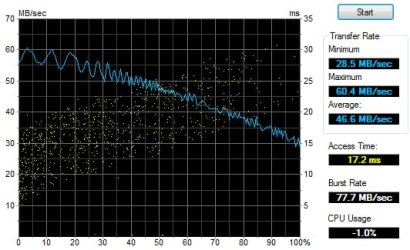
Here is the WD (D: ,E: ) drive: (Click here to see S.M.A.R.T.)
attachment.php

It's not fast but the read speed line is fairly stable.

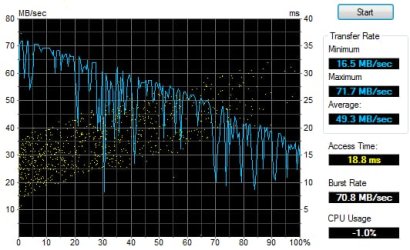
And here is my Toshiba (OS - C:) drive, this is the one I am worried about: (Click here to see S.M.A.R.T.)
attachment.php

The read speed line kept jumping up and down like crazy, as far as I know, when it's that spiky, that isn't a good sign.

So, would any of you guys please have a look at my S.M.A.R.T. or the benchmarks and tell me if something isn't right?
Is that spiky line a normal thing on an OS drive?

Thanks :)
 

Attachments

  • WD.jpg
    WD.jpg
    36.8 KB · Views: 70
  • Toshiba.jpg
    Toshiba.jpg
    39.8 KB · Views: 70
  • TS Smart.txt
    TS Smart.txt
    2 KB · Views: 4
  • WD SMART.txt
    WD SMART.txt
    1.7 KB · Views: 5

My Computer

OS
Windows 7 x64
with regards to the speed, a modern sata 3 mechanical drive will reach speeds of about 120-150MB/s.

as your drives are old and use older technology then consider these speeds to be much lesser.

with regards to the ps3 hard drive it will be even slower, 2.5" drives often spin less than 7500rpm, and sony would have wanted to use the cheapest but reliable drives they could.
chances are the drive is also more on the server level of quality so it wont wearout through out the of the console.. again this normally means slower :)
 

My Computer

Computer type
PC/Desktop
Computer Manufacturer/Model Number
Built by badgers!!!
OS
Windows 7 Ultimate x64, & Mac OS X 10.9.2
CPU
Intel Core i5 2500k
Motherboard
Asus P8z68 LE
Memory
Corsair Vengence 8gb 1866mhz
Graphics Card(s)
Nvidia GTX 770 OC
Monitor(s) Displays
2x ASUS LED 22" IPS
Screen Resolution
3840x1080
Hard Drives
240GB Crucial M500 SSD
120gb Corsair Force 3 SSD
1TB Western Digital
PSU
Corsair HX650w Modular
Case
Corsair Air 540
Cooling
Corsair H60 Push/Pull
Keyboard
Corsair K70/ Logitech G27 wheel
Mouse
Saitek R.A.T 9
Internet Speed
Too slow!
Other Info
AMD fusion E350N Home server-Windows Home Server 2011 (also made by badgers!)
2011 Macbook 2.4ghz Core2Duo, 4gb ddr3, 120gb Ocz Vertex SSD
The "mysterious 100MB hidden system partition" is not so mysterious. It is a partition added during Windows installation to handle boot management functions. Do not change or delete it.
 

My Computer

Computer type
PC/Desktop
Computer Manufacturer/Model Number
Home Built - Jan 2013
OS
Windows 7 64 Bit Home Premium SP1
CPU
i7-3820
Motherboard
Asus P9X79-PRO - Bios 4608
Memory
GSkill F3-14900CL9Q - 16GB
Graphics Card(s)
EVGA GeForce GTX660 - Driver 352.86
Sound Card
On board Realtek ALC898
Monitor(s) Displays
Acer S271HL
Screen Resolution
1920 x 1080
Hard Drives
#1- Samsung 840 Pro Series
#2- Western Digital WD1002FAEX Sata3 Black
#3- Western Digital WD1002FAEX Sata3 Black
PSU
Corsair CMPSU-850TX-V2 - 850 watt (by Seasonic)
Case
Corsair Obsidian 550D
Cooling
Standard 3 120mm case fans, Cooler Master Hyper 212 EVO
Keyboard
MS KC-0405
Mouse
Intellimouse 5-button
Internet Speed
56 Mbits/Sec (on a good day)
Antivirus
Avast & Malwarebytes
Browser
Firefox
Other Info
Asus DVD - DRW-24B1ST 24X
Thanks guys, your replies answer some of my questions, but not the most important one. The blue line on benchmark should smoothly descend (as far as I know) like on WD drive, or even smoother, instead it was jumping really bad, does that suggest there's something wrong with the drive? Might as well get a SATA III if my Toshiba fails :)
 

My Computer

OS
Windows 7 x64
I think there is nothing to worry about those spikes in the graph. It just simply indicate that your drive is in use and much more active than the WD one. both drives are healthy.
 

My Computer

Computer type
PC/Desktop
Computer Manufacturer/Model Number
Hewlett-Packard
OS
Windows 7 Ultimate x64
CPU
Intel Core i5-2410M
Motherboard
Hewlett-Packard 1651
Memory
2 x 4 GB ELPIDA 667Mhz 1.5V
Graphics Card(s)
Radeon (TM) HD 7650M
Hard Drives
750GB WD7500BPVT
You see this jumping up and down very often. It is probably from some system activity during the test. Nothing to worry about.
 

My Computer

Computer Manufacturer/Model Number
HP, Dell, Gateway, Toshiba - 4 laptops and 2 desktops
OS
Vista, Windows7, Mint Mate, Zorin, Windows 8
CPU
from 1.6GHz Duo to i7
Monitor(s) Displays
2x HP w2207
Hard Drives
5x HDD, 7x SSD, 12x Externals
Keyboard
with trackball - no mices
Mouse
Trackball mice
Internet Speed
DSL 6000
Alright, thank you whs and Frozwire. I'll keep an eye on my drives though ;)
 

My Computer

OS
Windows 7 x64
Back
Top