wpa enterprise

felchi80

New member
Local time
7:03 PM
Messages
9
I'm trying to connect to my school's wifi, which uses WPA Enterprise.
I follow same set up procedures, but when it asks for credentials on windows 7... there's no place to enter the domain... on vista there's user/password/domain..... without the domain, it's not connecting.... is there a way to enable this on windows 7?
thanks
 

My Computer

OS
windows 7
try to join the domain, since maybe under vista it was already configured for the domain, but windows 7 still doesn't know it should connect to a domain. you might need the help of an administator to do that, but try yourself first anyway, these are the steps:

1. click on start, then in the search/run bar type "domain", this should show the program "join a domain" click on that to run.
2. the system properties should open up, on the computer name tab, click on "network ID" to start the wizard
3. in the join a domain or network wizard, select the first option that says "this computer is part of a business network.."
4. you will be prompted again, also select the first option again that says "my company uses a network with a domain"
5. you will get notified that you need your username, logon password and your user's domain name, you might also need the computer name and the name of your computer's domain. if you don't know any of these, get it from your administrator, make sure your computer's name is also the same computer name registered in your domain ( you can also check your computer name under vista , make sure it's the same so that you don't have any issues ). press next
6. now type in the user / password / domain and click next

hope this helps, good luck!
 

My Computer

Computer Manufacturer/Model Number
home made
OS
Windows 7 7264x64(main), 7260x86(secendary), XP SP3 Triple Boot
CPU
Intel Core 2 Duo E7400 2.8Mhz
Motherboard
Intel G33 express chipset
Memory
2GB DD2 667
Graphics Card(s)
Intel(R) 82G33 Graphics and Memory Controller Hub
Sound Card
Realtek Built into the G31
Monitor(s) Displays
19"
Screen Resolution
1280x1024
Hard Drives
320GB SATA (Main), 160GB IDE (Backup)
Case
Gigabyte SETTO
Keyboard
Genius
Mouse
Logitech
Internet Speed
1MB Download, 128k Upload
thanks,
but i dont think that's the way to do it.

the computer itself is not part of a domain, it's the login that is part of a domain.
 

My Computer

OS
windows 7
to be honest, not sure if your computer has to be part of the domain to logon, maybe it depends on the security policy of the domain server, one thing to check, can you see what domain or workgroup settings you have on your vista? or the other PCs who can logon normally, see if they are part of the domain or not, or ask you administrator
 

My Computer

Computer Manufacturer/Model Number
home made
OS
Windows 7 7264x64(main), 7260x86(secendary), XP SP3 Triple Boot
CPU
Intel Core 2 Duo E7400 2.8Mhz
Motherboard
Intel G33 express chipset
Memory
2GB DD2 667
Graphics Card(s)
Intel(R) 82G33 Graphics and Memory Controller Hub
Sound Card
Realtek Built into the G31
Monitor(s) Displays
19"
Screen Resolution
1280x1024
Hard Drives
320GB SATA (Main), 160GB IDE (Backup)
Case
Gigabyte SETTO
Keyboard
Genius
Mouse
Logitech
Internet Speed
1MB Download, 128k Upload
felchi80 I have an idea, if your domain's name is "domain" , and your userid is "felchi80", type in the following as the userid: "felchi80@domain" , see if that works!

EDIT: actually that could be wrong, the format might be "domain\felchi80"
 

My Computer

Computer Manufacturer/Model Number
home made
OS
Windows 7 7264x64(main), 7260x86(secendary), XP SP3 Triple Boot
CPU
Intel Core 2 Duo E7400 2.8Mhz
Motherboard
Intel G33 express chipset
Memory
2GB DD2 667
Graphics Card(s)
Intel(R) 82G33 Graphics and Memory Controller Hub
Sound Card
Realtek Built into the G31
Monitor(s) Displays
19"
Screen Resolution
1280x1024
Hard Drives
320GB SATA (Main), 160GB IDE (Backup)
Case
Gigabyte SETTO
Keyboard
Genius
Mouse
Logitech
Internet Speed
1MB Download, 128k Upload
felchi80 I have an idea, if your domain's name is "domain" , and your userid is "felchi80", type in the following as the userid: "felchi80@domain" , see if that works!

EDIT: you domain might also have a .com or something in the end as well, try felchi80@domain.com for instance...

i tried something similar to that, instead of a @ i used a slash / and \, because i couldn't remember which... eitherway both didn't work.
i'll try with the @....

and no, the vista machine is not on a domain... just the plain and regular "workgroup"
 

My Computer

OS
windows 7
the @ is to spesify the machine I think, while the \ is for domain, the format is "domain\felchi80" I think, did that also fail?
 

My Computer

Computer Manufacturer/Model Number
home made
OS
Windows 7 7264x64(main), 7260x86(secendary), XP SP3 Triple Boot
CPU
Intel Core 2 Duo E7400 2.8Mhz
Motherboard
Intel G33 express chipset
Memory
2GB DD2 667
Graphics Card(s)
Intel(R) 82G33 Graphics and Memory Controller Hub
Sound Card
Realtek Built into the G31
Monitor(s) Displays
19"
Screen Resolution
1280x1024
Hard Drives
320GB SATA (Main), 160GB IDE (Backup)
Case
Gigabyte SETTO
Keyboard
Genius
Mouse
Logitech
Internet Speed
1MB Download, 128k Upload
sorry for breaking in, but I wanted to just make one remark.

In many cases username and password credentials are not enough to join a domain.

Many admins set up the server to demand a computer account too.

That means that your machine identification number has to be entered in an machine account in active directory, before you could even begin to try login in.

Machine accounts override user accounts.

Check with the system administrator.

greetz.
 

My Computer

OS
Win7 Build 7600 x86
CPU
Pentium II 300MHz
Motherboard
Asus
Memory
32mb EDO RAM
Graphics Card(s)
Diamond Viper
Sound Card
Soundblaster 16
Monitor(s) Displays
14" AOC CRT 16K color
Screen Resolution
800x600
Hard Drives
300mb Quantum fireball
PSU
110 Watts
Cooling
Passive
Keyboard
Trust Ergonomic
Mouse
Generic
Internet Speed
256K u 128K d
sorry for breaking in, but I wanted to just make one remark.

In many cases username and password credentials are not enough to join a domain.

Many admins set up the server to demand a computer account too.

That means that your machine identification number has to be entered in an machine account in active directory, before you could even begin to try login in.

Machine accounts override user accounts.

Check with the system administrator.

greetz.

actually i can use any machine. vista or xp to login with domain name.... it's just that on windows 7... the box for domain name is not there...
 

My Computer

OS
windows 7
sadly, both methods failed.

Can I ask.

Do you know the domain name you are trying to connect to?

Is your machine registered in active directory on the server?

Is your user account registered in active directory on the server?


If one of the answers is a no, then you won't be able to connect, regardless of the wpa password.

greetz
 

My Computer

OS
Win7 Build 7600 x86
CPU
Pentium II 300MHz
Motherboard
Asus
Memory
32mb EDO RAM
Graphics Card(s)
Diamond Viper
Sound Card
Soundblaster 16
Monitor(s) Displays
14" AOC CRT 16K color
Screen Resolution
800x600
Hard Drives
300mb Quantum fireball
PSU
110 Watts
Cooling
Passive
Keyboard
Trust Ergonomic
Mouse
Generic
Internet Speed
256K u 128K d
Can I ask.

Do you know the domain name you are trying to connect to?

Is your machine registered in active directory on the server?

Is your user account registered in active directory on the server?


If one of the answers is a no, then you won't be able to connect, regardless of the wpa password.

greetz

1) yes
2) no, because any machine with the right username/password/domain name can connect no problems
3) i have no idea.
 

My Computer

OS
windows 7
1) yes
2) no, because any machine with the right username/password/domain name can connect no problems
3) i have no idea.

1. ok

2. Are you sure those machines are not registered in active directory by the admin?

3. You need to have a user account on the server, made for you by the admin.
Without it you can never join the domain.

greetz
 

My Computer

OS
Win7 Build 7600 x86
CPU
Pentium II 300MHz
Motherboard
Asus
Memory
32mb EDO RAM
Graphics Card(s)
Diamond Viper
Sound Card
Soundblaster 16
Monitor(s) Displays
14" AOC CRT 16K color
Screen Resolution
800x600
Hard Drives
300mb Quantum fireball
PSU
110 Watts
Cooling
Passive
Keyboard
Trust Ergonomic
Mouse
Generic
Internet Speed
256K u 128K d
3. You need to have a user account on the server, made for you by the admin.
Without it you can never join the domain.
he did mention he can logon to the domain on vista.. so I think he does have a valid domain user account
 

My Computer

Computer Manufacturer/Model Number
home made
OS
Windows 7 7264x64(main), 7260x86(secendary), XP SP3 Triple Boot
CPU
Intel Core 2 Duo E7400 2.8Mhz
Motherboard
Intel G33 express chipset
Memory
2GB DD2 667
Graphics Card(s)
Intel(R) 82G33 Graphics and Memory Controller Hub
Sound Card
Realtek Built into the G31
Monitor(s) Displays
19"
Screen Resolution
1280x1024
Hard Drives
320GB SATA (Main), 160GB IDE (Backup)
Case
Gigabyte SETTO
Keyboard
Genius
Mouse
Logitech
Internet Speed
1MB Download, 128k Upload
let me explain this again....

I'm trying to access a Wifi internet access from my University which uses wpa enterprise encryption. All I am provided is a username, password and domain name.

I can take any one's notebook (xp or vista) and enter those three things and connect without trouble.

it is only in windows 7, that i dont have the option to type in the domain.

thanks guys for trying to help
 

My Computer

OS
windows 7
ok since you are using WPA enterprise, try double checking your setings.
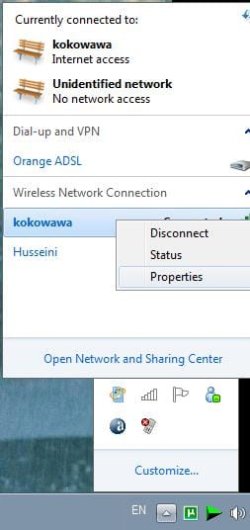
goto the properties of your wireless connection, here is a screenshot that shows how to do that:
step1.JPG
now goto the security tab, what is your security type? if it's not WPA-enterprise then this could be the problem, change it to WPA-enterprise like in the following screenshot:
step2.JPG
atfer that you may need to fine tune your settings, it seems there is a lot of things you can confugre, I would try it with the default settings, if it doesn't work, then go to vista and check what settings you have there, and try to put the same settings in w7 and see if it now works.. hope this helps!
 

My Computer

Computer Manufacturer/Model Number
home made
OS
Windows 7 7264x64(main), 7260x86(secendary), XP SP3 Triple Boot
CPU
Intel Core 2 Duo E7400 2.8Mhz
Motherboard
Intel G33 express chipset
Memory
2GB DD2 667
Graphics Card(s)
Intel(R) 82G33 Graphics and Memory Controller Hub
Sound Card
Realtek Built into the G31
Monitor(s) Displays
19"
Screen Resolution
1280x1024
Hard Drives
320GB SATA (Main), 160GB IDE (Backup)
Case
Gigabyte SETTO
Keyboard
Genius
Mouse
Logitech
Internet Speed
1MB Download, 128k Upload
there may have been a security policy change from vista to win 7. migth be something as simple as enforcing strong security. I seem to remember something abt it. some one with more gpedit than me might know

Ken
 

My Computer

Computer Manufacturer/Model Number
HP Pavillion dv-7 1005 Tx
OS
Win 8 Release candidate 8400
CPU
[email protected]
Memory
4 gigs
Graphics Card(s)
Nvidia 9600M
Sound Card
HD built-in
Monitor(s) Displays
17" Wxga
Screen Resolution
1440x900
Cooling
none
Internet Speed
45Mb down 5Mb up
that's the thing. I'm just following instructions for vista for configuring the connection in windows 7.... everything is set the same way, just that there's no domain box in the end when it asks for credentials.
 

My Computer

OS
windows 7
let me explain this again....

I'm trying to access a Wifi internet access from my University which uses wpa enterprise encryption. All I am provided is a username, password and domain name.

I can take any one's notebook (xp or vista) and enter those three things and connect without trouble.

it is only in windows 7, that i dont have the option to type in the domain.

thanks guys for trying to help

Ok, now that is a bit clearer than your initial post.

Now if I understand right, you just want to use the wireless connection to get to the internet, not logon to the schools server, right?

If I were you I would go to the system administrator and ask for his help instead of spending two days here without result.

Don't take that the wrong way. Text can sound harsh sometimes.

What I mean is, you are welcome to ask here, but isn't asking your admin the shortest way to your goal?

Good luck
 

My Computer

OS
Win7 Build 7600 x86
CPU
Pentium II 300MHz
Motherboard
Asus
Memory
32mb EDO RAM
Graphics Card(s)
Diamond Viper
Sound Card
Soundblaster 16
Monitor(s) Displays
14" AOC CRT 16K color
Screen Resolution
800x600
Hard Drives
300mb Quantum fireball
PSU
110 Watts
Cooling
Passive
Keyboard
Trust Ergonomic
Mouse
Generic
Internet Speed
256K u 128K d
Ok, now that is a bit clearer than your initial post.

Now if I understand right, you just want to use the wireless connection to get to the internet, not logon to the schools server, right?

If I were you I would go to the system administrator and ask for his help instead of spending two days here without result.

Don't take that the wrong way. Text can sound harsh sometimes.

What I mean is, you are welcome to ask here, but isn't asking your admin the shortest way to your goal?

Good luck

that is totally fine.

only problem is that i doubt they'd want to know anything about something that is not even sold yet.

admins in universities tend to be less than helpful.

haha...
 

My Computer

OS
windows 7
Back
Top